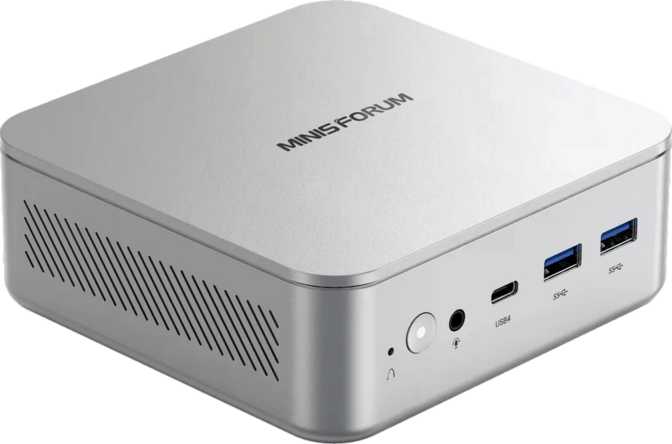
Minisforum M2 Review: A Compact Desktop That Punches Above Its Weight
Mini PCsThe mini PC category has matured quietly over the past few years, and the Minisforum M2 represents exactly where that evolution has landed: a fully capable desktop computer that occupies less desk space than a hardback novel. At roughly the footprint of a thick paperback and standing just under two inches tall, it challenges the assumption that meaningful computing power requires a tower, or even a full-sized machine.
What makes the M2 worth examining seriously is not just its physical compactness — plenty of small PCs exist — but what Minisforum has packed inside that compact shell. The combination of a modern multi-core processor architecture, next-generation memory, Wi-Fi 7 wireless, and a port selection that would make some full-sized desktops look dated puts this machine in an interesting position. The question is whether those headline ingredients translate into real performance, or whether the M2 is a spec-sheet exercise that disappoints when pushed.
Design and Build: Small Does Not Mean Cheap
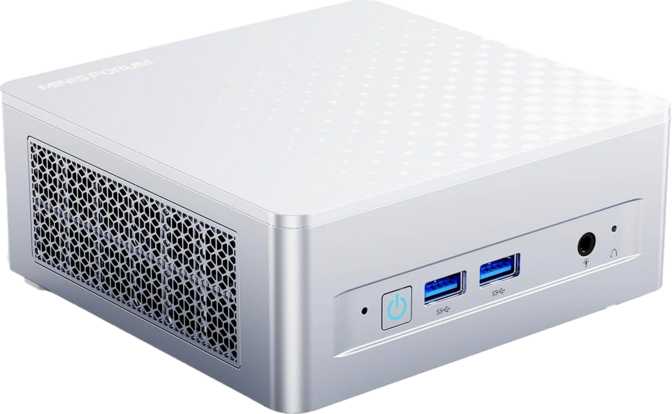
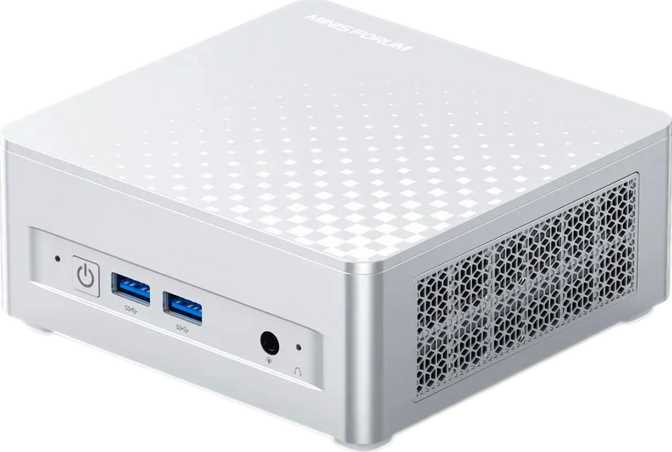
The M2 follows the Micro-ATX mini PC form factor, keeping it compatible with VESA mounting brackets used on the back of monitors. The physical footprint is compact enough to sit directly beneath a monitor stand, mount behind a display entirely out of sight, or tuck cleanly into a media cabinet.
At 127mm wide, 130mm deep, and 50mm tall, the entire internal space amounts to less than a liter — a standard 500ml water bottle occupies a similar volume. Fitting a full computing platform inside that space requires careful thermal engineering, and Minisforum has built its product line around exactly this challenge.
Build quality is solid, with a metal-dominant top and sides and a plastic base. There is no flex and minimal chassis noise. A fan is present — this is not a fanless device — but under everyday workloads it remains unobtrusive.
- Width
- 127 mm
- Depth
- 130 mm
- Height
- 50 mm
- Volume
- 825.5 cm³
- Form Factor
- Micro-ATX
Processor Performance: 16 Threads in a 25-Watt Envelope
The CPU inside the M2 uses a heterogeneous core architecture — commonly called big.LITTLE — which means it contains multiple types of processing cores designed for different tasks. This is the same fundamental concept found in Apple's M-series chips and modern smartphone processors, now appearing in mainstream PC silicon.
The processor organizes its cores into three distinct groups: high-performance cores for demanding tasks, efficiency cores for lighter workloads and power savings, and a third cluster for background operations. In total, the chip exposes 16 processing threads to the operating system, meaning multitasking and parallel workloads — video encoding, compiling code, running multiple applications simultaneously — are handled by a genuinely wide execution pipeline.
Peak burst speed reaches 4.7GHz on the performance cores, fast enough to feel snappy in single-threaded applications like web browsing, word processing, and everyday productivity software. The 18MB L3 cache acts as a meaningful buffer that reduces how often the processor has to reach out to slower system memory — particularly beneficial for applications that repeatedly access the same data sets.
Memory and Storage: No Compromises
32GB is the sweet spot for heavy multitasking, light virtualization, and creative work. Running a browser with dozens of tabs, a video call, a code editor, and background cloud sync simultaneously — the M2 handles all of it without memory pressure.
- DDR5 at 5,600MHz — meaningfully higher bandwidth than DDR4 in memory-intensive workloads
- Dual-channel configuration — integrated GPU draws from shared memory with full bandwidth benefit
- Expandable to 128GB — workstation-class memory ceiling that is genuinely rare for a mini PC
PCIe 5.0 is the current leading standard for drive bandwidth, capable of sustained sequential transfers approximately double what PCIe 4.0 drives achieve. For everyday use the difference is modest, but for large file operations, data work, or frequent large software installations, it makes a tangible difference in waiting time.
- PCIe 5.0 interface — the fastest currently available for consumer NVMe drives
- 1TB starting capacity covers most users without needing external storage
- NVMe format — orders-of-magnitude faster than SATA SSDs or traditional hard drives
Integrated Graphics: More Capable Than You Might Expect
The M2 has no discrete graphics card. Everything visual runs on the integrated GPU, built directly into the same 3-nanometer chip package as the CPU. The 3nm manufacturing process is significant — it is the same node used by the most advanced mobile chips available, enabling more transistors in a smaller area and better performance-per-watt than older designs.
The integrated GPU turbo frequency reaches 2,450MHz, putting it in the range where modern games at 1080p become genuinely playable at modest settings. It supports DirectX 12 Ultimate — the same API tier found on high-end discrete cards — meaning it is compatible with every modern game that exists, even if demanding titles require settings compromises.
The GPU can drive up to four independent displays simultaneously. This makes the M2 an unusually capable multi-monitor workstation in a product class where even two-display support is sometimes an afterthought. OpenGL 4.6 and OpenCL 3.0 confirm compatibility with professional creative and computational applications that rely on these standards.
- Process Node3nm
- DirectXDirectX 12 Ultimate
- OpenGLOpenGL 4.6
- OpenCLOpenCL 3.0
- PCIe InterfacePCIe 5.0
- GPU Turbo2,450 MHz
- Max Displays4 simultaneous
Connectivity: Where the M2 Genuinely Stands Out
The port and wireless configuration on the M2 reads like a checklist for a machine twice its size — and it is arguably the product's strongest differentiator.
Wireless
Wi-Fi 7 (802.11be)Backward compatible with Wi-Fi 6E, 6, 5, and 4
Bluetooth 5.4Wired Network
2 × 2.5 Gigabit EthernetTwo independent RJ45 ports. Connect two networks simultaneously or dedicate one port to a NAS.
USB Ports
- 1 × USB4 at 40Gbps
- 1 × Thunderbolt 4
- 3 × USB 3.2 Gen 2 Type-A
- 1 × USB 2.0 Type-A
Display Outputs
- HDMI 2.1 (4K@120Hz)
- 1 × DisplayPort
- Via USB4 / TB4
- 3.5mm audio jack
How the Minisforum M2 Stacks Up
The M2 avoids the usual budget mini PC compromises. Most machines at this size sacrifice either connectivity or memory capability to hit a price point. The M2 does neither.
| Feature | Minisforum M2 | Typical Budget Mini PC | Mid-Range NUC-Class |
|---|---|---|---|
| Memory Generation | DDR5 | DDR4 | DDR4 / DDR5 |
| Storage Interface | PCIe 5.0 NVMe | PCIe 3.0 / 4.0 | PCIe 4.0 |
| Wireless Standard | Wi-Fi 7 | Wi-Fi 5 / 6 | Wi-Fi 6E |
| Ethernet Ports | 2 × 2.5GbE | 1 × 1GbE | 1 × 2.5GbE |
| High-Speed USB | USB4 + Thunderbolt 4 | USB 3.2 only | USB4 or TB4, rarely both |
| Max Display Support | 4 screens | 2 screens | 2–3 screens |
| Max RAM Expansion | 128GB | 32–64GB | 32–64GB |
Who Should Buy the Minisforum M2?
- Home or office desktops where space is at a premium — sits under a monitor stand or mounts invisibly behind a screen
- Multi-monitor power users who need to drive up to four displays from one compact device
- Home server and NAS builders who need dual Ethernet and power-efficient always-on operation
- Developers, coders, and productivity professionals who need real processing headroom without a tower
- Home theater PC setups — compact enough to disappear behind a television
- Legacy desktop upgraders who want modern connectivity without a large chassis
- You plan to run GPU-intensive workloads — 3D rendering, AI training, or demanding games at high settings all require discrete graphics this machine cannot provide
- You need PCIe slot expandability for capture cards, sound cards, or additional networking hardware
- You require sustained maximum processor performance under extended heavy loads — the 25W power design throttles more quickly than a full desktop chip would
Honest Assessment
Where It Genuinely Excels
The M2's strengths compound each other in a way that is easy to underestimate. The combination of Wi-Fi 7, dual 2.5GbE, USB4, Thunderbolt 4, and four-display support in a sub-liter chassis is genuinely unusual. Most mini PCs offer one or two of those features. Having all of them means this machine does not force compromise on your desk setup.
The DDR5 memory and PCIe 5.0 storage are not marketing additions — they materially benefit real workloads, and the 128GB memory ceiling means this machine can grow with demanding use cases over its lifetime.
Genuine Limitations
The integrated graphics, despite being modern and capable for their category, will disappoint anyone accustomed to a mid-range discrete GPU. Gaming is possible at 1080p with settings adjustments, but current-generation titles at high or ultra settings are out of reach. Video editing works well for 1080p timelines; 4K editing will require patience.
The one-year warranty is shorter than competitors offering two or three years on comparable hardware. This is a legitimate concern for business deployments or buyers who prioritize long-term service coverage.
Frequently Asked Questions
Final Verdict
The Minisforum M2 is a well-specified, genuinely modern mini PC that makes the right trade-offs for its target audience. It does not try to be a gaming PC or a workstation — it is a productivity powerhouse in a form factor that eliminates the usual excuses for keeping a large desktop on your desk.
The combination of current-generation connectivity — Wi-Fi 7, dual 2.5GbE, USB4 alongside Thunderbolt 4, and four-display support — with DDR5 memory and PCIe 5.0 NVMe storage gives it a hardware foundation that will remain relevant and capable for years. Most competitors at this size force a choice between modern connectivity and adequate performance. The M2 refuses that trade-off.
For home office workers, developers, content consumers, multi-monitor power users, and anyone building a clean, compact desktop setup, the M2 earns a confident recommendation. If serious GPU capability or sustained maximum processor power is a priority, look toward machines with discrete graphics or higher-wattage desktop silicon. For everyone else, the Minisforum M2 delivers more than its size suggests — and that is precisely the point.