Minisforum M1 Lite Review: Full Desktop Power in a Palm-Sized Package
Mini PCsThe mini PC category has a reputation problem. For years, buyers accepted that going small meant accepting sluggish performance, outdated connectivity, or cramped thermal designs that throttled under any real workload. The Minisforum M1 Lite challenges that assumption directly — not by being extraordinary in one area, but by being genuinely competent across all of them at a footprint that fits in a jacket pocket.
If you're shopping in this space, you're likely weighing desk space against capability, or hunting for a quiet, low-power machine that doesn't embarrass itself when work actually needs to get done. This review covers exactly where the M1 Lite earns its keep — and where it doesn't.
Processor
Hybrid 10-core, up to 4.3GHz
Memory
16GB DDR5 at 5,600MHz
Storage
512GB NVMe SSD
Display Support
Up to 4 simultaneous
Connectivity
USB4 + Thunderbolt 4 + Wi-Fi 6E
Form Factor
825 cm³ micro desktop
Design and Build Quality
A Box That Means Business
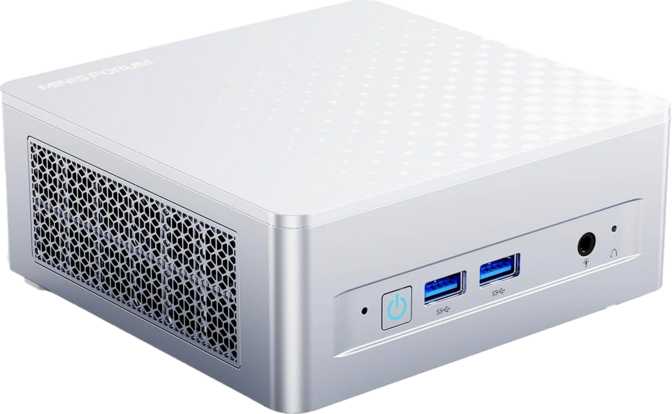
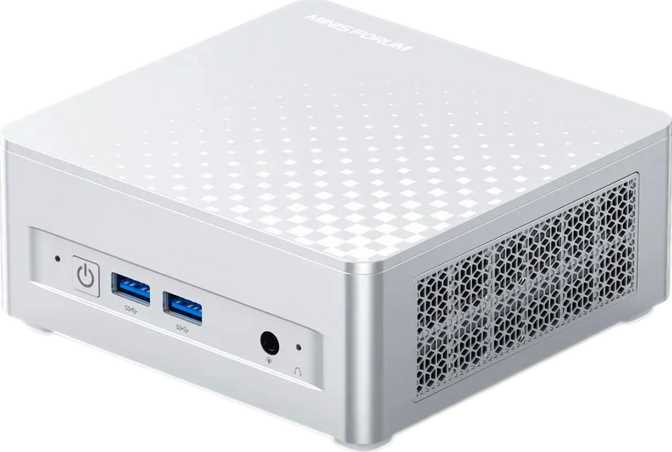
At 130mm wide, 126mm deep, and just over 50mm tall, the Minisforum M1 Lite occupies roughly the footprint of a thick paperback novel. Its total internal volume sits just above 825 cubic centimeters — a number that matters because it directly dictates how aggressively Minisforum could engineer the cooling system while keeping the chassis silent.
The form factor is designed as a compact desktop unit intended to sit on or behind a monitor, tucked on a bookshelf, or mounted to a VESA arm. It doesn't demand desk real estate the way a traditional tower does. Build quality follows Minisforum's clean, utilitarian design language — functional rather than flashy, with nothing designed to be admired but everything designed to stay out of your way.
The thermal design deserves specific attention given the 15W processor inside. A 15W TDP — the maximum sustained heat the cooling system must handle — is a laptop-class power envelope. This is both a constraint and an advantage: it means the M1 Lite can dissipate heat efficiently enough to run silently or near-silently under moderate workloads, while still sustaining performance that would have required a full desktop chip just a few years ago.
Physical Specifications
- Width
- 130 mm
- Depth
- 126 mm
- Height
- 50.4 mm
- Total Volume
- 825.6 cm³
- Processor TDP
- 15W (laptop-class)
- Warranty Period
- 1 year
Processor Performance
Hybrid Architecture, Honest Assessment
The M1 Lite runs a processor built on a hybrid core architecture — combining two types of processing cores on the same chip. Two higher-clocked performance cores handle demanding, time-sensitive tasks, while eight efficiency cores manage lighter workloads and background processes without burning power unnecessarily.
This translates into a mini PC that draws remarkably little power at idle while still being capable of surging when needed. Peak single-core speed reaches 4.3GHz — fast enough that nothing in everyday office computing, web browsing, or content consumption will feel slow.
The processor supports 14 simultaneous processing threads across its 10 physical cores, which matters for software that distributes work in parallel — video encoding, batch file processing, running virtual machines, or code compilation. A 12MB L3 cache (a fast, on-chip memory pool that reduces how often the processor must wait for data from slower RAM) is generous for a chip in this power class and helps sustain smooth performance in data-heavy workflows.
Performance Benchmarks
Shown against a 30,000-point reference ceiling
Shown against a 5,000-point reference ceiling
Shown against a 15,000-point reference ceiling
Shown against a 3,000-point reference ceiling
Integrated Graphics and Display Output
Four Monitors From One Tiny Box
The integrated GPU in the M1 Lite is more capable than the term "integrated graphics" might suggest to buyers burned by older systems. It operates on a 7-nanometer manufacturing process, supports DirectX 12 Ultimate (the current standard for modern Windows gaming and GPU-accelerated applications), and peaks at 1,850MHz — a clock speed that enables fluid 4K video playback, GPU-accelerated image and video editing in supported apps, and casual gaming at modest settings.
The most practically impressive specification here is display support: the M1 Lite can drive up to four independent monitors simultaneously. For a machine this size, that's exceptional. Productivity users who run multi-monitor setups — traders, developers, video editors managing a timeline and multiple reference windows — gain a capable multi-screen workstation that fits in a bag.
Where the GPU excels is GPU-accelerated productivity: Adobe Premiere's hardware acceleration, DaVinci Resolve for lighter cuts, Lightroom's GPU-assisted export pipeline, and general AI-acceleration tasks through OpenCL 3.0 support.
GPU Specifications
- Peak Clock Speed
- 1,850 MHz
- Fabrication Node
- 7nm
- DirectX Support
- DirectX 12 Ultimate
- OpenGL Version
- 4.6
- OpenCL Version
- 3.0
- PCIe Version
- PCIe 4.0
Memory and Storage
DDR5 Memory
The M1 Lite ships with 16GB of DDR5 memory running at 5,600MHz across a dual-channel configuration. DDR5 — the fifth generation of consumer memory — delivers substantially higher data transfer speeds than the DDR4 found in older or more budget-oriented mini PCs. At 5,600MHz, the RAM feeds the processor and integrated GPU fast enough that the memory subsystem never becomes a performance bottleneck in everyday workloads.
Important: 16GB is both the standard configuration and the maximum supported. Memory appears to be soldered to the board — there is no upgrade path. If your RAM needs grow beyond 16GB in the future, the only option is a new machine. Purchase with long-term needs in mind.
- Installed Capacity
- 16 GB
- DDR Generation
- DDR5
- Operating Speed
- 5,600 MHz
- Memory Channels
- Dual-channel
- Max Supported Speed
- 7,467 MHz
NVMe SSD Storage
The 512GB NVMe SSD provides meaningfully fast storage for the operating system, applications, and active project files. NVMe drives access data far faster than older SATA SSDs or mechanical hard drives — boot times measure in seconds, large file operations complete in moments, and application launches feel nearly instant.
Whether 512GB is sufficient depends entirely on your workflow. For a lean Windows installation, productivity software, and a working set of active files, it's adequate. Users with large media libraries, game installations, or substantial creative project archives will need to supplement with external drives.
There is no external memory card slot for easy storage expansion. External USB or network-attached storage is the practical path for additional capacity.
- Capacity
- 512 GB
- Interface
- NVMe
- External Memory Slot
- None
Connectivity: A Genuinely Modern Port Selection
This is where the Minisforum M1 Lite quietly impresses. Mini PCs in this category frequently cut corners on connectivity — older USB standards and a single HDMI output. The M1 Lite's port selection is configured for actual current-generation use.
USB4 — 40Gbps
The fastest USB connection available for consumers. Transfers a large 4K video file in seconds. Doubles as a display output and power delivery port with the right cable or dock.
Thunderbolt 4
Certified for Thunderbolt docks, daisy-chained displays, and high-performance external SSDs. Essential for users with existing Thunderbolt peripherals.
USB 3.2 Gen 2 × 2 (USB-A)
Running at 10Gbps each, fast enough for external SSDs, fast drives, and high-speed peripherals. Two ports available for simultaneous high-speed connections.
HDMI 2.1
Supports 4K at 120Hz or 8K at lower refresh rates. Fully compatible with modern TVs and monitors. Ready for the latest display standards.
DisplayPort Output
A dedicated second high-quality video output for monitors that don't use HDMI. Combined with HDMI and USB4, supports complex multi-screen configurations.
Wi-Fi 6E + Bluetooth 5.2
Wi-Fi 6E offers faster speeds and less congestion in dense wireless environments. Backward compatible with older networks. Bluetooth 5.2 provides low-latency connections for peripherals.
Complete Port Reference
| Port / Interface | Quantity | Speed / Standard |
|---|---|---|
| USB4 | 1 | 40 Gbps — data + display + power |
| Thunderbolt 4 | 1 | 40 Gbps — certified dock and display support |
| USB 3.2 Gen 2 (USB-A) | 2 | 10 Gbps each |
| USB 2.0 (USB-A) | 2 | Adequate for keyboards, mice, low-speed peripherals |
| HDMI | 1 | HDMI 2.1 — 4K@120Hz capable |
| DisplayPort | 1 | Second display output |
| RJ45 Ethernet | 1 | Wired network connection |
| 3.5mm Audio Jack | 1 | Headphones, speakers, headsets |
| Wi-Fi | — | Wi-Fi 6E (802.11ax) — backward compatible |
| Bluetooth | — | Version 5.2 |
Who the M1 Lite Is For — and Who Should Look Elsewhere
Right Buyer Profiles
Remote and hybrid workers
Need a capable home desktop with minimal desk clutter running standard productivity software, email, and video conferencing.
Multi-monitor productivity users
Want to drive three or four screens from a single, quiet, power-efficient machine without a tower desktop.
Home theater and media users
Seeking a capable media playback device with HDMI 2.1 and 4K support that can also handle light computing tasks.
Students and educators
Need a full desktop experience without the cost or footprint of a traditional tower system.
Dedicated single-task machines
A quiet machine dedicated to one job: home server, smart home hub, kiosk terminal, or a dedicated application platform.
Not the Right Fit For
Gamers seeking meaningful performance
No discrete GPU means modern AAA titles are not playable at acceptable settings. Look at mini PCs with dedicated graphics or a full desktop instead.
Heavy content creators
Regularly exporting long-form video, 3D rendering, or demanding maximum CPU throughput will hit the thermal ceiling of the 15W processor under sustained load.
Users who anticipate needing more than 16GB RAM
There is no upgrade path for memory. If your demands will grow, this machine cannot grow with them. Consider this carefully before purchasing.
Users needing large local storage
512GB fills quickly with video projects, photo libraries, or game installations, and there's no memory card slot for easy expansion.
Competitive Positioning
The M1 Lite positions itself above the budget tier through meaningfully better connectivity and the DDR5 memory platform, while staying within the 15W thermal envelope that keeps it quiet and power-efficient. Here's how it stacks up against typical alternatives in the category.
| Feature | Minisforum M1 Lite | Typical Budget Mini PC | Higher-End Mini PC |
|---|---|---|---|
| Memory Generation | DDR5 | DDR4 | DDR5 |
| Max Simultaneous Displays | 4 | 2 | 3–4 |
| USB4 / Thunderbolt 4 | Both present | Absent | Often present |
| Wi-Fi Standard | Wi-Fi 6E | Wi-Fi 5 or 6 | Wi-Fi 6E |
| Processor TDP | 15W | 10–15W | 15–28W |
| Expandable RAM | No | Sometimes | Sometimes |
| PassMark Score (approx.) | ~17,000 | 5,000–10,000 | 18,000–30,000 |
Strengths and Weaknesses
Where It Excels
The M1 Lite's genuine strength is integration. Few machines at this physical scale offer both USB4 and Thunderbolt 4 simultaneously, a four-display GPU, DDR5 memory, and Wi-Fi 6E in a single package. That combination of features typically requires paying more or accepting a larger chassis. Here, it arrives in a footprint that genuinely disappears on a desk.
The performance-to-size ratio is honest. The processor produces results that feel fast in everyday use, and the benchmark scores confirm it comfortably handles the workloads its buyers actually have. At a PassMark score north of 16,900, it outperforms the vast majority of entry-level office desktops sold in recent years.
The integrated GPU is more capable than legacy integrated graphics, and its support for four simultaneous displays is a genuine differentiator for productivity-focused buyers building multi-screen setups.
Where It Falls Short
The memory situation is the clearest limitation. A 16GB ceiling with no upgrade path is a real long-term constraint in a machine that otherwise has a thoughtful, future-facing feature set. A buyer who is at the edge of 16GB usage today will have no relief in two or three years without replacing the entire machine.
The one-year warranty is on the shorter end of the category. Some competing mini PCs offer two or three years of coverage as standard, which reduces ownership risk on a sealed, non-upgradeable system. Budget for this reality when evaluating total cost of ownership.
Storage at 512GB is serviceable but not generous. Users with established software libraries or media collections should plan their external storage strategy before purchasing rather than after.
Common Buyer Questions Answered
Final Verdict
A Mini PC That Delivers on Its Promise
The Minisforum M1 Lite is a well-considered machine for buyers who know what they need. Its processing performance handles productivity workloads reliably, its connectivity spec is genuinely current-generation rather than a cost-cutting holdover, and its physical footprint is small enough that placement is never a constraint.
Buy it if you need a capable, quiet, multi-display desktop that doesn't dominate your workspace, and your work lives in browsers, office applications, video calls, and light creative tools. The port selection alone — USB4, Thunderbolt 4, Wi-Fi 6E, HDMI 2.1, four-display support — justifies its position above budget alternatives.
Skip it if gaming beyond casual titles is on your list, if your workloads routinely push sustained CPU limits, or if you expect your RAM needs to grow beyond 16GB. The sealed memory is not a flaw, but it is a permanent boundary — and it's the single most important factor to get right before purchase.
For the buyer it's designed to serve, the Minisforum M1 Lite delivers full desktop capability, a minimal footprint, no meaningful sacrifices in connectivity, and performance that won't leave you waiting.