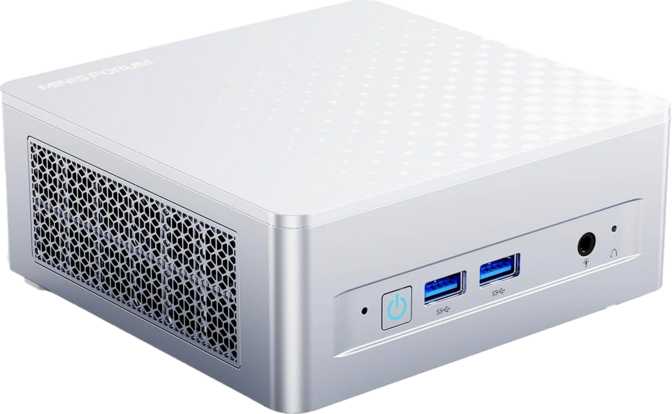
Minisforum M1 Plus Review: Big Performance in a Tiny Chassis
Mini PCsWhat the Minisforum M1 Plus Actually Is — and Why It Matters
Mini PCs have quietly become one of the most practical computing decisions a person can make. They sit on or behind your monitor, consume a fraction of the power of a tower, and when the hardware inside is chosen well, they punch far above their size. The Minisforum M1 Plus sits squarely in this category, bringing a specification set that makes it worth examining more carefully than most.
This is not a stripped-down machine asking you to make compromises. It ships with 32GB of fast DDR5 memory, a terabyte of NVMe storage, and a hybrid processor architecture borrowed from the laptop world but tuned for desktop-class sustained workloads. Whether you are building a capable home office hub, a quiet media center, or a compact productivity workstation, the M1 Plus positions itself as a serious answer to all three.
Design and Build: Small Enough to Disappear, Solid Enough to Trust
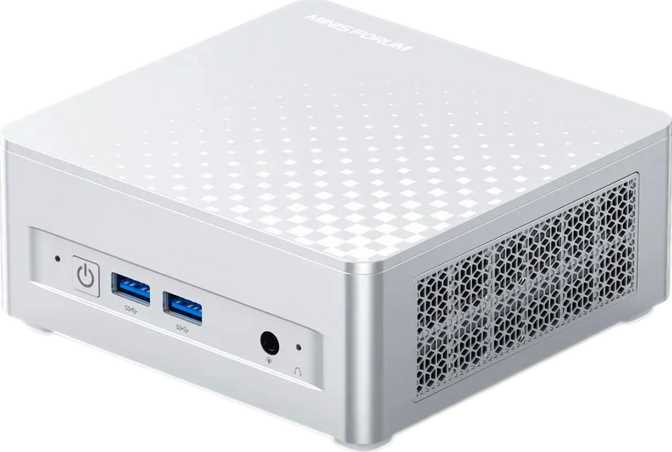
The M1 Plus occupies a footprint smaller than a hardcover novel. Its dimensions — 130mm deep, 126mm wide, and just 54mm tall — place it comfortably on a desk corner, behind a monitor via VESA mount, or inside a media cabinet without dominating the space. At under 885 cubic centimeters of total volume, this is a machine that genuinely disappears into your setup, physically and acoustically.
The chassis follows Minisforum's established design language: clean, angular, and utilitarian without feeling cheap. The build material gives the unit enough heft to feel purposeful rather than flimsy, and the port layout is thoughtfully distributed between the front and rear panels to minimize cable clutter.
One practical consideration worth understanding: the M1 Plus uses a laptop-class processor. This is a deliberate engineering choice, not a shortcut. Laptop chips are optimized for thermal efficiency, meaning the M1 Plus can deliver competitive performance while staying cool and quiet in a chassis too small to house a full desktop TDP cooler. For a machine of this size, that trade-off works strongly in the user's favor.
| Form Factor | Micro-ATX Mini PC |
|---|---|
| Depth | 130 mm |
| Width | 126 mm |
| Height | 54 mm |
| Total Volume | 884.52 cm³ |
| Warranty | 1 Year |
Processor Performance: A Hybrid Architecture Explained
How the CPU inside the Minisforum M1 Plus works — and what it means for your workload
The CPU inside the M1 Plus uses a hybrid core design — two distinct types of processor cores working together on a single chip. This approach pairs a set of high-performance cores with a larger cluster of high-efficiency cores. The result is a processor that directs heavy tasks like rendering, compiling, or video export to its performance cores while letting lighter background tasks run on efficiency cores without burning unnecessary power.
The M1 Plus has six performance-class cores running at a base of 2.4GHz alongside eight efficiency cores at 1.8GHz. With hyperthreading active on the performance cores, the system presents twenty logical threads to the operating system — real multi-tasking headroom. Under sustained load, the chip boosts to 4.8GHz on its fastest cores, and a 24MB L3 cache keeps frequently accessed data close to the processor to reduce latency.
The 45W thermal design power envelope is the key number here. It sits meaningfully higher than what you find in the most power-constrained mini PCs, which means the M1 Plus sustains performance under workload rather than throttling aggressively when things get demanding. For large spreadsheet manipulation, multi-track audio editing, software compilation, or sustained video calls with multiple applications running, that headroom matters.
Multi-Core Score
Competitive with mid-range discrete-GPU desktop builds on CPU-bound tasks
Single-Core Score
Strong per-core speed — critical for software that cannot distribute work across threads
Memory and Storage: No Compromises Here
32GB DDR5 — What It Means Day to Day
The M1 Plus ships with 32GB of DDR5 RAM running at 4,800MHz across a dual-channel configuration. For most users, this removes memory as a limiting factor entirely. You can comfortably run a full browser session with thirty-plus tabs, a virtual machine, a video editor, and a communication app simultaneously without the system slowing down.
DDR5 at this speed is meaningfully faster than the DDR4 found in competing mini PCs at similar price points. Because the integrated GPU shares system memory rather than having dedicated VRAM, faster RAM directly improves graphics performance — a practical benefit when running multiple displays or GPU-accelerated tasks.
1TB NVMe — The Right Starting Point
Storage is handled by a 1TB NVMe SSD over a PCIe 4.0 interface — the current performance standard for solid-state storage. It operates in a tier where real-world differences from top-end drives are difficult to perceive in daily use. Applications launch quickly, large files transfer without waiting, and the operating system stays responsive.
One terabyte is enough for most users as a primary system drive, particularly if large media libraries live on external or network storage. The PCIe 4.0 interface means any future drive swap stays fast.
Graphics: Four Displays from an Integrated GPU
Intel Iris Xe Graphics with 96 Execution Units — more capable than its category suggests
The Intel Iris Xe integrated graphics with 96 execution units is one of the more capable iGPU solutions available in a machine of this class. Running up to 1,400MHz on its graphics clock, it handles 4K video playback, light photo editing, and casual gaming at modest settings — significantly more capable than integrated graphics from even a few years ago.
The more striking capability is multi-display support. The M1 Plus can drive up to four independent monitors simultaneously using its HDMI 2.1 output, DisplayPort, Thunderbolt 4, and USB4 port — all of which carry display signals. HDMI 2.1 specifically supports 4K at 120Hz or 8K at lower refresh rates. For a multi-monitor productivity setup, this machine handles a genuinely expansive workspace without external adapters or hubs.
DirectX 12 and OpenGL 4.6 support cover the graphics API requirements for most modern applications. OpenCL 3 support means GPU-accelerated computing in compatible software — including some AI inference tools and video encoding pipelines — runs natively.
| Port | Max Capability | Bandwidth |
|---|---|---|
| HDMI 2.1 | 4K@120Hz / 8K | — |
| DisplayPort | 4K@60Hz+ | — |
| Thunderbolt 4 | 4K display | 40Gbps |
| USB4 | 4K display | 40Gbps |
Connectivity: A Port Selection That Covers Nearly Everything
The M1 Plus port lineup is one of its strongest arguments over competing mini PCs in the same category. The combination of USB4, Thunderbolt 4, Wi-Fi 6E, and wired ethernet in a chassis this small and at this price point is genuinely unusual.
| Port / Interface | Qty | Speed / Standard | Panel |
|---|---|---|---|
| USB4 (Type-C) | 1 | 40Gbps | Rear |
| Thunderbolt 4 (Type-C) | 1 | 40Gbps | Rear |
| USB 3.2 Gen 2 Type-A | 2 | 10Gbps each | Rear |
| USB 2.0 Type-A | 2 | 480Mbps | Front |
| HDMI 2.1 | 1 | 4K@120Hz / 8K | Rear |
| DisplayPort | 1 | 4K | Rear |
| RJ45 Ethernet | 1 | Wired LAN | Rear |
| 3.5mm Audio Jack | 1 | Headset / Speaker | Front |
Wireless Connectivity
- Wi-Fi 6E — accesses the 6GHz band
- Wi-Fi 6 / 5 / 4 backward compatible
- Bluetooth 5.2
Not Included
- SD / microSD card reader
- VGA output
- S/PDIF audio output
Who the Minisforum M1 Plus Is Built For
- Home Office WorkersReliable, fast, quiet computing for video calls, documents, spreadsheets, and web tools — with performance headroom to spare
- Multi-Monitor Power UsersFour simultaneous display outputs is unusual at this size and price tier — the M1 Plus handles it all natively
- Developers and Technical Users32GB DDR5 makes running virtual machines and Docker containers comfortable; 20 threads handles compilation tasks well
- Media and Content Consumers4K playback is effortless and the machine is quiet enough for living room or bedroom use
- Space-Constrained EnvironmentsOffices, apartments, server rooms, or anywhere a tower would be impractical
- 3D Artists and Heavy Render WorkloadsWithout a discrete GPU, complex 3D rendering and GPU-accelerated effects pipelines will be significantly slower than a dedicated workstation
- Serious GamersIntegrated graphics cannot compete with even an entry-level dedicated GPU for modern gaming at acceptable frame rates and settings
- Users Needing Cellular ConnectivityNo built-in LTE or 5G option — wired ethernet or Wi-Fi only
- Always-On Server WorkloadsHours-long sustained maximum CPU load requires verifying thermal behavior expectations for your specific use case
Competitive Positioning
The Minisforum M1 Plus consistently lands above the category average on the specifications that translate directly into real-world usability. Competitors at this price point typically force you to choose between good RAM, strong ports, or fast storage — this machine does not force that trade-off.
| Feature | Minisforum M1 Plus | Typical Competing Mini PC |
|---|---|---|
| RAM | 32GB DDR5 | Often 16GB DDR4 or DDR5 |
| Storage | 1TB NVMe PCIe 4.0 | 256GB–512GB common |
| Display Outputs | 4 simultaneous | 2–3 typical |
| USB4 / Thunderbolt 4 | Both present | Often one or neither |
| Wi-Fi Generation | Wi-Fi 6E | Wi-Fi 6 or older |
| Max RAM Upgrade | 64GB | 32GB common cap |
| Processor Threads | 20 threads | 12–16 typical |
Honest Assessment: Strengths and Weaknesses
The M1 Plus is genuinely impressive in ways that extend beyond the spec sheet. Shipping DDR5 memory, PCIe 4.0 storage, Thunderbolt 4, USB4, Wi-Fi 6E, and four display outputs in a box this small reflects a deliberate decision to include current-generation components rather than mixing in older standards to hit a lower cost.
The 32GB base RAM configuration is a meaningful differentiator. Most buyers will never need to upgrade it, and those who do have a clear 64GB path available. The port selection — particularly the pairing of Thunderbolt 4 and USB4 — provides docking station flexibility that most competing mini PCs simply cannot match.
The integrated GPU has real and non-negotiable limits. For anything GPU-intensive beyond multi-display productivity work, media consumption, and light creative tasks, it reaches its ceiling. Buyers with GPU-heavy workflows should evaluate whether an external GPU enclosure via Thunderbolt 4 is worth the added cost and complexity.
The one-year warranty is shorter than some competitors offer — worth factoring in for a machine intended as a long-term primary computer. The laptop-chip origins also mean that extended, hours-long maximum-load workloads warrant specific thermal verification for your use case.
Questions Real Buyers Ask Before Purchasing
Final Verdict
Minisforum M1 Plus — Our Honest Purchase Recommendation
The Minisforum M1 Plus earns its place as one of the more thoughtfully specified mini PCs in its category. It does not cut corners on the components that matter most — memory speed and capacity, storage performance, wireless generation, and display output flexibility all sit at or above the current standard for compact desktop computing.
For home office professionals, multi-monitor power users, developers, and anyone who wants a quiet, capable, space-efficient machine that handles everything outside of GPU-intensive gaming or rendering, the M1 Plus is a confident recommendation. The 32GB DDR5 base configuration, four display outputs, Thunderbolt 4, and Wi-Fi 6E combination at this size is genuinely difficult to beat without spending significantly more.
If your workload is graphics-heavy or demands sustained compute tasks requiring a dedicated GPU, look toward machines with discrete graphics. For everyone else, the Minisforum M1 Plus is compact computing done right.