Amkette XS Flow Plus Review: A Versatile Wireless Gaming Mouse Tested
MiceA triple-connection wireless gaming mouse that prioritises flexibility over peak performance — and largely succeeds on those terms.
The wireless gaming mouse market is crowded at every price point, and most buyers face the same frustrating trade-off: pay more for a reputable brand or take a chance on an affordable alternative that might disappoint when it matters most. The Amkette XS Flow Plus enters that conversation with an unusually flexible pitch — three ways to connect, a fully programmable button layout, and a sensor tuned for responsive gaming, all packaged into a right-handed form factor that weighs about as much as a large egg.
Whether you're a college student who switches between a gaming rig and a laptop daily, or a productivity user who wants a mouse that punches above its price tag, the XS Flow Plus is making a case worth examining closely. The specs suggest genuine ambition. The question is where ambition meets reality.
Design and Build: Right-Handed, Reasonably Sized, and RGB-Ready
Shape and Dimensions
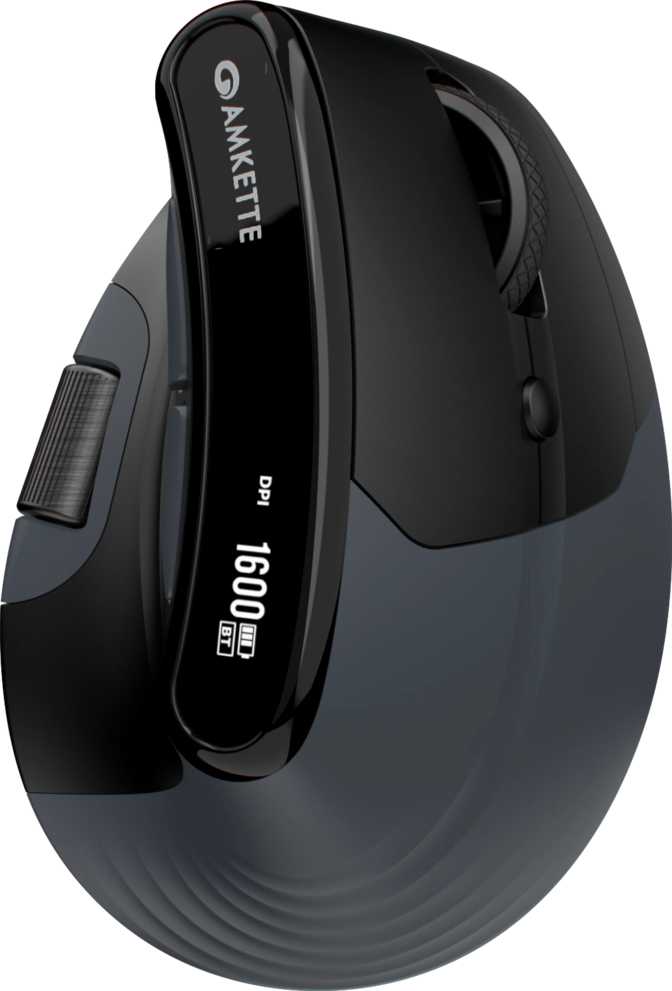
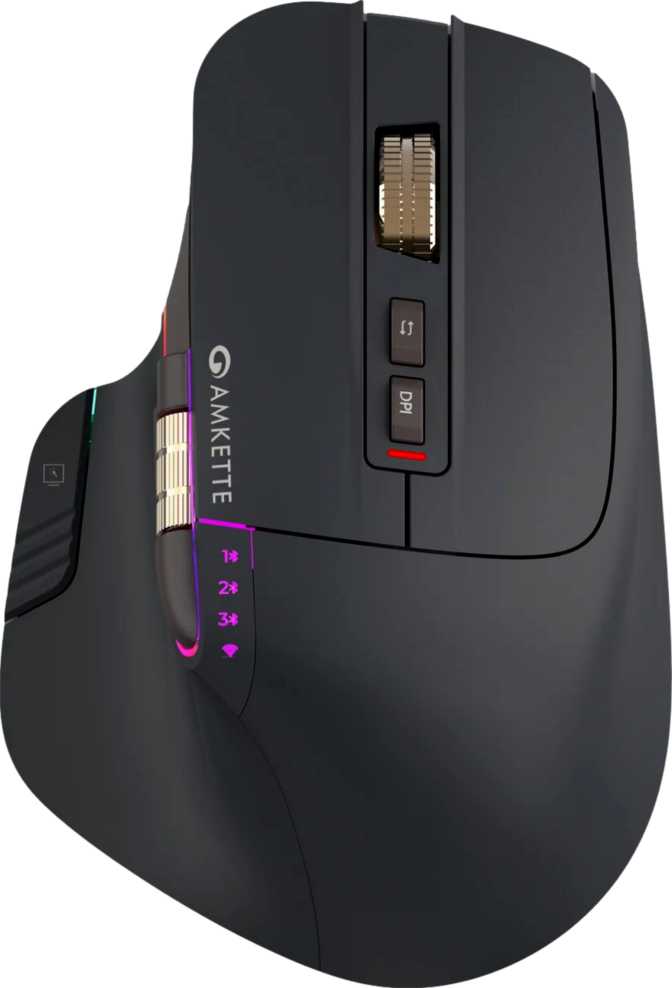
The XS Flow Plus is built exclusively for right-handed users — lefties should look elsewhere immediately. Its footprint sits in comfortable mid-size territory: 124mm from front to back, 85mm wide, and 40mm tall at its highest point. That puts it closer to a medium-large grip than a compact travel mouse, making it most natural for medium-to-large hands using a palm or claw grip style.
At 112 grams, it isn't competing with the ultralight hollow-shell designs that have become popular in competitive gaming circles, but it isn't heavy either. For most users, 112g is perfectly manageable across long sessions. The absence of adjustable internal weights means you get what you get — a deliberate choice that keeps mechanical complexity out of the equation.
The Scroll Wheel Situation
One detail worth calling out: the XS Flow Plus includes a thumb scroll wheel on the left side, in addition to the standard top-mounted scroll wheel. This is an uncommon feature at this price point. Whether you use it for horizontal scrolling in spreadsheets, timeline scrubbing in video editors, or remapping it entirely in software, it adds a layer of versatility that most competing mice in the same bracket simply don't offer.
The top scroll wheel does not tilt sideways — horizontal input is handled entirely by the thumb wheel.
The thumb scroll wheel is a rare feature at this price tier — a genuine differentiator for spreadsheet users and video editors.
RGB Lighting and Cable
RGB Lighting
RGB lighting is present and accounted for. This is accent lighting that adds personality rather than the kind of multi-zone spectacle you'd find on flagship peripherals. If RGB matters to your desk setup, it's here. If it doesn't, it won't get in the way.
Cable
A 1.8-metre cable is included for wired use — long enough to reach comfortably from a desktop tower to a mouse pad without pulling tight. It doubles as a charging cable when the battery needs topping up during wireless use.
Connectivity: Three Modes, One Mouse
This is the XS Flow Plus's most defining feature, and it deserves more than a bullet point.
2.4GHz Wireless
The mode to use for gaming. A dedicated RF connection via USB receiver dongle delivers near-zero perceptible latency. This is the mode the sensor and polling rate are tuned for.
Best for GamingBluetooth 5.0
Connect to a laptop, tablet, or second PC without the USB dongle. Bluetooth 5.0 brings improved stability and lower power consumption. For competitive gaming, note that latency is measurably higher than 2.4GHz — for productivity and casual play, you won't notice.
Best for Travel & Multi-DeviceUSB Wired
Plug in the included cable and use it as a conventional wired USB mouse. Particularly useful when the battery runs low mid-session — the XS Flow Plus can be used while charging, so you're never forced to pause.
Best for Backup / ChargingMode switching is handled through a dedicated button on the underside — standard practice that keeps the top-surface button count clean. There is no profile-switching button on the body itself.
Sensor Performance: What 6400 DPI Actually Means for You
The XS Flow Plus uses an Instant S203 optical sensor — a mid-range optical sensor suited to everyday gaming and general use, not a top-tier competitive sensor of the kind found on mice costing three to four times more.
DPI Range Explained in Human Terms
-
400 DPI
Slow, precise — favoured by FPS players who want deliberate, controlled crosshair movement across large mouse pads.
-
1600 DPI
A common everyday sweet spot for productivity use on standard monitors.
-
3200 DPI
Suits higher-resolution displays or users who prefer faster cursor movement with minimal physical effort.
-
6400 DPI
Upper ceiling — fast enough for large multi-monitor setups, though micro-tremors in hand movement become amplified at this sensitivity.
Key Performance Metrics
- Polling Rate
- 1000Hz — the mouse reports its position 1,000 times per second (once every millisecond). This matches the top tier and is identical to what high-end competitors offer. Mice that report at 125Hz feel noticeably sluggish by comparison.
- Max Tracking Speed
- Handles movement up to 60 inches per second before losing accurate tracking — a solid threshold that only extremely fast sweeping arm motions approach during intense play.
- Acceleration Ceiling
- The sensor handles up to 20G of sudden directional change without the cursor stuttering — meaningful for competitive games where quick flicks and rapid repositioning are common.
Realistic expectations: For the vast majority of users, the range between 400 and 3200 DPI covers every real-world need. The 6400 DPI ceiling is adequate for this class of mouse but not in the same league as premium sensors found on flagship competitors.
Battery Life: Forty Hours Between Charges
Forty hours of wireless usage is a generous endurance figure. Here's what that looks like across different usage patterns.
Light User
2 hours/day
~20 days
per charge
Average User
4 hours/day
~10 days
per charge
Heavy User
8 hours/day
~5 days
per charge
Use While Charging
Topping up the battery via USB cable doesn't pause your session — the mouse stays fully functional while plugged in.
No Wireless Charging
There is no Qi or proprietary wireless charging pad support. A cable is always required for recharging.
Who Should Buy the Amkette XS Flow Plus
The XS Flow Plus earns its place on some desks more than others. Here's a clear-eyed look at who it genuinely suits — and who it doesn't.
Ideal Buyers
-
The dual-device daily user
Switches between a desktop gaming setup and a laptop. Use 2.4GHz at your desk, Bluetooth on the go — no second mouse needed.
-
The budget-conscious gamer
Needs a competent wireless gaming mouse without spending on a flagship. The polling rate and DPI range check the essential boxes.
-
The power productivity user
Eight fully programmable buttons including a thumb scroll wheel give meaningful shortcut real estate for creative or productivity software.
-
Right-handed, medium-to-large hands
The dimensions and right-handed shell are a natural fit for palm and claw grippers with average to larger hands.
Not the Right Choice For
-
Left-handed users
No ambidextrous or left-handed variant exists. Full stop.
-
Competitive esports players
Users grinding ranked precision shooters who demand sub-millisecond latency, top-tier sensors, and ultralight builds under 70g will find this mouse outside that performance envelope.
-
Frequent multi-computer users
Without onboard memory, custom button mappings don't travel between machines. If your workflow spans three different PCs, this will frustrate you.
-
Wireless charging users
No Qi or proprietary pad support. The charging cable is always required.
How It Compares to the Competition
The XS Flow Plus's strongest competitive edge is its triple connectivity. Most mice in the same price bracket offer a single wired connection or, at best, 2.4GHz wireless. Here's how the key differentiators stack up.
| Feature | Amkette XS Flow Plus | Typical Budget Wired Gaming Mouse | Typical Mid-Range Wireless Mouse |
|---|---|---|---|
| Wireless Modes | 3 Modes 2.4GHz + BT + USB |
None (wired only) | Usually 2 2.4GHz + USB |
| Polling Rate | 1000Hz | 1000Hz | 1000Hz |
| Max DPI | 6400 | 6400–8000 | 12000–16000 |
| Programmable Buttons | 8 of 8 | 4–6 | 6–8 |
| Thumb Scroll Wheel | Rare | Rare | |
| Battery Life | ~40 hours | N/A | 40–70 hours |
| Onboard Memory | None | Sometimes | Usually present |
| Weight | 112g | 85–120g | 80–100g |
| Use While Charging | N/A | Sometimes |
The absence of onboard memory and the mid-tier sensor are the gaps that higher-priced alternatives use to justify their cost. For users who prioritise flexibility over raw performance headroom, the trade-off favours the XS Flow Plus.
Strengths and Weaknesses, Honestly Assessed
Where It Excels
Three connection modes in one mouse removes real friction from daily workflows that single-mode alternatives create. The full 1000Hz polling rate and complete programmability across all eight buttons deliver on the gaming promise without asterisks.
The thumb scroll wheel is almost unheard of at this price tier — it gives the XS Flow Plus genuine daily-driver credentials that basic gaming mice can't match. For users who live in spreadsheets, timelines, or applications with rich shortcut systems, this one feature can justify the purchase on its own.
A 40-hour battery that allows continued use while charging means battery anxiety essentially disappears from your daily experience.
Where It Falls Short
The lack of onboard memory is a real constraint, not a minor footnote. The mouse is only as smart as the last computer it was configured on, and that matters for multi-machine workflows.
The Instant S203 sensor performs reliably within its range but doesn't offer the tracking precision of premium optical sensors. Experienced competitive players will feel that gap at high sensitivities and during fast-paced engagements.
At 112 grams, it's noticeably heavier than what dedicated ultralight-performance users are accustomed to. And a one-year warranty is shorter than what several established peripheral brands offer in the same price range — a reflection of the brand's market positioning rather than any specific durability signal.
Answers to Questions Buyers Actually Ask
Final Verdict
The Amkette XS Flow Plus is a well-considered versatile gaming mouse built for buyers who need flexibility more than they need peak performance.
Its triple connectivity — 2.4GHz for gaming, Bluetooth for travel, wired for charging — solves a real problem that single-mode mice create. The full 1000Hz polling rate, complete programmability across all eight buttons, and a thumb scroll wheel that rarely appears at this price tier make it a compelling daily-driver option.
Where it compromises — mid-tier sensor performance, no onboard memory, 112g weight, and a shorter warranty — are the exact trade-offs you'd expect from a mouse optimised for price-to-versatility rather than price-to-performance. These aren't flaws so much as honest reflections of what the XS Flow Plus is designed to be.
Buy this if:
You're a right-handed user who switches regularly between devices, wants a capable wireless gaming mouse without a flagship price tag, and values having more programmable inputs than the standard six-button layout offers.
Skip this if:
You're left-handed, compete seriously in precision shooters where sensor class and body weight matter, or you need onboard memory to carry your settings between different computers.