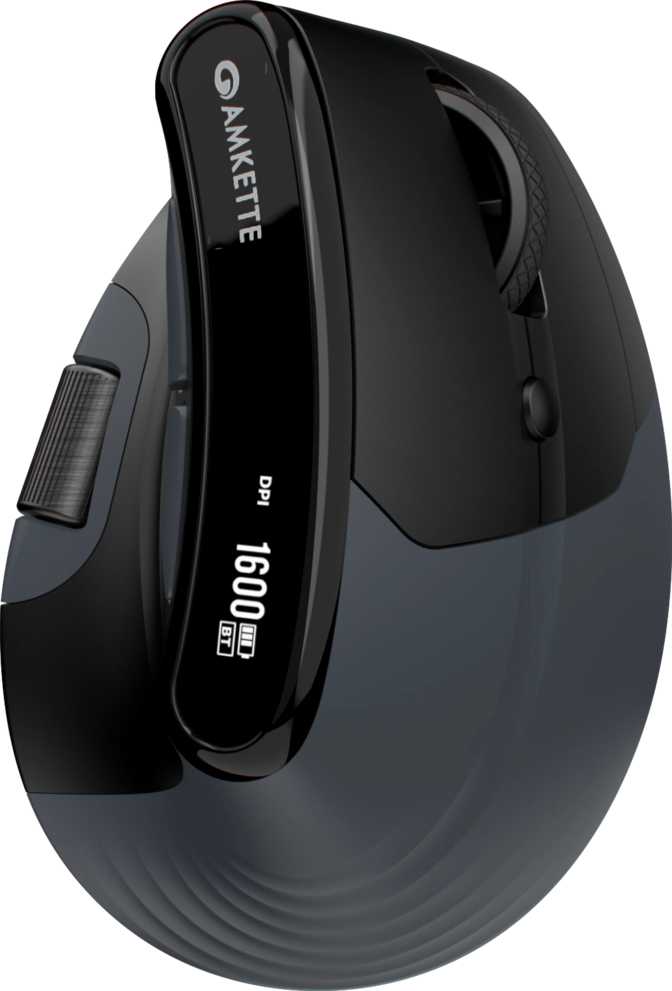
Amkette XS Natural Plus Review — The Multi-Device Productivity Mouse
MiceMost mice fall into one of two camps: gaming hardware dressed up for office use, or stripped-down budget peripherals that cut corners on everything that matters. The Amkette XS Natural Plus tries a different path — a dedicated productivity mouse built around versatile connectivity, a thoughtful button layout, and genuine daily-use endurance. Whether that approach delivers real value depends on exactly what your workday looks like, and that is what this review unpacks.
Design and Build: Right-Handed, No-Nonsense, Surprisingly Refined
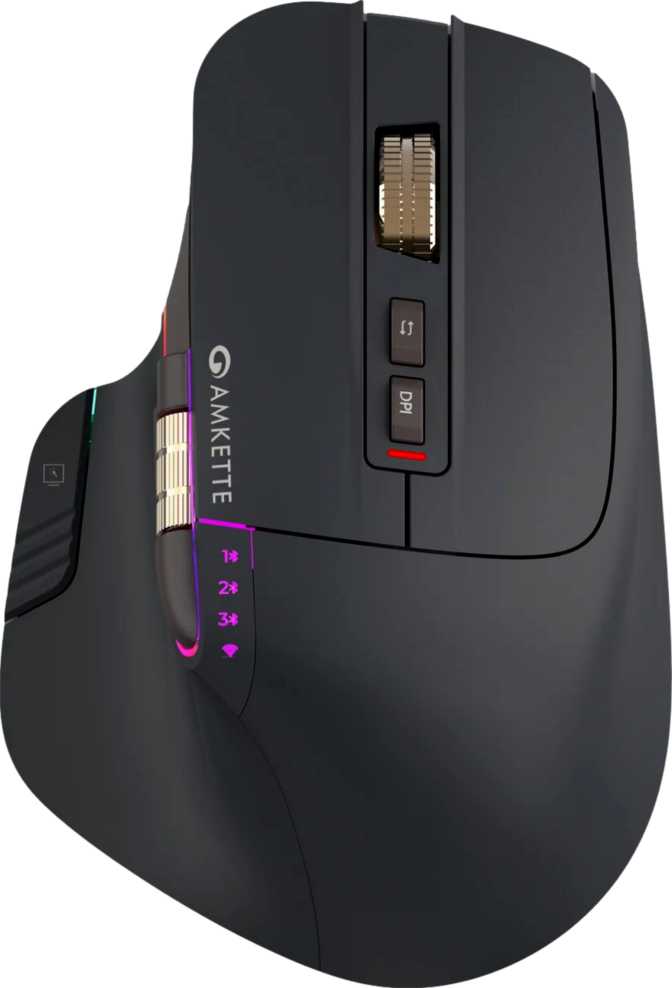
The XS Natural Plus is a right-handed mouse — left-handed users should stop reading here, as the ergonomic shaping is specifically contoured for right-hand palm and claw grip and there is no ambidextrous variant available.
For right-handed users, the proportions hit a comfortable middle ground. The mouse is 106 mm long, 73 mm wide, and 68 mm tall — dimensions that fit a medium-to-large hand in a relaxed palm or claw grip without forcing the fingers into an awkward splay. At 95 grams, it sits in a range most users find genuinely comfortable across long sessions: light enough to prevent fatigue during extended work, yet substantial enough that precise cursor movements feel controlled rather than floaty.
There is no RGB lighting anywhere on this mouse, and that is a deliberate design choice worth appreciating. Without the power drain and heat of lighting arrays, the battery lasts longer, the design stays simpler, and the mouse avoids looking out of place on a professional desk. If you need your peripheral to glow, this is not your mouse. If you need it to disappear into a clean workspace, it does that exceptionally well.
The included cable runs 1.8 meters — long enough to reach any reasonable desktop configuration without pulling taut. The cable matters here less as a primary connection and more as a charging lifeline, which becomes relevant in the battery section below.
- Length106 mm
- Width73 mm
- Height68 mm
- Weight95 g
- Cable Length1.8 m
- OrientationRight-Handed
- RGB LightingNone
Connectivity: Three Ways to Connect, One Mouse to Rule Them All
This is arguably the XS Natural Plus's most practical feature — the one that most directly justifies choosing it over simpler alternatives. It supports three distinct connection modes, each serving a specific use case.
2.4GHz Wireless
Via USB dongle. Delivers the lowest latency wireless experience — ideal for primary workstations where you want near-wired responsiveness without the physical cable in the way.
Bluetooth 5
For laptops, tablets, and secondary machines. Bluetooth 5 offers improved stability and interference resistance — especially useful in dense wireless environments like open-plan offices where older versions struggle.
Wired USB
Functions as both a direct connection fallback and the charging conduit. The mouse remains fully operational while plugged in, meaning a depleted battery never forces a pause in your work.
Sensor and Tracking Performance: More Than Enough for Its Purpose
The Instant S203 sensor powering the XS Natural Plus is tuned for productivity, not competitive gaming, and understanding that distinction matters when evaluating its numbers.
DPI Range: 400 to 6400
The lower end suits precise work on high-resolution displays — design applications, detailed spreadsheets, or any scenario requiring slow, accurate cursor movement. The upper end enables quick sweeping travel across large or multi-screen setups. Most productivity users settle in the 800–1600 range for everyday work.
Polling Rate: 1000 Hz
The mouse communicates its position to the computer 1,000 times per second — the standard rate for quality wireless mice. Cursor movement is smooth and responsive with no perceptible lag during everyday tasks.
Tracking Speed and Acceleration
The sensor handles movement up to 30 inches per second and acceleration up to 10G. It will not lose tracking even when you move quickly across a large surface — comfortably covering every realistic office use case with headroom to spare.
No Onboard Memory
There are no saved DPI profiles that travel with the mouse. Settings exist only within the companion software environment. For users who move the mouse between multiple computers and want consistent button behavior everywhere, this is a real limitation worth factoring in.
- Sensor ModelInstant S203
- Minimum DPI400
- Maximum DPI6400
- DPI AdjustableYes
- Polling Rate1000 Hz
- Max Tracking Speed30 IPS
- Max Acceleration10G
- Onboard ProfilesNone
Battery Life and Charging: A Full Workweek and Then Some
The built-in rechargeable battery delivers approximately 40 hours of active use on a single charge. At a standard eight-hour workday, you would charge it roughly once a week. Lighter usage patterns stretch that to ten or thirteen days between charges — making charging feel like a weekly ritual rather than a daily concern.
There is no wireless charging, so the cable is required for recharging. The key practical feature is use-while-charging: the mouse stays fully operational when plugged in via USB. A depleted battery never halts your work — plug in, switch to wired mode, and continue without interruption.
The battery is non-removable, which is standard for rechargeable mice. Over years of daily use, capacity will gradually diminish and cannot be user-swapped. The one-year warranty is worth noting in this context — it sits on the shorter end for a daily-use peripheral.
3 hrs/day
5 hrs/day
8 hrs/day
Who Should Buy the Amkette XS Natural Plus
- You regularly work across two or more devices and want one mouse for all of them
- You navigate wide spreadsheets, financial models, or project timelines regularly
- You prefer a clean, professional desk setup free from RGB lighting
- You travel or hot-desk and need Bluetooth flexibility without sacrificing wireless performance
- You have a medium-to-large right hand and prefer a palm or relaxed claw grip
- You want all buttons fully programmable to match your exact workflow
- You are left-handed — the shaping is specifically right-handed with no alternative
- You plan to use this for gaming, even casually — sensor and features are office-tuned
- You need custom button assignments to travel between computers without software
- Long-term repairability matters — a built-in battery means eventual full replacement
- You rely on gesture support or a tilting scroll wheel from your current mouse
How It Compares to Logical Alternatives
The XS Natural Plus's triple connectivity at this feature set is its clearest differentiator. A comparable three-mode mouse from a premium brand would typically cost significantly more. The areas where it concedes — onboard memory, brand reassurance — are real but limited to specific use cases.
| Feature | Amkette XS Natural Plus | Typical Single-Mode Wireless | Entry Bluetooth Office Mouse |
|---|---|---|---|
| Connectivity Modes | 3 Modes | 1 Mode | 1–2 Modes |
| Thumb Scroll Wheel | Rare | ||
| Battery Life | ~40 hrs | 20–60 hrs | 40–100+ hrs |
| Use While Charging | Sometimes | ||
| DPI Range | 400–6400 | 800–3200 typical | 400–1600 typical |
| Onboard Memory | Sometimes | ||
| RGB Lighting | Sometimes | ||
| Grip Orientation | Right-Handed | Varies | Usually Ambidextrous |
Honest Assessment: Where It Wins and Where It Does Not
The combination of 2.4GHz wireless, Bluetooth 5, and wired connectivity in one mouse is genuinely practical — not a spec-sheet checkbox. For users who hot-desk or switch between a laptop and desktop daily, this eliminates the need for multiple mice or the repetition of re-pairing a single one across machines.
The thumb scroll wheel is a feature that sounds minor until you are twenty minutes into navigating a 40-column spreadsheet without it. Anyone who works regularly in Excel, project management platforms, or wide-format design applications will recognize the difference immediately.
At 95 grams with a 40-hour battery, it is comfortable through the longest work sessions. The no-RGB design keeps it professional and extends battery endurance simultaneously — restraint in design translating directly to better daily performance.
The absence of onboard memory is a meaningful gap for a mouse marketed on multi-device flexibility. Custom button assignments require the companion software on every computer — the promise of versatility is partially undercut by this software dependency.
The one-year warranty is brief. Peripherals used daily for extended sessions are wear items, and two-to-three-year coverage is common among competitors. This does not make the mouse a poor choice, but it is a factor worth weighing when considering long-term value.
There is no gesture support and no tilting scroll wheel — those functions are partially compensated by the thumb wheel and programmable side buttons. That substitution works, but users migrating from gesture-enabled mice should know the experience does not transfer directly.
Frequently Asked Questions
Final Verdict
The Amkette XS Natural Plus earns a clear recommendation for the right user profile: a right-handed professional who regularly works across two or more devices, values a clutter-free desk aesthetic, and wants more button functionality than a standard three-button mouse without crossing into gaming hardware territory.
The thumb scroll wheel alone justifies the choice for anyone whose work involves regular horizontal navigation. The multi-mode connectivity makes the mouse genuinely versatile in practice — not just on paper — and the 40-hour battery means charging is a weekly ritual rather than a daily concern.
If you work exclusively on a single computer, never scroll horizontally, and want custom button assignments to follow the mouse without installing software, there are better-optimized alternatives. But for the multi-device professional looking for a capable, practical daily driver that disappears into the work rather than demanding attention, the XS Natural Plus delivers where it counts.