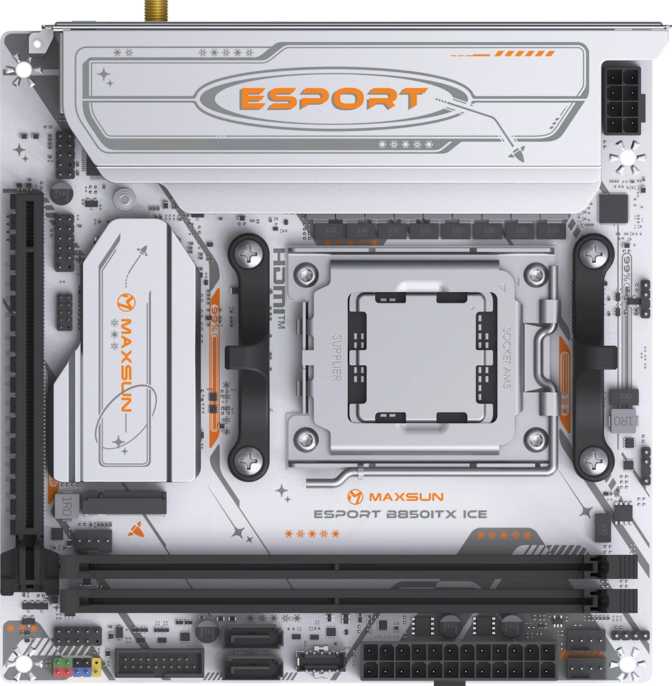
Maxsun eSport B850ITX WiFi Ice: Full Review for Compact AMD Builds
MotherboardsAt a Glance — Key Specifications
Mini-ITX motherboards have always asked more of their buyers than standard-sized boards. Every purchasing decision carries more weight when you cannot easily add a PCIe card later, expand storage with extra slots, or accommodate an afterthought. The Maxsun eSport B850ITX WiFi Ice enters this space as an AM5-platform board on AMD's current-generation B850 chipset — a combination that places legitimate, future-aware computing power into a footprint small enough to fit in a backpack. Whether that trade makes sense depends entirely on knowing, before you buy, exactly what it includes and what it leaves out.
Design and Aesthetics: The "Ice" Identity
The name is doing real work here. The "Ice" designation in Maxsun's product line signals a white color direction — a board built for white and light-themed builds that have become a significant aesthetic movement among PC enthusiasts. Onboard RGB lighting confirms this is a system component intended to be seen, not hidden. If you are planning a build around a white case, white cooler, and white GPU, this board was designed with that vision explicitly in mind.
The physical dimensions are the Mini-ITX standard: 170 mm × 170 mm, roughly 6.7 inches square. Every Mini-ITX case on the market accommodates this size — compatibility at the case level is not a concern. What the format does impose is a fixed ceiling on what can physically fit: one expansion slot, two memory slots, and a deliberately curated internal connector layout. Those are not compromises unique to this board — they are the Mini-ITX contract, and Maxsun has allocated the available space with reasonable priority.
For a brand better established in Asian markets than Western ones, the three-year warranty is a meaningful signal. At a tier where some manufacturers offer half that coverage, three years of protection reduces one category of risk significantly.
Build Identity
- White "Ice" theme — built for neutral and white-build aesthetics
- RGB lighting — onboard LEDs visible through tempered glass panels
- Standard Mini-ITX size — fits every 170 mm case on the market
- 3-year warranty — above average for this price tier
Platform Foundation: The AM5 Socket and B850 Chipset
This board is built around AMD's AM5 platform, the current and actively supported CPU socket for Ryzen 7000 and 9000 series processors. AMD has publicly committed to AM5's longevity, making it a safer long-term investment than boards built on transitional or outgoing platforms. In a Mini-ITX build where replacing the motherboard means rebuilding from scratch, that platform lifespan matters more than usual.
The B850 chipset sits in AMD's midrange tier — a step above the budget B650 but below the enthusiast-grade X870. In practical terms, B850 natively supports PCIe 5.0 for the primary GPU slot, which this board delivers through its single expansion slot. PCIe 5.0 delivers twice the bandwidth of PCIe 4.0, and while no consumer graphics card currently saturates PCIe 4.0 bandwidth, having PCIe 5.0 means this board is architecturally ready for the next generation of discrete GPUs without any bottleneck concern.
For enthusiasts, the B850 chipset also provides the foundation for solid memory overclocking support — something this board leverages well, as covered in the memory section below.
Platform at a Glance
- CPU Generations
- Ryzen 7000 & 9000
- Chipset Tier
- Midrange (B850)
- GPU Slot
- PCIe 5.0 x16
- Expansion Slots
- 1 (Mini-ITX Standard)
- Platform Longevity
- Confirmed Long-Term
Memory: DDR5 with Real Overclocking Headroom
The board offers two DDR5 memory slots running in dual-channel configuration — the standard for Mini-ITX, where a four-slot layout simply does not fit. Dual-channel DDR5 is not a compromise; it is what virtually every consumer workload and gaming scenario is optimized for.
The maximum supported capacity of 96 GB across both slots is enough for 48 GB DIMMs — a configuration that most professional workflows will not outgrow. Standard DDR5 kits will operate at their native specification out of the box without any intervention.
The more compelling figure is the overclocking ceiling. Through AMD EXPO profiles — a one-toggle process in the BIOS that automatically loads pre-validated timings from compatible memory kits — this board supports DDR5 running at speeds that place it among the fastest consumer DDR5 configurations available. At those frequencies, CPU-bound gaming frame rates see real improvements, and creative workloads involving large data sets benefit from the increased throughput. You do not need to manually tune timings to achieve this; you need a compatible EXPO kit and a BIOS toggle.
Two-Slot Limitation to Plan For
With two slots instead of four, upgrading capacity means replacing sticks entirely — not adding them. Budget for where you want to end up, not just your starting point. DDR5 pricing should factor into this calculation at purchase time.
ECC memory is not supported, which is expected for a consumer B850 board. Workstation operators who require error-correcting memory should look at a different platform entirely.
Memory Specifications
- Memory Type
- DDR5
- Slot Count
- 2 (Dual-Channel)
- Maximum Capacity
- 96 GB
- Native Speed
- Up to 5200 MHz
- OC Ceiling (EXPO)
- 8000 MHz
- ECC Support
- No
Storage Layout: Two Paths to Fast Storage
M.2 NVMe Sockets
Two M.2 sockets provide the primary storage backbone. NVMe drives in M.2 form factor are the fastest consumer storage available — compact cards that slot directly into the board without cables, delivering sequential read speeds measured in multiple gigabytes per second depending on the drive generation.
Two sockets is the standard Mini-ITX allocation and covers the practical needs of most builds: one for the operating system and applications, a second for games, media, or working files.
SATA Connectors
Two SATA 3 connectors support legacy 2.5-inch SSDs and traditional hard drives. This count is on the lower end — some competing Mini-ITX boards offer four SATA ports.
Builders migrating multiple drives from an existing system should count their SATA devices carefully before committing. Carrying over three or more SATA drives will exceed this board's capacity without an external enclosure.
Wireless and Networking: Wi-Fi 6 Included
Wi-Fi 6
802.11ax
The current mainstream wireless standard. Its practical advantage over Wi-Fi 5 is most visible in crowded environments — apartments, offices, anywhere dozens of devices share the same router. Wi-Fi 6's improved handling of simultaneous connections reduces latency spikes under load. Backward compatibility with Wi-Fi 5 and Wi-Fi 4 ensures connectivity to older routers.
Bluetooth 5.2
Current Consumer Standard
Supports improved multi-device management and lower-energy audio profiles. One specific absence worth flagging: aptX audio codec support is not included. For the majority of Bluetooth headphone users this is irrelevant — but if your headset specifically requires aptX for low-latency audio, factor in a USB Bluetooth adapter with aptX support.
Wired Ethernet
RJ45 Port
A single RJ45 ethernet port provides wired network connectivity for setups where a physical cable is preferred over wireless — the reliable fallback for competitive gaming, large file transfers, or any environment where wireless signal quality is inconsistent.
I/O and Connectivity: Where the Trade-offs Live
This section deserves the most careful attention before purchasing. The board's connectivity profile defines both its value and its limitations.
Rear Panel I/O
The rear panel provides six USB ports in total: two running at 5 Gbps (Type-A) and four at USB 2.0 speeds. There is no USB-C on the rear panel — and no 10 Gbps USB port of any kind. In a landscape where fast external drives, docks, and modern peripherals increasingly rely on USB-C or minimum 10 Gbps speeds, this is the board's most significant real-world limitation.
| Port Type | Count | Speed |
|---|---|---|
| USB Type-A | 2 | 5 Gbps (Gen 1) |
| USB Type-A | 4 | 480 Mbps (2.0) |
| USB Type-C | 0 | — |
| HDMI | 1 | HDMI 1.4 |
| DisplayPort | 1 | iGPU Output |
| RJ45 Ethernet | 1 | Wired LAN |
Internal Headers
The internal picture is more encouraging. A USB 3.2 Gen 2 (10 Gbps) internal header allows a case front panel to deliver a fast USB-C port — partially compensating for the rear panel's absence. This depends on your case including a front-panel USB-C connector, which many current Mini-ITX cases do.
| Header Type | Count | Notes |
|---|---|---|
| USB 3.2 Gen 2 | 1 | Supports front USB-C |
| USB 3.2 Gen 1 | 2 | 4× front USB-A (5 Gbps) |
| USB 2.0 | 2 | Legacy device support |
| SATA 3 | 2 | Internal storage |
| M.2 | 2 | Primary NVMe storage |
| Fan Headers | 3 | Adequate, not generous |
| TPM Header | 1 | OS security compliance |
Know the HDMI Limitation Before You Build
The HDMI port on the rear panel is capped at 4K at 30 frames per second — adequate for a secondary productivity display, but not for gaming or smooth video playback at that resolution. For integrated graphics use above 1080p, the DisplayPort output is the better option. For discrete GPU gaming builds — the primary audience for this board — this is a non-issue since all display output flows through the GPU's own outputs.
BIOS and Overclocking: Features That Matter Daily
Dual BIOS
Two separate firmware chips: a primary and a backup. If a BIOS update fails — power interruption, corrupted file, incompatible version — the board can recover from the secondary chip automatically or manually. For an AM5 platform where firmware updates arrive regularly as new CPU generations launch, this is meaningful protection against a bricked board.
EXPO Memory Profiles
AMD's EXPO system enables one-toggle memory overclocking: purchase a compatible DDR5 kit, enable the profile in the BIOS, and the board loads pre-validated timing presets automatically. No manual tuning required to reach the upper frequency ceiling. More experienced builders can tune manually through full BIOS access for voltage and timing refinement.
Clear CMOS Access
Physical CMOS reset — the ability to restore factory BIOS settings without navigating the firmware — saves time when a pushed overclock prevents the system from starting. A button press resets the board rather than requiring disassembly to locate a jumper. Most useful at the worst possible moments.
The dual-chip BIOS design also means advanced tuning attempts carry less risk of a permanent failure state. Builders who push memory overclocks aggressively and occasionally need to recover to a stable state benefit from knowing a second firmware chip is available as a fallback.
Audio: Functional Coverage, Nothing More
Three 3.5mm analog audio jacks cover the standard use cases: headphone output, microphone input, and line-level input. For gaming headsets, bookshelf speakers, and standard desktop audio setups, this coverage is complete and sufficient for the overwhelming majority of users.
Digital optical audio output is absent. This matters specifically to users who connect to AV receivers or home theater processors via TOSLINK cable for multi-channel audio decoding. In a Mini-ITX build, the absence of additional PCIe slots means a sound card is not an option alongside a GPU. Users who require optical output will need a USB audio interface — a compact external solution that handles the conversion independent of the motherboard. If optical audio is critical to your setup, factor that cost and desk space into your build planning.
Audio Summary
- 3× 3.5mm analog jacks
- Headphone, mic, and line-in coverage
- No S/PDIF optical output
- USB audio interface needed for optical
Who This Board Is Built For — and Who It Is Not
Well-Matched For
- Builders constructing a compact AMD gaming system with a discrete GPU, where the GPU handles all display output and USB-C is not part of the rear-panel daily workflow.
- Enthusiasts who want AM5's platform longevity and DDR5's speed potential in the smallest possible footprint.
- White or light-themed build enthusiasts for whom the "Ice" aesthetic is a deliberate design choice that reduces the need for aftermarket white components.
- Buyers who want Wi-Fi 6 and Bluetooth included without purchasing separate adapters or PCIe cards.
- Budget-conscious builders who recognize that PCIe 5.0 GPU support and competitive DDR5 overclocking are meaningful long-term inclusions at this price tier.
Not the Right Fit For
- Users who rely on USB-C connections at the rear panel for peripherals, external drives, docks, or charging — this board offers no rear USB-C path whatsoever.
- Builders migrating multiple SATA drives from an older system, where two SATA ports may fall short of their needs.
- Anyone who needs optical digital audio output for a home theater receiver or audiophile setup, and cannot accommodate a USB audio interface.
- Builders planning complex multi-fan cooling layouts who need four or more fan headers without adding an external controller hub.
- Workstation configurations requiring ECC memory for data integrity, or iGPU-only setups where the HDMI output's frame rate ceiling would be felt daily.
Competitive Positioning: How It Stacks Up
The B850 Mini-ITX segment is contested, with offerings from established brands across multiple price tiers. Here is where the Maxsun typically sits in that landscape.
| Feature Area | Maxsun eSport B850ITX WiFi Ice | Midrange B850 Mini-ITX | Premium B850 Mini-ITX |
|---|---|---|---|
| PCIe 5.0 x16 GPU Slot | Yes | Yes | Yes |
| DDR5 OC Ceiling | Very High (EXPO) | Very High | Very High |
| Wi-Fi Standard | Wi-Fi 6 | Wi-Fi 6 or 6E | Wi-Fi 6E |
| Rear USB-C | No | Sometimes | Usually Yes |
| Rear USB 10 Gbps | No | Often Yes | Yes |
| M.2 Sockets | 2 | 2 | 2–3 |
| SATA Ports | 2 | 2–4 | 2–4 |
| Fan Headers | 3 | 3–4 | 4+ |
| Dual BIOS | Yes | Sometimes | Often |
| Warranty | 3 Years | 2–3 Years | 3 Years |
| Price Tier | Budget | Mid | Premium |
Competing boards at higher price points typically win on rear I/O quality. The Maxsun trades those conveniences for a lower entry price — a fair exchange only when the missing features are genuinely absent from your workflow.
Where This Board Excels and Where It Falls Short
What It Gets Right
The platform choice is sound. AM5 with a confirmed future CPU roadmap, B850's PCIe 5.0 GPU support, and DDR5 overclocking at speeds that meaningfully separate this platform from older architectures in CPU-limited workloads — these are specifications that age well. A buyer investing in this board today has a credible upgrade path for future Ryzen generations without rebuilding from scratch.
Dual BIOS, Wi-Fi 6, and Bluetooth 5.2 are features that some boards at this price tier treat as optional extras or upsell points. Having them included changes the effective cost of building around this board and removes the need for add-in adapters in a form factor that has nowhere to put them.
The three-year warranty adds confidence for a brand building its reputation in Western markets. The white "Ice" aesthetic and onboard RGB serve a real demand for affordable white Mini-ITX boards on AMD's current platform — a category where most alternatives cost significantly more.
Where It Falls Short
The rear I/O is the weakest link in an otherwise credible package. No USB-C and no 10 Gbps USB-A on the rear panel is a real limitation in an era where cables have increasingly standardized on that connector. Fast external storage, KVM switches, and modern docking stations all depend on speed tiers this board's rear panel cannot deliver. The front-panel USB 3.2 Gen 2 header provides one compensating route, but it depends on case support and places the connection at the front rather than the rear.
HDMI 1.4 on the rear is a dated specification. In the primary use case — discrete GPU gaming — it is rarely touched. In any scenario where the board's integrated graphics output serves a monitor, that port's refresh rate ceiling becomes a daily frustration.
Three fan headers is workable but leaves no margin for ambitious cooling without a controller hub. Two SATA ports limits options for builders with existing drive collections. The absence of S/PDIF closes one audio connectivity path that home theater users specifically rely on.
Questions Buyers Ask Before Purchasing
Answers to the most common searches before committing to this board.
Final Verdict
A Budget AM5 Board That Earns Its Place
The Maxsun eSport B850ITX WiFi Ice earns a clear recommendation — with an equally clear condition attached. It delivers a strong feature set at a price point that undercuts most B850 Mini-ITX competition: AM5's long-term platform support, a PCIe 5.0 GPU slot, competitive DDR5 overclocking headroom, Wi-Fi 6, Bluetooth 5.2, dual BIOS recovery, and a white aesthetic that removes the need for expensive aftermarket white-themed components in a Mini-ITX build.
The condition is non-negotiable: the rear I/O panel belongs to an earlier era of connectivity. No USB-C, no 10 Gbps USB-A. A builder who discovers those trade-offs after the return window closes will be frustrated. A builder who evaluates them beforehand and determines their peripheral ecosystem does not require them — who routes display through the GPU, uses USB-A at the rear, and leverages the front-panel USB 3.2 Gen 2 header for USB-C — will find those gaps exist mainly on paper.
Platform
Rear I/O
Value