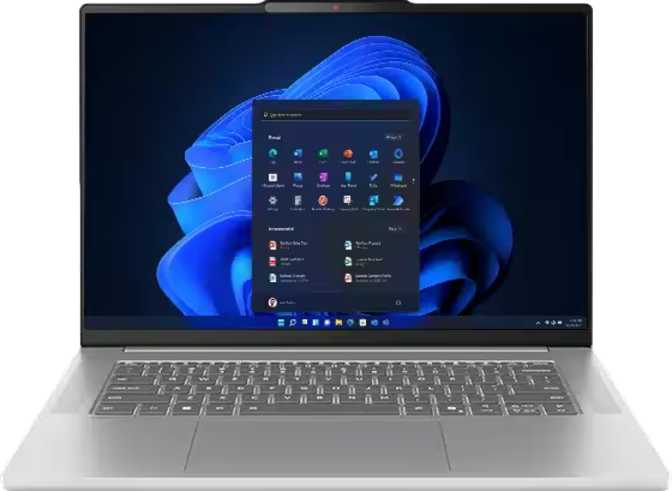
Lenovo IdeaPad Slim 5 Gen 10 16″ Review: OLED Display Meets Everyday Power
LaptopsA 16-inch OLED laptop that genuinely earns the word slim — the IdeaPad Slim 5 Gen 10 pairs a display that outclasses most competitors with a processor built for sustained professional workloads. The trade-offs are real but predictable, and for the right buyer, they are easy to accept.
Recommended for Productivity & Creative Work
Score Breakdown
The 16-inch laptop category has always carried an awkward reputation — too big to feel portable, yet not quite powerful enough to justify the bulk over a compact desktop. The Lenovo IdeaPad Slim 5 Gen 10 16″ makes a deliberate argument against that stigma. It pairs a stunning OLED panel with a processor built on cutting-edge 4-nanometer silicon, wraps it in a chassis that genuinely earns the word “slim,” and prices itself squarely in the mainstream premium market. The question isn’t whether this laptop looks good on paper — it does. The real question is whether it delivers during a full working day, and where it quietly asks you to compromise.
Design and Build: Slim Ambitions, Sensible Execution
At 16 millimeters thin and weighing 1,760 grams, the IdeaPad Slim 5 Gen 10 16″ is meaningfully slimmer and lighter than most 16-inch machines. To put that weight in context: it’s roughly equivalent to a large hardcover novel, and considerably less than the typical 2-kilogram-plus notebooks in this screen-size class. You’ll notice the difference after an hour in a shoulder bag.
- Backlit keyboard included — useful for low-light and travel environments
- Active cooling fan handles the 28-watt processor; quiet at idle, audible under sustained load
- Not weather-sealed or ruggedized — treat it like a quality professional notebook
- 2-year warranty surpasses the 1-year standard offered by many competitors
The Display: Where This Laptop Sets Itself Apart
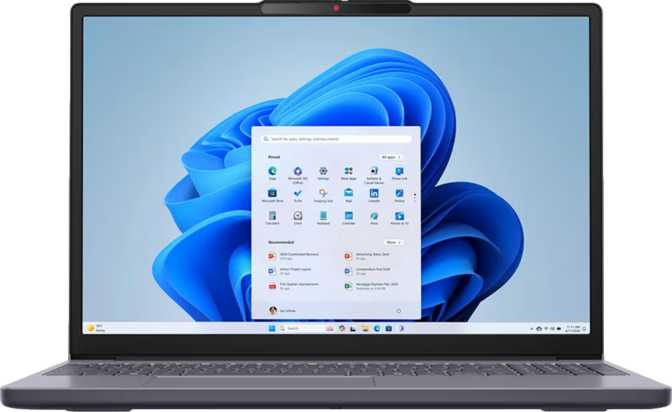
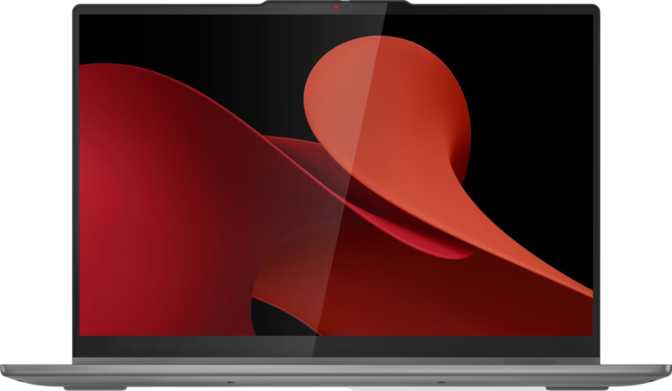
This is the most important section of this review for one simple reason: the IdeaPad Slim 5 Gen 10 16″ ships with an OLED panel in a category where most competitors still use LCD. That distinction matters every minute of every working day.
| Panel Type | OLED / AMOLED |
| Screen Size | 16 inches |
| Resolution | 2880 × 1800 px |
| Pixel Density | 212 ppi |
| Refresh Rate | 120 Hz |
| Peak Brightness | 500 nits |
| Touch Input | No |
| Anti-Reflection | No |
| Max External Displays | 4 |
What OLED Means in Practice
Each pixel generates its own light and switches off completely for true black. The contrast between dark backgrounds and bright content is effectively infinite — photographs, video, and even plain text all look noticeably better than on LCD alternatives at this price point.
Resolution and Refresh Rate
At 212 pixels per inch, individual pixels are invisible at normal viewing distances. The 120Hz refresh rate makes scrolling, window movement, and video appear noticeably smoother than the 60Hz standard — once experienced daily, reverting feels sluggish.
Performance: Built for Sustained Professional Work
The chip inside this machine is built on a 4-nanometer manufacturing process — the same scale used in the most advanced processors today. Smaller transistors deliver more computing power from less energy, which is why a 28-watt processor here delivers performance that would have required nearly twice the power just a few years ago.
Benchmark Results in Context
| Benchmark | Score | Tier |
|---|---|---|
| Geekbench 6 Multi-Core | 11,247 | High |
| Geekbench 6 Single-Core | 2,467 | High |
| PassMark Multi-Thread | 34,459 | High |
| PassMark Single-Thread | 3,878 | Strong |
These scores place it comfortably in the upper tier of mainstream productivity laptops.
Processor Architecture Highlights
- Hybrid core design — performance and efficiency cores optimized for different task types
- 16 processing threads handle true simultaneous multitasking without visible strain
- Peaks at 5 GHz for responsive application launches and file operations
- 4nm process efficiency means more power in a slim, light chassis
- 16 MB L3 cache reduces latency for frequently accessed data
Memory and Storage
32 GB DDR5 RAM
This is the threshold where modern computing stops feeling constrained. Developers running local services, designers with multiple apps open, and power users with dozens of browser tabs will find this headroom genuinely useful. DDR5 running at 5,600 MHz also boosts integrated graphics bandwidth meaningfully over older memory standards.
1 TB PCIe 4.0 NVMe SSD
PCIe 4.0 is the current high-speed standard — meaningfully faster than SATA or older PCIe 3.0 drives still found in some rivals. Large file transfers, application launches, and boot times all benefit from this speed class. One terabyte provides room for a full professional workflow without constant storage management.
Graphics: Capable Integrated — With Clear Limits
The AMD Radeon 860M handles graphics here. This is integrated graphics, sharing the processor package and drawing on system RAM rather than dedicated VRAM. That needs to be stated clearly upfront — this is not a gaming GPU, and it is not intended to be one.
- Smooth 4K video playback
- Photo editing in Lightroom and similar tools
- Light video editing at 1080p
- UI rendering for development and design software
- Driving up to 4 external displays
- Modern 3D games at playable frame rates
- GPU-accelerated 4K RAW video rendering
- 3D rendering in Blender or VFX software
- Ray tracing — not supported
- AI-based upscaling (DLSS/equivalent) — not supported
Connectivity: Modern Where It Counts
Port Inventory
| Port | Count | Speed / Standard | Status |
|---|---|---|---|
| USB-C | 2 | USB 3.2 Gen 2 (10 Gbps) | Present |
| USB-A | 2 | USB 3.2 Gen 1 (5 Gbps) | Present |
| HDMI | 1 | HDMI 2.1 | Present |
| SD Card Slot | 1 | External Memory | Present |
| 3.5mm Audio | 1 | Headset Combo Jack | Present |
| Ethernet (RJ45) | 0 | — | Absent |
| Thunderbolt 4 | 0 | — | Absent |
| USB4 40 Gbps | 0 | — | Absent |
| DisplayPort | 0 | — | Absent |
Wireless
A genuine differentiator at this price. Wi-Fi 7 hardware means maximum performance on current networks and full speed readiness as infrastructure improves. The wireless radio will not become a bottleneck over this laptop’s lifespan.
Current-generation standard. Full compatibility with wireless peripherals, headphones, and audio devices.
Battery and Power: An Honest Assessment
The 80 watt-hour battery sits among the larger cells in the 16-inch mainstream laptop category. At this capacity, productivity-focused users — document work, web browsing, video calls, and light creative tasks — can expect to cover a full working day before needing a charge.
That estimate, however, carries qualifications. OLED displays draw more power than LCD at comparable brightness settings, and the processor’s thermal design means intensive workloads accelerate drain. Display brightness management is the single biggest lever users have over real-world endurance — OLED panels consume substantially less power when displaying dark content or operating at reduced brightness.
The USB sleep-and-charge feature lets the machine charge phones and earbuds from its USB ports even while powered off — a practical travel benefit that costs nothing.
- Above-average for 16-inch class
- USB sleep-and-charge supported
- No MagSafe-style proprietary connector
- Use dark mode to extend endurance
Security
The IdeaPad Slim 5 Gen 10 16″ uses 3D facial recognition for Windows Hello login — the more secure variant that reads depth data, making it resistant to photo spoofing unlike flat 2D camera systems.
Audio
Stereo speakers, a dual-microphone array, and a 3.5mm headset jack cover the essentials. The dual-microphone setup performs adequately for video calls. The built-in speakers serve for background music and video — external audio output delivers the best results when quality matters.
- Stereo speaker configuration
- Dual microphones for calls and recording
- 3.5mm combo headset jack present
- No Dolby Atmos certification
Who This Laptop Is Built For — And Who Should Look Elsewhere
- Knowledge workers & professionals — browsers, office tools, communication apps, cloud services. The display and processing make those tasks excellent.
- Photographers & photo editors — OLED color accuracy makes culling and editing in Lightroom significantly more reliable than on LCD panels.
- Students & academics — large, sharp screen for reading, research, and writing; powerful enough for any academic software.
- Developers & writers — 32 GB RAM supports local development environments; the display makes reading code comfortable for extended sessions.
- Media enthusiasts — this OLED panel makes streaming genuinely pleasurable in ways LCD cannot match.
- Gamers — the integrated Radeon 860M cannot handle modern 3D games at acceptable frame rates. A dedicated GPU machine is required.
- GPU-dependent creative professionals — 4K RAW video editors, 3D artists, VFX professionals need dedicated VRAM this machine lacks.
- Thunderbolt-dependent users — no Thunderbolt 3 or 4 means no TB docks, no eGPU enclosures, no TB storage arrays.
- Outdoor workers — the glossy OLED without anti-reflection coating is a genuine obstacle in sunlit environments.
- Frequent wired-network users — no built-in Ethernet means carrying an adapter in office environments.
Competitive Positioning
How does the IdeaPad Slim 5 Gen 10 16″ stack up against the logical alternatives in its segment?
| Feature | IdeaPad Slim 5 Gen 10 16″ | Typical 16″ LCD Rival | Typical 16″ Gaming Laptop |
|---|---|---|---|
| Display Type | OLED, 2880×1800 | IPS LCD, 1920×1200 | IPS LCD, 1920×1200 |
| Refresh Rate | 120 Hz | 60–120 Hz | 144–165 Hz |
| RAM | 32 GB DDR5 | 16 GB DDR5 | 16–32 GB DDR5 |
| Storage | 1 TB PCIe 4.0 | 512 GB–1 TB PCIe 4.0 | 512 GB–1 TB PCIe 4.0 |
| GPU | Integrated Radeon 860M | Integrated Intel/AMD | Dedicated NVIDIA/AMD |
| Wi-Fi | Wi-Fi 7 | Wi-Fi 6/6E | Wi-Fi 6/6E |
| Weight | ~1.76 kg | 1.7–2.0 kg | 2.3–2.8 kg |
| Thunderbolt | No | Often Yes | Sometimes |
| Anti-Glare | No | Usually Yes | Usually Yes |
| Target Use | Productivity / Creativity | Productivity | Gaming / Heavy GPU |
The OLED display, Wi-Fi 7, and 32 GB RAM are the IdeaPad Slim 5 Gen 10’s genuine advantages over comparably priced LCD competitors. The absence of Thunderbolt and dedicated GPU are the primary areas where those rivals hold an edge depending on user needs.
Strengths and Weaknesses: The Full Picture
Where It Excels
The OLED display is not a marketing checkbox — it changes daily screen time in ways that are immediately apparent and don’t wear off after novelty fades. Color accuracy, contrast depth, and the 120Hz smoothness combine to create a screen experience that most competitors at this price point simply cannot match.
The processor delivers genuinely fast computing across both single-threaded tasks (application responsiveness) and multi-threaded workloads (compilation, export, rendering previews). The benchmark numbers confirm what the 4nm architecture implies: this is a chip that belongs in a higher tier than its efficiency envelope suggests.
Wi-Fi 7 at this price is forward-thinking inclusion. It means the wireless hardware won’t become a bottleneck as router infrastructure continues to improve over the laptop’s usable lifespan. The 32 GB RAM removes memory as a daily concern for any professional workflow short of GPU-accelerated rendering.
Where It Falls Short
The glossy OLED surface is the most practically impactful weakness. OLED reflections in bright environments are more noticeable than on matte LCD screens, and Lenovo made a glossy-over-matte design choice that not every buyer will appreciate or accommodate in their working environment.
The absence of Thunderbolt limits expansion meaningfully for professional users with established dock setups. The integrated graphics ceiling is fixed and cannot be upgraded later. And while 32 GB is generous, the soldered RAM means future-proofing stops there permanently.
The audio system — dual microphones and stereo speakers without Dolby Atmos tuning — is functional but not exceptional. Anyone who spends significant time on video calls in noisy environments or genuinely cares about built-in speaker quality will notice the absence of premium audio features that some competitors offer at this tier.
Questions Real Buyers Ask
Final Verdict
The Lenovo IdeaPad Slim 5 Gen 10 16″ earns its place through a display that is meaningfully better than what most competitors offer at this price. The OLED panel is not a feature to admire on a spec sheet — it changes daily screen time in ways that are immediately apparent and don’t fade after novelty wears off.
Paired with a processor that is genuinely fast across productivity workloads, 32 GB of RAM that removes memory as a daily ceiling, and a Wi-Fi 7 radio that positions this machine well for the next several years, the value proposition is strong for the right buyer.
The people this machine serves best are professionals, students, and creatives who work primarily in productivity and creative software, value display quality highly, and don’t require dedicated GPU performance or Thunderbolt connectivity. If you are coming from a 60Hz LCD laptop, the step up in display experience will be immediately noticeable — and permanent.
If you need Thunderbolt, plan to game, or require outdoor readability, look at alternatives. For the productivity-focused 16-inch laptop buyer who wants a premium display without a premium-tier price, the IdeaPad Slim 5 Gen 10 16″ makes a genuinely compelling case.