Intel Arc Pro B50 Review: A Compact Workstation GPU Done Right
Graphics CardsThere is a specific kind of frustration that creative professionals know well: a GPU that eats power, demands a full-length slot, and costs a premium — yet still cannot drive four monitors without a hub. The Intel Arc Pro B50 is Intel’s answer to that frustration. It is not a gaming card with a professional badge slapped on. It is a purpose-built workstation GPU designed around efficiency, reliability, and multi-display density, packaged in a form factor that fits where most cards do not.
Understanding this card requires setting aside the consumer GPU mindset entirely. The Arc Pro B50 exists to serve professionals working in compact or power-constrained environments — and once you accept that framing, nearly every specification decision it makes becomes logical.
Design and Build: Purpose Over Spectacle
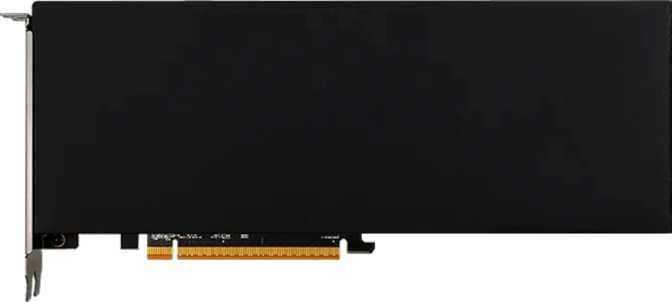
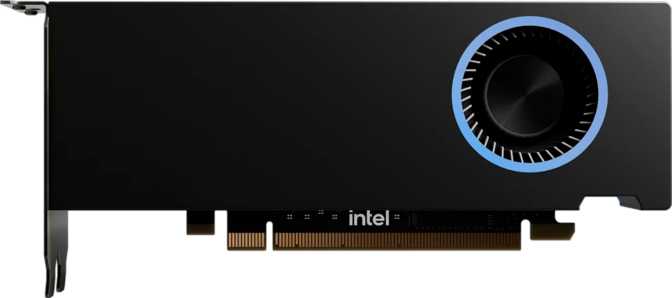
At 167mm long and 69mm tall, the Arc Pro B50 occupies significantly less physical space than a typical consumer graphics card. This is a deliberate engineering choice, not a compromise. Many small form factor workstations, rack-mounted systems, and low-profile enclosures physically cannot accommodate full-length, dual-slot cards. Intel sized this card to serve those systems.
The card carries no RGB lighting whatsoever — a choice that signals its audience immediately. This is not a card designed to be shown off through a glass panel; it is designed to be installed in a tower under a desk, in a media cabinet, or inside a compact professional machine, and then forgotten about while it works.
The cooling solution is passive by design, which means the card relies on case airflow rather than its own active fan. In a well-ventilated enclosure, this translates to completely silent operation — a meaningful quality-of-life advantage for audio professionals, recording studios, or anyone driven mad by fan noise during quiet work.
- Card Length167 mm
- Card Height69 mm
- Cooling TypePassive (Fanless)
- RGB LightingNone
- Display Outputs4× Mini DP
- HDMI OutputNone
The Xe2-HPG Architecture: What 5nm Delivers
The Arc Pro B50 is built on Intel’s Xe2-HPG architecture, fabricated on a 5-nanometer process node — the same tier used for high-efficiency mobile chipsets and modern flagship consumer GPUs. At this node, Intel packs 19.6 billion transistors into the card’s die, a count that reflects genuine silicon complexity rather than an entry-level product.
The Xe2-HPG architecture carries forward meaningful improvements over Intel’s first-generation Xe graphics, particularly in compute throughput, ray traversal hardware, and AI inference capability. It shares generational roots with Intel’s Battlemage consumer desktop GPUs, adapted here for professional workstation requirements.
Compute Performance in Context
The card’s 2,048 shader processors, combined with a boost clock reaching 2,600 MHz, produce a compute throughput of approximately 10.65 TFLOPS in single-precision floating-point operations. For a 70-watt card, that is a strong efficiency ratio — many full-power consumer cards in the 150W–200W range reach 15–20 TFLOPS, so raw throughput is not the story here. Performance per watt is.
Double-precision floating-point (DPFP) computation is supported natively. GPU manufacturers routinely cut this from consumer cards to differentiate professional SKUs. Its presence here matters directly for simulation work, scientific computing, and any application requiring numerically exact 64-bit floating-point results.
Memory: 16 GB That Goes Further Than the Number Suggests
Sixteen gigabytes of GDDR6 memory is the specification that will stop many buyers mid-scroll. In the low-profile, sub-100W GPU segment, 16 GB is genuinely uncommon — most cards in this power and size class ship with 8 GB or less. This headroom matters practically: large 3D scene data, high-resolution texture sets, multi-display framebuffers, and video editing timelines all consume GPU memory, and running out means slowdowns or crashes mid-task.
The memory operates over a 128-bit bus at a speed generating 224 gigabytes per second of bandwidth. A 128-bit bus is narrower than the 192-bit or 256-bit buses found in higher-end cards, but at this memory speed it delivers bandwidth sufficient for the workloads this card targets: 3D viewport navigation, multi-monitor desktop composition, video playback across four displays, and moderate rendering tasks.
ECC Memory: Why Professionals Care
This memory supports Error Correcting Code (ECC), which detects and automatically corrects single-bit memory errors before they become data corruption. In consumer computing, ECC rarely matters. In professional environments — medical imaging, financial modeling, engineering simulation — a silent data error can invalidate hours of critical work. ECC is not a nice-to-have in those contexts; it is a professional standard, and finding it in a card at this power level is genuinely rare.
- Capacity16 GB
- TypeGDDR6
- Bandwidth224 GB/s
- Bus Width128-bit
- ECC SupportActive
- Effective Speed14,000 MHz
Feature Set: What “Pro” Means in Practice
The feature set of the Arc Pro B50 is defined by completeness and professional relevance rather than marketing headline count. Every capability here serves a specific professional use case.
DirectX 12 Ultimate
Full support for the current DirectX standard, covering hardware ray tracing, variable rate shading, mesh shaders, and sampler feedback. Any professional application written to current standards runs without compatibility gaps.
OpenGL 4.6 & OpenCL 3.0
Current full standards for both APIs. OpenCL 3.0 matters specifically for GPU-accelerated compute workloads outside traditional rendering pipelines, including video transcoding and scientific simulation tools.
Hardware Ray Tracing
Dedicated ray traversal hardware via Xe2 enables real-time ray-traced viewport feedback in 3D software like Blender and Cinema 4D, removing the need for software-based approximations when previewing lighting and reflections.
XeSS AI Upscaling
Intel’s XMX hardware (Xe Matrix Extension) powers XeSS, reconstructing higher-resolution frames from lower-resolution inputs. DLSS is not supported — that technology is proprietary to NVIDIA hardware and cannot be implemented here.
4-Display Native Output
Four simultaneous monitors from a single card via Mini DisplayPort — no daisy-chaining or hub hardware required. Ideal for trading workstations, video production suites, and multi-application desktop environments.
PCIe 5.0 Interface
Current-generation interface with full backward compatibility for PCIe 4.0 and 3.0 systems. For new-platform workstation builds, PCIe 5.0 ensures no bottleneck at the system bus between GPU and CPU or NVMe storage.
Double-Precision Floating Point: The Professional Differentiator
DPFP support is a capability that GPU manufacturers routinely cut from consumer cards to push buyers toward higher-margin professional SKUs. Native double-precision (64-bit) floating-point support matters for simulation work, scientific computing, and applications requiring numerically exact results. Its presence in the Arc Pro B50 without the premium pricing of a dedicated compute card is a legitimate competitive advantage.
Power, Thermals, and the Efficiency Argument
The Arc Pro B50 has a Thermal Design Power of 70 watts. At this level, the card draws no supplemental power connector from the power supply — it runs entirely from the PCIe slot’s native power delivery. In practical terms, installation requires nothing beyond inserting the card. No cable routing, no PSU compatibility checks, no concerns about whether an SFF system has a PCIe power connector accessible.
For a compact workstation built around a smaller power supply, this matters directly. A system with a 300W or even 250W PSU can accommodate this card alongside a modern processor without approaching its power limits.
The passive cooling design means the entire 70W heat load is managed through case airflow rather than a dedicated fan. Case airflow that would struggle to cool a 150W–200W consumer GPU will generally manage the Arc Pro B50 without issue — and in complete silence.
- No Supplemental Power ConnectorFully powered via PCIe slot alone
- Passive Fanless CoolingZero acoustic output during operation
- SFF & Compact PSU CompatibleWorks comfortably with 250W+ supplies
Who This Card Is For — and Who Should Look Elsewhere
- Multi-monitor workstation usersFour displays from a single card, natively, without daisy-chaining or hub hardware.
- Compact and SFF workstation builders167mm length and 70W TDP fit enclosures where full-length cards simply cannot go.
- Regulated industry professionalsECC memory meets requirements in medical imaging, financial modeling, and engineering simulation.
- Simulation and compute workflowsNative DPFP enables accurate 64-bit floating-point calculations without a dedicated compute card.
- Silent work environmentsPassive cooling means zero acoustic output. Studios, recording spaces, and quiet offices benefit directly.
- OpenCL and GPU compute pipelinesFull OpenCL 3.0 support for framework-agnostic compute workloads not dependent on CUDA.
- High-volume 3D renderingSustained high-resolution rendering farms need higher compute throughput than 70W can deliver.
- CUDA-dependent workflowsIf your software requires NVIDIA’s CUDA platform, this card is incompatible. This covers significant portions of deep learning and scientific tooling.
- High-refresh gamingThe card supports modern APIs but is not optimized for competitive frame-rate targets in demanding games.
- HDMI-only monitor setupsNo HDMI output. HDMI monitors require active adapters, adding cost and potential compatibility concerns.
- ISV-certified software pipelinesIf your vendor certifies NVIDIA or AMD hardware specifically, Intel’s shorter certification history matters operationally.
Competitive Positioning: How It Stacks Up
The Arc Pro B50 occupies a clearly defined position: more VRAM and professional-grade memory reliability than comparably priced consumer cards, inside a physical package that consumer cards rarely match.
| Feature | Intel Arc Pro B50 | Consumer Mid-Range | Entry Pro GPU |
|---|---|---|---|
| VRAM | 16 GB | 8–12 GB | 8–16 GB |
| ECC Memory | Yes | No | Some models |
| DPFP Support | Yes | Rarely | Often |
| Thermal Design Power | 70W | 115–180W | 50–100W |
| Display Outputs | 4× Mini DP | 2–3 (mixed) | 2–4 |
| HDMI Output | No | Yes | Varies |
| DLSS Support | No | NVIDIA only | No |
| XeSS Support | Yes | No | No |
| Card Length | 167 mm | 240–320 mm | 150–200 mm |
| PCIe Generation | 5.0 | 4.0–5.0 | 4.0 |
| RGB Lighting | None | Often | Rarely |
Honest Assessment: Strengths and Limitations
The Arc Pro B50’s greatest strength is its coherence. Intel made deliberate choices — the 70W power envelope, the four Mini DisplayPort outputs, the 16GB of ECC-capable memory, the compact footprint — and those choices fit together into a product that makes complete sense for its intended audience.
- ECC memory support at this power and price tier is genuinely rare. Finding it in a card this compact is not something buyers in this segment take for granted.
- 16 GB of VRAM in the low-profile, sub-100W segment is a real market differentiator with direct daily-use implications for memory-intensive workloads.
- DPFP support opens doors to workloads that consumer cards explicitly close, without the pricing of a dedicated compute accelerator.
- Silent, fanless operation in any adequately ventilated system — a meaningful quality-of-life advantage in professional settings.
- No PCIe power connector required: the simplest possible installation, compatible with the smallest PSUs in the SFF category.
These limitations are not flaws — they are the natural result of the choices Intel made — but they will rule the card out for some buyers entirely.
- No CUDA platform: any workflow locked to NVIDIA’s CUDA ecosystem — most deep learning frameworks, NVIDIA OptiX, certain DCC plugins — is simply incompatible.
- Mini DisplayPort only: HDMI monitors require active adapters, adding cost and introducing occasional compatibility concerns, particularly with HDMI 2.0/2.1 devices.
- Intel’s professional driver ecosystem and ISV certification history is shorter than NVIDIA’s or AMD’s — meaningful in high-stakes production environments where software vendor certification matters.
- Not designed for gaming: the architecture supports modern APIs, but sustained competitive game frame rates are not among its optimization priorities.
Common Questions Before You Buy
Final Verdict
The Intel Arc Pro B50 is an intelligently designed card that succeeds precisely because it was not trying to be everything. For a professional working in a compact workstation, needing four display outputs, operating in an environment that demands data reliability through ECC memory, and unable or unwilling to install a power-hungry full-length card — this is one of very few options that addresses all of those needs simultaneously.
The 16 GB of VRAM at this power tier is a genuine market differentiator, and the double-precision compute support opens doors to workloads that consumer cards explicitly close. This is not a CUDA platform, not a gaming GPU, and does not carry the ISV certification depth of an established NVIDIA professional card. If any of those three factors is a hard requirement for your workflow, look elsewhere. For everyone else in the target profile, the Arc Pro B50 earns a firm recommendation.