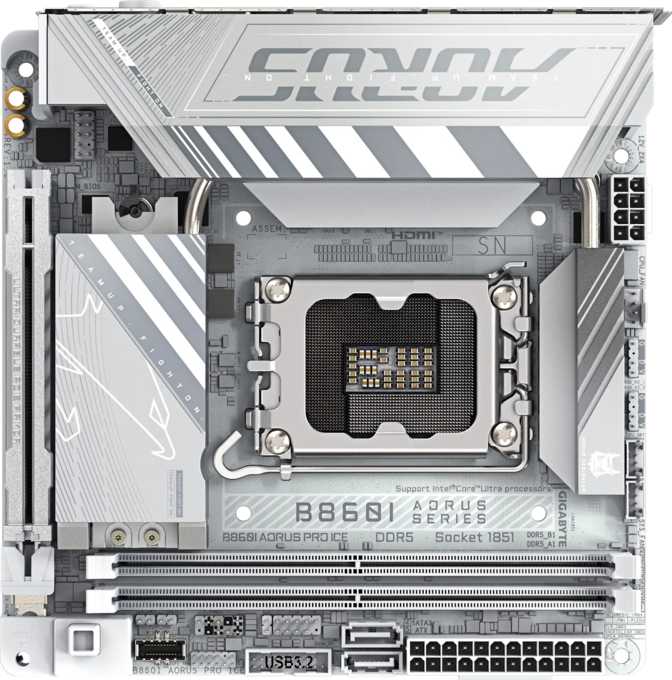
Gigabyte B860I Aorus Pro Ice Review: Compact Intel Power Done Right
MotherboardsBuilding a small-form-factor PC used to mean accepting meaningful trade-offs: fewer ports, outdated wireless, stripped-down connectivity. The Gigabyte B860I Aorus Pro Ice arrives as a pointed challenge to that assumption — squeezing a specification list that would be impressive on a full-size board into the strict 170 by 170 millimeter boundaries of the Mini-ITX form factor.
This board targets Intel's current-generation LGA 1851 socket, positioning it alongside Core Ultra 200 series desktop processors. The B860 chipset sits in the middle of Intel's platform lineup — a deliberate choice that removes the premium of a flagship chipset while retaining the connectivity and memory performance features that most builders actually use. The "Ice" branding signals something you will not find elsewhere on this board: not a single RGB LED.
For compact-build enthusiasts who want current-generation Intel capability, sophisticated wireless, and a clean aesthetic, the B860I Aorus Pro Ice deserves close examination — both for what it delivers and where it draws clear, deliberate lines.
- Socket LGA 1851
- Chipset Intel B860
- Form Factor Mini-ITX (170 × 170 mm)
- Memory DDR5, 2 slots, 128 GB max
- Wireless Wi-Fi 7 + Bluetooth 5.4
- PCIe Slot 1× PCIe 5.0 x16
- Storage 2× M.2 + 2× SATA 3
- Thunderbolt Thunderbolt 4 / USB4 40G
- Display Out HDMI 2.1 + DisplayPort
- Audio 7.1 CH + S/PDIF Out
- Warranty 3 Years
Standout Features
The capabilities that define this board in its category
Design and Build Quality: Small Board, Serious Intent
Mini-ITX motherboards live or die by how intelligently their designers use limited real estate. At 170 by 170 millimeters, there is no room for poor planning — components must be positioned with purpose, and every connector header must earn its place. The B860I Aorus Pro Ice conforms to the standard Mini-ITX footprint, which means straightforward compatibility with the broad ecosystem of compact cases available on the market. Builders familiar with Mini-ITX will encounter no mounting surprises here.
The "Ice" aesthetic is a deliberate design direction. There is no addressable RGB lighting anywhere on this board — a decision that frustrates LED builders and delights everyone else. For windowed builds where visual restraint is the goal, the B860I Aorus Pro Ice can serve as the visual centerpiece rather than competing for attention with lighting effects.
Dual BIOS Recovery
Two separate firmware chips reside on the board. If a BIOS update corrupts or fails to complete — a real risk during any firmware flash — the board automatically falls back to the backup chip and recovers without user intervention. This is not a universal feature at any price point, and its presence is especially valuable on a compact board where physical access inside a small case is considerably more disruptive than in a full tower.
No Rear CMOS Reset
There is no dedicated CMOS reset button on the rear I/O panel. Clearing the BIOS configuration after an unstable memory profile or a failed update requires reaching into the board to use the traditional jumper. In a compact case with a GPU installed and cables routed, this is significantly more involved than pressing a single rear-panel button — a minor but real inconvenience that experienced compact builders should plan around.
Platform and Performance: What the B860 Chipset Actually Delivers
The LGA 1851 socket and B860 chipset combination means this board runs Intel's current processor generation. Within that generation, B860 occupies a defined role: it unlocks the full feature set of the platform — including DDR5 support, PCIe 5.0, and integrated wireless capabilities — while keeping one specific capability locked away.
No CPU Multiplier Overclocking
B860 does not allow pushing the processor's core frequency beyond its rated specification. Only Z890-series boards permit manual CPU overclocking on this platform. This is a chipset constraint, not a Gigabyte design choice — but it is a real ceiling for builders who want that specific headroom.
What B860 does enable is substantial memory tuning. The board supports the standardized one-click speed profiles built into modern DDR5 kits, and its memory configuration ceiling reaches well beyond what typical mid-range chipset boards offer. For workloads like video editing, 3D rendering, and heavily-parallelized applications, that additional memory bandwidth delivers measurable real-world gains.
DDR5 Memory: Two Slots, Full Bandwidth
The board accommodates two DDR5 modules in a dual-channel configuration. An important nuance for DDR5: each module contains two internal sub-channels, so a two-slot dual-channel setup delivers the full bandwidth architecture of a four-slot configuration on the prior DDR4 generation. Fewer physical slots is not a bandwidth compromise on this platform — it is simply how DDR5 is designed.
The total capacity ceiling is large enough to exceed every realistic consumer workload — a professional 4K video editing workstation under heavy load rarely pushes past 64 gigabytes. The headroom exists so the board remains relevant as application memory demands grow throughout its useful life. ECC memory, used in servers for hardware-level error correction, is not supported — a non-issue for consumer builds, but worth noting for anyone considering this board in a light home-server role.
Connectivity: A Rear I/O That Punches Above Its Class
USB Ports
Five USB Type-A ports cover the rear panel. Three operate at speeds fast enough to saturate modern external solid-state drives — suited for high-speed external storage and demanding peripherals. The remaining two cover standard bandwidth needs: keyboards, mice, controllers, and USB hubs.
A Thunderbolt 4 connection anchors the rear as the board's single USB-C port. Thunderbolt 4 combines data transfer, video output, and power delivery in a single cable — fast enough to drive multiple high-resolution displays simultaneously, connect external GPU enclosures, or handle ultra-fast external storage. It simultaneously operates as USB4 at peak specification, backward-compatible with any USB-C device.
Wireless
The B860I Aorus Pro Ice includes Wi-Fi 7 — the current ceiling of consumer wireless networking. Wi-Fi 7 supports the 6 GHz frequency band and introduces multi-link operation: the ability to transmit and receive across multiple bands simultaneously rather than switching between them. The practical result is lower latency and higher throughput than any prior Wi-Fi generation, particularly in homes where many devices compete on the same network.
For a board sold without a separate wireless card, including Wi-Fi 7 removes any need to purchase one. For builders planning wireless connections, this is the current ceiling — there is no wireless upgrade to make after purchasing this board.
Bluetooth 5.4 operates alongside the wireless module, supporting headsets, game controllers, keyboards, and mice with improved stability over older versions. Wired Gigabit ethernet is also present — both wired and wireless networking operate simultaneously with no need to choose between them.
Video Output
Two display outputs appear on the rear panel: HDMI operating at the current standard that supports 4K at high refresh rates and 8K output, and a DisplayPort connection for additional monitors or displays with DisplayPort input.
The Thunderbolt 4 port also carries display signal, extending potential output to a third monitor through a compatible Thunderbolt or USB4 display or dock — beyond what the two fixed rear video ports alone can provide.
Internal Expansion Headers
The board's internal connectors support front-panel USB through the case, covering fast USB-A ports, a front-panel USB-C connection, and standard USB connections — enabling full use of the built-in ports on a wide range of modern compact cases. Three fan headers manage cooling, sufficient for a CPU cooler and one or two case fans in a standard Mini-ITX build; more complex fan configurations will need a hub. A TPM header supports hardware security requirements including Windows 11 compatibility and enterprise environments.
Storage Architecture: Two NVMe Slots, Two SATA Ports
Two M.2 sockets handle NVMe solid-state storage — the current standard for system and application drives. These compact, cable-free modules install directly onto the board. Two slots allow a primary drive for the operating system and applications paired with a secondary drive for media, projects, or games — an all-NVMe setup that eliminates SATA data cables and power cables entirely from the storage chain. In the tight confines of a Mini-ITX case, that cable reduction is a genuine practical benefit.
Two SATA ports support conventional drives for builds that mix NVMe speed with high-capacity traditional storage. Two SATA connections is the expected allocation at this form factor and covers most additional needs. Builders who require more than two SATA devices will find this board limiting — four total storage connections (two M.2 plus two SATA) is the absolute maximum.
RAID configurations are available across the storage connections without additional software: a striped configuration for higher sequential throughput, or a mirrored configuration where one drive maintains a continuous copy of the other for redundancy. Both modes are configured entirely through the BIOS. RAID 5 and RAID 10 are not supported on this platform — only the two primary RAID modes are available.
Graphics and PCIe: One Slot, the Fastest Available
Mini-ITX boards offer a single PCIe expansion slot, and the B860I Aorus Pro Ice fills that slot with the current peak PCIe specification: fifth-generation bandwidth at full sixteen-lane width. The significance is practical — the latest GPU architectures from both major discrete graphics manufacturers are designed around this interface. Installing a high-end graphics card here means the slot itself will never constrain GPU performance, not at purchase and not for the foreseeable future of this platform.
PCIe 5.0 x16 — No Bandwidth Compromise
Compact builds once required accepting a reduced PCIe lane allocation compared to full-size boards. That trade-off no longer applies here. The single expansion slot runs at the highest specification available for consumer GPUs, meaning a flagship graphics card installed in a 170×170 mm board performs identically to the same card in a full-size ATX system on the same platform. The form factor does not limit the capability.
There are no secondary expansion slots. This is inherent to Mini-ITX and expected by anyone choosing the format. Additional expansion beyond a single GPU requires USB-based devices, network-attached options, or the Thunderbolt 4 connection — which supports external GPU enclosures, high-speed storage, and additional displays without consuming a second PCIe slot that, in this case, does not exist.
Audio: Onboard 7.1 Surround with Optical Output
Onboard audio covers a full 7.1 surround channel configuration — the standard for gaming headsets, desktop speaker systems, and surround-sound setups. Two analog jacks on the rear panel handle headphone and speaker output alongside microphone input. An optical digital output allows connection to external AV receivers and soundbars, routing audio digitally to eliminate interference from other board components.
For standard gaming, media consumption, and headset use, the onboard audio handles every common scenario without supplementary hardware. For professional audio production or critical listening, an external USB or Thunderbolt-connected audio interface will always deliver superior results — but this is true of onboard audio universally, not a specific shortcoming of this board. For the intended audience of the B860I Aorus Pro Ice, the onboard audio is fully adequate.
Who This Board Is For — And Who Should Look Elsewhere
- Compact build enthusiasts who want current-generation Intel performance without paying the Z890 chipset premium
- Aesthetics-focused builders doing white, silver, or neutral-themed builds where RGB would work against the visual direction
- Users needing best-in-class wireless — for low-latency wireless gaming or workspaces where running ethernet is impractical
- Creators and power users with Thunderbolt-dependent workflows — external high-speed storage, dual-display docking, or Thunderbolt audio and video interfaces
- Single-GPU builds with an all-NVMe storage preference, where the single PCIe slot is fully dedicated to a discrete graphics card
- You plan to manually overclock the CPU — B860 locks the processor multiplier; only a Z890 board unlocks this on the current Intel platform
- Your build requires more than four total storage connections — two M.2 plus two SATA is the hard ceiling with no expansion possible
- Your devices predominantly use USB-C — one rear USB-C port via Thunderbolt 4 means a hub or dock becomes necessary for multiple USB-C peripherals
- You expect display output without a discrete GPU — no integrated graphics output is available on this board under any configuration
- RGB lighting is part of your build — there is none on this board, no header for it, and no workaround; the "Ice" designation is absolute
Competitive Positioning: How It Stacks Up
The B860I Aorus Pro Ice competes across three reference points: other B860 Mini-ITX boards at a similar price, Z890 Mini-ITX boards at a higher tier, and previous-generation Intel compact boards on the used and clearance market. The table below reflects platform and category characteristics — individual competitor models shift frequently, so specifics should always be verified before purchasing.
| Feature | B860I Aorus Pro Ice | Typical B860 Mini-ITX | Z890 Mini-ITX | Prev-Gen LGA 1700 |
|---|---|---|---|---|
| Wireless Standard | Wi-Fi 7 | Often Wi-Fi 6E | Varies (6E or 7) | Wi-Fi 6 or 6E |
| Thunderbolt 4 | Yes | Rarely included | Sometimes | Rare |
| PCIe GPU Slot | PCIe 5.0 x16 | PCIe 5.0 x16 | PCIe 5.0 x16 | PCIe 4.0 x16 |
| CPU Overclocking | No (B860) | No (B860) | Yes (Z890) | Z-chipset only |
| Memory Platform | DDR5 | DDR5 | DDR5 | DDR4 or DDR5 |
| Memory Speed Ceiling | Very High | Moderate to High | Very High | Moderate |
| RGB Lighting | None — by design | Typically Yes | Typically Yes | Varies |
| Dual BIOS | Yes | Varies by model | Varies by model | Varies by model |
| Typical Price Tier | Mid-range | Budget to Mid | Mid to High | Budget (used) |
Reflects platform and category characteristics. Individual product specifications vary — always verify current offerings before purchasing.
Honest Assessment: Strengths and Real Limitations
The B860I Aorus Pro Ice makes a strong argument through the connectivity choices Gigabyte prioritized. Wi-Fi 7 and Thunderbolt 4 together on a mid-range chipset Mini-ITX board represent a clear vision of what a compact build should be in the current era — fully wireless-capable, highly connected, and ready for external peripherals that would otherwise require expansion slots. These are not marketing additions; they affect how a build integrates into a workspace every day. Dual BIOS and a three-year warranty reinforce that the engineering priorities extend well beyond the headline feature list.
Where It Excels
- Wi-Fi 7 included as standard — the current ceiling of consumer wireless, with no add-in card purchase required
- Thunderbolt 4 with USB4 40 Gbps — extends external connectivity far beyond what internal ports alone can offer on a single-slot board
- PCIe 5.0 x16 GPU slot — the highest current GPU interface, meaning this compact build never compromises graphics card performance
- Dual BIOS firmware recovery — essential peace of mind in a compact case where replacing a motherboard is notably more disruptive
- High DDR5 memory speed ceiling — substantial performance headroom above standard operation for bandwidth-sensitive workloads
- Committed no-RGB "Ice" aesthetic — a rare, deliberate design position that opens this board to an audience most boards ignore entirely
Real Limitations
- No CPU multiplier overclocking — a B860 chipset restriction, not a Gigabyte design choice, but a real capability ceiling for enthusiast builders
- CMOS reset requires physical board access — no rear-panel button means reaching into the case after any failed BIOS operation, more disruptive in compact builds
- Only two SATA ports — four total storage connections is the absolute ceiling; additional storage requires USB or external solutions
- Single rear USB-C port — the Thunderbolt 4 port is the only rear USB-C connection; multiple USB-C devices require a dock or hub
- No display output without a GPU — no discrete graphics card means no rear-panel video signal under any configuration
- Three fan headers only — adequate for standard Mini-ITX builds, but multi-fan setups will require a separate fan hub
Questions Buyers Ask Before Purchasing
A Compact Board That Earns Its Pro Designation
The Gigabyte B860I Aorus Pro Ice earns its designation through genuine connectivity decisions rather than feature checklists. Wi-Fi 7, Thunderbolt 4, PCIe 5.0 x16, and a high-ceiling DDR5 memory configuration — all in a board that fits cases smaller than a briefcase — reflect a clear understanding of what a well-connected compact build actually needs.
The trade-offs are clearly defined and upfront: no CPU overclocking, no RGB, limited SATA connectivity, and one USB-C port on the rear panel. These are deliberate choices that mark the product's intended audience — not limitations buried in fine print.
Buy It If
- You want current-gen Intel in a compact build without the Z890 premium
- Best-in-class wireless — Wi-Fi 7 — included natively is a genuine priority
- A clean, RGB-free aesthetic is a core requirement for your build
- Your workflow depends on Thunderbolt 4 or a high-bandwidth external dock
Skip It If
- Manual CPU overclocking is on your list — only Z890 allows it on this platform
- You need more than four total storage connections
- RGB lighting is a core part of your build's identity
- You are building without a dedicated graphics card installed
Approach it with a discrete GPU ready, a DDR5 memory kit selected, and no plans for manual CPU overclocking — and the Gigabyte B860I Aorus Pro Ice covers the rest with notable competence. For the right compact build, it is a platform investment that delivers where it matters and makes its limitations clear before you commit.