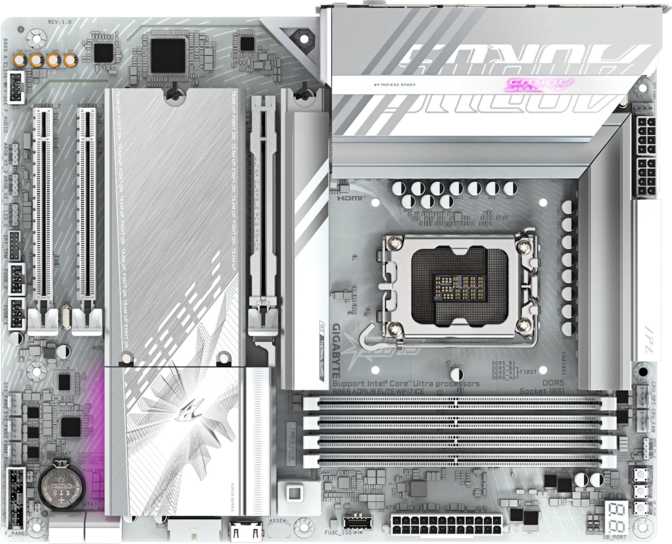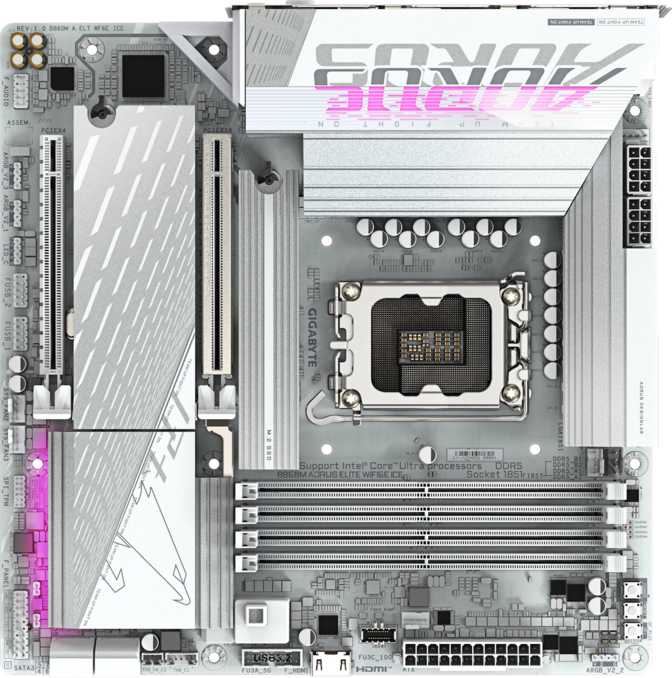
Gigabyte B860M Aorus Elite WiFi6E Ice Review: Is It Worth Buying?
MotherboardsIf you've been told that going Micro-ATX means accepting a watered-down experience, the Gigabyte B860M Aorus Elite WiFi6E Ice is the rebuttal. Compact in footprint but loaded with connectivity that rivals full-size alternatives, this board targets practical, space-conscious builders who want access to Intel's current-generation platform without paying the premium that flagship overclocking chipsets demand. The Thunderbolt 4 port alone signals this isn't a board trimming features to hit a price point — it's a mid-range board that takes connectivity seriously.
The "Ice" name is not just marketing — it signals a deliberate aesthetic direction designed for white-themed builds, a trend that has shifted from niche preference to one of the most popular PC build styles in the enthusiast community. If you're planning an all-white system and need a foundation that won't force you into a case the size of a small refrigerator, this board warrants serious attention.
Thunderbolt 4
USB4 40 Gbps
Wi-Fi 6E
6 GHz ready
Triple M.2
NVMe storage
DDR5 XMP
High-speed rated
Dual BIOS
Backup firmware
PCIe 5.0
GPU slot
Design and Build Quality: A White Board That Means It
The Micro-ATX form factor means a board that fits in compact mid-tower cases without any modification or specialty enclosures. Standard Micro-ATX is supported across dozens of cases at every price point — a practical advantage over premium compact standards like Mini-ITX, which often sacrifice connectivity for the smallest possible size.
The "Ice" naming points to a white PCB paired with white heatsink treatment over the voltage regulator modules — the components responsible for delivering clean, stable power to the processor — and the chipset area. This is a coordinated visual design, not the superficial approach of adding a white PCB while keeping black heatsinks. That distinction matters when you're building a themed system and want every component contributing to the look.
Onboard RGB lighting adds configurable color for builders who want a unified light theme, and the board reads cleanly even with lighting disabled for those who prefer a minimal aesthetic.
At the Aorus Elite tier, Gigabyte typically delivers reinforced primary expansion slots to prevent GPU sag over time — important as modern graphics cards trend toward significant weight. The three-year warranty signals meaningful confidence in the build quality; most budget-tier boards ship with shorter coverage, making this a real differentiator when calculating total cost of ownership.
No Dedicated CMOS Reset Button
Resetting the BIOS after an unstable configuration requires using a physical jumper or briefly removing the CMOS battery. Enthusiasts who regularly push memory settings to their limits will encounter this friction point most often.
The Platform: What LGA 1851 and B860 Actually Mean for You
LGA 1851 is Intel's current consumer desktop socket, designed for the Core Ultra 200 series — Intel's most recent mainstream desktop generation. Building on this platform means active product support and the full range of current Intel CPU options, from capable mid-range processors to the company's most powerful desktop chips.
The B860 chipset is the practical sweet spot in Intel's current lineup. It is not the flagship — that distinction belongs to Z890, which unlocks full processor core overclocking — but B860 provides the majority of features that most builders actually use. The tradeoff is clear: you cannot manually increase your processor's core clock speeds on a B860 board. For everyone who doesn't overclock CPUs, B860 delivers the platform's full connectivity, memory performance, and PCIe 5.0 capability at a more accessible price.
What B860 does support — and what matters meaningfully for day-to-day performance — is full XMP and DOCP memory profile support, letting high-speed DDR5 kits run at their rated performance with a single BIOS setting change.
- Full XMP and DOCP memory profile support
- PCIe 5.0 connectivity for GPU and storage
- Current-gen platform features at a more accessible price
- No manual CPU core clock speed increases — Z890 is required for that
The board does not include an integrated processor or onboard GPU chip. A compatible LGA 1851 processor is required separately. The video outputs on the rear panel function only when paired with a processor that includes integrated graphics.
Memory: DDR5 With a Serious Performance Ceiling
This board accepts DDR5 memory exclusively. DDR4 is not compatible — the two standards use different physical connectors and voltage requirements. For a new build on this platform, DDR5 is the correct baseline and the better long-term investment.
4
Memory Slots
Dual-channel capable
256 GB
Maximum Capacity
Future-proof headroom
9200 MHz
XMP Peak Speed
Top of current DDR5
Four memory slots give you the practical maximum for Micro-ATX, supporting dual-channel operation — running two matched modules in the correct slots effectively doubles the available memory bandwidth compared to a single module, with measurable impact on performance in bandwidth-sensitive workloads.
The total memory capacity ceiling is extraordinarily generous for a consumer board. No current productivity, gaming, or creative workload comes close to requiring it; that ceiling future-proofs the platform through the board's entire useful lifespan.
Enable XMP profiles in the BIOS and validated high-speed kits can reach speeds at the very top of what DDR5 currently delivers. Bandwidth-hungry applications — video encoding, large-file compression, 3D rendering — respond to faster memory in measurable ways. Gaming sees smaller gains, concentrated in CPU-bound scenarios where frame rates are limited by the processor rather than the graphics card.
Running all four memory slots at extreme XMP speeds may require some BIOS tuning to achieve stability. This is standard behavior across platforms, not specific to this board. The dual BIOS safety net makes that experimentation considerably less risky.
Storage: Three M.2 Slots and Meaningful RAID Support
Three M.2 slots is a generous allocation for a Micro-ATX board. M.2 drives — the small, card-like SSDs that plug directly into the motherboard without cables — are the current standard for fast storage, delivering transfer speeds that dwarf traditional hard drives. Three slots allow a primary fast boot drive, a secondary work drive, and a third for overflow or backup, all without a single storage cable in the chain.
For conventional storage, four SATA 3 ports handle HDDs, older SSDs, and optical drives without running short of connections. The breadth of RAID support exceeds what most gaming motherboards include, and it's practically useful for users managing large local data collections who want basic protection against drive failure without a dedicated NAS device.
| RAID 0 | Striping — maximum sequential speed | |
|---|---|---|
| RAID 1 | Mirroring — data redundancy | |
| RAID 5 | Distributed parity across 3+ drives | |
| RAID 10 | Mirroring combined with striping |
Connectivity: Where This Board Earns Its Position
The rear I/O panel is where the B860M Aorus Elite Ice most clearly separates itself from budget-tier alternatives in the same chipset family.
High-Speed USB and Thunderbolt 4
The headline is a Thunderbolt 4 port with USB4 40 Gbps capability — high-bandwidth connectivity typically reserved for more expensive boards. At this data rate, Thunderbolt 4 supports external GPU enclosures, multi-port Thunderbolt docks that drive multiple displays and provide numerous downstream ports from a single cable, and ultra-fast external SSDs all at full rated performance. To put the bandwidth in tangible terms: transferring a 100 GB file at peak throughput takes roughly 20 seconds — compared to several minutes through a standard USB 3.0 connection. Thunderbolt 4 on a mid-range Micro-ATX board is a genuine category exception.
| Port Type | Count | Max Speed | Best For |
|---|---|---|---|
| Thunderbolt 4 / USB4 | 1 | 40 Gbps | External GPUs, Thunderbolt docks, ultra-fast SSDs |
| USB 3.2 Gen 2 (USB-A) | 2 | 10 Gbps each | Fast external storage, high-bandwidth peripherals |
| USB 3.2 Gen 1 (USB-A) | 4 | 5 Gbps each | Webcams, mice, keyboards, standard accessories |
| USB 2.0 (USB-A) | 4 | 480 Mbps each | Older accessories where speed is irrelevant |
Wireless Connectivity
Wi-Fi 6E extends beyond the bands that standard Wi-Fi 6 uses by adding access to the 6 GHz frequency range. In practical terms, that third band is significantly less congested in most environments — fewer devices currently broadcast on it — which translates to more consistent speeds and lower interference in busy wireless environments like apartments or offices with many connected devices. The advantage is most pronounced in dense wireless environments; in low-density settings, the difference from Wi-Fi 6 is more modest.
Bluetooth 5.3 handles wireless peripherals — headsets, controllers, trackpads — with the connection reliability and range of a current-generation standard. One wired Ethernet port handles cable-based networking for users who prefer the consistency and low latency of a physical connection.
Display Outputs
An HDMI 2.1 output and a DisplayPort output both appear on the rear panel — but these activate only when the installed processor includes integrated graphics. HDMI 2.1 supports high-refresh-rate and high-resolution content at the top of current display standards, making it adequate for any monitor available today and those likely to appear throughout this board's lifespan.
PCIe 5.0 and Expansion: Future-Proofed Where It Counts
The primary graphics card slot runs at the fastest current PCIe standard. Every GPU available today runs comfortably within lower PCIe bandwidth tiers, so the PCIe 5.0 x16 slot here exists specifically to provide headroom for future GPU generations — meaning the board will not become a connectivity bottleneck as graphics card technology advances. That's forward-thinking engineering that extends the useful life of the platform.
A secondary expansion slot with x4 bandwidth rounds out the physical expansion options. Practical add-in cards — 10 Gigabit Ethernet adapters, capture cards, additional M.2 adapters, and RAID controllers — all work here without conflict. In Micro-ATX, two expansion slots is the practical norm; this board uses both in a sensible configuration that covers real-world needs.
-
1 slot
PCIe 5.0 x16
Primary GPU slot
-
1 slot
PCIe x4
Add-in cards
-
3 slots
M.2 Sockets
NVMe / SATA drives
-
4 ports
SATA 3 Ports
HDDs / SATA SSDs
Internal Connectors: Building Inward
Fan and Thermal Management
Six fan headers provide thermal management coverage appropriate for most builds. A mid-tower case with two or three intake fans, an exhaust fan, and a CPU air cooler connects everything directly to the board without a separate fan controller. All headers support automatic speed control based on temperature readings, keeping noise levels managed under varying loads.
Front-Panel USB Headers
Internal headers cover USB 3.0 Gen 1 connections for older case panels, a USB-C 3.2 Gen 2 connector for current-generation cases with a front-panel USB-C port, and additional USB 2.0 headers for legacy case designs. A case with a USB-C front port — a standard growing across mid-range and premium cases — is directly supported without adapters.
| Header Type | Count | Purpose |
|---|---|---|
| Fan Headers | 6 | CPU cooler, case fans — all auto-controlled |
| USB 3.0 Gen 1 | 2 | Front-panel USB-A expansion |
| USB-C 3.2 Gen 2 | 1 | Modern front-panel USB-C port |
| USB 2.0 | 4 | Legacy and supplemental front-panel ports |
| TPM Connector | 1 | Hardware security module and Windows 11 compliance |
Audio: Surround Sound Supported, With One Configuration Note
The onboard audio solution supports 7.1 surround sound — eight discrete channels for full positional audio across front, rear, side, and center/subwoofer positions — alongside a digital S/PDIF output for connection to AV receivers or external digital-to-analog converters.
The rear panel provides two analog audio jacks. This is more limited than boards carrying a full five- or six-jack array designed for native analog 7.1 speaker wiring. The large majority of users run headphones or 2.1 speaker setups through a single output, and the digital S/PDIF output adds flexibility for those routing audio through external processors.
If your setup specifically requires wiring a full analog 7.1 speaker array directly to rear panel jacks without an external DAC or audio processor, verify the rear-panel configuration matches your needs before purchasing.
7.1 Surround
8-channel audio support
2
Analog Jacks
S/PDIF
Digital Out
BIOS, Dual BIOS, and Memory Tuning
The dual BIOS earns its value in a specific scenario: when a firmware update fails due to power interruption during flashing, a corrupted file, or a write error. Most motherboards carry a single firmware chip — if that chip is corrupted, the system cannot boot. The secondary firmware chip on this board detects the failure automatically and takes over without manual intervention. It's insurance that most users never need and will be relieved to have if they do.
Enabling XMP memory profiles is a single setting change in the BIOS that immediately unlocks the performance you paid for when selecting a high-speed DDR5 kit. The platform handles profiles reaching the upper boundary of what current DDR5 delivers.
Know Your Jumper Location Before You Need It
Enthusiasts going beyond pre-validated XMP profiles into manual timing adjustments will occasionally land in a configuration that prevents startup. Without a physical reset button, recovery requires opening the case and locating the CMOS jumper. Locate it in the manual before your first tuning session.
- Survives failed firmware updates automatically
- No manual intervention required on switchover
- Reduces risk during aggressive memory tuning experiments
- No physical CMOS reset button — jumper required instead
Who This Board Is Right For — And Who Should Look Elsewhere
- You're building a current-generation Intel system in a compact case and want connectivity that outpaces the board's price tier.
- You're planning or executing a white-themed system with a coordinated aesthetic across all components.
- You want current-gen Intel platform performance — DDR5, PCIe 5.0, modern CPU support — without the overclocking chipset premium.
- You run CPUs at factory-rated speeds and want the best connectivity that B860 can deliver at Micro-ATX size.
- You need RAID storage, Thunderbolt 4 docking, or Wi-Fi 6E without stepping into full ATX territory.
- You want to push CPU core clock speeds beyond factory ratings — B860 does not support that; Z890 is the correct chipset.
- Frequent BIOS resets are a regular part of your workflow and you expect a one-touch physical solution.
- Your build requires three or more physical expansion slots — that constraint comes from the Micro-ATX form factor itself.
- You're prioritizing minimum cost above all else on the LGA 1851 platform — budget H-series and entry B860 boards exist at lower price points.
Competitive Positioning: How It Compares
Against typical B860 competition, Thunderbolt 4 is not standard at this chipset tier — many boards skip it to reduce cost. Wi-Fi 6E similarly varies across the category. The combination of both, alongside triple M.2 and a coordinated white aesthetic, is relatively rare within B860 Micro-ATX offerings.
| Feature | B860M Aorus Elite Ice | Typical B860 Board | Z890 Board | Previous B760 |
|---|---|---|---|---|
| CPU Core Overclocking | ||||
| Memory XMP / DOCP | ||||
| Thunderbolt 4 / USB4 | Occasional | Often | Rare | |
| Wi-Fi 6E | Varies | Often | Rare | |
| PCIe 5.0 GPU Slot | ||||
| M.2 Slots | 3 | 2–3 | 3–5 | 2–3 |
| Dual BIOS | Sometimes | Often | Sometimes | |
| White / Ice Aesthetic | Rarely | Rarely | Rarely | |
| Form Factor | Micro-ATX | Varies | Often ATX | Varies |
vs Z890
The chipset premium is real, and its primary justification is CPU core overclocking. For users who don't overclock CPUs, the performance difference between a well-configured B860 system and Z890 is negligible in daily use. Paying for a feature you won't use produces no value.
vs Previous B760 Platform
Those with functional B760 systems have limited immediate reason to switch, but for new builds from scratch, the PCIe 5.0 GPU slot, the higher DDR5 XMP ceiling, and Intel's current-generation CPU lineup make the current platform the stronger foundation.
The Honest Assessment: Strengths and Weaknesses
Where It Delivers
The B860M Aorus Elite WiFi6E Ice earns its consideration through a combination of features that the mid-range Micro-ATX market rarely delivers together. Thunderbolt 4 on a B860 board is an exception within the category, not an expectation. Wi-Fi 6E, three M.2 slots without cramping the board layout, a PCIe 5.0 primary GPU slot, and a well-executed white aesthetic all contribute to a package that over-delivers for its chipset tier.
The dual BIOS is not a talking-point feature — it's a real safeguard that adds meaningful peace of mind for anyone who updates firmware regularly or experiments with memory profiles. The white PCB and matching heatsinks are implemented consistently rather than cosmetically; the board doesn't look like a standard black design with a coat of paint, which matters when a themed build is the goal.
Where It Falls Short
The weaknesses are specific rather than general. The absent CMOS reset button is the most practically felt omission, particularly for users drawn to this board's memory overclocking range. Two rear analog audio jacks constrain certain audiophile configurations that require wiring a full analog surround speaker array directly.
The B860 chipset's CPU overclocking restriction is an architectural fact — not a flaw in the board's execution, but a boundary that belongs clearly in any honest assessment. The single secondary expansion slot will not satisfy users who need multiple high-bandwidth add-in cards alongside a GPU. None of these weaknesses are hidden; they're the predictable shape of the chipset and form factor choices this board represents.
Questions Real Buyers Ask Before Purchasing
Final Verdict: Should You Buy It?
The Gigabyte B860M Aorus Elite WiFi6E Ice is a well-positioned choice for the builder who has already decided B860 fits their needs and is now choosing which board within that chipset delivers the most. The Thunderbolt 4 connectivity, Wi-Fi 6E, triple M.2 storage, PCIe 5.0 GPU slot, dual BIOS safety net, and coordinated white aesthetic arrive in a Micro-ATX package that few direct competitors match comprehensively.
The limitations are specific and knowable in advance: no CPU core overclocking, no physical CMOS reset button, two rear audio jacks rather than five. None are hidden tradeoffs — they're the natural shape of the chipset and form factor choices this board represents.
Buy It If
You're building a compact Intel system with current-generation connectivity needs, investing in a white-themed build, or want the most feature-complete Micro-ATX B860 option without stepping into Z890 pricing territory.
Look Elsewhere If
CPU overclocking is a priority, your build demands more than two physical expansion slots, or you're targeting the lowest possible entry cost on the LGA 1851 platform without needing premium connectivity.