Gigabyte B860 Aorus Elite WiFi7 Ice Review: An Honest, In-Depth Look
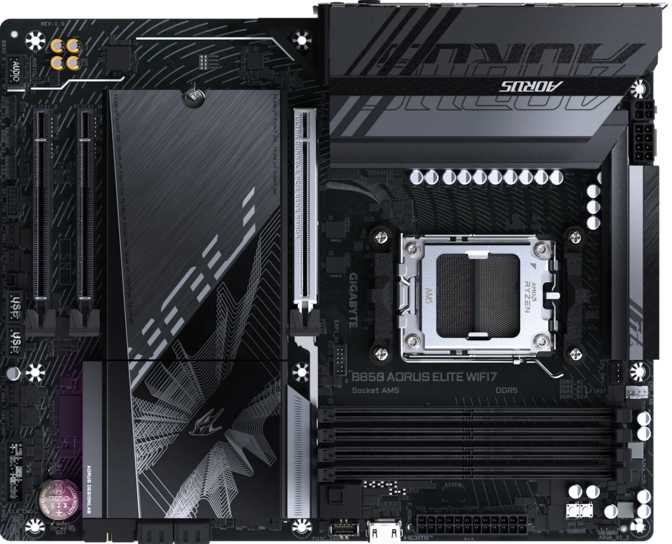
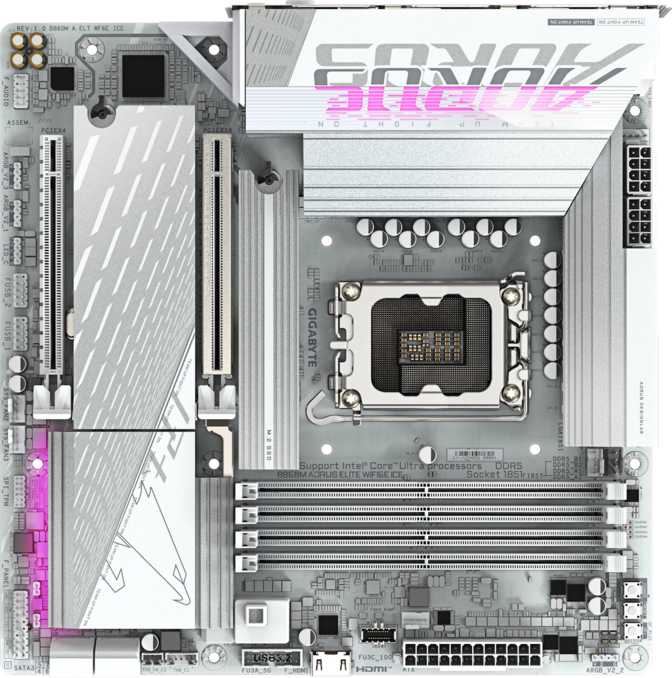
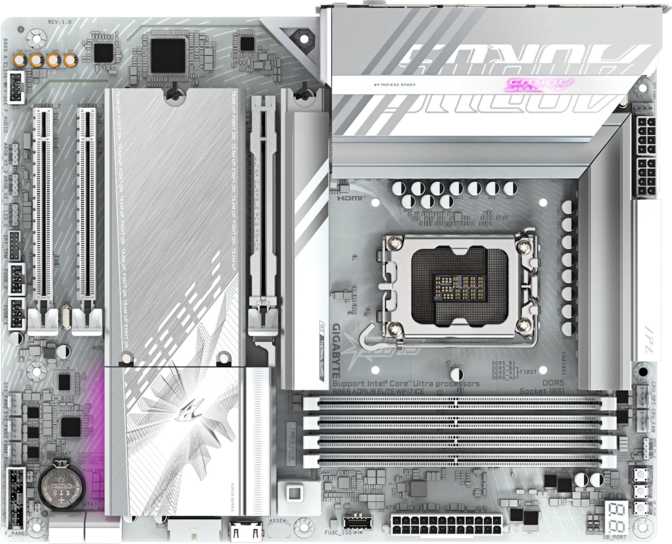
MotherboardsThe "Ice" in this board's name isn't decoration, it tells you exactly what kind of build this motherboard belongs in. Where most Aorus boards lean into black PCBs and gunmetal heatsinks, the Ice edition flips the palette toward white and silver tones, the kind of finish that actually photographs well behind a tempered-glass side panel instead of disappearing into shadow.
Socket
LGA 1851
Chipset
B860
Memory
DDR5, up to 256GB
Wireless
Wi-Fi 7, BT 5.4
Storage
3x M.2, 4x SATA
Form Factor
ATX, 244x305mm
Built for a Clean, Light-Themed Build
There's no onboard RGB lighting here, and that's a deliberate trade rather than a missing feature, Gigabyte clearly decided that a board meant to look bright and uncluttered shouldn't compete with its own light show. If you're the type who prefers your case lighting to come from fans, strips, or a GPU rather than the motherboard shouting for attention, this is the right call.
Physically, the board uses the full-size ATX layout, measuring 244mm tall and 305mm wide, the same footprint as the vast majority of mid-tower and full-tower cases on the market. That's worth confirming before you buy if you're working with a smaller case, but for anyone using a standard ATX or E-ATX chassis, fit won't be a concern. The "Elite" tier in Gigabyte's Aorus lineup sits in the sweet spot between bare-bones budget boards and the flagship Master/Xtreme models, and the build quality here reflects that positioning: solid without being showy, practical without feeling stripped down.
Platform and CPU Compatibility
What processors actually work here
This board uses Intel's LGA 1851 socket paired with the B860 chipset. The socket determines which physical CPUs will fit, and the chipset determines which features those CPUs can actually use. LGA 1851 is the socket Intel introduced for its current desktop CPU generation, so as a practical takeaway: this board is built to run today's mainstream Intel desktop processors, not older Intel chips that used previous sockets like LGA 1700 or LGA 1200.
The B860 chipset sits in the middle of Intel's current lineup. It's not the flagship Z-series chipset, which means a couple of trade-offs worth knowing upfront:
- CPU overclocking on unlocked "K" series processors is typically reserved for the top-tier chipset, not B-series boards like this one.
- Memory overclocking is supported here, and generously so.
- PCIe lane allocation is more conservative than a flagship board, which shows up in the single full-length expansion slot.
In exchange for skipping CPU overclocking headroom, B860 boards are almost always priced more accessibly than their Z-series counterparts, while still inheriting modern I/O standards like Wi-Fi 7 and Thunderbolt 4. That's the real story of this motherboard: flagship-adjacent connectivity on a mainstream chipset. The board carries a single CPU socket, as virtually every consumer desktop board does, multi-socket configurations are strictly a server and workstation feature.
Memory Performance
How much RAM, and how fast
This board runs DDR5 memory exclusively, there's no backward compatibility with older DDR4 sticks. You get four memory slots arranged in a dual-channel layout, meaning the board reads and writes memory across two parallel pathways for better bandwidth than a single-channel setup. For day-to-day use, that translates into snappier application loading, smoother multitasking, and better-fed data pipelines for the CPU during gaming and content creation.
Capacity tops out at 256GB, which is enormous headroom for a mainstream board.
| Capacity | Best Suited For |
|---|---|
| 32 to 64GB | Covers the overwhelming majority of gamers and everyday users comfortably for years |
| 96 to 128GB | Creators juggling large video projects, big Photoshop files, or virtual machines |
| 256GB | Workstation-tier multitasking, large dataset work, or running multiple VMs simultaneously |
On speed, the board officially supports memory running at up to 6400 MHz out of the box, and, notably for a B-series board, it supports overclocked memory speeds up to 9200 MHz. That ceiling is genuinely high for this chipset tier and signals that Gigabyte put real engineering effort into the memory subsystem rather than treating it as an afterthought. The board's "easy overclock" tooling in its BIOS means applying a memory speed profile is typically a one-click action rather than a manual process of dialing in voltages and timings.
Wireless Connectivity
Wi-Fi 7 and Bluetooth 5.4
This is arguably the headline feature of the entire board. Built-in wireless support spans the full range from older Wi-Fi 4 networks all the way up to Wi-Fi 7, meaning the board automatically works with whatever router you currently own, while also being ready for the fastest wireless standard available once you upgrade your network.
Each generation of Wi-Fi has progressively reduced congestion and increased throughput, and Wi-Fi 7 pushes that further with wider channels and lower latency than Wi-Fi 6 or 6E. In practical terms, on a Wi-Fi 7 router, you can expect noticeably better performance in crowded wireless environments, along with meaningfully reduced lag for time-sensitive tasks like online gaming or video calls. If your router is still on Wi-Fi 5 or 6, you won't see Wi-Fi 7 speeds today, but the board is future-proofed for whenever you do upgrade.
Bluetooth 5.4 rounds out the wireless package, covering wireless keyboards, mice, headsets, and controllers with stable, low-latency pairing. It's the current mainstream Bluetooth standard, so compatibility with modern peripherals is a non-issue.
Rear I/O and Ports
What you can actually plug in
Port selection is where a lot of buyers get tripped up by spec sheets that just list numbers without context, so here's the practical breakdown of what's on the back panel.
| Port Type | Qty | What It's Good For |
|---|---|---|
| USB4 / Thunderbolt 4 (Type-C, 40Gbps) | 1 | High-speed external SSDs, docking stations, eGPU enclosures, daisy-chained monitors |
| USB 3.2 Gen 2 (Type-A, 10Gbps) | 2 | Fast external drives, high-speed flash transfers |
| USB 3.2 Gen 1 (Type-A, 5Gbps) | 4 | General peripherals, webcams, controllers, mid-speed storage |
| USB 2.0 (Type-A) | 4 | Keyboards, mice, and other low-bandwidth peripherals |
| HDMI 2.1 | 1 | High-resolution, high-refresh-rate display output (CPU graphics dependent) |
| DisplayPort | 1 | Secondary or primary display output (CPU graphics dependent) |
| RJ45 Ethernet | 1 | Wired network connection for stable, low-latency internet |
The only USB-C port on the rear panel is the Thunderbolt 4 / USB4 port. There's no separate, lower-spec USB-C connector, so if you need to plug in multiple USB-C devices simultaneously, you'll be relying on a hub off that single port.
Including a full Thunderbolt 4 implementation on a B-series board is genuinely uncommon, this is usually a feature reserved for premium chipsets, and its presence here is one of the strongest value arguments for this motherboard.
Internal Expansion
Headers for front-panel ports
Beyond the rear panel, the board provides internal headers for additional connectivity through your case's front panel or expansion brackets. You get headers supporting additional USB 3.x ports alongside a separate header for additional USB 2.0 ports, giving builders flexibility to wire up front-panel USB hubs, fan controllers, or case-specific I/O panels without sacrificing rear-panel connectivity.
Storage: M.2, SATA, and RAID
Three M.2 sockets means you can realistically run a fast boot drive, a dedicated game-library drive, and a bulk storage drive without ever touching a SATA cable, which keeps cable clutter down and airflow cleaner inside the case. For anyone still using traditional 2.5-inch SSDs or 3.5-inch hard drives, four SATA III connectors are also onboard.
The board also supports hardware RAID configurations, a way of combining multiple drives to either boost speed, add redundancy, or both:
- RAID 0
- Stripes data across drives for maximum speed, at the cost of redundancy.
- RAID 1
- Mirrors data across drives for redundancy, your data survives a single drive failure.
- RAID 5
- Balances speed and redundancy across three or more drives, tolerating one drive failure.
- RAID 10
- Combines striping and mirroring for both speed and redundancy, requiring four drives.
A built-in TPM (Trusted Platform Module) connector is also present, the security chip standard required for Windows 11 installations and for features like BitLocker drive encryption.
Expansion Slots
Graphics cards and add-in cards
The board provides a single full-length PCIe 5.0 x16 slot, this is where your graphics card goes, and PCIe 5.0 is the current top-tier interface standard, so the slot itself isn't a bottleneck for any graphics card available today or in the near future. Beyond that primary slot, you get two PCIe x1 slots for smaller add-in cards, Wi-Fi adapters, capture cards, sound cards, or low-bandwidth expansion devices.
What you don't get is a second or third full-length x16 slot. For the vast majority of builders running a single graphics card, this changes nothing. But if your plans include a full-length expansion card beyond your GPU, you'll want to confirm those specific cards are compatible with an x1 slot, because there's no second full-size slot to fall back on.
Audio
What 7.1-channel sound actually delivers
Onboard audio supports 7.1-channel surround sound through two audio connectors, plus a dedicated S/PDIF output for passing digital audio to an external receiver without any analog conversion loss. In practice, 7.1 surround means the board can drive a full home-theater-style speaker setup directly from the motherboard, no separate sound card required for most users. For competitive gamers and movie watchers alike, that's enough channel separation to localize footsteps or directional audio cues accurately.
Cooling, Stability, and System Management
Six fan headers are spread across the board, giving you enough connections to run a healthy mix of case intake fans, exhaust fans, and a CPU cooler without needing a separate fan hub for a typical build.
Dual BIOS is included, meaning the board carries two separate BIOS chips rather than one. If a firmware update fails or the primary BIOS becomes corrupted, the secondary chip acts as a safety net, letting the system boot and recover rather than leaving you with a dead board.
The board is backed by a 3-year warranty, a solid baseline that signals reasonable manufacturer confidence in long-term reliability.
Real-World Fit
Who This Is For
- Gamers building a new Intel system who want fast NVMe storage and a clean white aesthetic
- Content creators who'll benefit from the high memory ceiling and Thunderbolt 4 connectivity
- Future-focused buyers who want Wi-Fi 7 now, even before their router catches up
- First-time builders who want simplified BIOS overclocking and dual BIOS safety
- White or light-themed build enthusiasts tired of all-black boards
Who Should Look Elsewhere
- Enthusiasts who want to overclock an unlocked "K" series CPU
- Multi-GPU or multi-full-card builders needing more than one x16 slot
- Workstation users who specifically need ECC memory support
- Buyers needing multiple high-speed USB-C ports simultaneously
How It Compares to the Alternatives
Within the Intel LGA 1851 / B860 ecosystem, boards generally split into a few tiers based on what they include beyond the chipset baseline.
| Comparison Point | Budget B860 | This Board | Premium Z890 |
|---|---|---|---|
| CPU overclocking | No | No | Yes |
| Memory overclocking | Limited | Up to 9200 MHz | Yes, typically higher |
| Wireless standard | Often Wi-Fi 6 or none | Wi-Fi 7 | Wi-Fi 7 |
| Thunderbolt 4 / USB4 | Rarely included | Included (1 port) | Usually included |
| M.2 slots | Often 1 to 2 | 3 | Typically 3 to 5 |
| Full-length PCIe x16 | 1 | 1 | Often 2+ |
| Typical price position | Lowest | Mid-range | Highest |
The takeaway: this board punches above its B860 chipset class by including Wi-Fi 7 and Thunderbolt 4, two features more commonly reserved for the pricier Z890 tier. What you give up by staying on B860 is CPU overclocking and a second full-length expansion slot, reasonable trade-offs for anyone who isn't planning to overclock an unlocked CPU.
Honest Strengths and Weaknesses
Where It Excels
The strongest argument for this board is connectivity value. Wi-Fi 7 and Thunderbolt 4 are not common pairings on mainstream chipset boards, and finding both here, alongside three M.2 slots and a genuinely high memory overclocking ceiling, makes the spec sheet feel more premium than the B860 chipset label might suggest. The white aesthetic is also a real differentiator in a market still dominated by black-and-gray boards, and the absence of built-in RGB will read as a feature, not a flaw, to anyone building a deliberately restrained, light-toned system.
Where It Falls Short
The honest weaknesses are concentrated in flexibility for power users with specific edge-case needs. A single full-length PCIe slot rules out multi-card setups that need more than one x16 connection. The single USB-C port, while fast, means heavy USB-C peripheral users will need a hub. No ECC support closes the door on certain workstation use cases. And the missing clear-CMOS button is a small but real inconvenience for anyone who overclocks aggressively enough to need frequent BIOS resets.
Frequently Asked Questions
Final Verdict
The Gigabyte B860 Aorus Elite WiFi7 Ice earns its place by doing something a lot of mainstream-chipset boards don't: it brings genuinely premium connectivity, Wi-Fi 7, Thunderbolt 4, three M.2 slots, and a high memory overclocking ceiling, down into B860 territory, all wrapped in a white aesthetic that's still relatively rare in this market.
It's not built for CPU overclockers chasing every last megahertz from an unlocked chip, and it's not the choice for builders who need multiple full-length expansion slots or several fast USB-C ports. But for the much larger group of buyers building a modern Intel gaming or creator PC who want fast storage, future-ready wireless, and a clean look without paying flagship Z890 prices, this board is a genuinely smart pick.
If that description matches your build, this is one of the stronger value propositions you'll find in the current B860 lineup.