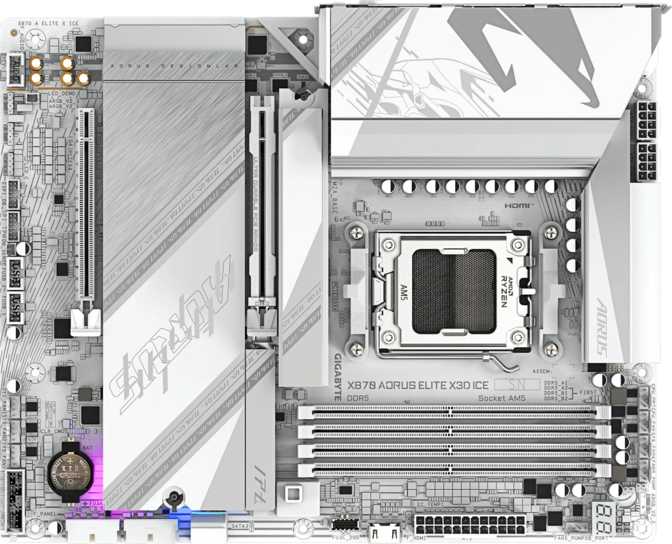
Gigabyte X870 Aorus Elite X3D Ice: Full Review for AM5 Builders
MotherboardsBoard at a Glance
Overall Score
8.5/10
Enthusiast RecommendedWhy the X870 Aorus Elite X3D Ice Deserves Your Attention
AMD's AM5 platform has matured into a genuinely compelling ecosystem, and the X870 chipset sits at the top of the consumer stack — designed for builders who refuse to compromise. The Gigabyte X870 Aorus Elite X3D Ice enters that space with a specification profile that reads like a checklist for a no-regrets build: the latest wireless standard, a connectivity array that most full-tower systems would envy, and memory headroom that won't bottleneck anything AMD has planned for AM5 in the foreseeable future.
But a dense spec sheet is easy to print. Whether those specs translate into a board worth your money is a different question — and one this review answers directly.
Design & Build Quality
Form Factor and Physical Presence
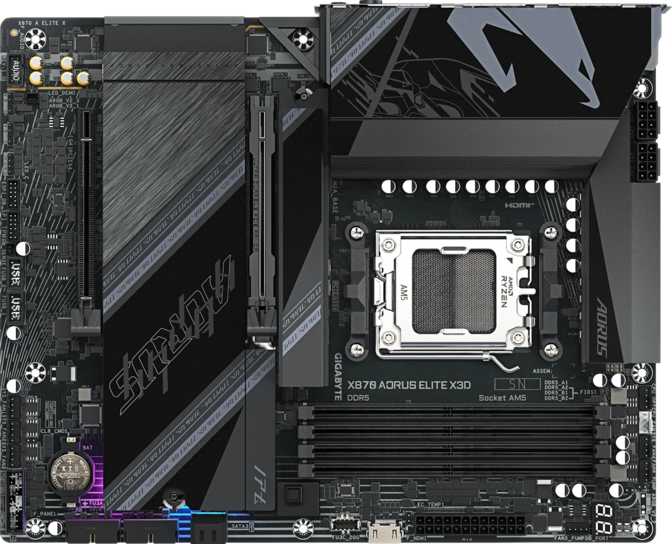
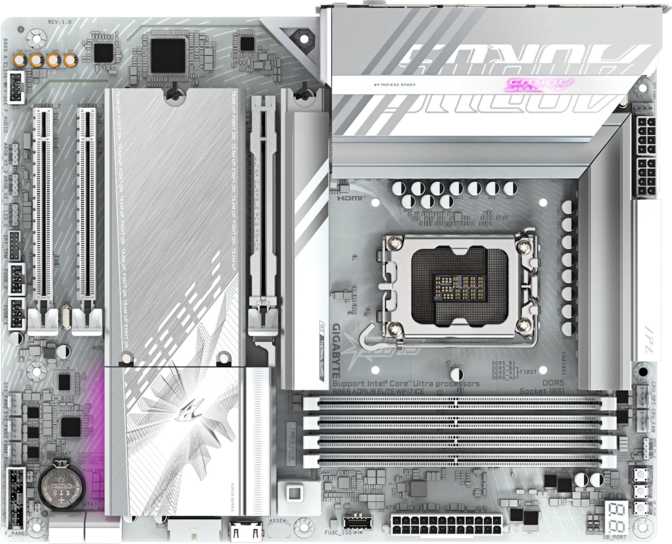
The X870 Aorus Elite X3D Ice follows the standard ATX footprint, measuring 305 mm wide by 244 mm tall. Any mid-tower or full-tower case built in the last several years will accommodate it without issue, and the dimensions leave enough breathing room around the board for proper airflow management. If you're planning a compact build, this is not that board — but for the performance tier it occupies, the full ATX layout is the right call.
The “Ice” designation signals a visual theme oriented toward a clean, white-and-silver aesthetic — a welcome departure from the all-black default that dominates this category. The heatsink design over the VRM and chipset areas carries this through consistently, giving the board a cohesive look that pairs well with white cases and light-colored components without looking forced.
RGB Lighting and BIOS Controls
Onboard RGB lighting is present, integrating with Gigabyte's RGB Fusion ecosystem for a coordinated aesthetic across compatible Aorus components. The lighting can be adjusted or fully disabled through the BIOS or software — it enhances the look without dictating it.
A physical Clear CMOS button on the board provides hardware-level BIOS reset without pulling the battery — a genuine quality-of-life feature that matters most when you're deep inside a case troubleshooting a failed overclock. Gigabyte's BIOS interface also includes accessible one-click tuning profiles alongside full manual controls, lowering the barrier for first-time overclockers while giving experienced builders a useful starting baseline.
Processor & Platform Compatibility
The board is built exclusively for AMD's AM5 socket, which houses the Ryzen 7000 and Ryzen 9000 series processors, as well as AMD's 3D V-Cache variants. X870 is AMD's flagship consumer chipset for AM5, positioned above X670 and B650 to support the highest-bandwidth configurations and the most aggressive overclocking headroom the platform allows.
This is not a board you buy today for a budget processor — it's a platform investment. AMD has confirmed AM5 socket continuity through future lineup generations, which means the board carries a credible upgrade path. Buy into X870 now, and you can reasonably expect to drop in future AM5 CPUs without swapping out the motherboard.
Compatible Processors
- AMD Ryzen 7000 Series (Zen 4)
- AMD Ryzen 9000 Series (Zen 5)
- AMD Ryzen X3D V-Cache Variants
Important Notes
- No integrated CPU or graphics on the board
- Discrete GPU required for most Ryzen builds
- HDMI 2.1 port active only with APU variants
Memory Performance: DDR5 With Real Headroom
Configuration and Capacity
Four memory slots in a dual-channel configuration supporting DDR5 exclusively. The practical implication: you can populate all four slots and still maintain full dual-channel bandwidth — the ideal setup for content creation workloads, simulation software, or any application that benefits from large memory pools.
The ceiling of 256 GB total capacity is well beyond what any gaming or productivity build requires today, but it's the kind of ceiling that makes the board relevant for professional workstation configurations where large datasets, virtual machines, or RAM-hungry applications are the daily workload.
Speed Tiers: Standard to Extreme
At its base DDR5 specification, the board runs memory at speeds that represent current mid-to-high-tier DDR5 kit performance. Any DDR5-5600 or DDR5-6000 kit will load its XMP or EXPO profile with a single BIOS toggle and run at rated speeds without issue.
The overclocked ceiling is where this board separates itself. Memory tuners can push compatible kits toward 9000 MHz under manual configuration — a ceiling that places this firmly in the category of boards built for enthusiast-grade memory tuning. Reaching those numbers requires high-speed kits and careful sub-timing work, but the platform won't be the limiting factor.
ECC (Error-Correcting Code) memory is not supported. For server or mission-critical workstation use cases requiring memory error correction, this board is not the appropriate platform — but that was never the intended audience for a consumer X870 board.
Storage Expansion: Built for Fast, Not Just a Lot
M.2 and NVMe Options
Four M.2 slots give this board exceptional storage flexibility. You can run a primary NVMe drive for the operating system, a second for games or applications, a third for project working files, and still have a slot free — all without touching a single SATA cable. Modern NVMe drives operate at a completely different performance tier than traditional hard drives or SATA SSDs, and four dedicated slots ensure every drive in the system benefits from those speeds.
SATA Connectivity and RAID
Two SATA 3 connectors are available for traditional 2.5” SSDs or HDDs. This is on the leaner side for a full ATX board — builders with legacy hard drive arrays or older SATA SSDs may find themselves working around that limitation. Prioritizing NVMe from the ground up makes this a non-issue, but it's worth flagging for anyone migrating an existing storage setup.
Full RAID support across configurations 0, 1, 5, and 10 is included. This is relevant for creative professionals or small workstation users who want redundancy or performance striping across multiple drives without a dedicated RAID controller. The four supported configurations cover the overwhelming majority of real-world professional use cases.
Storage Highlights
- 4 × M.2 NVMe slots — full NVMe-only builds possible
- RAID 0, 1, 5, and 10 supported out of the box
- No additional RAID controller required
Storage Limitations
- Only 2 SATA 3 connectors — lean for a full ATX board
- RAID 0+1 configuration not supported
- Legacy multi-drive SATA arrays will be constrained
Connectivity: Where This Board Genuinely Stands Out
The rear I/O on the X870 Aorus Elite X3D Ice is the section of the specification that most clearly justifies the board's tier positioning. The combination of ports here is unusual — particularly for an AMD platform — and represents genuine value for the right user profile.
Rear USB Port Breakdown
| Port Type | Count | Real-World Performance |
|---|---|---|
| USB4 40 Gbps | 2 | Fastest consumer USB — handles NVMe enclosures and Thunderbolt-class peripherals at near-internal drive speeds |
| Thunderbolt 4 | 2 | 40 Gbps, daisy-chainable, universal docking station compatible — rare on AMD platforms |
| USB 3.2 Gen 2 (Type-A) | 2 | 10 Gbps — fast external SSDs and high-speed hubs |
| USB 3.2 Gen 1 (Type-A) | 4 | 5 Gbps — keyboards, mice, controllers, and standard peripherals |
| USB 3.2 Gen 2 (Type-C) | 1 | 10 Gbps Type-C for modern peripheral compatibility |
| USB 2.0 | 1 | Legacy device compatibility |
Why Thunderbolt 4 Matters on an AMD Board
Thunderbolt has historically been an Intel stronghold, and its appearance here opens the door to the full Thunderbolt ecosystem: high-resolution external monitors, NVMe enclosures running at near-internal speeds, compact docking stations that handle video, audio, and charging from a single cable, and daisy-chained device setups without a hub. For a content creator or developer who uses both a laptop and a desktop, external drives and monitors work across both systems without adapters.
The two USB4 40 Gbps ports (distinct from the Thunderbolt 4 ports) add further high-bandwidth connectivity. In total, this rear panel gives you four ports capable of 40 Gbps — an unusually generous allocation that stands apart from any X670E or B650E board in this price range.
Internal Expansion Headers
Wireless Connectivity: Wi-Fi 7 Is the Real Deal
The included wireless module supports the full progression from Wi-Fi 4 through Wi-Fi 7 (802.11be), with Bluetooth 5.4 alongside it. This isn't a checkbox entry — Wi-Fi 7 is a meaningful upgrade over Wi-Fi 6E, and backward compatibility ensures it works with any existing network immediately at supported speeds.
For users with a Wi-Fi 7 router, the practical improvements include lower latency under congestion, higher throughput on the 6 GHz band, and Multi-Link Operation (MLO), which lets the adapter maintain simultaneous connections across multiple frequency bands. In a crowded apartment building or a home with many connected devices, the congestion management improvements alone are immediately noticeable.
Wi-Fi Standards Supported
- Wi-Fi 7 (802.11be) — flagship standard
- Wi-Fi 6E (802.11ax) — 6 GHz band support
- Wi-Fi 6 (802.11ax) — current-generation
- Wi-Fi 5 (802.11ac) — backward compatible
- Wi-Fi 4 (802.11n) — full legacy support
Bluetooth & Key Wireless Features
- Bluetooth 5.4 — current-generation peripherals
- Multi-Link Operation (MLO) with Wi-Fi 7 router
- 6 GHz band access for reduced congestion
- Fully backward compatible with existing routers
PCIe Expansion: The GPU Gets the Best Lane
The primary PCIe slot runs at PCIe 5.0 x16 — the fastest consumer interface currently available. For GPU installations, this means no bandwidth bottleneck with current or near-future discrete graphics cards. Modern high-end GPUs don't yet fully saturate PCIe 4.0 x16 in most workloads, so PCIe 5.0 here is forward-looking headroom rather than an immediate performance differentiator — but it's exactly the right slot to have in a board built for long-term relevance.
A secondary PCIe x4 slot accommodates add-in cards: capture cards, 10 GbE network cards, USB expansion cards, or NVMe expansion cards if the four onboard M.2 slots prove insufficient for an ambitious storage build. There are no additional slots — this is a single-GPU platform, which reflects the current direction of the industry rather than a meaningful constraint for the intended audience.
Audio: A Clean Signal for Onboard Sound
The integrated audio solution delivers a 120 dB signal-to-noise ratio on the DAC output — a strong result for onboard audio. To put that number in context: entry-level and mid-range motherboards typically measure in the 95–108 dB range. At 120 dB, the background noise floor is low enough that users with quality wired headphones — even audiophile-grade ones — may find the onboard audio genuinely satisfying without reaching for a dedicated DAC.
A 7.1-channel output configuration supports full surround sound setups, and an S/PDIF optical output provides a lossless digital connection to an AV receiver or external DAC for those who want to bypass the analog output entirely.
One practical note: Only two physical audio connectors are present on the rear panel. Builders who need simultaneous front-panel and rear-panel audio — a headset and speakers active at the same time — will need to route audio through the front-panel header rather than relying on the rear panel alone.
Who Should Buy the X870 Aorus Elite X3D Ice?
This Board Is For
-
Enthusiast gamers building for longevity.
The AM5 platform commitment, PCIe 5.0 GPU slot, DDR5 support with aggressive OC headroom, and modern wireless make this a build-once proposition that doesn't demand an upgrade in two years.
-
Content creators and video editors.
Thunderbolt 4, USB4 40 Gbps, four M.2 slots for fast working storage, and up to 256 GB of DDR5 address almost every professional creative workflow need on a single board.
-
Developers and workstation builders on a consumer budget.
RAID support, a high memory ceiling, and dense I/O cover professional-grade requirements without stepping into HEDT platform pricing.
-
Users maximizing AMD X3D V-Cache processors.
The X870 chipset and overclock-friendly BIOS infrastructure are purpose-built for AMD's highest-performance gaming CPU lineup.
This Board Is NOT For
-
Budget-conscious first-time builders.
X870 carries a meaningful price premium over X670E or B650E. If your CPU and GPU budget is already stretched, the incremental benefits of this chipset won't show up in everyday use.
-
Builders needing extensive SATA storage.
Two SATA ports is limiting if you're migrating a multi-drive array. A B650 board with four or six SATA ports would be more practical for that specific use case.
-
ECC memory workloads.
Server or mission-critical applications requiring error-correcting memory need a different platform entirely — EPYC or Threadripper on the AMD side, or Xeon on Intel's.
How It Compares to Logical Alternatives
For buyers weighing the X870 Aorus Elite X3D Ice against lower-tier AM5 options, the table below maps the key differentiators across three realistic choices in the AMD AM5 ecosystem.
| Feature | X870 Aorus Elite X3D Ice | Typical X670E | Typical B650E |
|---|---|---|---|
| CPU Platform | AM5 (X870) | AM5 (X670E) | AM5 (B650E) |
| Thunderbolt 4 | Yes — 2 ports | Rare at this tier | No |
| USB4 40 Gbps | Yes — 2 ports | Sometimes — 1 port | No |
| Wi-Fi Version | Wi-Fi 7 | Wi-Fi 6E typical | Wi-Fi 6E typical |
| M.2 Slots | 4 | 3–4 | 2–3 |
| PCIe GPU Slot | PCIe 5.0 x16 | PCIe 5.0 x16 | PCIe 5.0 x16 |
| Memory OC Ceiling | ~9000 MHz | ~7200 MHz typical | ~6400 MHz typical |
| SATA Ports | 2 | 4–6 | 4–6 |
| Dual BIOS | No | Often Yes | Sometimes |
| Onboard Audio SNR | 120 dB | 108–115 dB typical | 100–110 dB typical |
Honest Assessment: Strengths & Where It Falls Short
What It Does Well
The connectivity specification on this board is genuinely excellent. The dual Thunderbolt 4 paired with two USB4 40 Gbps ports on an AMD platform is something that, until recently, wasn't available outside Intel's ecosystem. For any user whose workflow touches Thunderbolt peripherals — docking stations, fast external storage, professional audio interfaces — this is a meaningful advantage that justifies the premium over a comparable X670E board.
The memory configuration is another highlight. Four slots with a DDR5 overclock ceiling approaching 9000 MHz isn't marketing theater — it serves the growing ecosystem of high-speed DDR5 kits and gives memory enthusiasts a legitimate platform. Combined with the 256 GB capacity ceiling, the board handles both raw performance demands and capacity-intensive professional workloads without compromise.
The audio solution punches well above the typical motherboard expectation. At 120 dB SNR, this approaches territory where a separate DAC becomes optional rather than necessary for most listening setups — a rare distinction for onboard audio at any price.
Where It Falls Short
The omission of dual BIOS is a legitimate concern at this price tier, and it's worth stating clearly. Gigabyte includes dual BIOS on several boards above and below this one in their lineup, making its absence here feel like a cost-trimming decision rather than a considered design choice. It doesn't affect day-to-day use, but it introduces a single point of failure for BIOS integrity that a backup chip would eliminate entirely.
The SATA situation is the other practical limitation. Two SATA 3 connectors is minimal for a full ATX board in this category. A board designed for users who prioritize NVMe exclusively might consider this a non-issue — but against comparable X670E options that routinely offer four to six SATA ports, it remains a gap that some buyers will feel immediately.
Common Questions Before You Buy
Final Verdict
The Gigabyte X870 Aorus Elite X3D Ice is a well-targeted product for a specific type of builder: someone investing seriously in the AM5 platform who wants connectivity that stays relevant for years, a memory configuration with genuine overclocking ambition, and Thunderbolt 4 access without switching to an Intel platform.
It isn't the value play in the AM5 lineup — that's not what it's designed to be. The missing dual BIOS is a real omission that a board at this tier should include. But the combination of Wi-Fi 7, dual Thunderbolt 4, USB4 40 Gbps, four M.2 slots, a 120 dB audio codec, and a PCIe 5.0 primary slot adds up to a platform that a serious builder won't outgrow quickly.
Buy It If
- You're pairing it with a high-end AM5 processor
- You value Thunderbolt 4 or Wi-Fi 7 in your workflow
- You're building for several years without a board swap
Skip It If
- Budget efficiency is your primary concern
- You need more than two SATA storage ports
- The advanced connectivity features don't match your use case
8.5/10
Enthusiast Recommended