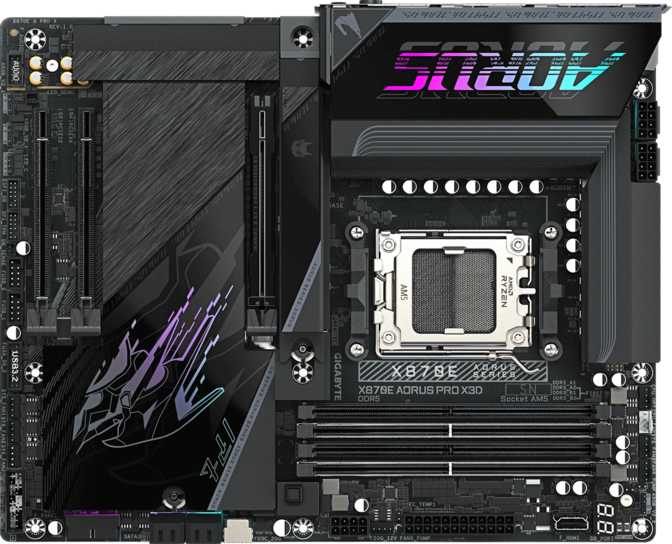
Gigabyte X870E Aorus Pro X3D: Full Review of a Flagship AM5 Board
MotherboardsKey Specifications at a Glance
Socket / Chipset
AM5 / X870E
Max Memory
256 GB DDR5
Wireless
Wi-Fi 7 / BT 5.4
M.2 Slots
4 x NVMe
Thunderbolt 4
2 Ports
Warranty
3 Years
The AM5 platform has matured into a genuine powerhouse ecosystem, and the X870E chipset sits at its apex. The Gigabyte X870E Aorus Pro X3D is a high-end enthusiast motherboard built to extract the maximum from AMD's Ryzen 7000 and 9000 series processors — particularly the 3D V-Cache variants that the "X3D" designation in its name directly courts. This is not a board you buy because you have to. You buy it because you want every performance ceiling raised, every connectivity option covered, and every upgrade path left open for the foreseeable future.
Whether you are building your first serious gaming or creative workstation or migrating an existing system to AMD's latest architecture, the details here matter more than the branding — and there is a great deal to unpack.
Review Score
Design and Build Quality
Form Factor and Physical Presence
The Aorus Pro X3D follows the standard ATX footprint, measuring 305 mm wide by 244 mm tall — the size that fits virtually every mid-tower and full-tower case sold today. If you are working with a compact or micro-ATX case, this board will not fit. ATX is your floor, not your ceiling.
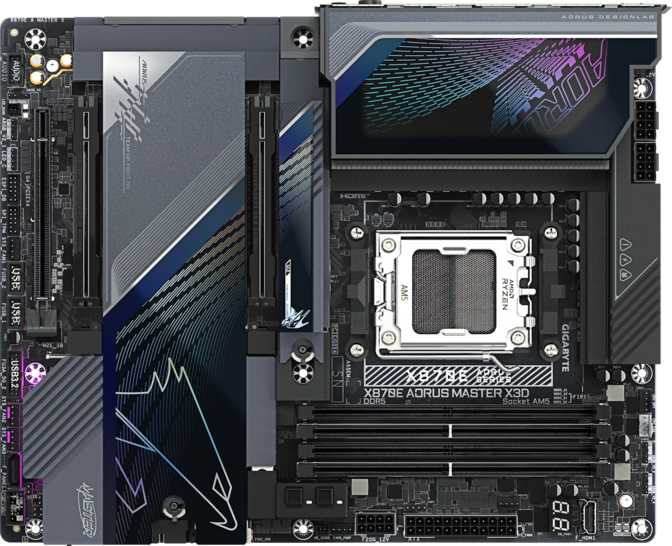
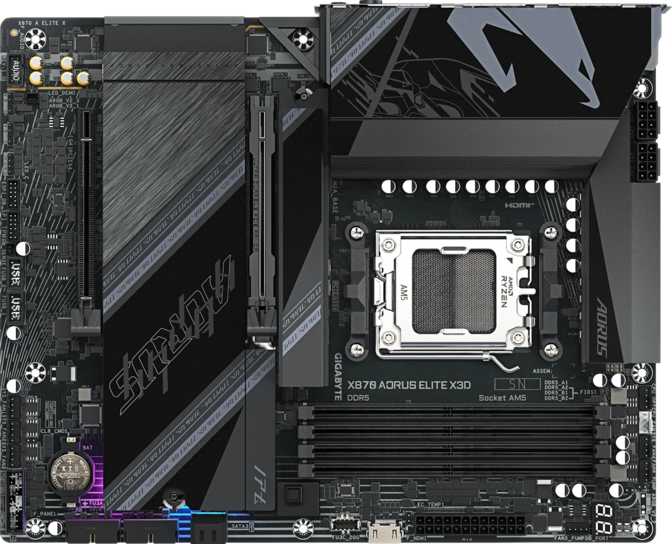
Gigabyte's Aorus line has always leaned into visual aggression, and this board continues that tradition. RGB lighting is integrated across the board and controlled through Gigabyte's RGB Fusion software, which allows per-zone customization and synchronization with other Aorus ecosystem components. For builders who care about aesthetics, the lighting implementation is generous. For those who prefer a clean, dark build, it can be switched off entirely.
The physical construction reflects a premium-tier product. Reinforced PCIe slots, robust M.2 heatsink covers, and dense component density around the VRM area are all visible indicators that this board is engineered for sustained high-load operation, not just initial benchmark runs.
BIOS Accessibility
A dedicated CMOS reset mechanism is built in, meaning you can recover from a failed overclock or corrupted BIOS configuration without hunting for a header or a coin cell battery. This is genuinely useful for enthusiasts who push memory or CPU frequency limits regularly.
No Dual BIOS on This Board
Unlike some competing X870E options, the Aorus Pro X3D does not carry a backup BIOS chip. If aggressive firmware experimentation bricks the primary BIOS, recovery requires a USB flashback procedure rather than a physical switch. For users who routinely push BIOS limits, this is a genuine trade-off to weigh before committing.
Processor Compatibility and Platform Choice
The board uses AMD's AM5 socket, the current-generation platform for Ryzen 7000 and 9000 series CPUs including the 3D V-Cache variants. The X870E chipset is the flagship of the AM5 chipset stack, sitting above X670E, X670, B650E, and B650. The practical significance is full PCIe 5.0 lane allocation to both the primary GPU slot and M.2 storage — a distinction that matters for the fastest NVMe drives available today.
The "Pro X3D" naming signals that Gigabyte has specifically tuned this board's power delivery and cooling infrastructure for the thermally demanding Ryzen X3D processors, which stack additional cache on the die and have more nuanced thermal management requirements than standard CPUs.
Platform Longevity Matters Here
AMD's AM5 platform carries an extended support commitment, with future Ryzen generations expected to remain socket-compatible. For buyers thinking in three-to-five-year upgrade cycles, that longevity is a meaningful part of the value proposition — and a factor that separates AM5 from its predecessor platform, which received a comparatively shorter support window.
Memory Performance: DDR5 at Its Limits
Capacity and Configuration
Four DDR5 memory slots in a dual-channel configuration allow for up to 256 GB of total RAM. Most users will install 32 GB or 64 GB, leaving room for future expansion without replacing existing modules. Installing two or four sticks — not one or three — yields the best bandwidth from the dual-channel architecture.
Stock to Extreme Speeds
At standard plug-and-play speeds, the board runs DDR5 at 5200 MHz — already substantially faster than the DDR4 speeds that defined the previous generation. Engaging XMP or EXPO profiles in the BIOS pushes speeds all the way to 9000 MHz, placing this board among the most memory-capable AM5 options in its class. For gaming, the jump from mid to very-high DDR5 speeds is noticeable but not transformative; for memory-intensive creative workloads, the headroom pays real dividends.
DDR5 Speed Range
Speed range shown from JEDEC minimum to this board's certified XMP/EXPO maximum
Connectivity: Where This Board Sets Itself Apart
The rear I/O and internal headers represent one of the most complete connectivity packages in the X870E class. The port selection directly determines what you can attach to your system for the next several years — this section deserves careful attention before you buy.
Rear I/O USB Breakdown
| Port Type | Speed | Count | Best Used For |
|---|---|---|---|
| USB4 40 Gbps (Type-C) | 40 Gbps | 2 | External SSDs, high-speed docks, hubs |
| Thunderbolt 4 (Type-C) | 40 Gbps | 2 | Daisy-chaining, eGPUs, pro audio/video |
| USB 3.2 Gen 2 (Type-A) | 10 Gbps | 5 | Fast external drives, controllers |
| USB 3.2 Gen 2 (Type-C) | 10 Gbps | 2 | Modern peripherals, cables |
| USB 3.2 Gen 1 (Type-A) | 5 Gbps | 3 | Standard peripherals, keyboards, mice |
No legacy USB 2.0 ports appear on the rear I/O. The bandwidth stays clean, but very old peripherals may need an adapter. Internal headers cover the gap: four USB 3.2 Gen 1 ports, four USB 2.0 ports, and one USB 3.2 Gen 2x2 front-panel connector for case panels that support it.
Wireless: Wi-Fi 7 and Bluetooth 5.4
The integrated Wi-Fi 7 module operates across 2.4 GHz, 5 GHz, and 6 GHz bands simultaneously. This is the current-generation wireless standard, delivering higher throughput and lower latency than Wi-Fi 6E. The module maintains full backward compatibility with Wi-Fi 6E, 6, 5, and 4 — it connects to any router you already own, with Wi-Fi 7 advantages activating only when a Wi-Fi 7 router is introduced.
Bluetooth 5.4 handles wireless peripherals and headsets with full current-generation pairing support.
Wired Ethernet
A single RJ45 port handles wired networking. At the X870E tier and this board's price point, 2.5 Gigabit ethernet is the expected and standard implementation — a meaningful step above the 1 Gigabit connections that defined previous-generation builds, enabling faster local network file transfers and reduced bottlenecks on high-bandwidth internet connections.
For users who require 10 Gigabit ethernet, a PCIe add-in card fits the secondary expansion slot.
Storage: Four M.2 Slots and Full RAID Support
M.2 NVMe Slots
Four M.2 sockets accommodate NVMe SSDs simultaneously. The primary slot connects to PCIe 5.0 lanes — the fastest consumer storage interface currently available, supporting drives capable of sequential read speeds exceeding 12,000 MB/s. Remaining slots run at PCIe 4.0 speeds, still dramatically faster than traditional SATA storage.
For content creators and heavy multitaskers who need simultaneous fast read and write on multiple volumes, having four M.2 slots without a single add-in card is a genuine structural advantage over competing boards that cap at two or three.
SATA and RAID Configurations
Four SATA 3 connectors accommodate traditional SSDs or hard drives for bulk storage, backup volumes, or secondary arrays. Full RAID support is included across all four configurations:
- RAID 0 — Stripes data across drives for maximum speed with no fault tolerance
- RAID 1 — Mirrors data between drives for straightforward fault protection
- RAID 5 — Distributes parity across three or more drives; balanced speed and resilience
- RAID 10 — Combines mirroring and striping for both speed and redundancy simultaneously
GPU and Expansion Slots
The primary PCIe 5.0 x16 slot handles the graphics card. PCIe 5.0 doubles the theoretical bandwidth of PCIe 4.0, and while current GPU generations do not yet fully saturate that headroom, it means the board will not become the performance bottleneck when next-generation discrete GPUs arrive. A secondary PCIe x4 slot accommodates add-in cards — capture cards, 10 Gigabit ethernet adapters, RAID controllers, or additional M.2 storage expansion. There are no legacy PCIe 3.0 slots or PCIe x1 slots; the layout prioritizes the two positions builders actually use.
Important: The Rear HDMI Port and Integrated Graphics
An HDMI 2.1 port is present on the rear I/O but functions exclusively with Ryzen processors that carry AMD's integrated Radeon graphics — typically models with a "G" suffix. Ryzen X3D processors, the primary audience for this board, do not include integrated graphics. If you pair this board with a Ryzen X3D CPU, the rear HDMI port will remain inactive without a discrete GPU installed. Plan your build sequence accordingly and ensure your graphics card is in place before expecting any display output.
Audio Capabilities
The onboard audio delivers a signal-to-noise ratio of 120 dB from its DAC — a figure that places it well above the threshold where most listeners detect degradation on quality headphones or speakers. The 7.1 surround channel configuration supports full surround sound speaker setups or virtual surround processing in compatible headsets.
An S/PDIF optical output allows connection to external DACs, AV receivers, or soundbars via digital optical cable. For users who have invested in standalone audio equipment, this means the motherboard serves as a clean digital source rather than forcing analog conversion through the onboard codec. Two analog jacks complete the rear audio panel for standard headphone and speaker connections.
The board does not support the aptX Bluetooth audio codec. For standard wireless audio use cases, this has no practical impact; users with specifically aptX-dependent high-fidelity headset workflows should note the omission.
120 dB
Signal-to-Noise Ratio
7.1 Surround S/PDIF Optical 2 Analog JacksThermal Management: Eight Fan Headers
Eight fan and pump headers give builders precise, independent control over every airflow and liquid cooling component in the system. This is enough to simultaneously manage a high-static-pressure radiator, multiple case intake and exhaust fans, and a CPU pump — all addressable individually through Gigabyte's BIOS fan curves or through software control utilities. For air-cooled builds, eight headers is simply more than most configurations require, which is the right kind of excess to have.
Custom fan curves are configurable per header inside the BIOS without needing to install additional software, making quiet-compute and performance-cooling profiles accessible even for first-time builders willing to spend ten minutes in the firmware.
Who Should Buy This Board
This Board Is Right For You If...
- You are building around a Ryzen X3D processor and want a platform matched to its power delivery and thermal demands
- Thunderbolt 4 connectivity is a genuine workflow requirement — for audio production, video capture, professional docking, or eGPU use
- You plan to run high-speed DDR5 kits above 6000 MHz and want memory overclocking headroom without hitting a chipset ceiling
- You need multiple NVMe drives and want at least one running at PCIe 5.0 speeds without expansion cards
- Wi-Fi 7 wireless and the longest available upgrade path on AM5 are priorities for this build
This Board Is Not Right For You If...
- Your budget ceiling is around $200–$250 — the X870E tier commands a significant premium, and for moderate use cases it does not pay itself back in perceptible performance gains
- You are building without a discrete GPU — Ryzen X3D processors carry no integrated graphics, leaving the rear HDMI port inactive
- Dual BIOS is a non-negotiable safety requirement for your firmware experimentation and overclocking workflow
- You need ECC memory support for professional server or workstation error-correction requirements
Competitive Positioning
At the X870E tier, the Aorus Pro X3D competes directly with offerings from ASUS ROG, MSI MEG, and ASRock Taichi in a similar feature and price bracket. The table below captures the areas that matter most in a side-by-side evaluation.
| Feature Area | Gigabyte X870E Aorus Pro X3D | Typical X870E Competitor Range |
|---|---|---|
| Thunderbolt 4 Ports | 2 Ports | 0–2 (varies by model) |
| USB4 40 Gbps Ports | 2 Ports | 1–2 |
| M.2 Slots | 4 Slots | 3–5 |
| DDR5 OC Ceiling | 9000 MHz | 8000–9000 MHz |
| Dual BIOS | Not Included | Sometimes included |
| Fan Headers | 8 Headers | 7–10 |
| Wi-Fi Generation | Wi-Fi 7 | Wi-Fi 6E or 7 |
The Aorus Pro X3D holds its own on connectivity and memory performance but loses ground on the dual BIOS front. ASUS ROG Crosshair and MSI MEG Ace boards at comparable pricing often include a backup BIOS — a meaningful advantage for heavy firmware modifiers. However, neither typically matches the Aorus Pro X3D's Thunderbolt 4 port count at an equivalent price, making the Gigabyte the stronger choice for users whose workflow depends on that interface.
Honest Assessment: Strengths and Weaknesses
The Aorus Pro X3D's greatest strength is breadth. Gigabyte has not skimped on any single category — connectivity, storage, wireless, audio, and memory performance all land at or near the top of the X870E class. The Thunderbolt 4 implementation stands out most: two full Thunderbolt 4 ports alongside two USB4 40 Gbps Type-C ports creates a rear I/O capable of the most demanding peripheral and dock configurations without a single add-in card required.
- Two Thunderbolt 4 ports plus two USB4 40 Gbps ports — an exceptional rear I/O depth that few competitors at this price match
- 9000 MHz DDR5 overclocking ceiling, placing it among the top memory-capable AM5 boards in its segment
- Wi-Fi 7 and Bluetooth 5.4 — current-generation wireless with no legacy compromises
- PCIe 5.0 on both the GPU slot and primary M.2, future-proofing storage and graphics simultaneously
- Full RAID support, four M.2 slots, and eight fan headers — no compromises on completeness
- No dual BIOS — a notable omission for a board explicitly targeting enthusiast overclockers who routinely push firmware limits
- Secondary PCIe slot runs at x4 bandwidth, limiting its utility for add-in cards with higher throughput demands
- Rear HDMI port is inactive with Ryzen X3D CPUs, which carry no integrated graphics — a source of genuine build-day confusion
- No ECC memory support, excluding it from server or mission-critical workstation configurations that require error correction
Questions Real Buyers Ask Before Purchasing
Final Verdict
The Gigabyte X870E Aorus Pro X3D is a genuinely excellent motherboard for the buyer who wants a single, definitive AM5 build that does not compromise in any direction. Its combination of Thunderbolt 4, USB4 40 Gbps, Wi-Fi 7, PCIe 5.0, four M.2 slots, and a 9000 MHz DDR5 ceiling makes it one of the most well-rounded high-end AM5 options available at its price tier.
It is best matched to a Ryzen X3D processor, a discrete GPU, and a user who will actively use the Thunderbolt or USB4 ports — for high-speed external storage, professional peripherals, or docking setups. If those use cases align with your build, this board earns an unqualified recommendation.
If you are building a more moderate system — a mid-range GPU, standard-speed DDR5, no Thunderbolt requirements — a B650E or entry-level X870 board delivers most of the platform's experience at significantly lower cost. The Aorus Pro X3D is a premium product, and its return scales directly with how hard you push the features that make it premium.