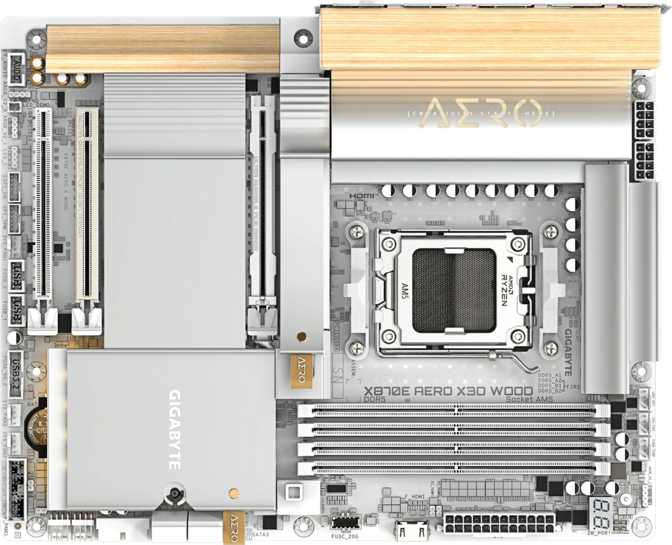
Gigabyte X870E Aero X3D Wood Review – An Honest Look at AMD's Flagship
MotherboardsEditor's Score
Gigabyte X870E Aero X3D Wood
Most motherboards look like motherboards. The Gigabyte X870E Aero X3D Wood takes a different position — pairing AMD's most capable consumer chipset with real wood paneling and one of the strongest external connectivity suites available on the AM5 platform. The hardware underneath earns scrutiny before the premium price does.
Design & Build Quality: The Wood Element, Explained
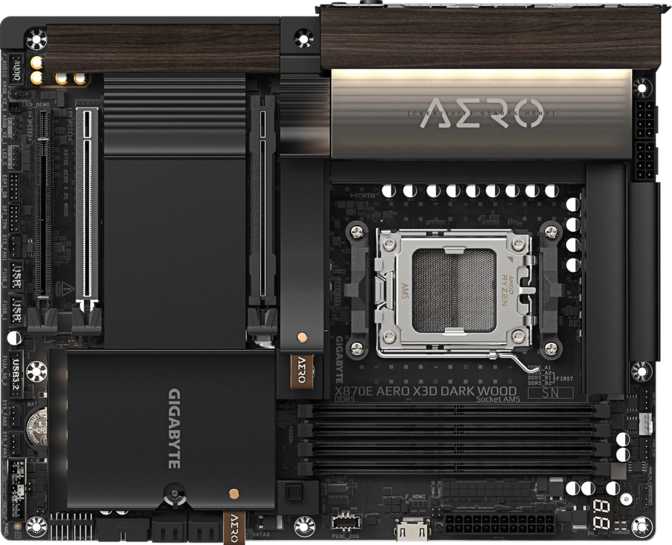
The defining visual characteristic is genuine wood paneling integrated into the heatsink and shroud areas. This is not a wood-grain print on plastic — Gigabyte's Aero line uses real wood materials in its accents, meaning each unit carries a slightly unique surface texture and grain pattern. The result is a motherboard that reads closer to premium audio hardware or consumer electronics than to a typical gaming board.
The board follows standard ATX dimensions at 305mm wide and 244mm tall, fitting any full-tower or mid-tower case with ATX support. No specialty enclosures are needed. Heatsink coverage across the VRM zones and chipset area is substantial, which matters for sustained workloads and the aggressive processor configurations this board is clearly built to support.
RGB lighting is present, though the Aero line applies it with considerably more restraint than gaming-branded boards. Expect accent illumination that complements the wood tones rather than drowning them out.
Build Highlights
- Real wood paneling — each unit has a unique grain pattern; no two boards look identical
- Standard ATX form factor — 305 × 244 mm, universally compatible with full and mid towers
- Dual BIOS chips — physical switchover protects against corrupted or failed firmware
- Dedicated Clear CMOS button — fast BIOS recovery without jumpers or case opening
- Restrained RGB — accent lighting tuned to complement the wood aesthetic, not compete with it
Platform & Performance: What X870E Actually Means
The "E" designation in X870E matters. It sits above standard X870 in AMD's lineup, mandating PCIe 5.0 support for both the primary graphics slot and M.2 storage while providing more connectivity lanes. For an AM5 Ryzen build where every bandwidth bottleneck needs to be removed, X870E is the chipset that does it.
2× PCIe 5.0 x16
Dual full-bandwidth PCIe 5.0 slots deliver twice the throughput of PCIe 4.0, removing bottlenecks for current and next-generation GPUs and high-speed expansion cards
1× PCIe 4.0 x16
The third expansion slot handles capture cards, high-bandwidth network adapters, or PCIe SSD expansion without crowding the primary PCIe 5.0 slots
DDR5 · Up to 256 GB
Four slots across dual channels, with stock support up to 5200 MHz and validated overclocking all the way to 9000 MHz for high-frequency enthusiast kits
Memory Configuration in Detail
Slots
4
DIMM total
Maximum Capacity
256 GB
DDR5 total
Stock Speed
5200
MHz native
OC Ceiling
9000
MHz overclocked
Connectivity: Where This Board Sets Itself Apart
The rear I/O is where the X870E Aero X3D Wood separates itself from boards that merely list impressive specs. No USB 2.0 ports appear on the rear panel — the right call for a modern flagship. What replaces them is a port selection rarely assembled on a single consumer product.
USB Rear Panel Breakdown
USB4 — 2 Ports
The fastest consumer USB connection available. An external SSD saturates its own interface before the port becomes a bottleneck. Essential for creators using fast portable storage arrays.
Thunderbolt 4 — 2 Ports
Daisy-chain up to six devices, connect external GPU enclosures, or drive dual 4K or single 8K displays through one cable. Native onboard Thunderbolt 4 eliminates the need for an add-in card.
USB 3.2 Gen 2x2 — 1 Port
Double the bandwidth of standard USB 3.2 Gen 2, covering next-generation portable SSDs and high-throughput devices that aren't Thunderbolt-equipped.
USB 3.2 Gen 2 — 5 Ports (USB-A)
Five high-speed USB-A ports handle external drives, docking stations, and peripherals at speeds that won't bottleneck modern devices.
USB 3.2 Gen 1 — 3 Ports (USB-A)
Standard high-speed USB for keyboards, mice, USB sticks, and any peripheral that doesn't demand maximum bandwidth.
13
Total Rear USB Ports
All running at 5 Gbps minimum — no legacy USB 2.0 on the rear panel
Networking & Wireless
Dual Wired LAN
Two RJ45 Ethernet ports enable link aggregation for doubled throughput to a compatible router or NAS, or provide a redundant network connection with no add-in card required. One port handles primary internet traffic while the other connects a local storage network — a setup that normally demands extra hardware on competing boards.
Wi-Fi 7 + Bluetooth 5.4
Wi-Fi 7's multi-link operation uses multiple frequency bands simultaneously for higher aggregate throughput and lower latency than Wi-Fi 6E. The benefit is most apparent with a Wi-Fi 7 router; on older hardware, the module negotiates to the appropriate legacy standard automatically.
Bluetooth 5.4 covers all modern wireless peripherals and audio devices with the latest pairing and power-efficiency standards.
Internal Expansion & Storage
Two M.2 sockets handle NVMe SSDs — both capable of running current-generation PCIe 5.0 drives, the fastest consumer storage available. For an X870E flagship, two M.2 slots is a noticeable concession. Competing boards at the same tier routinely offer three to five. Builders managing a system drive, video editing scratch space, and a game library entirely on fast NVMe will find this limiting.
Four SATA connectors support traditional hard drives and SATA SSDs with full RAID capability across levels 0, 1, 5, and 10. RAID 5 support enables parity-based redundancy across multiple drives inside a desktop chassis — without external NAS hardware. It's a configuration that turns this board into a capable foundation for a high-capacity home server build.
Eight independently controllable fan headers distributed across the board handle CPU cooler, multiple case fans, and custom water cooling pump without splitter cables. Each header supports its own fan curve, giving thermal management the granularity a large, complex build requires.
Storage at a Glance
- M.2 NVMe Slots
- 2 (PCIe 5.0 capable)
- SATA Connectors
- 4 ports
- RAID Levels
- 0, 1, 5, 10
- Fan Headers
- 8 independent
Audio: Above the Noise Floor
The onboard audio delivers a signal-to-noise ratio of 120 decibels — well above the threshold where most listeners detect degradation, even through quality studio headphones or bookshelf speakers. Consumer-grade external DACs commonly target the same figure and many don't reach it. The 7.1-channel configuration covers everything from gaming headsets to full multi-speaker home theater setups.
An S/PDIF optical output provides a clean digital passthrough for external DACs and home theater receivers, bypassing the onboard amplification entirely when you have preferred audio hardware already. This is the correct implementation for a board targeting creators who may already own a dedicated audio interface or receiver.
This won't replace a dedicated sound card for professional audio production. For gaming, content consumption, and music listening, however, the onboard implementation is genuinely capable — not a checkbox feature.
Signal-to-Noise Ratio
120 dB
Onboard DAC output
7.1
Audio Channels
S/PDIF
Optical Out
Overclocking: Built for It, But Not Required
The board carries the full infrastructure of an enthusiast overclocking platform. For users who never touch the BIOS beyond initial setup, this headroom functions as a stability guarantee rather than a checklist — the same margins that enable extreme memory speeds ensure the board operates well within comfortable limits at stock settings. The X3D in the board's name also signals specific tuning attention for AMD's 3D V-Cache processors, which respond to memory configuration differently than standard Ryzen dies.
Dual BIOS
Automatic or manual failover to a backup firmware chip if the primary becomes corrupted — a bad flash won't brick the board
Dedicated CMOS Reset
One-button BIOS recovery without opening the case or hunting for a jumper — critical during aggressive tuning sessions
9000 MHz OC Ceiling
Validated support for extreme DDR5 frequencies — premium high-speed memory kits have genuine room to operate
X3D Tuning
Specific validation for AMD 3D V-Cache processors, where memory configuration affects performance more significantly than on standard Ryzen dies
Who Should Buy This Board
- Building a high-end AM5 system and want the strongest platform connectivity without making compromises
- A content creator actively using Thunderbolt 4 devices — external SSDs, monitors, audio interfaces, or eGPU enclosures
- A builder who cares about aesthetics and wants something genuinely distinctive in a windowed case
- Running multiple wired network connections for NAS access, dual-network setups, or link aggregation
- Planning to use fast DDR5 kits and want memory controller headroom to tune them properly
- Prioritizing build quality and warranty support — three years on a flagship platform investment
- Building a budget or mid-range system — the X870E premium is only justified alongside top-tier CPU and GPU choices
- Primarily storing data across many NVMe drives — two M.2 slots will feel restrictive if three or four are part of your plan
- Needing ECC memory for data integrity in professional workloads — this is a consumer board without that support
- Indifferent to aesthetics and connectivity extras — a standard X870 board costs less and performs identically in everyday workloads
How It Compares to the Competition
The clearest trade-off against competitor X870E boards is M.2 slot count — most rivals offer three to five where this board offers two. The compensation is superior external connectivity and a design identity no direct competitor matches. Against the previous-generation X670E platform, the newer board delivers updated standards, though reduced X670E pricing makes it a rational alternative for builders who don't need Wi-Fi 7 or the latest USB specifications.
| Feature | X870E Aero X3D Wood | Typical X870 Mid-Range | High-End X670E |
|---|---|---|---|
| Chipset Tier | X870E (Flagship) | X870 (Mainstream) | X670E (Prior Gen) |
| USB4 40Gbps Ports | 2 | 0 – 1 | 0 – 1 |
| Thunderbolt 4 | 2 Ports | Rare | Rare |
| Dual LAN | Yes | Sometimes | Sometimes |
| Wi-Fi Generation | Wi-Fi 7 | Wi-Fi 6E or 7 | Wi-Fi 6E |
| M.2 NVMe Slots | 2 | 3 – 4 | 3 – 5 |
| Distinctive Design | Yes (Real Wood) | No | No |
| PCIe 5.0 x16 Slots | 2 | 1 – 2 | 1 – 2 |
| Warranty Period | 3 Years | 3 Years | 3 Years |
Honest Strengths & Weaknesses
What It Does Well
Unmatched External Connectivity
Two Thunderbolt 4 ports alongside two USB4 40Gbps connections on a single rear panel is unusual even among X870E alternatives. With dual LAN and Wi-Fi 7, this rear I/O eliminates add-in cards for a professional creator setup — a meaningful cost and slot saving.
Genuinely Distinctive Design
The real wood material is executed with quality that matches the price point. Each board's unique grain pattern means no two builds look identical — something no amount of RGB can replicate, and no competitor offers at this tier.
Excellent Onboard Audio
The 120dB SNR figure holds up against what dedicated sound cards offered only a few years ago. Combined with S/PDIF optical output, the audio section covers both casual users and enthusiasts with preferred external gear.
Rock-Solid Reliability Infrastructure
Dual BIOS, a dedicated Clear CMOS button, eight fan headers, and a three-year warranty combine into a platform you can configure aggressively and trust for the long term.
Where It Falls Short
Only Two M.2 Slots
This is the most meaningful objection. Competing X870E boards from ASUS, MSI, and ASRock routinely provide three to five M.2 slots. Builders who need a system drive, scratch drive, and game library entirely on NVMe will either feel the pinch or repurpose the Thunderbolt 4 ports as the workaround for internal storage limits.
No Mid-Speed USB-C on Rear Panel
All Type-C connections operate at USB4 or Thunderbolt 4 speeds — faster than standard Gen 2, not slower. But users accustomed to a dedicated USB 3.2 Gen 2 Type-C port for quick everyday transfers should note the distinction in their peripheral planning.
Premium Pricing for Specific Needs
The features that justify the cost — Thunderbolt 4, dual LAN, Wi-Fi 7, real wood paneling — only deliver value to a specific type of builder. If your workflow doesn't use them, you're paying for capability you'll never activate when a less expensive X870 board would perform identically.
Questions Buyers Actually Ask
Final Verdict
The Gigabyte X870E Aero X3D Wood makes a specific argument: a top-tier AM5 motherboard can lead with connectivity and character rather than raw specification count. It largely wins that argument — with one clear exception.
Overall Score
8.5
out of 10
Best For
Creator Builds
TB4 + USB4 + Dual LAN + Wi-Fi 7
Main Caveat
Only 2 M.2 Slots
Rivals at this tier offer 3 – 5
Buy This Board If...
You want the best external connectivity on the AM5 platform, value a genuinely distinctive aesthetic, and can work within two M.2 slots. The three-year warranty, dual BIOS, and the combination of Thunderbolt 4 and USB4 ports make it a well-justified premium choice for creators, enthusiasts, and builders who use windowed cases and care what sits inside them.
Consider Alternatives If...
M.2 slot count is non-negotiable for your storage configuration, or your specific workflow doesn't benefit from Thunderbolt 4, dual LAN, or Wi-Fi 7. The X870E platform still delivers the best AM5 experience — you may simply find a competing board at this tier that trades external connectivity breadth for more internal NVMe expansion.