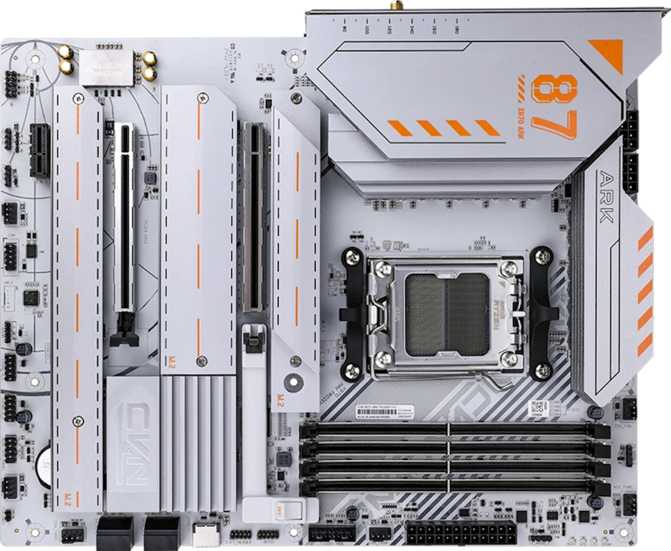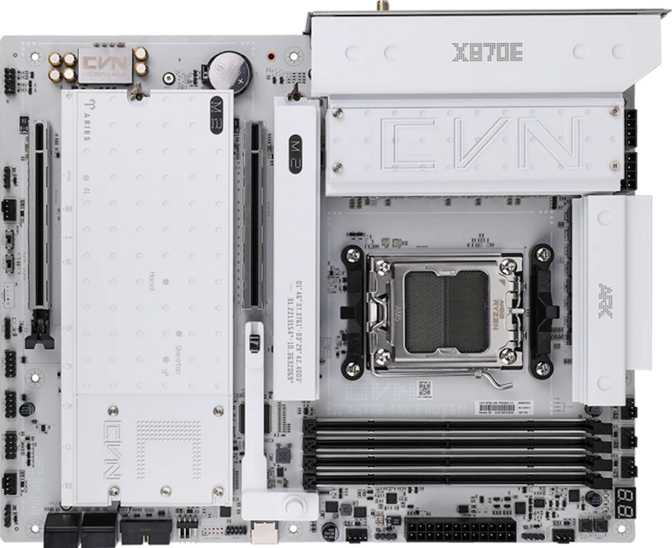
Colorful CVN X870E Ark Frozen V14: A Full Review on AMD's AM5 Platform
MotherboardsThe Colorful CVN X870E Ark Frozen V14 sits at the sharp end of AMD's current desktop ecosystem, built around the X870E chipset and the AM5 socket. For builders who want a flagship-tier foundation without defaulting to the usual household names, this board enters the conversation with a genuinely compelling feature set — but it also carries trade-offs that deserve honest examination before you commit.
Colorful is a brand that Western markets are still warming up to, though the company has shipped hundreds of millions of graphics cards and motherboards globally. The CVN line represents its enthusiast-grade tier. This particular model is aimed at builders who plan to push AMD Ryzen 7000 or 9000 series processors hard — overclockers, creative professionals, and power users who want the platform's ceiling, not its floor.
Design, Build Quality, and Physical Experience
Physical Presence and Layout
The Ark Frozen V14 occupies a standard ATX footprint — 305 mm wide by 245 mm tall — which means it fits comfortably in any full-tower or mid-tower case built for ATX boards. There are no surprises there, and that's a good thing: you're not working around a non-standard shape or unusual mounting positions.
The "Frozen" branding refers to Colorful's icy, crystalline aesthetic theme for this lineup. The board ships with addressable RGB lighting, and it's implemented with more restraint than you might expect from a brand that leans into visual flair. Illumination accents the heatsink shrouds and certain board zones rather than blanketing every surface — a choice that photographs well in a windowed case without looking chaotic at the desk.
Build Quality Signals
The PCB layering, reinforced primary PCIe slot, and overall component density communicate a product built with durability in mind. The steel-reinforced slot matters for anyone mounting a heavy triple-fan GPU — physical stress on the connector over time is real, and reinforcement prevents it. The VRM heatsink coverage is extensive, and the rear I/O shield comes pre-installed — a small quality-of-life detail that budget boards still routinely skip.
Core Performance: What the X870E Chipset Actually Means
The X870E designation is important to understand before comparing this board to anything else. It is AMD's top-tier desktop chipset — the "E" standing for Extreme — and it unlocks capabilities that the standard X870, B650E, and B650 chipsets either restrict or omit entirely. Practically, X870E guarantees USB 4 support at the platform level, PCIe 5.0 for both the primary graphics slot and at least one M.2 slot, and the highest overclocking ceiling available on the AM5 platform.
CPU Compatibility and Overclocking
The AM5 socket supports AMD's current and near-future Ryzen desktop lineup. The BIOS offers accessible toggle-based auto-overclocking for newcomers alongside full manual voltage, frequency, and timing controls for experienced builders. A dedicated clear CMOS mechanism on the board aids troubleshooting without needing to open the system or locate tiny jumper headers.
The Dual BIOS Gap
Unlike many competing flagship boards, the CVN X870E Ark Frozen V14 ships with a single BIOS chip. If a firmware update fails — due to a corrupted file, power interruption, or any other cause — there is no hardware backup to recover from. AMD's BIOS flashback function exists as a fallback, but a true dual BIOS remains absent. This is the board's clearest competitive disadvantage at this price tier.
Memory: Capacity and Speed That Outpaces Most Needs
What Four DDR5 Slots Unlock
Four DDR5 DIMM slots in a dual-channel configuration allow this board to accept up to 192 GB of total system memory. For most gamers, that upper limit is irrelevant — but for video editors working with 8K timelines, 3D artists running large scene files, or developers managing multiple virtual machines simultaneously, having that ceiling available without a platform change is genuinely valuable.
The board supports standard DDR5 speeds well into the range where most kits perform out of the box. Push further into XMP or EXPO profiles and the memory controller can be tuned up to 8400 MHz with manual overclocking. The sweet spot for most builders is a kit in the 6000–7200 MHz range — fast enough to feed a high-end Ryzen CPU without paying for diminishing returns.
Storage: Five M.2 Slots and Full RAID Flexibility
M.2 Slots — More Than Most Builds Will Ever Use
Five M.2 sockets is an exceptional count for a consumer desktop board. The system can hold up to five NVMe SSDs without using a single SATA port. For editors who maintain separate drives for operating system, active project cache, render output, and archive footage — all on fast NVMe storage — this board accommodates that workflow natively and without compromise.
| M.2 Slot | Interface | Connection | Best Use Case |
|---|---|---|---|
| Slot 1 (Primary) | PCIe 5.0 | Direct CPU | OS drive or primary NVMe for maximum sequential speed |
| Slots 2 – 5 | PCIe 4.0 | Chipset | Project storage, cache drives, archive, secondary NVMe |
SATA and RAID
Four SATA 3 ports serve traditional 2.5-inch SSDs or hard drives — useful for builders who want to carry forward existing storage without an adapter. The board supports RAID 0, 1, 5, and 10 configurations across SATA drives, covering striped speed arrays, mirrored redundancy setups, and more complex combinations. RAID 0+1 is absent, but that configuration has minimal practical demand outside specific enterprise scenarios.
Connectivity: Where This Board Genuinely Stands Out
The rear I/O panel is where the Ark Frozen V14 earns serious attention. The port selection is broad, fast, and forward-thinking in a way that most boards at any price point struggle to match. The combination of USB 4 and Thunderbolt 4 — both in dual-port configurations — is the headline, and it is legitimately rare.
Rear USB Ports Explained
| Port Type | Count | Real-World Speed | Best For |
|---|---|---|---|
| USB 4 — 40 Gbps (USB-C) | 2 | ~5 GB/s | External NVMe enclosures, Thunderbolt-compatible devices |
| Thunderbolt 4 (USB-C) | 2 | ~5 GB/s | eGPUs, docking stations, professional displays |
| USB 3.2 Gen 2 (Type-A) | 3 | ~1.2 GB/s | Fast external SSDs, cameras, audio interfaces |
| USB 3.2 Gen 1 (Type-A) | 4 | ~625 MB/s | Standard peripherals, USB hubs, flash drives |
| USB 2.0 (Type-A) | 2 | ~60 MB/s | Keyboards, mice, wireless dongles |
Internal Expansion Headers
The board's internal headers extend connectivity significantly for front-panel ports:
- Two USB 3.2 Gen 1 headers — adds up to four additional USB-A ports via the case front panel
- One USB 3.2 Gen 2x2 header — front-panel USB-C at up to 20 Gbps for cases that support it
- Four USB 2.0 header pins — legacy front-panel connectors and internal wireless dongles
Networking and Wireless
Wired Ethernet
A single 2.5 Gigabit Ethernet port handles wired networking. For most home and office environments, 2.5G easily outpaces any typical internet connection. The limitation surfaces when transferring large files between local machines over a 10GbE NAS — a setup common among the creative professionals this board otherwise targets. If that describes your workflow, factor in an add-in 10GbE card for the PCIe x4 slot.
Wi-Fi 7 and Bluetooth 5.4
The integrated wireless module covers every major Wi-Fi generation up through Wi-Fi 7 (802.11be). On 6 GHz bands, Wi-Fi 7 provides dramatically lower congestion and more consistent latency than older standards — a genuine improvement for online gaming and video calls in dense wireless environments. Bluetooth 5.4 supports the latest low-energy audio profiles for wireless peripherals, earbuds, and controllers. AptX audio codec support is not included.
Expansion Slots: Lean but Purposeful
The slot configuration is deliberately minimal — two slots total — which reflects a design philosophy of quality over quantity:
| Slot | Specification | Primary Use |
|---|---|---|
| Primary (x16 physical) | PCIe 5.0 x16 | Discrete GPU — full bandwidth, steel-reinforced housing |
| Secondary | PCIe x4 | Add-in cards: capture cards, 10GbE NICs, RAID controllers |
There are no additional x16 slots, meaning multi-GPU configurations are off the table entirely. For the overwhelming majority of gaming and creative workstation builds, this is a non-issue — multi-GPU for gaming has been effectively dead for years, and the x4 slot comfortably covers the add-in cards most builders actually reach for. The PCIe 5.0 x16 primary slot ensures current and next-generation graphics cards operate at full bandwidth without lane splitting or compromise.
Audio: Onboard Quality Worth Taking Seriously
The onboard audio solution achieves a 120 dB signal-to-noise ratio on its DAC output — a figure that represents extremely clean audio with minimal background noise. For practical context, most listeners cannot perceive degradation above 100 dB SNR during normal use. At 120 dB, the onboard solution is genuinely competitive with entry-level dedicated audio cards for music listening and gaming.
The system supports 7.1 surround output through two physical audio jacks, allowing front stereo plus surround, center, and subwoofer channels through separate connections. The S/PDIF optical output passes a clean digital signal to an external receiver or DAC without any analog conversion on the motherboard — a direct benefit for home theater setups and audiophiles who use a standalone DAC. For professional studio recording requiring XLR inputs and ultra-low-latency monitoring, a dedicated audio interface is still the right choice regardless of what the motherboard provides.
Video Output: A Purposeful Limitation to Understand
The board includes one HDMI 2.0 rear output — capable of 4K at 60 Hz — and no DisplayPort outputs. This port is useful for initial system diagnostics and setup in the rare scenario where an APU is installed. For all standard Ryzen desktop builds, your graphics card determines display capability entirely: a capable discrete GPU can drive four or more monitors depending on its own port configuration, independent of this board's rear I/O.
Thermal Management: Six Fan Headers and VRM Coverage
Six fan headers distributed across the board provide meaningful, independent airflow control without requiring a fan hub. That count covers intake fans, exhaust fans, CPU cooler, and an optional radiator pump — most builders running three-fan cases will naturally use four or five of these without thinking about it.
The "Frozen" aesthetic theme is backed by substantial VRM heatsink coverage, and that matters practically. Thermal throttling from inadequate VRM cooling is a real failure mode when running power-hungry AMD processors at sustained loads — video encoding, large 3D renders, extended overclocking sessions. The VRM solution on this board is engineered to handle those workloads without becoming a bottleneck.
Who This Board Is For — and Who It Is Not
- Building a high-performance AMD Ryzen workstation for video editing, 3D rendering, or music production
- Running multiple NVMe drives simultaneously and need five M.2 slots to avoid external storage compromises
- Prioritizing external connectivity — specifically USB 4 and Thunderbolt 4 at the desktop level
- An enthusiast who overclocks both CPU and memory and wants headroom to experiment aggressively
- Someone who wants Wi-Fi 7 integrated from day one without an add-in card consuming the x4 slot
- A mainstream gamer on a tighter budget — the feature set here exceeds what gaming alone requires, and the price reflects it
- Building a value-focused system where a B650 or B650E board covers everything you actually use
- Someone who requires dual BIOS for firmware update safety — that feature is not present on this board
- Running a local 10 Gigabit Ethernet storage network — the 2.5G wired port is the ceiling without an add-in card
- Requiring ECC memory for continuous data integrity — this platform does not support it
Competitive Positioning: How It Stacks Up
The dual USB 4 paired with dual Thunderbolt 4 is a genuine differentiator — most competing X870E boards offer one standard or the other, not both at this port count. Where the CVN board falls short of the competition is dual BIOS, a safety feature buyers typically expect when spending at the flagship tier.
| Feature | CVN X870E Ark Frozen V14 | Typical X870E Competitor | B650E Alternative |
|---|---|---|---|
| USB 4 (40 Gbps) | 2 ports | 1–2 ports | Rare / 0–1 ports |
| Thunderbolt 4 | 2 ports | 0–1 ports | Typically absent |
| M.2 Slots | 5 | 4–5 | 3–4 |
| Wi-Fi Version | Wi-Fi 7 | Wi-Fi 6E – 7 | Wi-Fi 6E – 7 |
| Dual BIOS | No | Often Yes | Often Yes |
| Audio SNR | 120 dB | 108–120 dB | 100–113 dB |
| Fan Headers | 6 | 6–8 | 4–6 |
B650E boards from established brands often cost considerably less while covering most of the same ground — the primary sacrifices are USB 4 port count, Thunderbolt presence, and occasionally M.2 slot quantity. For a pure gaming system, those trade-offs are entirely reasonable. For a creative workstation where external connectivity drives daily workflow, they matter significantly.
Honest Assessment: Strengths and Weaknesses
Where It Delivers
- Dual USB 4 (40 Gbps) paired with dual Thunderbolt 4 is hard to find elsewhere at any price — this combination alone justifies serious consideration for connectivity-first builds.
- Five M.2 NVMe slots provide storage flexibility that most competing boards never reach — genuinely useful for professional content creation at scale.
- The 120 dB SNR onboard audio is above average for consumer motherboards and competitive with entry-level dedicated audio solutions for most use cases.
- Wi-Fi 7 integration eliminates the need for a separate wireless add-in card and delivers the cleanest, lowest-latency wireless standard currently available.
- PCIe 5.0 on both the GPU slot and the primary M.2 socket ensures no bandwidth ceiling for current or near-future hardware generations.
Where It Falls Short
- The absence of dual BIOS is the most meaningful gap at this price tier. Competing flagship boards typically include backup firmware as standard — this board does not, and that's a real risk during updates.
- The rear HDMI port is effectively vestigial for standard builds — no integrated graphics support from mainstream AM5 Ryzen CPUs means most builders will never use it.
- The 2.5 Gigabit Ethernet ceiling may frustrate builders running local 10GbE storage networks — common among the creative professionals this board otherwise serves well.
- Colorful's support infrastructure in Western markets is less established than ASUS, MSI, or Gigabyte. The three-year warranty is solid on paper, but regional RMA experience varies — worth researching for your location before purchase.
Frequently Asked Questions
Final Verdict
The Colorful CVN X870E Ark Frozen V14 is a purpose-built enthusiast platform for AMD builders who need serious external connectivity alongside serious compute. The dual USB 4 and dual Thunderbolt 4 combination is hard to find elsewhere at any price. Five M.2 slots serve content creation workflows that most boards simply cannot match. The memory headroom, Wi-Fi 7 integration, and PCIe 5.0 throughout make it a forward-looking purchase that won't feel dated quickly.
If your build demands high-bandwidth external connectivity and you are committed to an AMD Ryzen platform, this board delivers a feature set that most competitors don't assemble in one package. The audio quality and wireless implementation add genuine value on top of an already strong foundation.