Inno3D GeForce RTX 5060 Low Profile: Full Review for Compact Builders
Graphics CardsMost compact desktop builds are a compromise. You squeeze a small-form-factor PC into a tight case, accept the trade-offs, and live with a GPU that barely keeps pace with mid-range expectations. The Inno3D GeForce RTX 5060 Low Profile exists to break that assumption. It brings NVIDIA's latest Blackwell architecture — the same generation powering full-sized cards in much larger, more expensive configurations — into a half-height form factor that fits cases most gaming GPUs simply cannot enter.
This is a card for a specific buyer, and for that buyer, almost nothing else on the market competes directly. If you have been holding off upgrading a compact workstation, living room PC, or small-form-factor gaming rig because you could not find a capable low-profile GPU, read on.
At a Glance
Blackwell performance in a half-height form factor — the essential picture before diving deeper.
Overall Rating
Best-in-class for compact builds
Architecture
Blackwell
5nm · 21.9 Billion Transistors
Video Memory
8GB GDDR7
448 GB/s Bandwidth
Form Factor
Low Profile
178 × 69mm Half-Height
Design, Build Quality, and Physical Experience
Half the height. All the ambition.
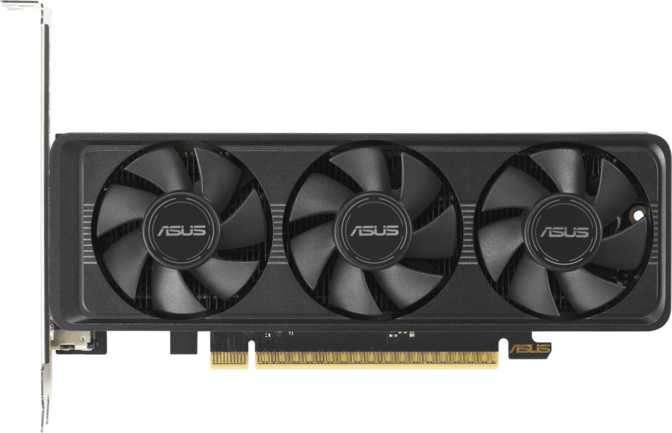
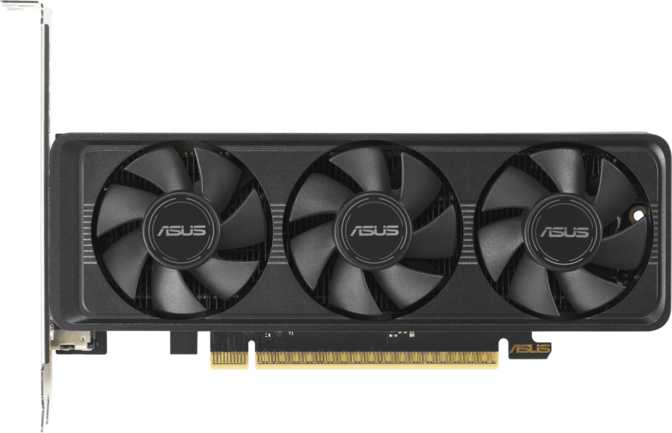
At 178mm long and just 69mm tall, the Inno3D RTX 5060 Low Profile adheres to the half-height bracket standard — roughly half the physical height of a conventional full-size GPU. That single measurement determines the entire reason to consider this card: it fits in slim desktop enclosures, mini-ITX builds, and HTPC chassis where full-height cards are mechanically impossible.
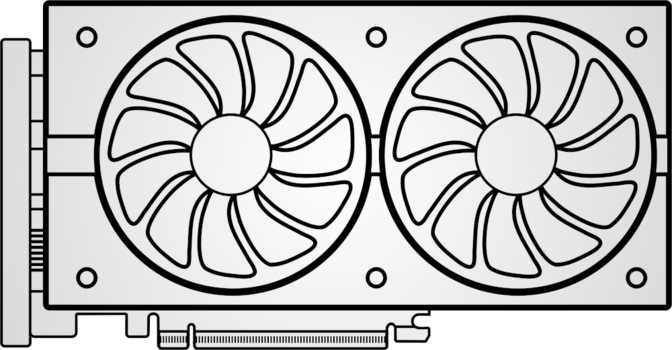
The cooler is air-based, using a compact heatsink-and-fan arrangement. This is the correct engineering choice for this form factor — liquid cooling adds bulk that defeats the purpose of a compact build. Given the constraints, the cooling solution manages the card's thermal load, though it does require a case with adequate airflow to do so consistently under sustained workloads.
Perhaps the most unexpected detail at this size: RGB lighting is included. In a category where manufacturers routinely strip every non-essential component to save space and cost, its presence signals that this card was designed with enthusiast compact builders in mind — not bare-minimum OEM deployments.
3-Year Inno3D Warranty
Inno3D backs this card with a full three-year warranty — a reassuring commitment for a compact card that may see extended uptime in always-on builds, HTPCs, or compact workstations.
-
1 × HDMI 2.1b4K at high refresh rates — TV and projector compatible, ideal for HTPC builds
-
2 × DisplayPortMulti-monitor support and high-refresh-rate desktop use
-
Up to 4 Simultaneous Displays3 physical outputs on the bracket with additional display support on compatible platforms
-
No USB-C OutputA reasonable bracket-space omission, but worth noting for USB-C monitor users
Architecture and Core Performance
What Blackwell actually delivers inside a half-height enclosure.
The Inno3D RTX 5060 Low Profile is built on NVIDIA's Blackwell architecture, manufactured on a 5-nanometer process node with nearly 22 billion transistors packed into a card small enough for a slim chassis. Smaller transistors mean higher efficiency and lower heat output per unit of performance — both critical factors where the cooler has strict physical limits.
The GPU runs at a base frequency of 2,280 MHz, accelerating to 2,497 MHz under workload. The net result is approximately 19.2 trillion floating-point operations per second — a throughput figure that roughly doubles what mid-range cards from the previous generation achieved. That translates directly to higher frame rates, faster AI upscaling calculations, and more headroom for ray tracing workloads than any previous low-profile GPU has offered.
The 3,840 shading units form the core rendering pipeline, supported by 120 texture mapping units that handle surface detail application, and 48 render output units that govern the final speed at which completed pixels reach the display. This configuration is well-matched to 1080p and 1440p workloads — the honest positioning for this card. Attempting to push 4K at maximum settings is not what these numbers are designed for, and the rest of the specification reflects that accurately.
- ArchitectureBlackwell
- Process Node5nm
- Transistors21.9 Billion
- Base Clock2,280 MHz
- Boost Clock2,497 MHz
- Compute19.2 TFLOPS
- Shading Units3,840
- TMUs / ROPs120 / 48
- PCIe InterfaceGen 5.0
Memory: GDDR7 Changes the Equation
8GB sounds familiar — what makes it meaningfully different this generation.
The RTX 5060 LP uses 8GB of GDDR7 — the latest memory standard in consumer graphics hardware. The speed advantage over previous-generation GDDR6X is substantial. Operating at an effective speed of 28 Gbps per pin across a 128-bit memory bus, the total memory bandwidth reaches 448 GB/s.
That bandwidth figure deserves context. A 128-bit bus is narrower than the 192-bit or 256-bit interfaces on higher-tier cards, which typically increase bandwidth through sheer width. GDDR7 takes a different approach: it achieves comparable or superior bandwidth through higher per-pin speed rather than a wider channel. The result is competitive with previous-generation mid-range cards that used wider buses with slower memory. The bandwidth constraint only surfaces in specific high-resolution, maximum-quality scenarios; at 1080p and 1440p in most titles, the memory system operates without meaningful bottlenecking.
The 8GB capacity is where buyers need to be clear-eyed. At 1080p, it is comfortable for virtually all current titles. At 1440p with maximum texture settings in the most demanding games, a small number of titles approach that ceiling. The practical fix — reducing texture quality one step — resolves the issue without visible impact at typical viewing distances. For 4K maximum settings, 8GB is not enough, and this card was not designed for that use case.
- Memory TypeGDDR7
- Capacity8GB
- Total Bandwidth448 GB/s
- Effective Speed28,000 MHz
- Bus Width128-bit
- ECC SupportYes
What is ECC Memory?
Error Correcting Code memory detects and fixes data errors in real time. For gaming and general use it has no visible effect. For scientific, financial, or data processing workloads running on a compact workstation, a single corrupted calculation can cascade through results — ECC prevents that, making this feature genuinely meaningful for dual-purpose professional builds.
Key Features Explained
What the spec sheet calls features — and what they actually mean for real-world use.
DLSS
NVIDIA's AI upscaling renders frames at a lower native resolution and reconstructs them to appear higher-quality — often matching or exceeding native rendering. For this card's 1080p and 1440p targets, DLSS can effectively double frame rates in supported titles. Blackwell's updated AI model further reduces the ghosting artefacts that occasionally appeared in earlier versions, making it a genuine performance tool rather than a quality trade-off.
Ray Tracing
Dedicated ray tracing hardware simulates how light physically behaves, producing accurate reflections, shadows, and global illumination. Blackwell's RT hardware is a step forward from the previous generation. The practical approach: use RT at medium settings with DLSS enabled, where the visual improvement over standard rendering is real and the performance cost remains manageable. Maximum RT settings without DLSS at 1440p is unrealistic for hardware in this class — and that applies equally to non-LP cards at comparable price points.
DirectX 12 Ultimate
Full DirectX 12 Ultimate compatibility covers every rendering feature Microsoft currently defines — including mesh shaders and sampler feedback that newer game engines increasingly use for performance and visual fidelity gains. OpenGL 4.6 and OpenCL 3.0 support extend compatibility to professional creative and compute applications: CAD software, digital content creation tools, and data processing pipelines that benefit from GPU acceleration.
Intel Resizable BAR
Resizable BAR allows the CPU to access the GPU's entire memory pool in a single operation rather than in smaller segments. On compatible Intel platforms with the feature enabled in firmware, this delivers a free 5–15% performance improvement in optimised games. No additional hardware cost required — just a BIOS toggle on a compatible system. If you are building on a modern Intel platform, this is an easy, zero-cost performance gain.
PCIe 5.0 Interface
PCIe 5.0 is the current-generation interface standard and is backward compatible with PCIe 4.0 and PCIe 3.0 systems — you do not need a new motherboard to use this card. GPU workloads do not saturate even PCIe 4.0 bandwidth in most gaming scenarios, so the practical frame rate difference today is negligible. The real benefit is longevity: this card will not be interface-bottlenecked for years ahead, regardless of when you decide to upgrade your platform.
RGB Lighting
RGB on a low-profile card is genuinely unusual — most LP cards skip it entirely to reduce board complexity and cost. Its presence here speaks to Inno3D's intent: this card is built for enthusiast compact builds with windowed side panels, not exclusively for sealed OEM desktops. If you are assembling a small showcase build and care about internal aesthetics, the fact that this feature exists at all at this size is worth acknowledging.
Power Draw and Thermal Considerations
145W in a compact enclosure — what that means for your specific build.
The card's thermal design power sits at 145 watts. For full-sized GPUs, this is moderate — high-end cards in the same Blackwell generation consume two to three times as much. For low-profile cards, 145W sits at the higher end of the category, and it raises a question that genuinely matters for compact builds: can a small cooler handle it reliably over sustained periods?
In a well-ventilated small-form-factor build with at least one intake fan directed toward the GPU, the answer is yes. In a poorly ventilated sealed enclosure with no active airflow path, thermal throttling — where the GPU reduces its clock speed to protect itself from heat damage — becomes a genuine risk. The card does not fail; it simply runs slower than its rated speed until temperatures stabilize. For a gaming or compute workload, that matters.
Power supply planning is equally important. A 145W GPU in a compact system consumes a meaningful portion of a small PSU's total capacity. Most SFF power supplies in the 300–450W range handle this comfortably alongside a modern low-power CPU, but verify your specific total system power draw before finalising your build — and confirm the available PCIe power connector type before purchasing.
- At least one intake fan directed toward the GPU cooler
- Clear exhaust path for heated air to exit the chassis
- PSU with comfortable headroom above total system draw
- Confirm available PCIe power connector type before purchasing
Who Should Buy This Card — and Who Should Not
A specific product for a specific buyer. Know which one you are before committing.
- You are building or upgrading an SFF or slim desktop PC where the case physically limits you to half-height PCIe slots
- You want a living room HTPC that handles 4K media playback and moderate gaming in a compact, quiet enclosure using HDMI 2.1b
- You use a compact workstation for GPU-accelerated compute tasks — CAD, digital content creation, AI workflows, or data processing
- You are upgrading an older pre-built compact desktop that has a spare half-height PCIe x16 slot and integrated or underpowered discrete graphics
- Your primary gaming targets are 1080p or 1440p and you are comfortable using DLSS for the best possible performance output
- You are building in a standard mid-tower or full ATX case — the low-profile form factor offers you no advantage, and a full-height RTX 5060 will sustain cooler operating temperatures under extended load
- You plan to game at 4K with maximum quality settings — the 8GB VRAM ceiling and 128-bit bus are not suited to that workload and will produce a frustrating experience
- Your compact case has no active airflow — at 145W, near-passive or sealed enclosures will cause the card to throttle under sustained load
- You need a USB-C monitor output directly from the GPU — the bracket carries no USB-C port and there is no workaround at the card level
How It Compares to the Alternatives
Where the RTX 5060 LP sits relative to its most logical competitors.
| Consideration | Inno3D RTX 5060 LP This Card | Full-Height RTX 5060 | RTX 4060 LP (Prev Gen) |
|---|---|---|---|
| Form Factor | Half-Height | Full-Height Only | Half-Height |
| Architecture | Blackwell | Blackwell | Ada Lovelace |
| Memory Type | GDDR7 | GDDR7 | GDDR6 |
| Memory Bandwidth | 448 GB/s | 448 GB/s | ~272 GB/s |
| Compute Throughput | ~19.2 TFLOPS | ~19.2 TFLOPS | ~15.1 TFLOPS |
| Case Compatibility | LP + Standard | Standard Only | LP + Standard |
| Power Draw (TDP) | 145W | ~150W | ~115W |
| DLSS Generation | Latest (Blackwell) | Latest (Blackwell) | Previous Gen |
Full-height RTX 5060 and RTX 4060 LP bandwidth and TFLOPS figures are estimated from reference architecture specifications for contextual comparison.
Honest Assessment: Strengths and Limitations
A card this specialised deserves a fully balanced view before you commit.
- Blackwell architecture in a half-height form factor — the most capable low-profile GPU currently available in this performance category
- GDDR7 memory delivers 448 GB/s bandwidth — a substantial leap over previous-generation LP cards on narrower or slower memory standards
- Industry-leading DLSS AI upscaling with Blackwell's updated model — the most refined and artefact-free version of this technology yet
- HDMI 2.1b makes this a genuine 4K TV-compatible GPU for living room and HTPC use cases — rare at this physical size
- ECC memory support broadens appeal to compact workstation users running compute-sensitive professional workloads
- PCIe 5.0 interface future-proofs the card against interface bottlenecks for the foreseeable future
- Three-year Inno3D warranty provides genuine purchase confidence for a compact card that may run continuously in always-on builds
- The 128-bit memory bus is the architecture's most visible constraint — GDDR7 speed compensates effectively, but at very high resolutions under maximum quality settings the limitation surfaces
- 8GB VRAM is approaching a ceiling in the most texture-heavy titles at 1440p maximum settings — a real consideration for buyers who never compromise on any quality slider
- The compact cooler leaves narrower thermal margins than a full-height card — case airflow planning is not optional at 145W, it is a requirement for sustained performance
- 145W TDP is meaningfully higher than comparable previous-generation LP cards, which may require PSU evaluation on older compact builds already running close to capacity
- No USB-C display output on the bracket — buyers using a USB-C monitor will need an active adapter or a different card entirely
Questions Buyers Ask Before Purchasing
The most common searches before clicking buy — answered directly.
Final Verdict
The Answer Compact Builders Have Been Waiting For
The Inno3D GeForce RTX 5060 Low Profile is the answer to a question compact PC builders have been asking for years: when does a genuinely capable GPU arrive in a half-height form factor that doesn't require accepting last-generation performance? That moment has arrived.
For its intended audience — builders physically constrained by case height — this is not just the best current option. In the current market, it is nearly the only serious option at this performance tier. The combination of Blackwell architecture, GDDR7 memory bandwidth, and hardware-accelerated DLSS delivers a 1080p–1440p experience that would have seemed implausible in a low-profile package just two generations ago.
For buyers without case constraints, the calculus changes: a full-height card at a comparable price point will sustain higher clock speeds longer under heavy loads simply because its cooler has more room to work. But for the builder who needs what this card is — a half-height GPU that doesn't apologise for its size — the Inno3D RTX 5060 Low Profile is the most capable product in its category, backed by a three-year warranty and built on an architecture with years of relevance ahead.
Our Rating
Strongly Recommended for Compact & SFF Builds
- Performance
- Excellent
- LP Category Value
- Outstanding
- Feature Set
- Very Good
- Thermal Margin
- Adequate