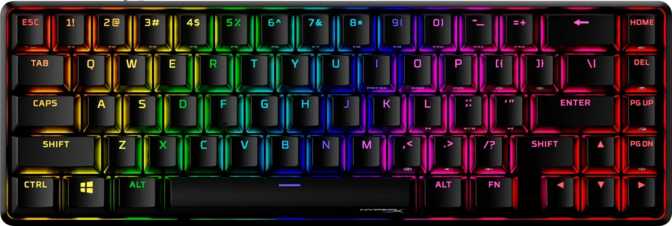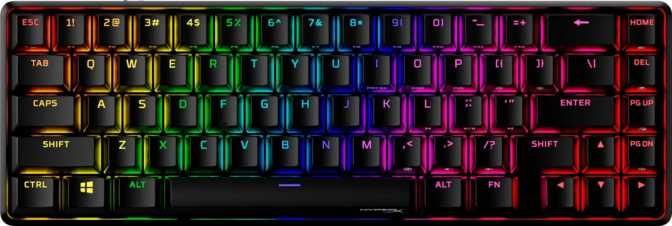
HyperX Origins 2 Pro 65 Review: Competitive Features in a Compact Build
KeyboardsThe HyperX Origins 2 Pro 65 targets competitive gamers who want Hall effect magnetic switches, rapid trigger, and an 8000 Hz polling rate in a compact wired keyboard — without needing to become a firmware hobbyist to get there.
Wired | 65% Compact | Hall Effect Linear | 8000 Hz | Rapid Trigger | Aluminum Build
4.5 / 5
Editor's Rating
What the HyperX Origins 2 Pro 65 Actually Gets Right
The compact keyboard market is crowded, and most of it is forgettable. Boards at this size tend to split into two camps: budget boards that cut corners on switches and build quality, or boutique boards that demand enthusiast prices. The HyperX Origins 2 Pro 65 lands somewhere more interesting — a wired 65% keyboard built around Hall effect magnetic switches and an 8000 Hz polling rate, features that until recently belonged exclusively to flagship-tier peripherals. Whether those specs justify your attention depends on who you are and what you actually need from a keyboard.
Build Quality and Physical Design
A Case That Earns Its Weight
Pick up the Origins 2 Pro 65 and the first thing you notice is that it doesn't feel hollow. At just under 700 grams, it sits on your desk with authority. That mass comes directly from the construction: an aluminum top case paired with an aluminum switch plate, with a plastic base completing the shell. This hybrid approach is smarter than it sounds — aluminum where your hands and eyes interact, plastic underneath to absorb resonance and keep manufacturing costs reasonable.
The aluminum plate deserves specific attention because it directly shapes how typing feels. Compared to polycarbonate or brass plates, aluminum delivers a stiffer, more direct keystroke with a slightly higher-pitched sound signature. Typists who prefer a firm, snappy response will appreciate this. Those who want a softer, more cushioned feel may find it less forgiving during long sessions — something worth considering before buying.
Dimensions and Physical Specs
| Attribute | Detail |
|---|---|
| Footprint | 315 mm wide × 105.5 mm deep |
| Height (back) | 37 mm |
| Weight | 692 g (~1.5 lbs) |
| Case Material | Aluminum (top) + Plastic (base) |
| Plate Material | Aluminum |
| Color | Black only |
| Adjustable Feet | Yes — multiple tilt positions |
| Cable | Detachable USB |
Cable and Connectivity
The detachable cable is a genuine quality-of-life feature, not a gimmick. It means transport, cable replacement, and desk routing are all simpler. The board connects via USB, and the detachable socket means you can swap in a coiled or braided aftermarket cable if aesthetics matter to you.
What to Expect from the Aluminum Plate
- Firm, direct keystroke feel with minimal flex
- Slightly higher-pitched, crisper sound signature
- Long-term structural rigidity — no creaking over time
- Less forgiving than polycarbonate plates for extended typing sessions
- No south-facing RGB bloom that some board aesthetics rely on
Switch Technology: Why Hall Effect Changes the Game
Most keyboards — including expensive ones — rely on physical contact between two metal components to register a keypress. Over time, those contacts wear. They also suffer from "bounce," where a single physical press is registered as two, requiring firmware debounce delays that add latency.
Hall effect switches use a small magnet inside the stem and a position sensor in the housing — no physical contact ever occurs. There is nothing to wear out and no bounce to compensate for. Debounce is dramatically reduced, and the switch reads exact positional depth rather than a simple on/off state.
Switch Feel: Linear
The Origins 2 Pro 65 uses Hall effect switches with a linear feel — meaning the keypress travels smoothly from top to bottom with no tactile bump or audible click. This makes them well-suited to both gaming (fast, consistent actuation) and typing (quiet, low-fatigue stroke). The sound profile is similar to traditional linear mechanical switches, with the aluminum plate lending a crisper, sharper character.
Hot-Swap Support
The switches are hot-swappable — pull any switch and install a replacement without soldering. This opens the board to tuning as the Hall effect switch market expands.
Performance Specifications: What the Numbers Actually Mean
8000 Hz
Polling Rate
Reports position to your PC 8,000 times per second — eight times the frequency of standard gaming keyboards — reducing maximum polling latency to 0.125 ms.
Rapid Trigger
On / Off at Any Point
The key activates the moment it begins moving downward and deactivates the moment it moves upward — from any position in the travel. No fixed reset gap.
NKRO
Full N-Key Rollover
Every key on the board can be pressed simultaneously and individually recognized. No phantom inputs, no rollover limitations.
Understanding the 8000 Hz Polling Rate
A keyboard's polling rate describes how often it reports its state to your computer per second. The standard for most keyboards — even gaming ones — is 1000 Hz, meaning a maximum input latency of 1 millisecond from that source alone. The Origins 2 Pro 65 polls at 8000 Hz, reducing the theoretical maximum to 0.125 milliseconds.
In purely perceptual terms, this difference is not something most people can consciously detect. Where it provides a measurable advantage is in extremely fast, precise input sequences — competitive FPS or rhythm games where inputs occur in tight succession. The higher polling rate ensures those inputs are captured at their exact timing rather than being grouped into the next polling window.
Analog Input and Rapid Trigger Explained
Analog input means the keyboard reads the exact depth of each keypress as a continuous value — every millimeter of travel, not just pressed or not pressed. Traditional keyboards are binary; this one is positional.
Rapid trigger is built on top of that analog reading. On a standard keyboard, a fixed gap between the actuation point and the reset point introduces a small but real delay before a key can fire again. With rapid trigger active, that gap disappears — the key resets the moment it moves upward, even fractionally. In counter-strafing, ability chaining, or rhythm game timing windows, this is a technically real improvement — not marketing language.
Polling Rate Comparison
| Polling Rate | Reports Per Second | Max Polling Latency | Typical Use Case |
|---|---|---|---|
| 125 Hz | 125 | 8 ms | Office / budget peripherals |
| 1000 Hz | 1,000 | 1 ms | Standard gaming keyboards |
| 8000 Hz This Board | 8,000 | 0.125 ms | Competitive / precision gaming |
Keycaps: Material and Profile
PBT Double-Shot Construction
The keycaps are made from PBT plastic — a denser, more rigid material than the ABS plastic found on many keyboards in this price range. PBT resists the shine that develops on heavily used keys over months of typing. The legends are formed through double-shot molding, meaning the character is a separate piece of plastic molded into the keycap rather than printed on the surface. Double-shot legends cannot fade or wear off under any normal circumstances.
The combination of PBT material and double-shot construction means the keycaps should look the same after two years of daily use as they do on day one.
- Resistant to shine and surface wear
- Legends cannot fade — molded-in, not printed
- Consistent RGB light transmission without hot spots
- Standard layout supports wide aftermarket keycap compatibility
OEM Profile
The keycaps use OEM profile — a sculpted shape where each row of keys has a slightly different angle and height, designed to match the natural angle of your fingers at rest. OEM profile is one of the most common keycap profiles in the market, meaning it is familiar to the majority of users and third-party replacement sets are widely available.
Software, Customization, and Limitations
What You Can Configure
The Origins 2 Pro 65 does not support QMK, ZMK, or VIA — the open-source firmware and configuration tools favored by the keyboard enthusiast community. Customization is handled through HyperX's own software ecosystem. RGB lighting effects, rapid trigger sensitivity, and key bindings are adjusted through that platform rather than through portable configuration files stored on the keyboard.
This is a meaningful distinction for a specific type of buyer. Enthusiasts who have built workflows around VIA or QMK will find this board less flexible than they're accustomed to. The trade-off is that HyperX's software is accessible and doesn't require firmware flashing or JSON editing to get started.
Features Present vs. Absent
| Feature | Status |
|---|---|
| Rapid Trigger | |
| Analog Input | |
| Full N-Key Rollover | |
| Hot-Swap Switches | |
| RGB Backlighting | |
| Detachable Cable | |
| QMK / VIA / ZMK Support | |
| Rotary Dial / Volume Knob | |
| USB Passthrough | |
| Wireless Connectivity | |
| Wrist Rest Included | |
| Dual Actuation |
RGB Lighting
The backlighting covers the full board and operates through per-key RGB LEDs, meaning each key can be independently addressed for effects and colors. The PBT double-shot keycaps transmit light evenly without significant hot spots — a common failure point of cheaper boards where lighting bleeds unevenly through thin or translucent legends. RGB customization is handled through HyperX software, where a range of preset effects and custom configurations are available. For users who keep RGB minimal or disabled, the aluminum build and PBT keycaps still make for a clean aesthetic that doesn't depend on lighting to look good.
Who Should Buy the HyperX Origins 2 Pro 65
- You play competitive FPS, rhythm, or precision games where input timing directly affects performance
- You want Hall effect technology and rapid trigger without needing enthusiast-level firmware knowledge
- You need a compact footprint for more mouse space without sacrificing build quality
- You prioritize durable keycaps and a solid, stable desk presence over portability
- You type extensively alongside gaming and want a linear switch that handles both comfortably
- You work primarily in creative or productivity environments with no interest in gaming-specific features — you'd be paying for capabilities you'll never use
- You want full QMK/VIA control over firmware and portable key configurations
- You prefer a softer, bouncier typing feel from a polycarbonate or brass plate
- You need wireless connectivity for a multi-device workflow or couch gaming setup
- A dedicated volume knob is a non-negotiable part of your desk workflow
How It Compares to Alternatives
The Origins 2 Pro 65 occupies a specific position in the market — it out-performs budget competition on switch technology and polling rate, but it trades firmware openness for accessibility. Here's how it stacks up against logical alternatives.
| Feature | HyperX Origins 2 Pro 65 This | Typical Budget 65% (Optical / Mechanical) | Enthusiast 65% (QMK / VIA) |
|---|---|---|---|
| Switch Type | Hall Effect | Optical or Contact Mechanical | Contact Mechanical |
| Polling Rate | 8000 Hz | 1000 Hz | 1000 Hz |
| Rapid Trigger | Rare at this tier | ||
| Plate Material | Aluminum | Often Plastic | Often Brass or Polycarbonate |
| Firmware | Proprietary (HyperX) | Proprietary | Open-Source QMK / VIA |
| Hot-Swap | (Hall Effect only) | Sometimes | |
| Keycap Quality | PBT Double-Shot | Often ABS | Varies by build |
| Wireless Option | Sometimes available | Typically wired |
Honest Strengths and Weaknesses
The Origins 2 Pro 65 makes a strong case in the areas that matter most to its target audience. Hall effect switches with rapid trigger aren't universally offered at this form factor, and the 8000 Hz polling rate puts it on equal footing with top-tier gaming mice in terms of input frequency. The features aren't inflated marketing claims — they're grounded in hardware that actually supports them.
The build quality reinforces that confidence. The aluminum plate and case construction, combined with genuinely durable PBT double-shot keycaps, means this isn't a product that reveals cut corners after a few months of use. The detachable cable and hot-swap support add practical longevity without requiring any technical skill to use.
Where the board shows its limitations is in flexibility. The absence of QMK, VIA, or ZMK support is a real constraint for users who've built their workflow around open firmware. The one-year warranty is modest for a product at this price tier — competitors in adjacent categories often offer two years or more. The wired-only design is fine for stationary setups but a hard stop for anyone whose usage patterns require disconnecting and reconnecting regularly across devices.
The lack of a rotary dial is the one omission that feels like an oversight rather than a deliberate design choice. At 65%, a volume knob is almost expected, and its absence means quick audio adjustments require a key combination that breaks typing rhythm. It's a minor friction point in daily use that adds up over time.
Strengths
- Hall effect switches with genuine rapid trigger
- 8000 Hz polling — uncommon at this form factor
- Aluminum plate + case for long-term rigidity
- PBT double-shot keycaps that won't wear
- Hot-swap without soldering
- Detachable cable
- Standard layout for easy keycap upgrades
Weaknesses
- No QMK / VIA / ZMK firmware support
- Wired only — no wireless option
- No rotary dial for volume
- Only available in black
- 1-year warranty is below category average
- Aluminum plate less forgiving for long typing sessions
Common Questions Before Buying
Final Recommendation
The HyperX Origins 2 Pro 65 delivers a technically coherent package for a specific buyer: someone who wants competitive-grade input features — Hall effect switches, rapid trigger, and an 8000 Hz polling rate — in a compact wired keyboard with durable construction and quality keycaps out of the box.
If that description matches you, this board earns a clear recommendation. The features aren't inflated marketing claims; they're grounded in hardware that actually supports them, and the build quality reinforces that the board is built to last rather than to sell on spec-sheet comparisons alone.
If you're on the fence because you want more firmware flexibility, need wireless, or would prefer a softer typing feel from a polycarbonate plate and softer switches, those are legitimate reasons to keep looking. This board doesn't pretend to be everything to everyone, and the confidence that creates is part of why it works so well for the audience it's genuinely designed for.
4.5 / 5
- Best for: Competitive gamers
- Layout: 65% Compact
- Switch: Hall Effect Linear
- Skip if: Wireless required