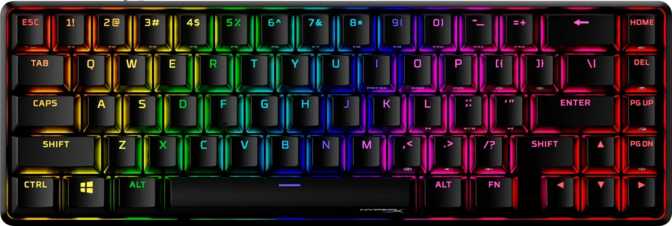
HyperX Origins 2 65 Review: A 65% Built for Competitive Speed
KeyboardsMost compact keyboards ask you to make peace with something — a mushy typing feel, a bargain-bin build, or a polling rate that belonged to keyboards from five years ago. The HyperX Origins 2 65 takes a different position. It pairs a genuinely premium physical construction with an 8,000 Hz polling rate tucked inside a desk-friendly 65% frame — a specification most keyboards twice its price cannot match.
Overall Score / 5.0
Performance at a Glance
Build Quality and Physical Construction
What the keyboard feels like before you press a single key.
The Case: Aluminum Meets Practicality
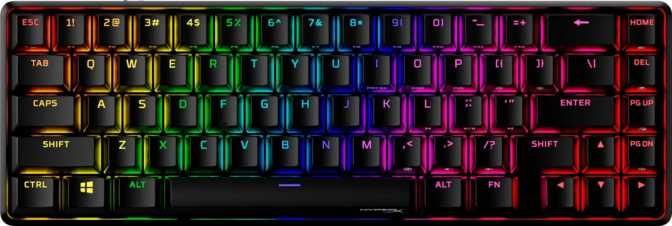
Pick up the HyperX Origins 2 65 and the first impression is that it does not feel hollow. At just under 700 grams, it carries enough heft to stay anchored during aggressive typing sessions without needing a rubber base to compensate. The case blends an aluminum exterior with a plastic foundation — a construction choice that balances premium tactile presentation with manageable weight.
The internal plate is full aluminum. This matters more than it initially seems. An aluminum plate transmits switch vibration more directly and produces a crisper, slightly brighter sound signature compared to polycarbonate or brass alternatives. Typing feel is firmer and more defined — there is no flex or wobble when pressing keys hard. For gamers who bottom out frequently, this rigidity translates to consistency across every single keystroke.
The keyboard ships exclusively in black, keeping it visually clean and compatible with nearly any setup aesthetic. Adjustable rear feet offer multiple tilt positions to find the right typing angle before your wrists register any complaints.
Footprint and Desk Presence
At 315mm wide and just over 105mm deep, the Origins 2 65 reclaims meaningful desk space compared to full-size or tenkeyless layouts. The 65% form factor is a well-considered middle ground: it removes the numpad and function row but retains dedicated arrow keys and a navigation cluster on the right edge — something the more compact 60% layout sacrifices entirely.
If you navigate documents, browse code, or rely on arrow keys during gameplay, the 65% layout preserves that utility while still freeing up room for wider mouse movement. For competitive players who need every centimeter of mousepad space, this is exactly the right balance.
Physical Specifications
- Width
- 315 mm
- Depth
- 105.5 mm
- Thickness
- 37 mm
- Weight
- 692 g
- Plate / Case Material
- Aluminum / Alu+Plastic
The Polling Rate Advantage
The specification that separates this keyboard from most of the 65% market.
HyperX Origins 2 65
Standard Gaming Keyboard
Input Registration Speed
8,000 Hz: Not Marketing Noise
Standard gaming keyboards communicate with your computer 1,000 times per second — the polling rate most of the market has treated as adequate for years. The HyperX Origins 2 65 communicates 8,000 times per second. In practical terms, this means the gap between a key being physically pressed and the action registering on screen shrinks to fractions of a millisecond.
For casual typists or most gaming genres, the perceptual difference is subtle. However, in fast-paced competitive gaming — particularly in titles where reaction time measured in single-digit milliseconds changes outcomes — a higher polling rate removes one more variable between intent and execution. Combined with a linear switch that offers no tactile resistance to slow down actuation, the Origins 2 65 is clearly configured for players who take input latency seriously.
This specification places the Origins 2 65 in a category previously dominated by far more expensive, niche hardware. At a compact 65% price point, it is the keyboard's single most distinctive technical credential.
Wired Only — The Right Decision
The USB wired connection is the correct choice for a performance-focused keyboard. Wireless introduces latency variables that directly undermine the value of an 8,000 Hz polling rate. Every millisecond of advantage the polling rate provides is preserved by staying on cable.
The detachable cable makes this a practical non-issue for transport and desk management. You can swap to a different cable style, length, or color without replacing the keyboard, and the cord-free transport keeps things tidy for competitive events or minimalist setups.
Cable Connection
The detachable cable interface allows for third-party upgrades — a popular customization in the mechanical keyboard community enabling different lengths, colors, and coiled styles without replacing the board itself.
Switches: Linear Feel, Hot-Swap Flexibility
The foundation of the typing and gaming experience — and the most customizable part of this keyboard.
What Linear Actually Means for You
Linear switches move straight down with consistent, even resistance from top to bottom — no tactile bump, no audible click at the actuation point. This produces smooth, quiet key presses well-suited to gaming because there is no friction event mid-travel to interrupt a rapid re-press.
Typists coming from tactile or clicky switches may find linears feel slightly unanchored at first — the feedback confirming a key has registered comes purely from bottoming out rather than a physical mid-stroke sensation. Most users adapt within a few days, and many dedicated typists actively prefer linears once they do.
Optimized for gaming
No mid-stroke resistance interrupting rapid re-presses
Quieter than clicky variants
Less disruptive in shared or office environments
Brief adaptation for tactile users
Expect a 3–7 day adjustment period coming from tactile or clicky switches
Hot-Swap: Your Switch, Your Choice
Every switch on this keyboard can be pulled out and replaced without soldering equipment or professional assistance — a switch puller and a set of replacement switches are all you need. This means the keyboard you buy today is not the keyboard you are permanently committed to.
Want a heavier linear feel? Swap in something with more spring weight. Prefer a tactile switch for productivity sessions? The board accommodates that fully. Standard 3-pin and 5-pin switches are both compatible, covering nearly the entire aftermarket switch ecosystem — a meaningful advantage over any soldered keyboard at any price point.
- 3-pin (PCB mount) switches — fully supported
- 5-pin (plate mount) switches — fully supported
- No soldering tools or skills required
- Compatible with virtually all aftermarket switch brands
Keycaps: Quality You Can Feel
The surface your fingers contact thousands of times a day — material and construction decide longevity.
PBT Double-Shot — The Right Material Choice
The keycaps are made from PBT plastic — polybutylene terephthalate — which is significantly denser and more wear-resistant than the ABS plastic found on most budget keyboards. PBT does not develop a greasy shine from extended use, and the texture remains consistent even after years of heavy daily typing.
Double-shot construction means each keycap is molded from two separate layers of plastic — the legend (the letter or symbol) is a physical part of the cap rather than a surface coating or ink layer. The legends cannot wear off or fade regardless of how long you use the keyboard. This is the highest standard for keycap longevity and the correct choice at any price point.
The OEM profile — the specific height curve of the keycaps — is one of the most widely used profiles in the industry. If you have used a major gaming keyboard brand in the past decade, you have almost certainly used OEM profile keycaps. No adaptation period is required.
ANSI Layout: Full Aftermarket Compatibility
The ANSI (United States) layout and fully standard key sizing means any aftermarket keycap set you purchase will fit without issues. There are no unusual spacebar lengths, oddly sized modifiers, or proprietary key positions that would limit customization options later. This is not guaranteed on every gaming keyboard, and it matters significantly if you ever plan to upgrade from the factory set.
| Specification | Detail |
|---|---|
| Material | PBT Plastic |
| Manufacturing | Double-Shot Molding |
| Profile | OEM |
| Layout | ANSI — US Standard |
| Aftermarket Fit | Full compatibility — standard sizing throughout |
RGB Lighting and Software Features
What this keyboard includes — and what it deliberately leaves out.
- Per-Key RGB Backlighting
Customizable per-key lighting through HyperX software
- N-Key Rollover (NKRO)
Every key registers simultaneously — zero inputs dropped under any conditions
- Hot-Swappable Switches
Replace any switch without soldering — 3-pin and 5-pin both supported
- Detachable USB Cable
Swap cables freely without any permanent cord commitment
- Adjustable Tilt Feet
Multiple height positions for personalized typing comfort
- Media Controls via Fn Layer
Accessible through secondary function key combinations
- QMK / ZMK / VIA Support
Open-source firmware is not supported — HyperX software required for customization
- Rapid Trigger
No variable re-actuation point — the switch must fully reset between presses
- Rotary Dial / Volume Knob
No physical media wheel — audio adjustments require key combinations
- USB Passthrough
No extra USB port built into the keyboard chassis
- Mac Optimization
No Mac-specific legends or native Mac layout support
- Wrist Rest
Not included — a separate purchase for those who need ergonomic support
The absence of QMK and VIA support means customization is confined to HyperX's own software ecosystem. For buyers who want full per-key remapping independence — particularly across operating systems without software installation — this is a genuine limitation that should factor into the purchase decision.
Who Is This Keyboard Actually For?
Not every keyboard suits every buyer — knowing the fit before purchasing saves regret.
You are a competitive PC gamer who wants a compact layout without surrendering dedicated arrow key access
Input latency matters to you and you want the most responsive wired polling rate at a non-specialist price
You plan to experiment with different switch feels and want a board that accommodates that without ongoing cost
You are upgrading from a membrane or entry-level mechanical keyboard and want an immediate, substantial improvement in build and feel
You need to reclaim desk space for a wider mouse range without giving up navigation keys entirely
You want full open-source firmware control through QMK or VIA — this keyboard does not support either platform
Rapid trigger is a non-negotiable feature for your competitive workflow — alternatives with this capability exist at similar price points
You are a Mac-primary user expecting native layout optimization and Mac-labeled keys out of the box
A longer warranty is important to you — the one-year coverage sits below the two-year standard offered by some direct competitors
You rely on a rotary volume dial or USB passthrough port and do not want to use key combinations for media control
How It Compares to the Competition
Where the Origins 2 65 wins, where it concedes, and what that means for your purchase.
| Feature | HyperX Origins 2 65 | Mid-Range 65% (Typical) | QMK-Focused 65% (Typical) |
|---|---|---|---|
| Polling Rate | 8,000 Hz | 1,000 Hz | 1,000 Hz |
| Plate Material | Aluminum | Plastic or Steel | Varies |
| Hot-Swap | Sometimes | ||
| Keycap Material | PBT Double-Shot | ABS (common) | PBT (varies) |
| QMK / VIA | |||
| Rapid Trigger | Rare at this range | ||
| Warranty | 1 Year | 1–2 Years | 1–2 Years |
The polling rate at this price bracket is the Origins 2 65's most defensible competitive advantage. Most keyboards reaching 8,000 Hz are either ultra-premium flagships or require additional hardware investments. Where this keyboard concedes ground is in firmware openness — the QMK and VIA ecosystem commands strong loyalty among enthusiasts, and keyboards supporting open firmware can command that loyalty on specification alone, regardless of build quality comparisons.
Common Questions From Real Buyers
The questions people search before deciding — answered directly.
Final Verdict
The bottom line — clearly stated.
Out of 5.0
Editor's RecommendationA well-executed compact mechanical keyboard that delivers on its core promise.
The HyperX Origins 2 65 earns its place on the recommendation list through physical construction and polling rate performance that genuinely exceed expectations at this price bracket. The aluminum plate and hybrid case produce a keyboard that feels more expensive than it is, and the 8,000 Hz polling rate is a specification most buyers will not find at the 65% compact size without a significant price premium. PBT double-shot keycaps and full hot-swap support round out a package built for long-term use rather than a quick spec-sheet win.
The gaps are real: no QMK or VIA support means committing to HyperX's software ecosystem, the one-year warranty sits at the shorter end of market averages, and the absence of rapid trigger matters to a growing segment of competitive players. These are legitimate reasons to consider alternatives — not minor footnotes.
Purchase Verdict
If open firmware and rapid trigger are not among your priorities, the Origins 2 65 is a confident buy for competitive PC gamers who type and game on a desk where space matters and performance expectations are high. Buyers who want firmware independence or rapid trigger functionality should evaluate dedicated alternatives before committing.