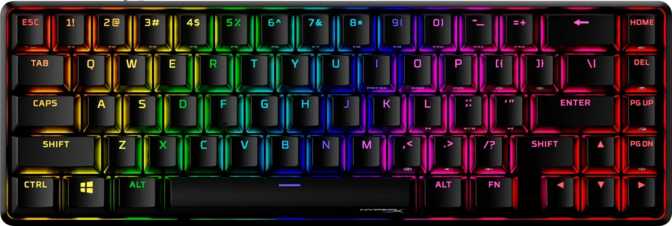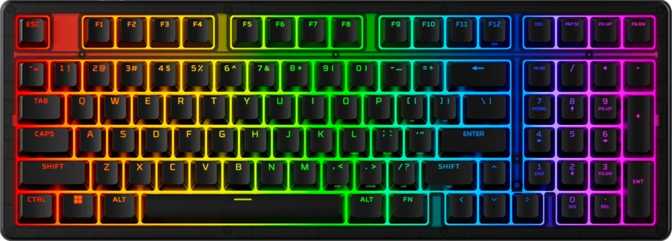
HyperX Origins 2 1800 Review: Aluminum Speed for Competitive Play
KeyboardsThe full-size gaming keyboard market is crowded, and most products in it are forgettable. The HyperX Origins 2 1800 is not. It arrives with a specification that would have turned heads on a flagship board not long ago — most notably a polling rate that outpaces the vast majority of its competition by a significant margin. This review breaks down everything you need to know before committing your money.
Performance at a Glance
Key Highlights
- 8000 Hz polling — 8x faster than standard gaming keyboards
- Full aluminum plate and chassis construction
- Hot-swappable switches — no soldering needed
- PBT double-shot keycaps resist shine and fade
- Full N-key rollover — zero dropped inputs
- No rapid trigger or open firmware support
Design and Build Quality: Aluminum Presence, No Apologies
A keyboard that plants itself on your desk and earns its footprint
Pick up the HyperX Origins 2 1800 and the first thing you notice is weight. At just under a kilogram, this is a keyboard that plants itself on your desk and stays there. That heft is not accidental — it comes from a construction approach that uses aluminum for both the outer case and the internal switch plate, with plastic reserved for the underside and internal structural components. The result is a board that feels genuinely premium in a way that purely plastic competitors simply do not.
The chassis ships exclusively in black, which suits the aesthetic: purposeful, understated, and built to let the RGB lighting do the visual work rather than the casing itself. There is no brushed-chrome trim or unnecessary texture — just a clean, angular form factor that fits naturally into any gaming or professional desk setup.
Adjustable tilt feet are included, letting you raise the back of the board to find your preferred typing angle. This matters more than many buyers realize — the right angle significantly reduces wrist fatigue during long sessions. No wrist rest is included in the box, which is a legitimate omission at this price tier and worth budgeting for separately if you type for extended periods.
The cable detaches from the keyboard via a port on the board itself. This practical feature makes travel and storage easier, reduces the chance of a damaged cable taking the whole keyboard out of action, and lets you swap in a custom cable if aesthetics matter to you. At 388mm wide and 140mm deep, this is a full-size board in every sense — measure your desk before you buy.
| Dimensions | 387.9 × 139.7 × 45.9 mm |
| Weight | 955 g (~2.1 lbs) |
| Layout | Full-Size 100% ANSI US |
| Plate Material | Aluminum |
| Case Material | Aluminum + Plastic |
| Cable | Detachable USB |
| Tilt Adjustment | Adjustable feet |
| Wrist Rest | Not included |
| Connection | Wired USB |
| Color Options | Black |
| Mac Compatible | No |
| Warranty | 1 Year |
The 8000 Hz Polling Rate: Why It Actually Matters
The specification that defines this keyboard's competitive identity
Standard gaming keyboards communicate with your computer 1,000 times per second — one input report every millisecond. The HyperX Origins 2 1800 communicates 8,000 times per second.
What that means practically: the keyboard sends its input state to your PC every 0.125 milliseconds rather than every full millisecond. The gap between pressing a key and the system registering it shrinks to a level that is measurable in competitive play. For most productivity users, this difference is imperceptible. For competitive FPS and real-time strategy players where frame-precise inputs separate wins from losses, this kind of latency reduction is exactly what they pay a premium for.
To put the figure in context: 8000 Hz polling is typically associated with high-end gaming mice targeting esports professionals. Seeing it on a full-size keyboard signals that HyperX is positioning this board squarely at the competitive gaming market, not the general enthusiast crowd.
Running at 8000 Hz does consume slightly more CPU resources than standard polling rates. On any modern gaming rig this is negligible — but it is worth knowing if you are running older hardware.
Bar width proportional to polling rate (max: 8000 Hz)
Switch Feel and the Hot-Swap Advantage
Linear switches and user-replaceable sockets — a platform, not just a product
The Origins 2 1800 ships with linear mechanical switches. Linear switches activate with a smooth, consistent downward press — no tactile bump partway through the stroke, no audible click at actuation. They are fast, relatively quiet, and strongly preferred in competitive gaming for their consistent, uninterrupted actuation.
The more significant feature is the hot-swappable sockets. Every switch on this board can be pulled out and replaced without soldering — you simply use a switch puller, remove the old switch, and press in a new one. This transforms the keyboard from a fixed product into a platform you can tailor over time as your preferences evolve.
Who Benefits from Hot-Swap
Keycaps: Quality Material, Familiar Profile
PBT double-shot construction means these legends will never fade — period
PBT Plastic
Denser and more heat-resistant than the ABS plastic used on most budget and mid-range keyboards. Resists the shine and grease that develops on heavily used keys over months of typing — a problem every ABS keyboard owner eventually encounters.
Double-Shot Legends
Each keycap is made by injecting two separate plastic layers together, so the characters are physically part of the keycap structure — not painted or laser-etched on top. They cannot fade or wear off regardless of how long or hard you type.
OEM Profile
The same gentle curved shape found on most mainstream keyboards. If you are coming from any standard desktop keyboard, OEM profile feels immediately familiar — no adjustment period required.
Standard ANSI Layout
Standard ANSI US means aftermarket keycap sets are available from dozens of manufacturers. Combined with the hot-swap sockets, this keyboard is straightforwardly customizable end-to-end.
- Material
- PBT (Polybutylene Terephthalate)
- Legend Method
- Double-Shot Injection
- Profile
- OEM (Standard Height)
- Layout
- ANSI US — Standard
- RGB Backlit
- Yes — Per-Key
- Aftermarket Compatible
- Yes — widely available
RGB Lighting and Per-Key Illumination
Sharp, clean light diffusion — no blurry bleed across keys
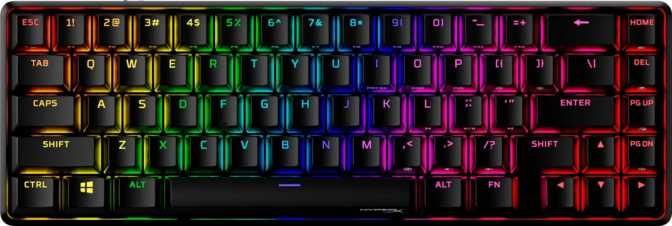
Every key is individually backlit with RGB lighting. The PBT keycaps allow light to diffuse through the legends cleanly — producing sharp, legible illumination rather than the blurry bleed common on cheaper boards that pair ABS keycaps with bright LED arrays. Customization and lighting effects are managed through HyperX's software.
There is no onboard display and no dedicated media keys — media functions are accessed through a function-layer combination on existing keys. For most users this is a minor adjustment. If you regularly adjust volume mid-game without looking down, the absence of a dedicated dial or media cluster is worth considering before you buy.
Full N-Key Rollover: Every Keypress, Every Time
No dropped inputs regardless of how many keys are held simultaneously
The Origins 2 1800 supports full N-key rollover (NKRO), meaning the keyboard correctly registers every single key pressed at the same time, regardless of how many keys are held at once.
When you hold multiple movement keys, modifier keys, and action keys simultaneously — a common scenario in fast-paced competitive games — keyboards with limited rollover drop inputs silently. NKRO ensures every simultaneous keypress is registered without exception.
What This Keyboard Does Not Do
Transparency here saves buyers from expensive mistakes
No Rapid Trigger
Rapid trigger allows a key to re-actuate after being released even a fraction of a millimeter, rather than waiting for full physical reset. It provides a real competitive advantage — primarily counter-strafing in tactical shooters. The Origins 2 1800 does not have this feature. If rapid trigger is a priority for your playstyle, this board is not the right choice.
No Open Firmware (QMK / VIA / ZMK)
These open-source firmware standards allow full key remapping, macro programming, and layer configuration through a universal interface. The Origins 2 1800 uses HyperX's proprietary software instead. For enthusiasts who rely on open firmware for their workflow, this is a hard limitation.
No Adjustable Actuation
The actuation point is fixed at the hardware level. There is no dual actuation, analog input support, or software-adjustable actuation distance available.
No USB Passthrough
There is no extra USB port on the keyboard to plug in a mouse or other device — a minor inconvenience on desks where ports are limited.
One-Year Warranty
In a competitive tier where two- and three-year warranties are increasingly common, one year is short — especially for a near-kilogram aluminum build that implies longevity.
Who Should Buy the HyperX Origins 2 1800
This keyboard has a clear target audience — and equally clear blind spots
- You play competitive games and want measurably lower input latency without moving to a boutique brand
- You need a full-size layout with a number pad and cannot compromise on that
- You prefer linear switches or want the flexibility to change your mind later without buying a new keyboard
- Build quality matters and you want aluminum construction without a custom-keyboard price tag
- You are new to mechanical keyboards and want durable, replaceable keycaps that will look the same in three years
- Rapid trigger support is non-negotiable for your competitive playstyle
- You want open firmware support (QMK/VIA) for advanced customization workflows
- Desk space is limited — the full-size 100% footprint is substantial
- You want a wrist rest included without extra cost
- A longer warranty period is an important factor in your purchasing decision
How It Compares to the Competition
Where the Origins 2 1800 leads, matches, and falls behind comparable boards
| Feature | HyperX Origins 2 1800 | Typical 1000 Hz Competitor | Budget Mechanical Full-Size |
|---|---|---|---|
| Polling Rate | 8000 Hz | 1000 Hz | 1000 Hz |
| Plate Material | Aluminum | Varies (steel or brass) | Usually plastic |
| Keycap Material | PBT Double-Shot | ABS on many models | ABS standard |
| Hot-Swap | Yes | Not always | Rarely |
| Rapid Trigger | No | Select models only | No |
| QMK / VIA Support | No | Available on some | No |
| Detachable Cable | Yes | Varies | Rarely |
Competitor comparisons reflect generalized market characteristics, not specific models.
Strengths and Honest Weaknesses
No product is perfect — here is where this one earns respect and where it loses points
What It Gets Right
The strongest case for this keyboard is the combination of its polling rate, aluminum construction, and hot-swap sockets in a single product. Individually, each of these appears on other boards. Finding all three together — with PBT double-shot keycaps and a standard layout that accepts aftermarket keycap sets — is less common than it should be at this price tier.
The build quality punches noticeably above weight. This is a keyboard that communicates craftsmanship before you press a single key, and the detachable cable and adjustable tilt feet add everyday practicality that compounds over months of use.
Where It Falls Short
The honest weakness is the feature gap relative to the most competitive gaming boards available. The absence of rapid trigger is not a deal-breaker for most players, but it is increasingly a feature buyers expect at premium price points. Being locked into proprietary software limits the ceiling for power users who want precise control over every aspect of the board's behavior.
The one-year warranty on a near-kilogram aluminum keyboard feels like an afterthought. The physical quality suggests longevity — the coverage period does not officially back that up. For a product positioned as a premium purchase, this is the most easily criticized aspect of the package.
Frequently Asked Questions
Answers to the questions real buyers search for before purchasing
A Fast, Well-Built Full-Size Board — With One Clear Trade-Off
The HyperX Origins 2 1800 is a well-made, full-size gaming keyboard that earns genuine respect for its input performance and physical construction. The 8000 Hz polling rate is not marketing fluff — it is a real technical advantage for competitive play, and pairing it with an aluminum-plate build and hot-swappable sockets produces a keyboard that is both fast and forward-compatible with your evolving preferences.
Where it falls short is in the feature checklist that the current competitive keyboard market has made standard expectations: no rapid trigger, no open firmware support, and a warranty that undersells the physical quality of the product.
For competitive gamers who want premium construction and fast input without paying boutique prices — and who do not need rapid trigger.
If rapid trigger or QMK/VIA support are requirements — better alternatives exist for those specific needs.