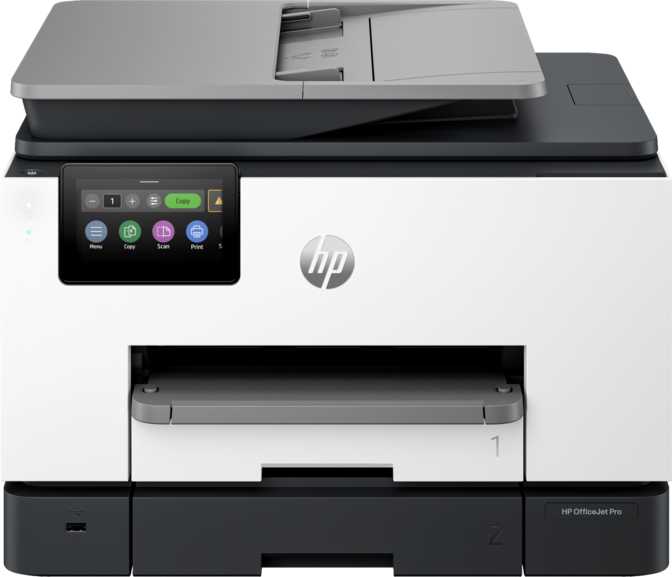
At a Glance
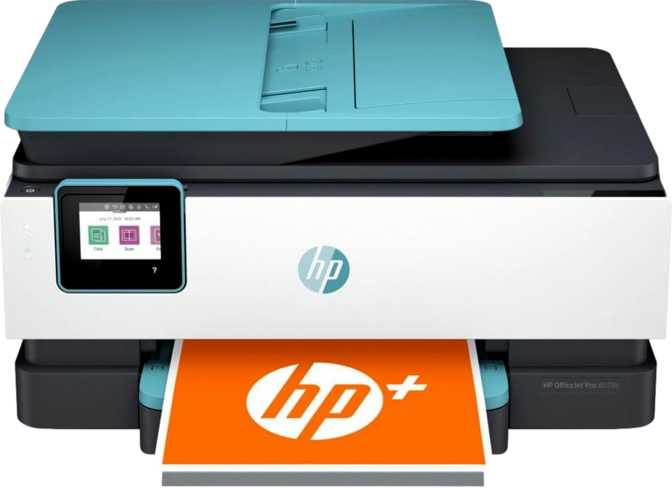
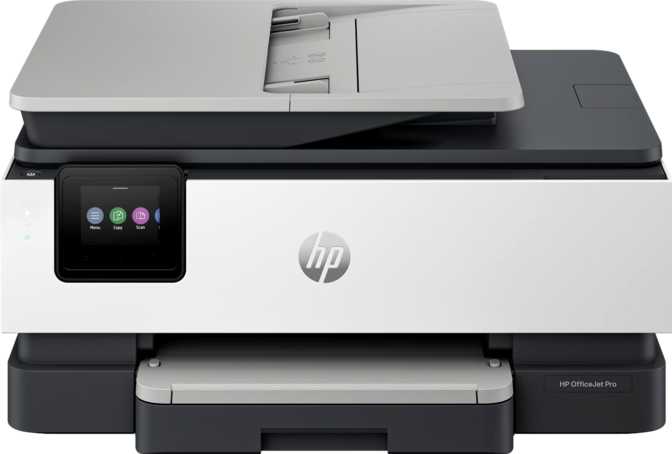
Buying a printer used to mean picking the cheapest box on the shelf and hoping for the best. That approach falls apart the moment you start working from home, running a small business, or managing a household that still deals in paperwork — tax documents, school forms, contracts, the occasional faded receipt that needs scanning before it disappears into a drawer forever. The HP OfficeJet Pro 9135e All-in-One is built for exactly that kind of daily friction: a machine that prints, copies, and scans without becoming a second job to operate. Before you commit your desk space and your budget to it, here is everything that actually matters.
Print Speed
25 ppm black, 20 ppm color
Paper Handling
535-sheet feed, 100-sheet output
Duplex Printing
Automatic, built in
Connectivity
Wi-Fi, Ethernet, AirPrint, Mopria
Design, Build Quality and First Impressions
Unbox this printer and the first thing you notice is that it is built like it expects to work, not just sit decoratively on a shelf. At roughly 17.2 inches wide, 12.5 inches deep, and 15.6 inches tall, and weighing close to 26 pounds, it occupies a similar footprint to a small microwave — substantial enough that you will want a dedicated spot on a desk or credenza rather than a floating side table.
That heft is not wasted. It comes from genuine paper-handling hardware: two separate input trays that together hold up to 535 sheets. In practice, that means you can keep plain letter paper loaded in one tray and letterhead, envelopes, or legal-size paper in the other, switching between them with a tap on the screen instead of physically swapping stacks every time a job changes. The output tray catches up to 100 finished pages before you need to clear it, comfortably covering most single print runs without supervision.
Controlling all of this is a 4.3-inch touchscreen — large enough to navigate menus with a fingertip rather than squinting at tiny buttons, though it stops short of showing a live preview of what you are about to scan or print, so double-checking settings before you commit is still on you.
1-Year Manufacturer WarrantyPrint Performance: Speed, Resolution and Everyday Output
How Fast It Actually Prints
Rated at around 25 pages per minute in black and white and 20 pages per minute in color, this printer moves at a pace that feels closer to a small office machine than a typical home inkjet. A 20-page school packet or contract finishes in under a minute; a quick single page comes out in about 10 seconds for black text and 11 seconds for color — fast enough that you are not standing there waiting through a slow warm-up cycle the way you might with some laser machines.
Resolution and What It Means for Output Quality
The print engine here is a thermal inkjet system, capable of resolutions up to 4800 x 1200 dpi. In plain terms, that is enough precision to render small text cleanly, hold fine lines in technical drawings, and produce color documents and photos with smooth gradients rather than visible banding. It is genuinely good for a working printer rather than a dedicated photo studio device — though one limitation is worth flagging early: it does not support borderless printing, so full-bleed, edge-to-edge photo prints are not possible. If you frequently print photos for framing without a white border, that is a real gap.
Duty Cycle: How Much Workload It Can Handle
HP rates this machine for a recommended monthly volume around 2,000 pages, with a maximum duty cycle of up to 30,000 pages in a given month. Those two numbers tell different stories: the 2,000-page figure is the sweet spot where the printer runs at its best long-term reliability, while the 30,000-page ceiling is a stress-test number showing the hardware can absorb an unusually heavy month without complaint. Treat 2,000 pages a month as your comfortable cruising speed, not the upper limit you should be hitting routinely.
Recommended monthly volume versus maximum rated duty cycle
Automatic duplex printing is built in, so two-sided documents print without you manually flipping pages — a genuine paper-and-time saver for anyone producing reports, packets, or anything longer than a single sheet.
Scanning and Copying: Strong Foundations With a Few Real Gaps
This is where the "all-in-one" label earns its keep, and also where you will find the most honest trade-offs. The printer combines an automatic document feeder with a flatbed scanner — the better of two worlds. Drop a multi-page stack into the feeder for unattended batch scanning, or lift the lid to scan a single odd-shaped item like an ID card, a book page, or a photograph that would not survive the feeder. Scanned files can be saved directly as PDFs, skipping the extra step of converting image files afterward.
What It Handles Well
- Automatic document feeder plus flatbed scanner
- Scan-to-PDF without extra conversion steps
- Adjustable copy density for faded originals
Where It Falls Short
- No duplex scanning despite having a feeder
- No automatic skip-blank-page detection
- No built-in text recognition (OCR)
The gaps show up around automation. There is no auto-scan mode that detects document type and adjusts settings for you, and despite having an automatic feeder, duplex scanning is not supported — double-sided originals need to be flipped and re-fed manually. For occasional use that is a minor annoyance; for anyone digitizing large two-sided contracts regularly, it is a real time cost worth factoring in. Scanned text also comes through as an image rather than searchable, editable text, since there is no onboard optical character recognition.
What About Faxing
The headline feature set here is print, copy, and scan — but the hardware also supports faxing at 300 x 300 dpi resolution with memory for up to 100 pages, useful if you occasionally still need to send something over a phone line for a bank, clinic, or legal office that has not caught up with email. There is no built-in answering machine function paired with it, so do not expect it to double as a phone system.
Connectivity: Fitting Into Your Devices and Network
Wireless support covers Wi-Fi 5 and the older Wi-Fi 4 standard — not the newest Wi-Fi 6, but for a task as lightweight as sending a print job, that distinction rarely shows up in real-world speed. A wired Ethernet port is also available for households or offices where a stable, drop-free connection matters more than wireless convenience. A single USB port allows a direct wired connection to one computer if you would rather skip wireless entirely.
Supported
- AirPrint for iPhone and iPad
- Mopria printing for Android devices
- Wi-Fi Direct for printing without joining a network
- Wired Ethernet for a stable connection
Not Included
- Bluetooth or NFC tap-to-print
- External memory card or USB drive printing
- Alexa or Google Assistant voice commands
For the vast majority of users relying on AirPrint, Mopria, or the companion app, none of the missing extras will be noticed day to day — but if voice-activated printing or USB-drive printing was on your checklist, it is not here.
Smart Features and Everyday Usability
A dedicated smartphone app extends control beyond the touchscreen, letting you start print jobs, check ink status, and manage settings remotely rather than walking over to the machine for every task. Backing this is 512MB of onboard memory — enough buffer to hold complex, multi-page, or graphics-heavy jobs without the printer choking or slowing mid-task.
A few smaller conveniences are absent: there is no document sync to a network folder or USB drive built into the machine itself, so files generally route through the app or a connected computer rather than directly to storage.
Power Consumption and Running Costs
This is genuinely one of the printer's quieter strengths. Operating power draw sits at around 5.58 watts, dropping to roughly 1.22 watts in standby — figures low enough that leaving it plugged in around the clock barely registers on an electricity bill, comparable to the trickle draw of a phone charger left in the wall.
Operating Draw
5.58 watts
Standby Draw
1.22 watts
Efficiency Rating
Top-tier energy rating
Paired with a top-tier energy-efficiency rating, this is a printer you do not need to feel guilty about leaving powered on between print jobs rather than fully switching off and waiting through a startup cycle every time you need it.
Who This Printer Is Built For
A Strong Fit If You
- Run a home office that prints a mix of black-and-white and color documents
- Want automatic double-sided printing without thinking about it
- Need to digitize paper records with a flatbed-plus-feeder combo
- Print from a mix of phones, tablets and laptops
- Care about running costs and low standby power draw
Look Elsewhere If You
- Want true borderless, edge-to-edge photo printing
- Regularly scan double-sided documents on autopilot
- Need to print directly from a USB drive
- Want voice-command printing through Alexa or Google Assistant
- Run a high-volume office well beyond a couple thousand pages a month
How It Compares to Other Printer Types
The honest takeaway: the HP OfficeJet Pro 9135e sits squarely between casual home printers and dedicated high-volume business machines.
| Category | HP OfficeJet Pro 9135e | Basic Home Inkjet AIO | Monochrome Laser AIO | High-Volume Business Inkjet |
|---|---|---|---|---|
| Color output | Yes, photo-capable quality | Usually yes, often slower | No, text only | Yes |
| Everyday speed | Strong, around 25/20 ppm | Modest | Fast for black text only | Fast across the board |
| Comfortable monthly volume | Around 2,000 pages, spikes well beyond that | A few hundred pages | Several thousand pages | Tens of thousands of pages |
| Auto double-sided printing | Yes | Often missing | Common | Yes |
| Best suited for | Mixed home-office work | Light, occasional printing | Heavy black-and-white paperwork | Busy shared-team printing |
Strengths and Weaknesses: The Honest Take
What stands out most after going through every corner of this printer is how well-matched the print engine is to actual home-office demand. The combination of real duplex printing, a two-tray paper system, and a duty cycle that comfortably outpaces its recommended volume means this is not a machine you will outgrow after a few months of regular use. The low power draw is a genuinely underrated win — most buyers never think about standby wattage until the bill arrives, and here it simply is not a concern.
The weaknesses cluster around automation and polish rather than core performance. No duplex scanning despite having a feeder is the most noticeable gap for anyone digitizing two-sided originals regularly. The absence of borderless printing rules it out for photo-print purists. And the lack of text recognition, auto-scan detection, and skip-blank-page handling means the scanning workflow, while functional, asks a little more manual attention than some rivals provide.
Frequently Asked Questions
Final Verdict: Is the HP OfficeJet Pro 9135e Worth Buying?
For a home office or small business that needs one reliable machine to handle documents, color reports, copies, and the occasional scan-to-PDF job, the HP OfficeJet Pro 9135e All-in-One earns a clear recommendation. Its print speed, automatic duplexing, generous paper capacity, and low running power put it ahead of casual home printers without venturing into the price or footprint of a dedicated business machine. The places it falls short — no duplex scanning, no borderless prints, no OCR or voice integration — are real but narrow, and unlikely to matter unless they are specifically on your must-have list. If your printing needs are genuinely mixed, this is a confident, low-regret buy. If duplex scanning or true edge-to-edge photo printing is non-negotiable for you, weigh those specific gaps before deciding.