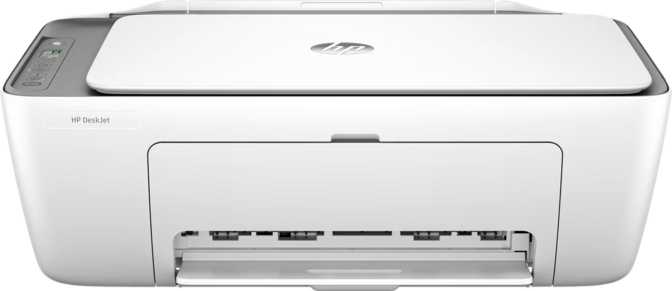
HP DeskJet 2820e All-in-One Review: The Honest Verdict for Home Buyers
PrintersMost households don't need a printer that does everything — they need one that handles the basics reliably without taking up half a desk or quietly draining money on ink. The HP DeskJet 2820e positions itself squarely in that space: a compact, wireless all-in-one designed for occasional home printing, quick scans, and the kind of everyday copying that everyone forgets they need until they need it urgently. Whether this is the right printer for your home depends almost entirely on how honestly you can answer one question: how much do you actually print each month?
Performance at a Glance
Quick Highlights
- Print, Copy, and Scan all-in-one
- Automatic duplex (two-sided) printing
- AirPrint and Mopria supported
- Top-rated energy efficiency
- No ADF — single-page flatbed scanning only
- Wi-Fi only — no USB, Ethernet, or Bluetooth
- Best suited to under 100 pages per month
Design and Build: Compact, Lightweight, and Unobtrusive
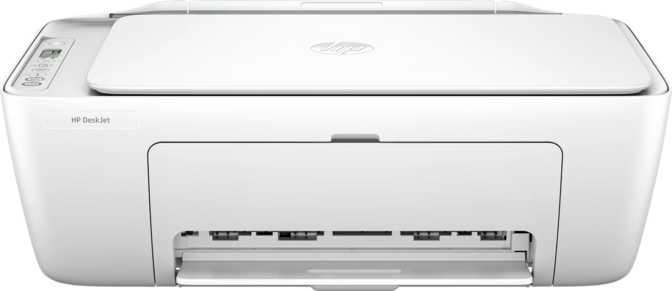
The DeskJet 2820e is a small printer by any reasonable measure. At just under 3.5 kilograms, one person can carry and reposition it without any effort. The white finish keeps it looking domestic rather than corporate — a deliberate choice that suits a living room shelf or kitchen counter as comfortably as a dedicated home office desk.
The proportions are well-considered. The depth is particularly restrained, which matters on narrower surfaces like secondary shelves or windowsill ledges. The height is modest enough to slide beneath a wall cabinet without issue. In terms of physical footprint, this is a printer that disappears into a room rather than defining it.
What you won't find is a touchscreen or any kind of display panel. Control is managed through physical buttons — functional, low-maintenance, and uncomplicated. There's no preview screen for confirming settings before printing, and copy density cannot be adjusted manually. For a printer at this price point, that's an acceptable trade-off rather than a design failure — it keeps the interface approachable and the unit cost down.
Build quality is appropriate for a purpose-built entry-level device: solid plastic construction that feels intentional rather than fl imsy, with design priorities clearly placed on reliability and compactness over material premium. The printer carries a one-year manufacturer warranty, consistent with industry norms in this segment.
Physical Specs
- Weight
- ~3.5 kg
- Width
- 425 mm
- Depth
- 154 mm
- Height
- 304 mm
- Colour
- White
- Control Panel
- Physical buttons
- Warranty
- 1 year
Print Performance: Speed, Quality, and Realistic Expectations
The DeskJet 2820e is not a fast printer, and it makes no pretense of being one. Here's what everyday printing actually looks like in practice.
Copying and Scanning: Flatbed-Only Reality
Copying
The copy function works cleanly and without complication: place a document on the glass, press the button, collect your copy. That simplicity is the point — and also the constraint.
Copy density is fixed rather than adjustable, which covers the majority of everyday needs but offers no recourse if you're trying to lighten an overexposed original or recover detail from a faded source.
No Automatic Document Feeder (ADF)
Every page must be placed on the flatbed glass individually. One page: trivial. A seven-page document: a minor chore. A fifteen-page contract: genuinely tedious.
Scanning
The flatbed scanner allows you to lay open books, place photographs, or scan ID cards and certificates that would never feed cleanly through a slot. Scans save directly to PDF format — the format most people actually need for emailing and digital filing.
The HP Smart app guides the scanning process and handles standard document scanning without complication.
- No auto scan mode — each scan is manually initiated
- Single-sided only — double-sided originals must be flipped manually
- No OCR — scans produce image-based PDFs, not searchable or editable text
Wireless Connectivity: Cable-Free, with Clear Boundaries
The DeskJet 2820e connects exclusively over Wi-Fi. That is your only connection option — understand what that means before purchasing.
Wi-Fi 4 (802.11n)
Handles the modest data demands of home printing with ease.
AirPrint
iPhones, iPads, and Macs print natively — no driver install needed.
Mopria
Android devices print without additional software via the open Mopria standard.
HP Smart App
Setup, scanning, ink levels, and print management — all platforms.
What's Supported
Once on your home network, the printer appears to every connected device automatically. Setup through the HP Smart app is a guided process most users complete without needing a manual. AirPrint and Mopria mean mobile printing works even before you've downloaded the HP app — iPhones and Android phones discover the printer natively through their built-in print menus.
What's Missing
| Connection Type | Available |
|---|---|
| Wi-Fi (802.11n) | |
| USB to Computer | |
| Ethernet / Wired Network | |
| Bluetooth | |
| Wi-Fi Direct | |
| NFC |
Automatic Two-Sided Printing: A Genuine Advantage
One feature deserves more attention than spec sheets typically give it: automatic duplex printing. The ability to print on both sides of a sheet without manually flipping the page is standard on mid-range and professional printers — but far less common among entry-level all-in-ones at this price.
In practice, schoolwork, reports, and multi-page letters are produced double-sided at the touch of a button. Paper consumption roughly halves for any document longer than two pages. Over months of regular household use, the savings in paper costs are noticeable — and the reduction in manual effort is quietly appreciated every single time.
It's a feature that reads modestly on a specification list but becomes one of the more practical aspects of daily life with this printer — and one that many rivals at this price point simply don't offer.
Paper Handling: Functional but Limited
The single input tray holds enough sheets to last most households a full week between top-ups. The output area is smaller — better suited to short print runs. For longer jobs, you'll want to stay nearby rather than walk away and return to a pile-up.
-
Single Input Tray
No separation between paper types. Switching media — plain, photo paper, envelopes — requires a manual swap each time.
-
No Borderless Printing
Photographs and images always carry a white margin. Edge-to-edge photo output is not supported.
-
Top Energy Efficiency Rating
Standby power draw is negligible — barely more than a small indicator light. Electrical running costs over a full year of typical use are genuinely immaterial.
Who Should Buy the HP DeskJet 2820e?
This printer has a clearly defined audience. Understanding which side of this line you fall on is the most important decision in this review.
Suited For
- Families or individuals printing fewer than 25 pages per week — school assignments, letters, forms, occasional photos
- iPhone and iPad households wanting instant printing via AirPrint with zero setup friction
- Users who scan documents occasionally — single-page records, receipts, certificates — without needing multi-page automation
- Buyers who want automatic duplex printing without moving to a more expensive model
- Small spaces where a physically larger all-in-one would be impractical
- Eco-conscious users for whom standby energy consumption is a genuine consideration
Not Suited For
- Home-based businesses or remote workers who print, copy, or scan in regular volume — throughput speed will become a daily friction point
- Anyone who regularly scans multi-page documents — no ADF means every page requires separate manual placement on the glass
- Environments where a wired network or direct USB connection is needed — no such option exists on this printer
- Users who need searchable or text-editable scanned documents — no OCR means scans produce image files only
- Photographers or creative users who need borderless or edge-to-edge photo output
How It Compares to the Competition
The DeskJet 2820e competes with wireless inkjet all-in-ones from Canon, Epson, and Brother. Here's how the key differentiators stack up across the segment.
| Feature | HP DeskJet 2820e | Typical Entry-Level Rivals |
|---|---|---|
| Automatic duplex printing | Often absent at this price tier | |
| ADF for multi-page scanning/copying | Occasionally present (esp. Brother) | |
| Wireless connectivity | Common; some also add USB | |
| Borderless photo printing | Sometimes available | |
| Top energy efficiency rating | Varies by model | |
| AirPrint (Apple devices) | Common across segment | |
| Mopria (Android devices) | Increasingly common | |
| Touchscreen panel | Rare at this price |
The DeskJet 2820e's clearest advantages are automatic duplex printing and top energy efficiency — both practical differentiators rather than marketing distinctions. Its most notable gap relative to some alternatives is the absence of an ADF. Buyers who regularly process multi-page originals should evaluate whether a model with an ADF — even at a slightly higher price — is the better long-term investment.
Common Questions Answered Before You Buy
These are the questions real buyers search for. Here are the straight answers.
A Well-Matched Printer — In the Right Hands
The HP DeskJet 2820e is a precisely targeted product. It does exactly what a light-use household needs, no more and no less.
The print quality is better than its price suggests, the wireless setup through HP Smart is genuinely painless, and the automatic duplex printing is a meaningful practical advantage over many similarly priced rivals. The energy footprint is excellent; standby power consumption is so low it barely registers on a household electricity bill.
The honest answer to whether you should buy it is conditional: only if your actual monthly printing volume fits within its comfort zone. Families printing letters, school documents, the occasional photo, and a few scanned forms will find this printer easy to live with and surprisingly capable for its size.
Buyers who need faster throughput, automatic multi-page scanning, wired connectivity, searchable scanned documents, or consistent daily output should look one or two tiers up. The DeskJet 2820e doesn't pretend to be that printer — and to its credit, it is all the better for knowing exactly what it is.
Best For
Light household printing under 100 pages/month
Avoid If
You need multi-page scanning, wired connection, or daily high volume
Stand-Out Feature
Automatic duplex printing — rare and genuinely useful at this price