Honor Choice MouseBuds Pro Review: One Device, Two Jobs
MiceMost accessories solve one problem. The Honor Choice MouseBuds Pro solves two — and packages them into a single object you carry to every meeting, every coffee shop, every flight. The earbuds live inside the mouse body. Pull them out when you need audio. Slide them back in when you need your cursor. It sounds gimmicky until you picture your bag with one fewer item in it. This is not a gaming peripheral or an audiophile listening device — it is, entirely and unapologetically, a productivity tool for people who are quietly exhausted by the ritual of packing two separate cases for two separate gadgets.
Design and Build Quality
What it looks like to carry one device instead of two
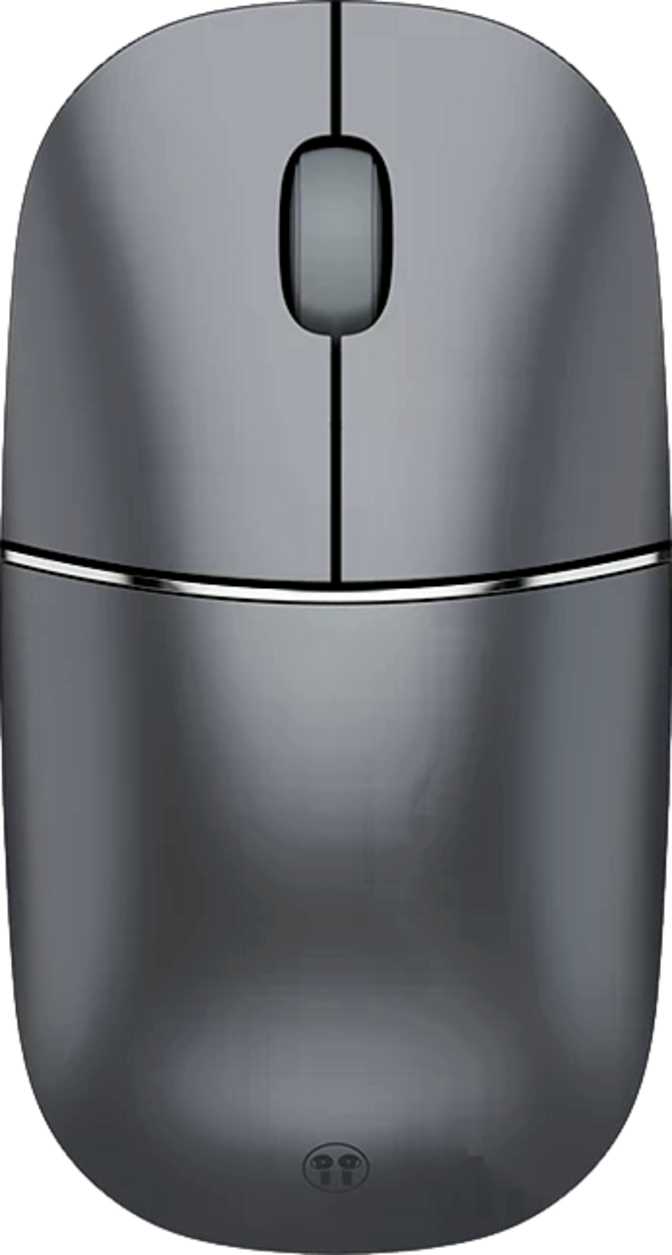
The MouseBuds Pro follows an ambidextrous silhouette — symmetrical from left to right, meaning left- and right-handed users are equally served without a second product variant. At 88 grams, it sits in a weight category that most people would describe as pleasantly light without feeling hollow or cheap. The footprint is compact: 112mm long, 60mm wide, and just 34mm thick at its tallest point.
Honor has engineered the earbud storage cavity into the mouse body without making the mouse itself feel oversized. The result is a mouse that looks conventional at a glance — no unusual humps, no theatrical cutouts — and only reveals its dual identity when you examine it closely.
There is no RGB lighting anywhere on this device, which is entirely appropriate for a productivity-first peripheral intended for offices, airports, and boardrooms. It will not pulse colors under your desk or attract stares in a quiet library.
A USB-C port handles both charging and the bundled 1-metre cable. A travel bag is included in the box — a small but meaningful detail for a device explicitly designed to travel with you.
| Length | 112 mm |
|---|---|
| Width | 60 mm |
| Thickness | 34 mm |
| Weight | 88 g |
| Orientation | Ambidextrous |
| Charging Port | USB-C |
| Cable Included | 1 m USB-C |
| Travel Bag | Included |
| RGB Lighting | None |
| Water Resistance | None |
Mouse Performance: Honest Numbers for Honest Work
What the tracking, polling rate, and connectivity actually mean in daily use
Cursor Precision and DPI
DPI — dots per inch — describes how far your cursor moves on screen relative to physical mouse movement. The MouseBuds Pro operates at a fixed 1200 DPI, a well-established middle ground for general computer use. It is responsive enough that you are not dragging the mouse across a full desk to reach the screen edge, yet not so twitchy that precision clicking becomes stressful.
Polling Rate and Responsiveness
The mouse reports its position to your computer 125 times per second. Cursor movement feels smooth and responsive for productivity tasks with no perceptible lag during normal use. Gaming mice often poll at 1000 Hz or higher — that gap matters enormously in fast-twitch gaming scenarios, but is completely invisible during email, spreadsheets, or presentations.
Button Layout
Three buttons: left click, right click, and a scroll wheel click. No side buttons, no DPI toggle, no programmable inputs, and no onboard memory. This is deliberate simplification — the MouseBuds Pro works immediately, without software, without profiles, without any configuration decisions on your part. That is either exactly what you want or a dealbreaker.
Dual Wireless Connectivity
The current mature wireless standard, offering stable connections and excellent energy efficiency. Ideal when you want to preserve a USB port on a thin laptop or connect to multiple devices across your workspace during the day.
A dedicated wireless link that typically delivers lower latency than Bluetooth. Useful in open-plan offices where Bluetooth congestion occasionally causes cursor hesitation. Requires the included USB receiver. Choose this when connection consistency matters most.
Battery Life: The Number That Changes Everything
What 720 rated hours actually means for how often you charge
720 hours of rated battery life deserves context. If you use this mouse for eight hours every working day, five days a week, that translates to roughly 18 weeks on a single charge — approximately four months before you need to reach for a cable. In practical experience, most productivity mice with similar claims rarely need charging more than once per month under typical use.
The mouse can be used while charging via USB-C, so plugging in a cable does not force you to stop working. If you run the battery low before a long journey, a short charge session while you finish packing buys continued use immediately.
One nuance worth understanding: the 720-hour figure covers the mouse component. The earbuds have their own independent power supply, with the mouse body serving as their charging case. Total system endurance depends on how heavily you use both components.
Estimates based on rated 720-hour capacity. Actual results depend on polling frequency, movement intensity, and usage patterns.
The Earbuds: ANC Audio That Lives in Your Mouse
What the audio component genuinely delivers — and where it draws the line
Active Noise Cancellation
The earbuds include ANC — microphones and processing electronics that actively reduce ambient sound around you. At this price tier, ANC is genuinely useful in the intended scenarios: open-plan offices, airplane cabins, busy coffee shops.
It will not match the noise reduction depth of premium dedicated earbuds at two or three times the price. However, it makes a meaningful difference against conversational background noise — precisely the kind that disrupts calls and focused work.
Calls and Communication
A noise-canceling microphone is built into the earbuds, and the device functions as a full headset — handling both call audio output and microphone input. Voice prompts keep you informed of connection status and battery level without requiring you to look at the device.
Controls are managed on-device. There is no companion app and no in-ear detection to auto-pause playback when you remove the earbuds — a convenience feature owners of premium earbuds will notice is absent.
Bluetooth Range
The earbuds connect via Bluetooth 5.3 with a rated range of 10 metres. In an open space, this is enough to step away from your desk briefly without interruption. In real-world office environments with walls and interference, treat 6–7 metres as a more realistic working expectation.
No NFC pairing, no fast-pair, and no multi-device switching is available. Pairing follows the standard manual process: hold a button and select from your device's Bluetooth menu.
Audio Codec Support — What It Means for Your Listening
The earbuds cover the full audible frequency range — from the deepest bass tones up through the highest frequencies the human ear can detect. This means the complete audio spectrum is represented across music, podcasts, and call audio. Stereo output is supported.
For music playback from streaming services at typical bitrates, the baseline Bluetooth audio transmission is unlikely to be noticeable to the vast majority of listeners. The device handles casual listening and call audio well.
Who Should Buy the MouseBuds Pro
Real-world scenarios — and honest exclusions
-
You travel regularly for work
Business travellers whose week involves multiple offices, hotel rooms, and airports. One object in your bag, one object on the security tray, one object to find when you sit down at a new desk.
-
You prefer a minimalist setup
Remote workers who value a clean desk and a simple gear list. No configuration, no software to install, no dedicated case to track down before you leave for the day.
-
You present and take calls throughout the day
The mouse handles navigation during presentations, the earbuds handle call audio, and USB-C covers both charging and the wired fallback. One device covers the full meeting room workflow.
-
Do graphic design or precision illustration
Fixed DPI with zero adjustability is a genuine constraint for work requiring precision at varying scales and zoom levels.
-
Play PC games
The polling rate, fixed DPI, and three-button layout are not designed for gaming. This is a productivity peripheral, full stop.
-
Take audio quality seriously
No premium codec support means audiophiles with high-resolution audio libraries will find the listening experience limited relative to dedicated earbuds in this price range.
-
Work out with earbuds
No water or sweat resistance is listed anywhere in the specifications. Using these during exercise or in wet conditions carries a genuine risk of hardware damage.
MouseBuds Pro vs Buying Devices Separately
The real competitive question: does consolidation beat raw capability? Here is the breakdown.
| Feature | Honor Choice MouseBuds Pro | Separate Travel Mouse + Earbuds |
|---|---|---|
| Items to pack | 1 item | 2 separate items |
| Charging cables needed | 1 USB-C cable | 2 cables (if both USB-C) |
| Carry cases | 1 (included free) | 2 separate cases |
| ANC earbuds | Yes, built-in | Depends on earbuds chosen |
| DPI adjustability | No — fixed at 1200 | Likely yes on most travel mice |
| Side buttons | None | Available on many models |
| Premium audio codecs | Not supported | Available on many earbuds |
| Water-resistant earbuds | Not rated | Available on many earbuds |
| Auto-pause on removal | No | Available on many earbuds |
| Battery life (mouse) | ~4 months typical | Varies by model |
| Purchase cost | Single purchase | Cumulative cost of both |
The trade-off is capability versus consolidation. Dedicated devices in each category will individually outperform this hybrid on their specialist metrics. The MouseBuds Pro wins on simplicity, packing efficiency, and total cost of ownership.
Strengths and Honest Weaknesses
A balanced assessment without softening the real limitations
The battery endurance is exceptional. Months between charges is a real quality-of-life advantage, and the ability to keep working while plugged in removes the last source of anxiety around power management.
The inclusion of ANC in an integrated device at this kind of price point is meaningful, not cosmetic. It will make a noticeable difference during calls in noisy environments and during focused work sessions.
The ambidextrous design means it works without compromise for left-handed users — a group that is frequently an afterthought in peripheral design.
Dual wireless modes, a included travel bag, USB-C charging, and stereo speaker support in the earbuds round out a feature set that is well-considered for the target user. Nothing about this device feels like an afterthought.
Fixed DPI is not just a missing feature — it is a deliberate constraint that makes this mouse unsuitable for work requiring precision at varying scales. There is no workaround, and the missing DPI button cannot be added after purchase.
The absence of side buttons eliminates browser back-and-forward shortcuts and any custom workflow shortcuts that power users rely on. For users who have internalized thumb-button navigation, the three-button layout will feel stripped.
No water resistance means the earbuds require care in unpredictable conditions. One rainy commute with earbuds in is a risk.
The audio codec situation is baseline. Adequate for calls and casual listening, but the absence of auto-pause on earbud removal and no find-my-earbuds feature are omissions that users of more capable earbuds will feel immediately.
Questions Real Buyers Ask Before Purchasing
Straightforward answers to the searches that lead people here
The Honor Choice MouseBuds Pro earns a clear recommendation for a specific type of buyer: the frequent traveller or hybrid worker who values simplicity, wants fewer items to track and charge, and whose computing needs are solidly in the productivity lane.
- Regular business traveller or commuter
- Hybrid worker moving between desks
- Minimalist who wants fewer items to manage
- Laptop user who presents and calls throughout the day
- Left-handed user tired of limited ambidextrous options
- Adjustable DPI for creative or precision work
- Side buttons for power-user workflows
- Premium codec support for high-res audio
- Water-resistant earbuds for exercise or outdoor use
- Gaming performance of any kind