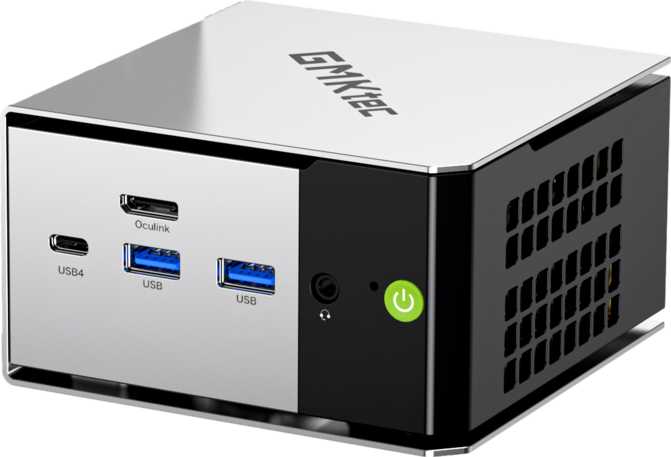
GMKtec NucBox M8 Review: Mini PC With Workstation-Class Memory
Mini PCsA Compact Machine With Workstation-Class Ambitions
Most mini PCs make a quiet, sensible bargain: modest memory, adequate storage, enough processing power for daily work, and a footprint small enough to hide behind a monitor. The GMKtec NucBox M8 takes a different position. It packs a memory configuration that most desktop workstations don't reach into a box you could fit in a coat pocket, pairs that with current-generation storage and wireless standards, and asks the obvious question: does size have to mean compromise? For the right buyer, the answer is no — but this is a machine with a specific profile, and understanding that profile is the whole game.
Design and Physical Experience
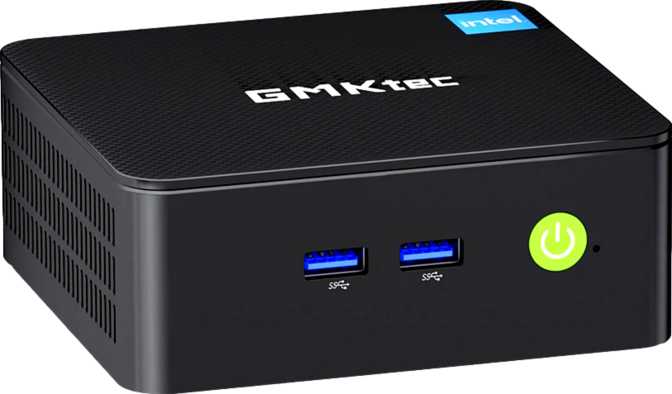
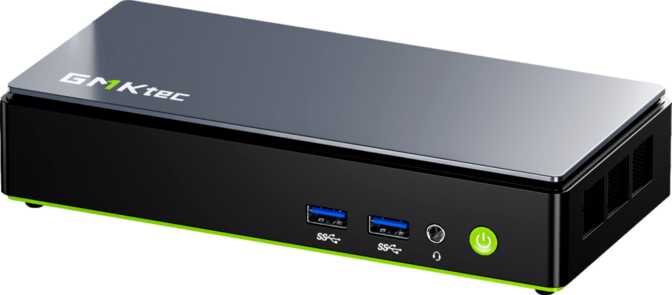
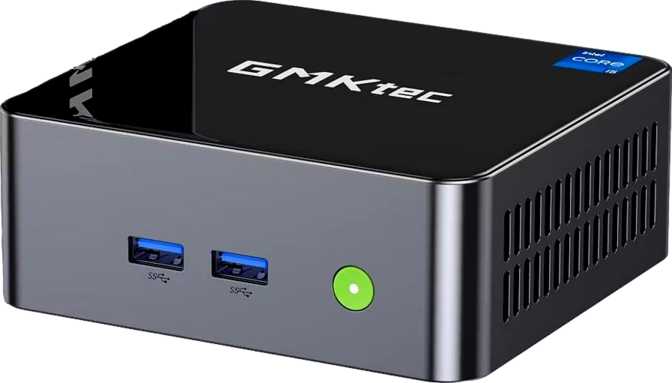
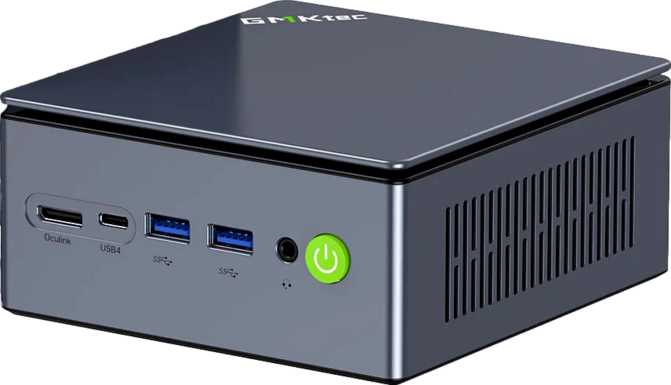
The NucBox M8 sits in the Mini-ITX category of compact computing — a family of small-form-factor machines that prioritize desk real estate above all else. The chassis is dense rather than large, built to occupy a corner of a desk, mount cleanly to the back of a VESA-compatible monitor, or disappear inside an entertainment cabinet. If you have seen an Intel NUC or a competing mini PC from Beelink or MINISFORUM, the language is familiar: a ventilated enclosure roughly the size of a thick trade paperback, with ports distributed across the front and rear panels.
Build quality lands in the competent-but-not-premium range typical for this product tier. Assembly feels solid, without the flex or rattle of cheaper machines, though buyers accustomed to the material quality of a ThinkCentre Tiny or an Apple Mac Mini will notice the difference immediately. This is functional hardware with functional aesthetics — it was designed to work well, not to impress on a shelf.
Before you buy: The NucBox M8 is not designed to be expanded. There are no additional RAM slots, no room for a discrete graphics card, and no PCIe expansion bays. The configuration you order is the configuration you keep for the life of the device.
Processing Power: What the Architecture Delivers
The Six-Core Engine
The NucBox M8 runs on a mobile-class processor with six physical cores, each capable of handling two tasks simultaneously — twelve threads total. This architecture bypasses the hybrid big-and-little design found in some competing chips, where different core types handle different workload classes. Every core here performs at the same level, which favors workloads that value consistent parallel execution over peak single-core bursts.
The 45-watt thermal budget is the specification that separates this from more conservative mini PCs. Many compact machines throttle aggressively to stay within a 15–28 watt envelope; this chip is allocated nearly double that headroom. The practical result is sustained performance under extended loads rather than a fast initial burst followed by a slowdown — something that matters significantly for build jobs, encoding pipelines, and multi-threaded data processing.
The cache allocation — a sixteen-megabyte top-level pool — acts as a fast buffer between the processor and main memory. Workloads that repeatedly access the same data (development builds, database queries, financial modeling) benefit measurably because the processor spends less time waiting for data to arrive from RAM.
Benchmark Performance in Context
Synthetic testing places the NucBox M8 firmly in upper-mainstream productivity territory. Multi-core scores sit ahead of the ultrabook chips in most thin-and-light laptops and in the same performance neighborhood as mid-range gaming laptop processors — machines that typically cost more and run louder. Single-core performance governs how snappy your browser, email client, and office applications feel. It is solid and immediate, if not class-leading. Multi-threaded workloads are where this processor earns its position: video transcoding, software compilation, parallel data processing, and running multiple demanding applications side by side.
Bars are scaled against representative competitive reference values for upper-mainstream mini PCs. Higher bars indicate stronger relative standing within each benchmark's practical category range.
Memory: The Specification That Defines This Machine
The NucBox M8 arrives with a memory configuration that is genuinely unusual for a consumer mini PC. The installed RAM is large enough that ordinary usage patterns — dozens of browser tabs, a running virtual machine, background applications, streaming — don't come close to stressing it. The practical effect is a machine that will not develop the sluggishness most computers exhibit after three or four years of accumulating software and running heavier applications.
DDR5 is the current-generation standard, operating at speeds that move data to and from the processor substantially faster than the DDR4 modules still common in budget-tier machines. That speed differential is most visible in memory-bandwidth-sensitive tasks: rendering, large-dataset analysis, scientific computing, and video editing pipelines.
Four memory channels working in parallel multiply that data throughput further. Most consumer mini PCs communicate with memory over two channels; quad-channel configuration effectively doubles the pipeline width between RAM and CPU. Enthusiasts working in professional applications — where memory bandwidth, not just capacity, creates bottlenecks — will recognize this as a meaningful architectural advantage rather than a spec sheet vanity point.
Storage: Fast and Unhobbled
The internal drive is a terabyte NVMe SSD accessed over PCIe 4.0 — not the slower PCIe 3.0 or SATA connections still present in some cost-reduced machines. PCIe 4.0 doubles the theoretical throughput available to the drive compared to the previous generation, which shows up meaningfully in large file operations, OS loading times, and application installations.
In practice, a terabyte of NVMe storage means the operating system loads in seconds, application launches feel instant, and large file operations complete quickly. A terabyte accommodates a comfortable working environment — full creative software suites, a significant game library, a multi-year photo or video archive — while leaving ample working space for active projects.
Users managing extensive 4K video projects or very large local media libraries will eventually reach that ceiling, but the storage interface supports a drive replacement when that time comes. The M.2 NVMe form factor is standard, and community disassembly resources specific to this model can guide that process if needed.
Integrated Graphics: A Clear-Eyed Assessment
The NucBox M8 uses integrated graphics built into the same chip as the processor, drawing on shared system memory rather than a dedicated pool of video RAM. This is the correct design for a compact productivity machine, and the right expectation to set from the start. Backed by fast DDR5 memory, the integrated GPU has more bandwidth available than the same configuration would on an older platform — and that matters for hardware-accelerated tasks like video export and image processing.
What It Handles Well
- 4K video playback at any codec
- Photo editing and image retouching
- 2D illustration and graphic design
- Hardware-accelerated video encode/decode
- Casual gaming in older or less demanding titles
- Driving dual 4K displays simultaneously
What Exceeds Its Scope
- Modern AAA gaming at playable frame rates
- GPU-accelerated machine learning training
- Complex 3D rendering at production speeds
- Heavy GPU-accelerated color grading pipelines
eGPU upgrade path: The Thunderbolt 4 port opens the possibility of connecting an external GPU enclosure, adding discrete graphics capability at the cost of a separate enclosure and investment — a viable option for users whose needs evolve over time.
Ports and Connectivity
Display Outputs
Two independent video outputs handle dual-monitor configurations without adapters. The HDMI port supports the latest high-bandwidth standard — capable of driving a 4K display at 120 frames per second, or an 8K display at standard refresh rates, making it compatible with premium high-refresh professional monitors and modern televisions. The DisplayPort connection covers mainstream PC monitors at 4K and high refresh rates. The Thunderbolt 4 port adds a third potential display pathway via a dock or adapter, enabling three-screen setups for those who want them.
High-Speed USB and Interface Ports
Two USB-A ports operating at ten gigabits per second mean external SSDs, modern audio interfaces, and high-speed storage enclosures run without bottlenecks. The Thunderbolt 4 / USB4 40Gbps port is the high-bandwidth crown jewel of the I/O layout: it connects to docks that add multiple ports, monitors, and storage in a single cable; to ultra-fast NVMe enclosures for demanding storage workflows; and to external GPU enclosures for users whose needs evolve. One USB-A port at legacy speeds handles older peripherals that simply don't need high bandwidth — keyboards, mice, flash drives.
Complete Port Reference
Wireless Connectivity
Wi-Fi 6E is the most current consumer wireless standard, operating on the 6GHz frequency band in addition to the older 2.4GHz and 5GHz bands. In practical terms: faster maximum speeds in favorable conditions, meaningfully lower interference in environments with many competing wireless devices, and compatibility with all previous Wi-Fi standards. For a machine without wired Ethernet, this quality of wireless is important rather than optional. Bluetooth 5.2 supports current-generation wireless peripherals — headphones, keyboards, mice, speakers — with improved stability and range compared to older Bluetooth versions.
No Built-In Ethernet — A Real Consideration
There is no wired Ethernet port on the NucBox M8. For home office workers, home lab builders, and anyone in an environment where a network cable provides the most stable connection, this is a real inconvenience. A USB-to-Ethernet adapter resolves the gap but consumes one of the limited USB-A ports, adds a cable, and represents an extra cost. Anyone for whom wired networking is non-negotiable should weigh this carefully before purchasing.
Thermal Design and Acoustics
A 45-watt processor in a compact enclosure requires active cooling, and the NucBox M8 uses a fan system as it must. Under sustained heavy loads — video encoding that runs for an hour, large software build jobs, extended database processing — the fan will spin audibly. Under light-to-moderate use — web browsing, office applications, video calls, streaming — the system runs quietly enough that the fan becomes a background detail rather than a presence.
The processor operates within standard temperature headroom for mobile chips before protective throttling engages — a normal and expected behavior, not a cause for concern. For home and office environments, the acoustic profile at moderate workloads is significantly quieter than a traditional desktop tower. For living room or bedroom setups where noise matters more, the NucBox M8 is not a passive-cooled silent machine — but it is far from obtrusive at typical usage levels.
Who This Machine Is For — and Who It Isn't
-
Developers and Power UsersContainerized applications, virtual machines, and concurrent development environments run without complaint. Twelve threads and fast DDR5 keep compile times reasonable.
-
Data Analysts and ResearchersPython, R, and similar memory-intensive environments benefit directly from both the raw capacity and the DDR5 quad-channel bandwidth.
-
Home Lab BuildersVirtualization hosts, home automation servers, and network monitoring tools all benefit from this headroom without the noise and power draw of server hardware.
-
Multi-Monitor Productivity SetupsDual 4K outputs work natively. The Thunderbolt 4 port enables docking configurations that add further displays and peripherals.
-
Long-Term ThinkersThe memory ceiling is high enough that this machine is unlikely to feel constrained within a typical hardware refresh cycle.
-
GamersModern titles at any serious visual quality setting are outside the scope of what integrated graphics at this level can deliver. Light gaming only.
-
Video Production Professionals4K editing is workable, but GPU-accelerated color grading, effects, and export pipelines will push against the graphics ceiling quickly.
-
Wired Networking RequiredThe absent RJ45 port is a real inconvenience requiring a workaround for anyone who needs a stable, low-latency wired connection.
-
Budget Buyers Without the NeedIf 32 or 64 gigabytes of RAM satisfies your workload, competing machines offer similar CPU performance at meaningfully lower prices.
How the NucBox M8 Compares to the Competition
Stacked against typical competing mini PCs in the same general price tier
| Feature Area | GMKtec NucBox M8 | Typical Competitor |
|---|---|---|
| Memory Capacity | 128GB — Class-leading | Usually maxes at 32–64GB |
| Memory Generation | DDR5, high-frequency | Mix of DDR4 and DDR5 by tier |
| Memory Channels | Quad-channel | Typically dual-channel |
| Storage Interface | NVMe PCIe Gen 4 | Often PCIe 3.0 or SATA SSD |
| Thunderbolt 4 | Included | Usually absent below premium tier |
| Wired Ethernet | Not included | Standard on most competitors |
| Wireless Standard | Wi-Fi 6E (6GHz capable) | Often Wi-Fi 6 only |
| Display Outputs | Dual — HDMI 2.1 + DP 1.4 | Varies significantly by model |
| High-Speed USB | USB4 40Gbps + TB4 | Often USB 3.2 Gen 2 as maximum |
Strengths and Honest Limitations
Where It Excels
The NucBox M8's strongest argument is also its most unusual one: the memory configuration. High-capacity DDR5 in a machine this compact is genuinely differentiating, and the quad-channel bandwidth compounds the benefit for the right workloads. Add Thunderbolt 4, current-generation Wi-Fi, NVMe PCIe 4.0 storage, and dual-monitor support, and the platform feels modern across every dimension that drives daily performance. The processor delivers meaningful real-world capability, and the sustained 45-watt thermal budget means that performance holds under extended load rather than fading after a few seconds.
Where It Falls Short
Integrated graphics at this execution unit count is a practical work GPU — capable and efficient for daily professional tasks, but not a substitute for a discrete card. Light gaming means genuinely light. The absent Ethernet port is the most frustrating gap because it feels solvable at the design level and costs real convenience in deployment. The one-year warranty is standard for the category but shorter than the two-to-three-year coverage offered by business-grade mini PC alternatives. For buyers who don't actually need the memory headroom, the price premium over simpler machines becomes harder to justify.
Common Questions Buyers Ask
Answers to what real buyers search for before committing
Final Verdict
Our assessment of the GMKtec NucBox M8
The GMKtec NucBox M8 is built for a specific buyer, and it serves that buyer unusually well. The memory configuration is genuinely category-defining for the compact desktop market. Stack that on a current-generation DDR5 platform, PCIe 4.0 storage, Wi-Fi 6E, and Thunderbolt 4, and the NucBox M8 is a thoroughly modern machine across every dimension that drives daily performance.
The integrated graphics ceiling is real, the absent Ethernet port is an inconvenience, and the one-year warranty is the floor rather than a comfort. For the developer, the analyst, the home lab operator, or the productivity-focused professional who needs the memory depth and doesn't need a discrete GPU: this machine earns a clear recommendation. Buy it knowing what it is — it will not disappoint you on those terms.