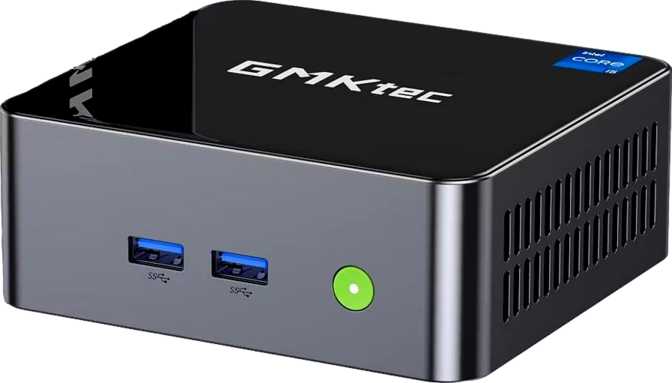
GMKtec NucBox M3 Pro Review: An Honest Look at the Compact Workstation
Mini PCsGMKtec NucBox M3 Pro — At a Glance
Compact by Design, Capable by Specification
The mini PC market is full of compromise. Machines that look impressive on a spec sheet but throttle the moment you push them, or boxes loaded with premium silicon that lack the ports to actually connect to anything useful. The GMKtec NucBox M3 Pro is trying to do something more considered: pack a real, unthrottled 12-core processor with 32 GB of RAM, dual Ethernet, and four-display support into a chassis smaller than a hardback novel. Whether it succeeds depends on what you're asking it to do — and that's exactly what this review settles.
Build Quality and Physical Design
Size in Real-World Terms
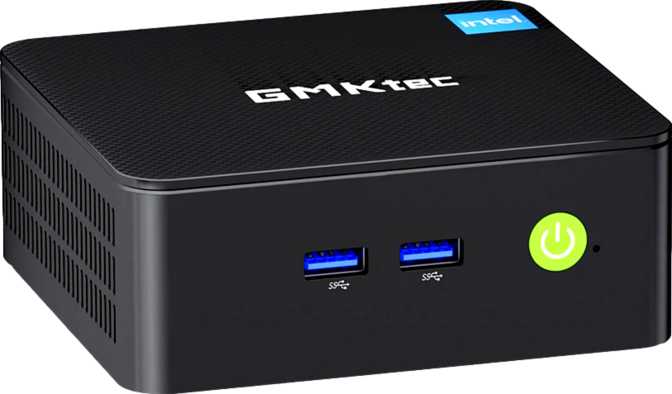
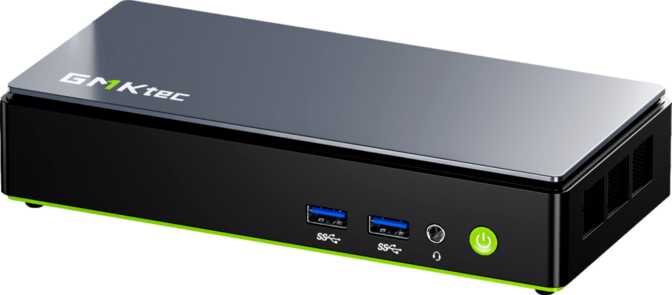
The NucBox M3 Pro occupies roughly the same footprint as two stacked smartphones placed side by side, standing only about two inches tall. It won't dominate a desk. You can sit it upright behind a monitor, mount it to a VESA arm with an optional bracket, tuck it inside a TV cabinet, or pack it into a bag for a portable workstation setup. It weighs little enough that a single HDMI cable without a securing clip could shift it — worth keeping in mind when connecting multiple cables at the rear.
The internal volume works out to just over 800 cubic centimeters — a carefully engineered enclosure, not a case with wasted air inside it. Every millimeter matters in this form factor, and that compactness has a thermal implication: this is an active-cooling design with a fan, not a passively cooled silent device. At idle or light load, the fan is nearly inaudible. Under sustained computational workloads, it becomes clearly audible from close range — not disruptive at desk distance, but present.
Materials and Fit
GMKtec has moved past the thin-walled plastic shells that defined budget mini PCs a few generations ago. The NucBox M3 Pro presents a cleaner, more solid exterior — a chassis that won't look out of place in a professional environment. It's not in the same material league as enterprise NUC-class devices from larger manufacturers, but it holds its own compared to the competition at this price point.
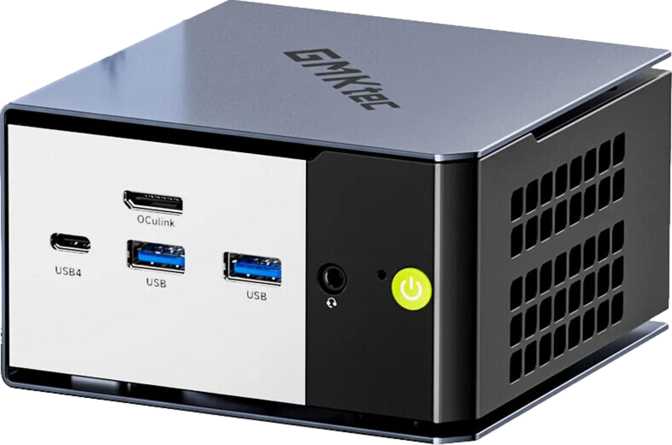
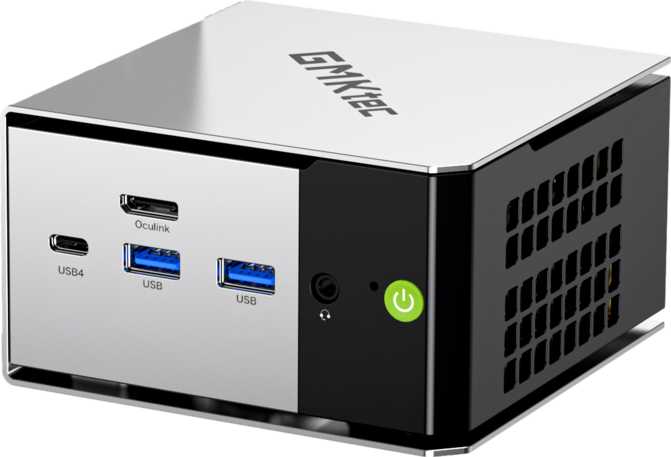
Port placement is thoughtful: daily-use connections sit at the front where they're easy to reach, while display outputs and networking are routed to the rear.
Active cooling is necessary for this 45-watt processor. The fan is near-silent at idle and audible — but not disruptive at typical desk distances — during heavy workloads.
The Processor: Hybrid Architecture in a Compact Box
How the CPU Works
The processor inside the NucBox M3 Pro uses Intel's hybrid core architecture — a design where two distinct types of processing cores share the same chip. Four high-performance cores handle demanding, latency-sensitive tasks: opening large files, compiling code, rendering a video clip, responding to keyboard input while something heavy runs in the background. Eight efficiency cores handle everything else: browser tabs, background sync, audio playback, system processes — all without pulling the performance cores away from their primary work.
Together they provide 12 cores and 16 simultaneous processing threads. For everyday computing, this means genuine, uncompromised multitasking. A video call running while a spreadsheet recalculates and a cloud backup runs in the background — all handled without the system hesitating.
Clock Speeds and Sustained Performance
The performance cores operate at base speeds well-suited for demanding work, with the ability to spike up to 4.7 GHz for immediate response tasks — the kind of speed that makes applications feel instant when you launch them or switch between them. The chip is rated for a 45-watt sustained power draw, which positions this squarely in the serious mobile workstation category. This is not a neutered processor dressed up in marketing language. This is a chip designed for 15-inch performance laptops, now running in a form factor that takes far less desk space.
Cache and Responsiveness
Beyond raw clock speed, this processor carries 18 MB of L3 cache and 10 MB of L2 cache — a large pool of high-speed memory that keeps frequently accessed data close to the processing cores. For users, this translates to faster responses in applications that repeatedly reference the same data: database queries, large spreadsheet calculations, audio plugins, code editors with active indexing. The chip doesn't have to reach out to system RAM as often, and the result is a perceptibly more responsive machine in complex workflows.
Benchmark Context
In standardized multi-core processor tests, the NucBox M3 Pro scores just above 21,000 — a result that places it comfortably ahead of most budget and entry-level mini PCs and in the same tier as capable mid-range desktop systems. Single-core performance comes in just above 3,300, which is sufficient for the vast majority of productivity, creative, and professional computing tasks. When pushed to its limits, the processor can produce results approaching 24,000 — a roughly 14% improvement that indicates the machine's normal operating state is not hitting a hard architectural ceiling.
PassMark Scores
CPU Benchmark — higher is better
The ~14% gap between standard and peak scores shows the processor is not at its architectural limit during normal operation — meaningful headroom for sustained workloads.
Graphics and Display Capabilities
What Integrated Graphics Can Actually Do
The NucBox M3 Pro has no dedicated graphics card. What it does have is Intel Iris Xe integrated graphics at its more capable tier — 80 execution units translating to 640 graphics processing cores, supported by 40 texture mapping units and 20 render output units. For non-gaming tasks, this GPU handles everything comfortably. High-resolution video playback, including the most bandwidth-intensive formats, is hardware-accelerated — the processor itself doesn't bear that load. Image editing in professional software, light video editing, 2D design work, and presentation graphics all run without issue.
The GPU also supports hardware acceleration for video encoding and decoding, which has real consequences for media applications, streaming, and video editing software that exploits GPU acceleration for previews and exports.
Four Simultaneous Displays
Driving four independent displays from a single compact PC is uncommon, and this machine does it through a combination of two full-size HDMI outputs, one DisplayPort, and the USB-C port which carries both data and display signals. For analysts, developers, traders, video editors working across multiple timelines, or anyone who has simply run out of screen real estate, this four-display ceiling is a genuine practical advantage. Most mini PCs in this class top out at two or three external monitors without additional hardware.
Both HDMI ports output at HDMI 2.0 specification — capable of 4K resolution at a full 60 frames per second, or 1080p content at up to 120 Hz.
HDMI 2.0 Ceiling: High-refresh-rate 4K at 120 Hz is not achievable over HDMI 2.0. For productivity and standard media use across even high-resolution displays, this limitation is irrelevant.
Gaming Reality Check
Casual and older titles run acceptably at reduced settings and moderate resolutions. Modern AAA titles, competitive multiplayer games that depend on high frame rates, or anything with demanding real-time rendering will expose the limits of integrated graphics quickly.
API Compatibility for Software
Full support for the modern GPU compute and graphics stack
| API | Version | Key Use Case |
|---|---|---|
| DirectX | 12 | Windows gaming and GPU-accelerated apps |
| OpenGL | 4.6 | 3D software, CAD, scientific visualization |
| OpenCL | 3.0 | GPU compute, ML inference, video tools |
For users relying on professional software that offloads computation to the GPU — 3D modeling applications, scientific data visualization, machine learning inference tools — GPU acceleration is available. You are not locked into CPU-only computation simply because there's no discrete graphics card in the system.
Memory and Storage
32 GB as a Starting Point, Not a Ceiling
The NucBox M3 Pro ships with 32 GB of DDR5 memory running in dual-channel configuration — both channels active, which doubles the available memory bandwidth compared to single-channel operation. For the integrated GPU, which draws on system RAM rather than dedicated video memory, dual-channel configuration is particularly important: it directly widens the data pipeline feeding the graphics processor.
32 GB is a meaningful specification for this form factor. Most competing mini PCs in the same price bracket ship with 16 GB as standard — enough for light use but a constraint the moment you run virtual machines, keep a full professional workflow open, or work with large data sets. At 32 GB, the NucBox M3 Pro gives power users room to work without managing memory.
Speed Note: The memory currently runs at a conservative speed relative to DDR5's full potential. Upgrading to faster DDR5 modules would provide a measurable GPU performance improvement, particularly for graphics-intensive or video processing tasks. The platform supports significantly higher frequencies.
1 TB NVMe Storage
The included drive connects directly to the processor via the NVMe interface, bypassing the bottlenecks of older storage pathways. The practical result: the operating system loads in seconds, applications launch immediately, and file operations across even large archives complete quickly.
1 TB is a comfortable working capacity for most users — enough for an operating system, full software suite, and a substantial library of working files without constant housekeeping. Users who work with large media libraries, maintain extensive local project archives, or need capacity for extended virtual machine images may want to supplement with external storage.
External drives connected to the USB 3.2 Gen 2 ports will transfer at speeds high enough to feel like an extension of the internal storage rather than a legacy attachment — a meaningful distinction for users who regularly move large files.
Connectivity: Ports and Wireless
The Full Port Layout
Dual Ethernet: The Unexpected Feature Worth Knowing About
Two wired network ports on a mini PC is genuinely unusual, and the use cases it enables are worth spelling out clearly. For most users, having two Ethernet ports means you can connect to a wired network while simultaneously keeping a direct link to a NAS device or network switch — without routing everything through Wi-Fi or a USB hub. It provides redundancy and flexibility in wired environments.
For technically oriented users, the dual Ethernet port configuration opens up something more significant: software like pfSense, OPNsense, or similar solutions can turn the NucBox M3 Pro into a capable, low-power network router, firewall, or traffic analyzer. The dual ports are the hardware requirement for that use case, and their presence here means you don't need a separate dedicated appliance.
Wireless
What's Not Here
Hardware-Level Constraints
- No Thunderbolt of any generation — eGPUs and full-bandwidth Thunderbolt docks are not supported
- No USB4 — external bandwidth via USB-C is capped at 10 Gbps
- No optical S/PDIF audio — HDMI and the 3.5 mm jack handle all audio routing
- No VGA connector — legacy displays require an active adapter
Who Should Buy This — and Who Should Look Elsewhere
The NucBox M3 Pro Is a Strong Match For
-
Productivity-Focused Professionals
The 12-core processor and 32 GB RAM handle a full professional workflow without strain, in a form factor that fits any desk or meeting room.
-
Multi-Monitor Power Users
Four-display support at this form factor and price point is genuinely rare — a meaningful differentiator for analysts, developers, and video editors working across large screen setups.
-
Home Server and Light NAS Operators
Always-on operation with lower power draw than a tower, dual Ethernet for proper networking, and 32 GB RAM for self-hosted services and containers.
-
Developers and Linux Users
Hardware virtualization support and 32 GB RAM enable multi-instance VM setups, Docker containers, and full local development environments without constraint.
-
Desktop Tower Replacements
For anyone whose workloads don't justify a full tower's size, noise, and energy draw, this machine delivers equivalent capability in a fraction of the space.
The NucBox M3 Pro Is Not the Right Choice For
-
Gamers Expecting Modern Titles to Run Well
Casual and older titles are manageable. Modern AAA games and competitive multiplayer at high frame rates will hit the integrated graphics ceiling quickly and consistently.
-
Professionals Dependent on Thunderbolt
No Thunderbolt of any generation. eGPUs, full-bandwidth Thunderbolt docking stations, and Thunderbolt storage arrays are permanently unsupported — this is a chip-level limitation, not a firmware one.
-
Heavy Video Producers or 3D Rendering Pipelines
Complex multi-layer timelines, heavy effects processing, long render queues, and GPU-accelerated production workflows benefit substantially from dedicated GPU hardware that integrated graphics cannot replicate.
-
Anyone Who Requires Absolute Silence
The 45-watt processor produces real heat in a compact space. Active fan cooling is the only viable solution. Fanless devices exist but they trade significant performance to achieve silence.
How It Sits Against the Competition
The NucBox M3 Pro competes in a well-defined bracket: performance mini PCs with current-generation hybrid-architecture processors, substantial RAM, and NVMe storage. Here is how it lines up.
| Feature | GMKtec NucBox M3 Pro | Typical 16 GB Competing Mini PC | Budget N-Series Mini PC |
|---|---|---|---|
| Standard RAM | 32 GB DDR5 | 16 GB DDR4 or DDR5 | 16 GB LPDDR5 |
| CPU Core Count | 12 (4P + 8E Hybrid) | 12 (same architecture) | 4 (efficiency-only) |
| Integrated GPU Tier | Iris Xe 80EU | Iris Xe 80–96EU | Entry-level Xe or UHD |
| Maximum Display Outputs | 4 | 2–3 | 2–3 |
| Wired Ethernet Ports | 2 | 1 | 1 |
| Thunderbolt Support | None | Occasionally | None |
| USB-C Top Speed | 10 Gbps | 10–40 Gbps | 10 Gbps |
| Internal Storage | 1 TB NVMe | 512 GB – 1 TB NVMe | 256 – 512 GB NVMe |
| Max Memory Upgrade | 64 GB | 32–64 GB | 16–32 GB |
Competitor specifications represent category averages and may vary by specific model and configuration.
Honest Assessment: Strengths and Real Weaknesses
Key Strengths
-
A 12-core hybrid processor running at its full intended power level — not underclocked to manage heat in a smaller chassis — delivering genuine workstation-grade performance where the form factor would normally demand compromise.
-
32 GB of DDR5 as the standard configuration, where most direct competitors ship 16 GB. The difference eliminates an upgrade cost immediately after purchase and gives power users real working room from day one.
-
Four-display output through two HDMI 2.0 ports, one DisplayPort, and a display-capable USB-C port is genuinely rare at this form factor and price point. Most competing mini PCs max out at two or three external monitors without additional hardware.
-
Dual Ethernet ports open up server, routing, and network appliance use cases that a single-port device structurally cannot serve — an underappreciated hardware choice that sets this machine apart.
-
The processor's ~14% performance headroom between standard and peak benchmark results indicates the machine is not hitting an architectural ceiling at its normal operating point — meaningful for sustained workload performance.
-
Memory ships at a conservative DDR5 speed, leaving bandwidth on the table that directly limits integrated GPU performance. The platform supports significantly faster modules — an upgrade would produce measurable gains for graphics-intensive and video processing tasks.
-
No Thunderbolt support of any generation — a permanent hardware constraint that closes off eGPU expansion, limits docking station compatibility, and caps external storage bandwidth. No firmware update can restore what the chip architecture does not include.
-
The fan is clearly audible at close range during sustained heavy workloads. Users accustomed to completely silent computing environments will notice the difference the moment a demanding task is placed on the processor.
-
The one-year warranty is shorter than several competitors offer. For an always-on home server or daily business workstation, this shorter coverage period is worth factoring into the total cost of ownership alongside the purchase price.
Questions Buyers Actually Search Before Purchasing
Real answers to the questions that matter most before you commit.
Final Verdict
Our recommendation after analyzing every specification and use case
The GMKtec NucBox M3 Pro makes a persuasive case for itself in a market where many small PCs underdeliver. The 12-core hybrid processor running at full specification, 32 GB of DDR5 memory as standard, 1 TB of fast NVMe storage, four-display output support, and dual Ethernet all contribute to a machine that punches considerably above what its physical size would suggest.
Its trade-offs are real but focused — no Thunderbolt connectivity, conservative memory speeds out of the box, active cooling that's audible under heavy load, and integrated graphics that serve general use but not GPU-intensive production or gaming. These aren't defects; they're the specific set of design decisions that make this machine what it is, and they define clearly who it serves. At its configuration and price point, the NucBox M3 Pro is one of the more honestly-specced options in the compact PC market.
Buy with Confidence If...
- You need a capable multi-display workstation in a minimal physical footprint
- You want a home server with proper dual-port networking hardware built in
- You plan to run development environments or virtual machines locally
- You are replacing a full-sized tower that does far less than its bulk suggests
Look Elsewhere If...
- Modern gaming performance is a genuine requirement for your setup
- Your workflow depends on Thunderbolt docks, eGPUs, or high-bandwidth external storage
- Completely silent fanless operation is a non-negotiable for your environment
- You need dedicated GPU power for intensive creative production or 3D rendering
Manufacturer warranty: 1 year. Consider extended coverage options for always-on or business-critical deployments.