GMKtec Evo-T2S Full Review: Compact Power With One Critical Catch
Mini PCsEditor's Rating
Add an NVMe SSD before first use — the rest of the hardware earns this verdict.
Category Ratings
Design and Build Quality
Compact without feeling compromised — a chassis built to house the hardware it carries.
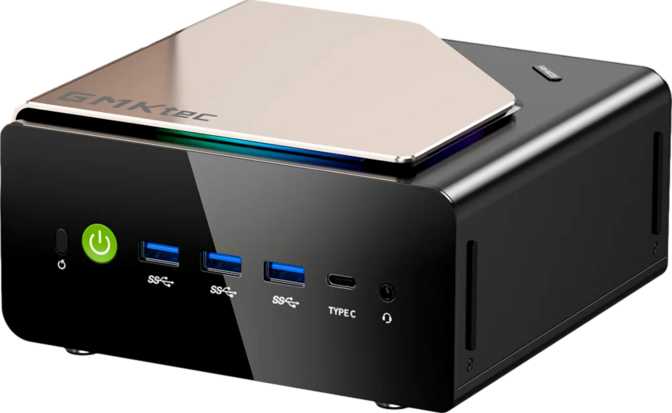
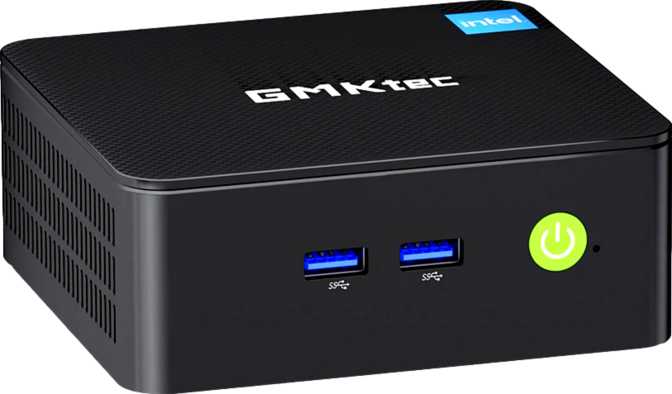
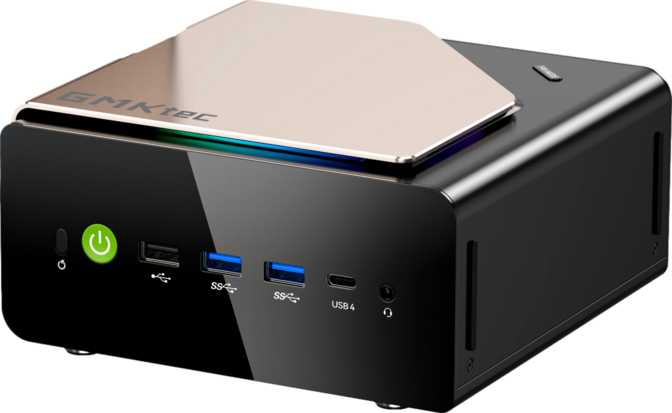
Picture a thick paperback book laid flat on a desk. That is the Evo-T2S's physical footprint — roughly the width and depth of an A5 notebook, standing just over seven centimeters tall. Its internal volume of approximately 1.7 liters places it firmly in the compact mini PC category, far from the ultra-miniature segment where thermal compromises become unavoidable.
At this size, GMKtec has enough room to fit proper cooling for the 25-watt processor without resorting to aggressive thermal throttling. Under sustained workloads the chassis manages heat without transforming into a hand warmer or producing distracting fan noise.
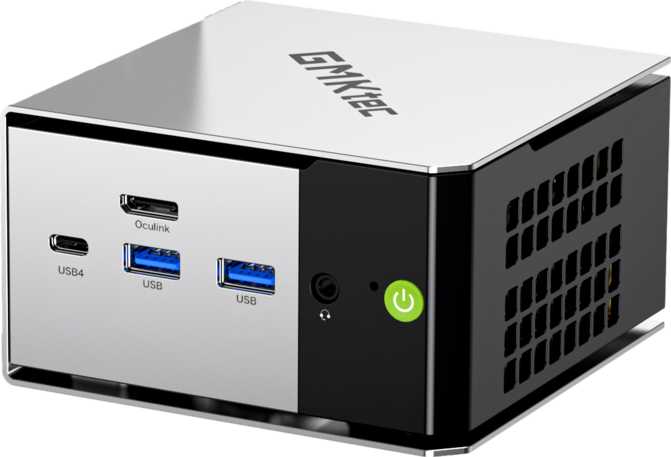
The physical port layout reflects deliberate design thinking: everyday plug-and-unplug peripherals belong at the front, while permanent connections — display outputs, networking, and high-speed data links — live at the rear. Cable clutter stays manageable, and you are never reaching behind a monitor to plug in a USB drive.
The Processor: Mobile Silicon, Desktop Ambitions
A 25-watt hybrid CPU that handles real workloads — with a performance ceiling worth understanding.
The CPU inside the Evo-T2S carries a mobile-class designation and operates within a 25-watt thermal boundary. That label can sound like a concession until context is applied: modern mobile silicon at this power level — particularly using Intel's hybrid big.LITTLE architecture — routinely outperforms desktop processors from just a few generations back.
The hybrid design splits workloads intelligently. High-performance cores sprint at up to 4.8GHz for demanding tasks while efficient cores handle lighter background activity across the same 16-thread array. The processor accelerates when you need it and conserves energy when you do not.
With 18MB of L3 cache, the chip keeps large chunks of frequently accessed data within ultra-fast reach. In daily use this translates to snappier application launches, smoother multitasking, and consistent responsiveness under mixed workloads — the kind of advantage felt rather than just charted.
PassMark Benchmark Results in Context
Handles demanding productivity software, video transcoding, software compilation, and heavy multi-application use without visible strain — placing this machine in the mid-range desktop performance tier.
Competent for most tasks. Applications depending heavily on single-threaded performance will reflect this ceiling — a characteristic of the 25W TDP constraint, not a deficiency in the chip architecture itself.
Intel Arc B390: Genuine Graphics Power in a Mini PC
This is where the Evo-T2S separates itself from the typical compact PC crowd.
The Intel Arc B390 is not a token integrated graphics solution bolted on to satisfy a marketing bullet point. Built on a 3-nanometer process node, it supports DirectX 12 Ultimate — the full feature set required by modern AAA games and real-time ray tracing workloads — alongside OpenGL 4.6 and OpenCL 3 for creative and GPU-compute applications.
The GPU reaches peak clocks of 2,500MHz and connects to the rest of the system over a PCIe 5 interface, eliminating the bandwidth bottleneck that hampered earlier integrated graphics solutions. System memory is shared between CPU and GPU — one reason the 64GB DDR5 configuration matters as much as it does.
DirectX 12 Ultimate
Full ray tracing and modern rendering API support — the same capability level required by current-generation AAA titles.
Four-Display Support
Drive up to four independent monitors simultaneously — a genuine multi-screen workstation capability built into the base unit.
PCIe 5 Interface
Latest-generation GPU-to-CPU bandwidth pipeline — no data bottleneck limiting what the Arc B390 can actually deliver.
3nm Process Node
Built on the current leading semiconductor process, delivering more performance per watt than the previous generation could manage.
Gaming Expectations: An Honest Assessment
The Arc B390 enables real gaming — within defined parameters.
Esports titles, indie games, and older AAA releases at medium settings are achievable on this machine. Cutting-edge titles at maximum fidelity are not the target. The Arc B390 covers a broad library of games that most mini PCs simply cannot touch — without pretending to compete with a dedicated desktop GPU.
64GB DDR5: An Unusually Generous Standard Configuration
Most competing mini PCs at this price level ship with 16GB or 32GB. The Evo-T2S ships with 64GB as standard.
The DDR5 standard at maximum supported speeds delivers substantially higher data throughput than DDR4 systems — directly important for the Arc B390 GPU, which draws from system memory rather than a dedicated VRAM pool. More bandwidth and more capacity means the GPU is not starved during memory-intensive workloads like high-resolution video playback, creative rendering, or gaming at higher frame buffer loads.
The dual-channel configuration doubles available bandwidth to both processor and GPU simultaneously, multiplying the real-world benefit of faster DDR5. You are not just getting faster memory — you are getting twice the throughput channels working in parallel.
For typical home and office workflows, 64GB exceeds what most users need daily. For video editing, running virtual machines, large dataset processing, or multiple GPU-accelerated applications simultaneously, it becomes a genuine asset rather than surplus capacity. The system supports expansion to 96GB total if future workloads demand it.
Storage: The Critical Gap You Need to Know About
The most important thing to know before purchasing — and it is entirely fixable.
A mechanical hard drive stores data reliably and at low cost, but it is dramatically slower than solid-state storage for system operations. Booting an operating system from a mechanical drive takes considerably longer than an SSD, application load times are noticeably slower, and general daily responsiveness suffers — none of which reflects the true performance capability of the hardware underneath.
The encouraging news: NVMe support is confirmed in the specification data, meaning an NVMe M.2 SSD slot is present and accessible on the board. Adding a drive and installing your operating system on it is a straightforward upgrade that completely transforms the experience.
What the 2TB HDD is good for
Documents, media libraries, project archives, and backup data. Think of the included drive as free bonus mass storage capacity — not the system drive.
What needs to be added
An NVMe M.2 SSD for the operating system and active applications. Any reputable 500GB–1TB NVMe drive installed as the boot disk resolves the bottleneck entirely.
Connectivity: Where the Evo-T2S Genuinely Excels
A port selection exceptional for this form factor — built for now and the next several years.
Four ports operating at the fastest available data transfer standards — two USB4 at 40Gbps and two Thunderbolt 4 — is a combination rarely found outside premium laptops costing significantly more. Each is also capable of carrying a display signal, which is how the Evo-T2S achieves four-monitor output without a dedicated graphics expansion slot.
| Category | Interface | Qty | What It Means |
|---|---|---|---|
| High-Speed | USB4 40Gbps | 2 | Fast enough for external NVMe enclosures at near-internal speeds; also carries display signals |
| High-Speed | Thunderbolt 4 | 2 | Intel-certified; compatible with a broad ecosystem of docks, displays, and peripherals |
| Standard | USB 3.2 Gen 2 (Type-A) | 2 | High-speed for external drives, cameras, and modern peripherals |
| Legacy | USB 2.0 (Type-A) | 2 | Keyboards, mice, and low-bandwidth devices that do not need faster connections |
| Display | HDMI 2.1 | 1 | Supports 4K at high refresh rates or 8K at standard refresh rates |
| Display | DisplayPort | 1 | Dedicated display output, distinct from the Thunderbolt 4 display-capable ports |
| Network | Wi-Fi 7 (802.11be) | — | Latest wireless generation; higher throughput and lower latency than Wi-Fi 6E |
| Network | Gigabit Ethernet (RJ45) | 1 | Wired connection for video calls, large file transfers, and latency-sensitive workflows |
| Network | Bluetooth 5.4 | — | Latest Bluetooth standard for wireless keyboards, mice, and headphones |
| Audio | 3.5mm Audio Jack | 1 | Headphones or desktop speakers without requiring USB audio adapters |
Who Should Buy the Evo-T2S — And Who Should Not
The right machine for a specific buyer. Understanding whether you are that buyer matters more than the specification list itself.
Ideal Users
- Multi-display professionalsContent creators, financial analysts, developers, and traders who need four independent screens from a single compact unit — the Evo-T2S handles this without additional hardware.
- Power users replacing aging desktopsIf your current machine is five or more years old, the Evo-T2S represents a meaningful generational upgrade that occupies a fraction of the desk space.
- Heavy home-office multitaskersRunning a browser with dozens of tabs, video conferencing, a local database, and a development environment simultaneously is unremarkable on 64GB of RAM.
- Light-to-moderate gamersThose wanting a broad game library without dedicating desk space to a gaming tower. The Arc B390 covers considerably more ground than any integrated graphics solution.
- Home media servers and NAS setupsThe 2TB HDD pairs well with media server software, and the USB4 and Thunderbolt 4 ports support high-speed external storage expansion.
Not the Right Fit
- Users needing maximum single-core outputCertain scientific simulations, legacy professional software, and competitive gaming at absolute peak frame rates need a desktop chip at 65W or more. The 25W mobile processor has a real ceiling here.
- Serious gamers with the latest demanding titlesThe Arc B390 is capable but not a substitute for a dedicated mid-range or high-end discrete GPU. Expect meaningful compromise on settings in the most graphically demanding current releases.
- Users who will not add an NVMe SSDRunning this machine solely from its included mechanical drive significantly undercuts what the hardware is capable of. Without an SSD, the experience will be disappointing regardless of every other specification.
How the Evo-T2S Stacks Up Against Alternatives
A competitive picture built on honest category differences — not cherry-picked advantages.
| Feature | GMKtec Evo-T2S | Typical Mini PC (16–32GB DDR4) | Typical Mini PC (Integrated GPU) |
|---|---|---|---|
| GPU Capability | Arc B390 (discrete-class) | Integrated only | Integrated only |
| RAM Standard | 64GB DDR5 | 16–32GB DDR4 | 16–32GB DDR4/DDR5 |
| Max Simultaneous Displays | 4 | 2–3 | 2–3 |
| USB4 / Thunderbolt 4 | 4 ports combined | 0–2 ports | 0–1 ports |
| Wi-Fi Generation | Wi-Fi 7 | Wi-Fi 5/6 | Wi-Fi 5/6 |
| Included SSD | None (slot available) | Often 256–512GB SSD | Often 256–512GB SSD |
| Included HDD | 2TB | None | None |
| Warranty | 1 year | 1–2 years | 1–2 years |
The Evo-T2S trades pre-installed SSD convenience for a substantially more powerful GPU, far more RAM, and next-generation connectivity. That is a different set of priorities — one that rewards buyers willing to invest a modest amount in an NVMe drive at purchase.
Strengths and Weaknesses: An Honest Look
Where It Delivers
The Arc B390 GPU with four-display support in a 1.7-liter chassis is a practical differentiator, not a marketing checkbox. No comparable mini PC at this price tier offers this combination in a factory configuration.
The DDR5 memory configuration at 64GB sets a benchmark competitors running 16GB or 32GB simply cannot match for memory-intensive professional workflows. For anyone running multiple resource-heavy applications simultaneously, the difference is felt immediately.
The connectivity suite — USB4, Thunderbolt 4, Wi-Fi 7, and HDMI 2.1 together — reflects engineering oriented around the next few years, not the last few. Most alternatives in this category are still catching up on individual standards, let alone all four simultaneously.
Where It Falls Short
The missing SSD is the most significant issue on this machine. Shipping without solid-state storage at this performance tier is a genuine oversight. A buyer who does not understand that an NVMe SSD is both possible and necessary will have a poor first experience through no fault of the hardware itself.
The one-year warranty period is on the shorter end for a machine intended as primary production hardware. Users planning to run the Evo-T2S in a professional capacity should factor this into the long-term cost equation.
The 25W CPU TDP places a real ceiling on single-threaded compute performance. This ceiling is high enough that most professional and creative workflows will never reach it — but it exists, and compute-heavy workloads will eventually find it.
Questions Buyers Actually Ask
Straightforward answers to the searches that lead buyers to this machine.
Final Verdict
Recommended — With One Condition
The GMKtec Evo-T2S is the right machine for a specific buyer: someone who needs multi-display support, high memory headroom, and GPU capability beyond integrated graphics in a compact chassis — and who is willing to add an NVMe SSD to complete the package.
It is not the right machine for someone expecting a ready-to-run, out-of-the-box experience with fast system storage already installed. That omission is real, and it carries a cost in both money and the inconvenience of a day-one upgrade.
For buyers who account for that: the Evo-T2S delivers a combination of GPU performance, memory capacity, and connectivity that legitimately does not exist in comparable mini PCs at this tier. The Arc B390, the USB4 and Thunderbolt 4 ports, Wi-Fi 7, and 64GB of DDR5 are not incremental improvements — they represent a meaningfully different class of machine in a familiar small chassis.
Purchase verdict: Add a quality NVMe SSD on day one and install your OS on it — the Evo-T2S then becomes one of the most capable compact PCs available at its size. Without that upgrade, the hardware's potential remains real but largely inaccessible.