GMKtec Evo-T2 Review: Workstation-Grade Power in a Mini PC
Mini PCsDesign, Build Quality, and Physical Presence
Compact form factor, purposeful layout, and a port selection that tells a clear story about the machine's ambitions.
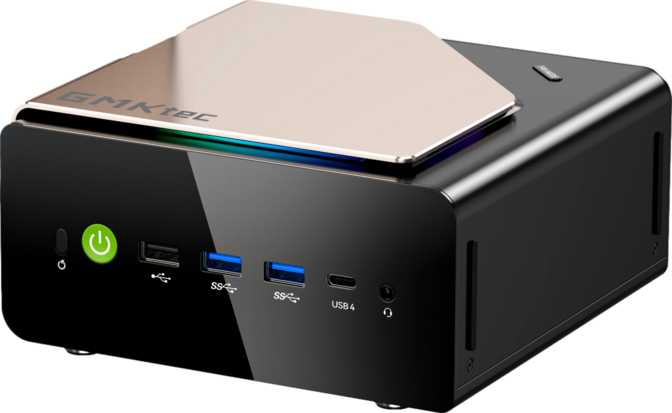
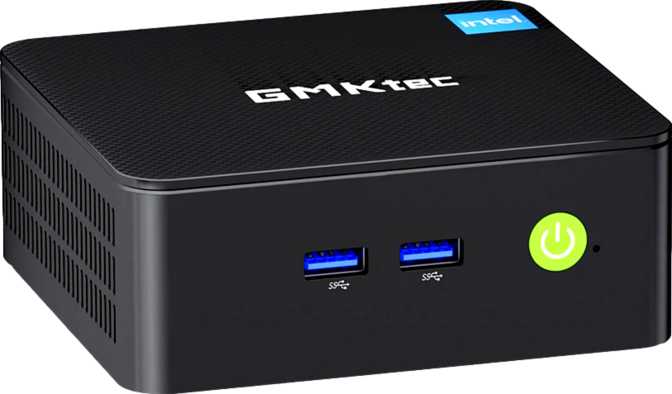
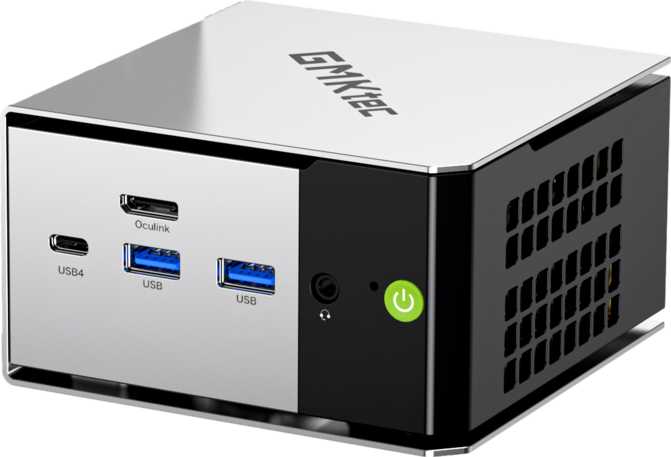
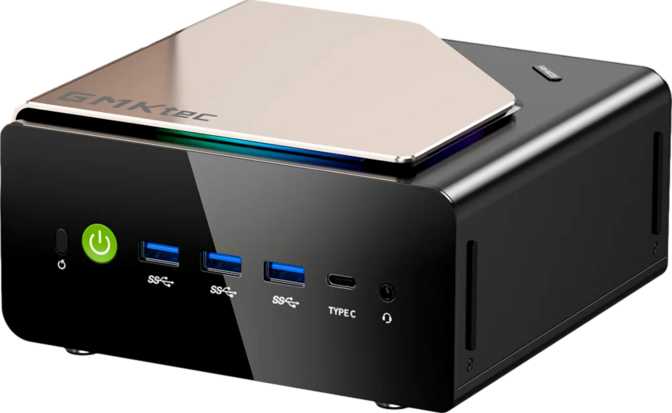
Mini PCs live and die by their thermals and port layouts, and the Evo-T2 addresses both with a chassis that clearly prioritizes airflow and real-world usability. The Micro-ATX footprint keeps the unit physically modest — this is a machine you place on a desk corner, VESA-mount behind a display, or tuck into a home theater cabinet without rearranging your space around it.
The port layout distributes connections in a way that keeps frequently used interfaces accessible rather than hiding them all on a rear panel. Build quality feels solid throughout — not hollow or rattly — continuing GMKtec's recent trend toward more premium chassis construction.
Fan noise sits at a low hum under moderate workloads, only rising noticeably during sustained heavy CPU tasks. For quiet environments such as a home office or recording studio, it remains usable without becoming a distraction. The headline physical detail, however, is that this unit supports four simultaneous display outputs natively — a capability that signals its true purpose as a multi-monitor productivity and content production tool rather than a basic compact desktop.
Physical Highlights
- Micro-ATX footprint — VESA-mount ready for behind-monitor placement
- Low fan noise under typical workloads — quiet enough for office environments
- Solid, non-hollow chassis construction that feels premium for the size class
- Ports distributed for practical accessibility, not tucked away inconveniently
- Native 4-display output — genuinely rare at this physical scale
Processor Performance Analysis
A heterogeneous core architecture engineered for burst speed and sustained multi-threaded output within a compact thermal budget.
How the CPU Architecture Works
The processor uses Intel's big.LITTLE-style heterogeneous core design — a layered arrangement of performance cores, efficiency cores, and low-power efficiency cores working in concert. The chip intelligently assigns workloads: demanding single-threaded tasks are routed to faster cores that reach up to 5.1GHz under boost, while background processes are handled by efficiency clusters without drawing unnecessary power.
With 16 threads available, the processor handles genuinely parallel workloads — video encoding, multi-application workflows, light virtualization, or running several browser instances alongside development tools — without the visible slowdown that plagues lower-end compact systems.
The 25-watt thermal envelope might raise eyebrows, but in a mini PC chassis with dedicated cooling it typically means the chip sustains performance longer than it would in a thin-and-light notebook. The generous 18MB of L3 cache keeps frequently used data close to the cores rather than making costly round trips to system RAM, which reduces latency meaningfully during code compilation, data analysis, and complex simulations.
Benchmark Context
Upper tier — handles 4K editing timelines, heavy multitasking, and parallel developer workflows
Competitive with mainstream desktop chips while drawing significantly less power
Intel Arc B390 Graphics: Redefining What Integrated Can Do
Built on a 3nm process with DirectX 12 Ultimate support — not your typical compact desktop graphics solution.
The Intel Arc B390 is not the lightweight display adapter you find in typical compact desktops. Built on a 3-nanometer process node and running at up to 2,500MHz, it supports the full DirectX 12 Ultimate feature set — including hardware raytracing and mesh shaders, capabilities most integrated graphics solutions cannot claim at all.
The PCIe 5 interface ensures the GPU has full bandwidth headroom, while OpenCL 3 compliance enables active participation in GPU-accelerated tasks: video transcoding, image processing, and machine learning inference at a level that previous-generation integrated graphics simply could not reach.
OpenGL 4.6 support ensures compatibility with legacy professional software alongside newer Vulkan-era applications, so creative and engineering workflows that depend on established OpenGL pipelines are not left behind.
What the Arc B390 Unlocks in Practice
Multi-Display Work
Four simultaneous screens across HDMI, DisplayPort, and USB 4 / Thunderbolt 4. Realistic for trading setups, video editing suites, and extended creative workflows.
Light Gaming
Less demanding titles run comfortably at 1080p, and some at 1440p. A generational leap over previous Intel integrated graphics — not a discrete GPU replacement.
Video & Creative
Hardware-accelerated transcoding for H.264, H.265, and AV1 via DirectX 12 Ultimate and OpenCL 3 — preview performance and export speeds are meaningfully better than software-only rendering.
AI & ML Inference
OpenCL 3 and modern shader support enable local machine learning inference workloads that were previously impossible on integrated graphics hardware.
Memory and Storage: Workstation Numbers in a Mini Box
128GB of DDR5 RAM and a full terabyte of NVMe storage in a chassis that fits behind a monitor.
Most mini PCs ship with 16GB or 32GB of RAM. Some higher-end models offer 64GB. The Evo-T2 ships with 128GB of DDR5 running at speeds up to 9,600MHz across a dual-channel configuration — a specification that would be notable in a full workstation tower and is genuinely extraordinary in this form factor.
DDR5 at these speeds delivers lower latency and higher bandwidth compared to DDR4 systems, translating to better real-world throughput on memory-intensive tasks. The dual-channel arrangement means both channels work in parallel, further improving data throughput to the processor.
- Run multiple VMs simultaneously with meaningful per-VM memory allocation
- Handle very large datasets entirely in-memory without paging to disk
- Local LLM inference, large CAD assemblies, and high-resolution compositing
- 128GB is also the maximum — no future RAM expansion is possible beyond this
A full terabyte of NVMe storage communicates with the processor through PCIe lanes rather than slower SATA channels, delivering read and write speeds that make application launches, large file operations, and OS responsiveness feel substantially faster than traditional drive solutions.
One terabyte comfortably holds a complete operating system, a comprehensive software library, and several hundred gigabytes of active project files before expansion becomes necessary. For users managing large media archives, external storage via the USB 4 port or network-attached solutions is the natural path for overflow content.
Connectivity: Nothing Left Out
Every port on the Evo-T2 offers meaningful speed — there is not a single USB 2.0 connector in sight.
| Port / Connection | Speed | Best Use Case |
|---|---|---|
| USB 4 (40Gbps) | 40 Gbps | External NVMe enclosures, high-resolution displays, daisy-chaining peripherals |
| Thunderbolt 4 | 40 Gbps | eGPU enclosures, Thunderbolt docks, fast storage arrays |
| USB 3.2 Gen 2 Type-A x3 | 10 Gbps each | External drives and high-speed USB peripherals |
| USB 3.2 Gen 2 Type-C | 10 Gbps | Additional fast peripheral or display connection |
| HDMI Output | Display signal | Primary or secondary monitor connection |
| DisplayPort Output | Display signal | Primary or secondary monitor connection |
| RJ45 Ethernet | Wired LAN | Stable high-speed networking without adapters |
| 3.5mm Audio Jack | Analog audio | Headphones, headsets, and powered speakers |
Wireless
Wi-Fi 7 (802.11be) delivers multi-gigabit wireless throughput and significantly reduced latency compared to Wi-Fi 6E. Backward compatibility with Wi-Fi 6E, 6, 5, and 4 ensures the machine works with any current router while remaining ready for next-generation network upgrades without additional hardware.
- Wi-Fi 7 / 6E / 6 / 5 / 4 — fully backward compatible
- Bluetooth 5.4 — low-latency peripheral connections
Absent Ports — Intentionally
- No USB 2.0 — correct choice, not missed
- No VGA — appropriately retired
- No S/PDIF — may affect legacy home theater setups
Who Should Buy the GMKtec Evo-T2?
This machine has a very specific buyer in mind — knowing which side of this line you fall on will save you time and money.
-
Software Developers and Engineers Multiple VMs, Docker containers, or local dev servers running simultaneously — the 128GB memory ceiling makes this genuinely practical rather than theoretical.
-
Data Analysts and Researchers Large in-memory datasets, Python or R environments with demanding libraries, and local ML model building and testing without cloud compute dependencies.
-
Multi-Monitor Power Users Financial analysts, video editors, and content creators who need four screens driven by a capable integrated GPU — without committing to a tower system.
-
Home Lab Builders A capable, low-power virtualization node that handles demanding workloads without loud fan noise or high electricity bills compared to full server hardware.
-
Space-Constrained Professionals Studio apartments, hot-desk environments, or anyone needing workstation-level output from a device that disappears behind a monitor or into a media cabinet.
-
Dedicated Gamers Modern AAA titles at high settings require discrete GPU performance. The Arc B390 is exceptional for integrated graphics, but competitive 3D gaming at 1440p and above is a stretch without an eGPU enclosure connected via Thunderbolt 4.
-
Casual Media Consumers If your workflow is primarily web browsing, streaming, and light office tasks, the Evo-T2 is massively overspecified. The price premium is very difficult to rationalize at this use level.
-
Legacy Hardware Users No optical drive bay, no VGA output, and no S/PDIF digital audio. Specific legacy hardware environments will require adapters or must look to alternative solutions.
How It Compares to Logical Alternatives
The Evo-T2 is not competing on price — it is competing on capability ceiling. Here is how it stacks up against the categories it displaces.
| Feature | GMKtec Evo-T2 | Typical 64GB Competitor | Typical 16GB Mini PC |
|---|---|---|---|
| RAM Ceiling | 128GB DDR5 | 64GB DDR5 | 32GB DDR4/DDR5 |
| GPU Class | Arc B390 — capable iGPU | Varies — often weaker | Basic integrated |
| Display Support | 4 screens natively | 2–3 typically | Usually 2 |
| USB 4 / Thunderbolt 4 | Both present | Sometimes one | Rarely present |
| Wi-Fi Generation | Wi-Fi 7 | Wi-Fi 6 / 6E typically | Wi-Fi 5 / 6 |
| PassMark Multi-Core | ~37,900 | ~20,000–28,000 | Under 15,000 |
| Target Buyer | Power users, developers | General power users | Everyday home / office |
Honest Assessment: Strengths and Weaknesses
What the Evo-T2 genuinely excels at, and where buyers should manage their expectations.
The memory configuration alone puts the Evo-T2 in a different category from most compact desktops. 128GB of fast DDR5 is workstation territory, and the machine earns that label without reservation. The processor's heterogeneous core design handles both burst performance — reaching 5.1GHz single-core peaks — and sustained multi-threaded loads efficiently within its compact thermal budget.
The Arc B390 graphics bring meaningful GPU horsepower for a system without a discrete card, and four-display output is a practical tool rather than a spec sheet checkbox. Driving four screens from a machine this size is simply not something most competitors can offer.
The connectivity suite is the other standout. Having USB 4 and Thunderbolt 4 together gives the machine genuine expandability — a Thunderbolt 4 eGPU enclosure could extend graphics performance without replacing the host unit entirely, which changes the upgrade economics considerably compared to a traditional desktop investment.
The 25W thermal envelope does mean that under fully sustained CPU and GPU load simultaneously, experienced users may observe some power management intervention. The chassis cooling is designed to handle this better than a thin-and-light laptop would — but buyers accustomed to unrestricted desktop TDP headroom should note the difference.
The absence of discrete graphics means that compute-intensive 3D rendering or high-refresh gaming at 1440p and above is a genuine stretch. The Arc B390 is impressive for its class, but it is not in the same performance tier as a mid-range discrete card.
A single internal NVMe slot means users with aggressive local storage requirements will reach for external solutions sooner rather than later. And since 128GB is both the current and maximum memory configuration, there is no upgrade path for RAM — though reaching that ceiling in actual daily use requires exceptionally demanding workloads.
Questions Buyers Ask Before Purchasing
Straight answers to the searches that led you here.
The Definitive Recommendation
A compact machine for serious professional work — not a bargain buy, but a genuine capability statement.
The GMKtec Evo-T2 is the rare mini PC that makes a credible case for replacing a full desktop tower in demanding professional workflows. Its combination of 128GB DDR5 memory, a heterogeneous multi-core processor with strong burst performance reaching 5.1GHz, and the Intel Arc B390 GPU creates a capability profile that simply does not exist at this physical scale from most manufacturers.
It is not a budget purchase, and it is not designed for casual users. It is built specifically for professionals — developers, analysts, researchers, and multi-display power users — who have outgrown conventional mini PCs but do not want to commit to the space, noise, and power draw of a full workstation tower.