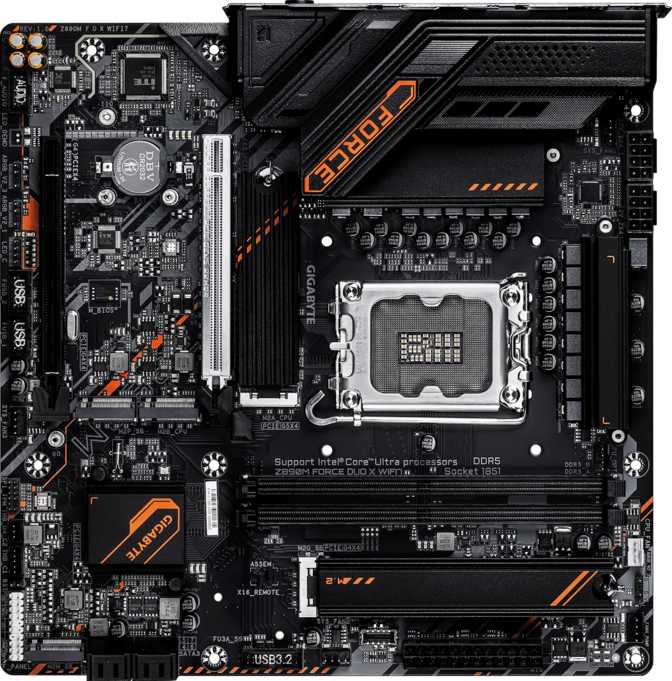
Gigabyte Z890M Force Duo X Wi-Fi 7 Review: Compact Done Right
MotherboardsA rare Micro-ATX board that refuses size-based compromises — five M.2 sockets, Thunderbolt 4, USB4 40Gbps, and full Z890 overclocking capability packed into a 244 mm square chassis.
Key Specifications at a Glance
Core hardware facts translated into what they mean for your build.
A Compact Board That Refuses to Compromise
Micro-ATX motherboards have always carried a quiet stigma — the assumption that choosing a smaller form factor means accepting fewer features, weaker connectivity, and limited upgrade potential. The Gigabyte Z890M Force Duo X Wi-Fi 7 exists specifically to challenge that assumption. Built around Intel's current-generation LGA 1851 platform and the Z890 chipset, this board packs an almost unreasonable amount of modern technology into a 244 mm square footprint. For builders who need a capable, future-oriented foundation without committing to a full ATX tower, this board deserves serious attention — and honest scrutiny.
Design and Build Quality
Small board, serious intentions.
The Micro-ATX format has always been the pragmatist's choice — not the minimalist's and not the maximalist's, but the builder who wants efficiency without sacrifice. At 244 mm square, the Z890M Force Duo X fits into a wide range of cases, including many compact mid-towers that accept standard ATX boards with room to spare.
Gigabyte has integrated RGB lighting into the design, which is increasingly expected at this tier rather than a premium differentiator. The implementation suits enthusiast builds without overpowering cleaner setups.
A physical Clear CMOS button is a meaningful quality-of-life inclusion. When overclocking experiments go wrong — and they will — resetting the BIOS without hunting for a jumper or disassembling part of the build saves real time and frustration. No dual BIOS is present, which is worth flagging clearly: if a bad BIOS flash occurs, recovery depends on a single chip rather than an automatic fallback.
Six fan and pump headers give thermal management genuine flexibility, competitive even against full-size ATX boards at this price point. Independent control of multiple case fans, a CPU cooler, and a liquid cooling pump requires no separate fan controller hub.
Build Highlights
- Physical Clear CMOS button — no jumper hunting
- 6 fan/pump headers for complex cooling setups
- RGB lighting — tasteful, not excessive
- 3-year manufacturer warranty included
- No dual BIOS — single-chip recovery only
Platform Performance: What Z890 and LGA 1851 Actually Mean
Why chipset tier matters more than most spec sheets admit.
The Z890 chipset paired with the LGA 1851 socket represents Intel's current flagship desktop platform. This is not a budget or mid-range compromise — it is the full-performance tier, supporting Intel's latest processors without restriction.
For builders unfamiliar with chipset tiers: Z-series chipsets unlock the complete feature set of the platform. That means unrestricted CPU overclocking, full memory tuning capability, and access to the maximum PCIe lane allocation the platform supports. Choosing Z890 over a B860 chipset is the difference between having a car and having a car with the speed limiter removed.
The board supports easy overclocking with BIOS-level controls designed to be accessible without requiring deep technical expertise. The underlying hardware — VRM quality, trace routing, thermal design — determines whether those controls translate into real, stable overclocks, and the overall specification positioning signals this as a performance-oriented product.
Z890 vs. Lower-Tier Chipsets
Full multiplier and voltage control — unavailable on B860
Access extreme XMP profiles up to 9,733 MHz
No chipset restrictions on bandwidth distribution
BIOS controls designed for accessibility, not just experts
Memory: DDR5 Headroom Most Builders Won't Hit — But Could
Capacity, speed ceiling, and what both mean for long-term value.
Capacity and Configuration
Two DDR5 memory slots support up to 256 GB of total system memory — an extraordinary ceiling for a consumer desktop board. In practical terms, most users will install 32 GB or 64 GB and never approach that limit. But the headroom matters for content creators, video editors, and anyone running memory-intensive virtualization workloads who plans to keep this system for five or more years.
The dual-channel configuration is standard for this platform and delivers the full memory bandwidth the Z890 chipset is designed to utilize. ECC memory is not supported — expected for a consumer-oriented board. Mission-critical data integrity workloads are simply outside the scope of this product.
Overclocking Ceiling
Support for memory profiles reaching 9,733 MHz places this board near the top of what DDR5 is currently capable of delivering on any platform. To put that in context: stock DDR5 kits typically operate between 4,800 MHz and 6,400 MHz. Reaching 9,733 MHz requires a high-quality kit rated for extreme XMP profiles, and real-world gains depend heavily on the specific CPU and memory kit pairing.
Storage: Five M.2 Slots Is Not a Marketing Number
A storage configuration that competes with flagship ATX boards.
M.2 NVMe Expansion
Five M.2 sockets is the headline storage specification, and it warrants emphasis. Most Micro-ATX boards offer two or three M.2 slots. Five means a builder can simultaneously install an operating system drive, a scratch disk for video editing or 3D rendering, a game library drive, and still have two slots available for future expansion — all without touching a single SATA cable.
Primary M.2 slots connected directly to the processor support the fastest PCIe 5.0 NVMe drives. Secondary slots routed through the chipset deliver PCIe 4.0 speeds — still multiple times faster than the best SATA solid-state drive.
Traditional SATA Storage
Four SATA 3 connectors remain available for conventional solid-state drives or mechanical hard drives — relevant for builders migrating large existing storage libraries, running media servers, or using mechanical drives for cold storage where cost-per-gigabyte still makes spinning disk practical.
| Interface | Slots | Speed Tier |
|---|---|---|
| M.2 (CPU-direct) | Primary slots | PCIe 5.0 |
| M.2 (Chipset) | Secondary slots | PCIe 4.0 |
| SATA 3 | 4 ports | 6 Gbps |
Connectivity: A Rear Panel That Earns Its Place
The I/O layout signals clearly who this board was designed for.
Rear Panel USB Breakdown
| Port Type | Count | Bandwidth | Typical Use Case |
|---|---|---|---|
| USB4 (Type-C) | 1 | 40 Gbps | External NVMe, high-speed docks, display output |
| Thunderbolt 4 (Type-C) | 1 | 40 Gbps | TB docks, daisy-chain, professional peripherals |
| USB 3.2 Gen 2 (Type-A) | 1 | 10 Gbps | External SSDs, fast hubs, card readers |
| USB 3.2 Gen 1 (Type-A) | 4 | 5 Gbps | Keyboards, mice, webcams, everyday peripherals |
| USB 2.0 (Type-A) | 4 | 480 Mbps | Dongles, older accessories, BIOS flash drives |
| DisplayPort | 1 | — | Monitor output via integrated graphics |
| RJ45 Ethernet | 1 | — | Wired network — verify speed in Gigabyte docs |
Expansion Slots: One Primary, One Practical
Full PCIe 5.0 bandwidth for the GPU, with a useful secondary lane.
x16PCIe 5.0 Primary Slot
The single PCIe 5.0 x16 slot is designed for the current and next generation of discrete graphics cards. PCIe 5.0 doubles the bandwidth of PCIe 4.0 — and while current GPU generations do not fully saturate even PCIe 4.0 bandwidth, the 5.0 slot positions this board for upcoming GPU architectures that may begin to benefit from that additional headroom. Micro-ATX form factor effectively limits this to one full-length x16 slot; multi-GPU configurations are not relevant to this platform.
x4PCIe Secondary Slot
A PCIe x4 slot accommodates expansion cards that do not need a full x16 interface — capture cards, additional NVMe controllers, networking cards, USB expansion cards, or workstation-specific accelerators. This slot gives the board meaningful expandability beyond the primary GPU. No PCIe x1 slots are present, which is an increasingly common trade-off at this tier, as x1 cards have largely been replaced by USB-connected equivalents.
Onboard Audio
7.1 surround with a clean digital output path.
The onboard audio supports 7.1 surround sound with two rear-panel audio connectors — typically a combined headphone and microphone stack. S/PDIF digital output is included, allowing the audio signal to pass directly to an external DAC, AV receiver, or home theater system without analog conversion loss from the motherboard's own circuitry.
For dedicated audiophiles using high-impedance headphones or studio monitors, a dedicated sound card or external USB DAC will still outperform any onboard solution. For gaming, streaming, video calls, and casual listening, the implementation here is more than sufficient — and the S/PDIF output provides a clean path to external audio hardware without requiring an additional expansion card.
Internal Headers
Front-panel and in-chassis expansion beyond the rear I/O.
- 2× USB 3.2 Gen 1 headers — 5 Gbps front-panel ports
- 1× USB-C 3.2 Gen 2 header — high-speed front-panel USB-C
- 4× USB 2.0 headers — wireless dongles and low-speed accessories
- 6× fan/pump headers — full thermal ecosystem control via BIOS
- TPM header — discrete module support for enterprise security needs
Who Should Buy This Board
Matched to the right build this board excels — in the wrong hands it overspends on features that go unused.
This Board Is Built For
- Builders choosing Micro-ATX without sacrificing performance headroom or modern connectivity
- Content creators and power users who need five M.2 slots for multiple simultaneous NVMe drives
- Enthusiasts planning aggressive memory overclocking with extreme XMP profiles
- Professionals working daily with Thunderbolt 4 peripherals, external NVMe enclosures, or USB4 devices
- Builders planning a 5+ year system who want Wi-Fi 7 and USB4 to stay relevant throughout
Not The Right Choice If
- Dual BIOS protection is a hard requirement — recovery from a bad flash relies on a single chip
- Multiple rear USB-C ports are needed — one Thunderbolt 4 port is the sole rear USB-C output
- HDMI display and integrated graphics are part of the build plan — there is no HDMI output
- ECC memory is required for data integrity in server or mission-critical workloads
- Budget is the priority and overclocking is not needed — a B860 board delivers similar daily performance at lower cost
How It Compares to the Alternatives
Context against the most logical competitors at a similar price point.
| Feature | Z890M Force Duo X Wi-Fi 7 | Typical B860 Micro-ATX | Typical Z890 ATX |
|---|---|---|---|
| Form Factor | Micro-ATX | Micro-ATX | ATX |
| PCIe 5.0 x16 Slot | Most | ||
| M.2 Slots | 5 | 3 – 4 | 4 – 6 |
| USB4 40Gbps | Rarely | Often | |
| Thunderbolt 4 | Sometimes | ||
| CPU Overclocking | Z890 | B860 locked | Z890 |
| Wi-Fi Generation | Wi-Fi 7 | Wi-Fi 6 / 6E typical | Wi-Fi 7 |
| Dual BIOS | Varies | Often | |
| Memory OC Ceiling | ~9,733 MHz | ~6,400 – 7,200 MHz | ~9,600 – 9,733 MHz |
Strengths and Weaknesses, Stated Plainly
An honest assessment — not a surface-level checklist.
The Z890M Force Duo X Wi-Fi 7 does several things that are genuinely uncommon on Micro-ATX boards. Five M.2 slots remove any practical ceiling on NVMe storage expansion — a figure that typically appears on flagship ATX boards and not on compact alternatives.
The combination of USB4 40Gbps and Thunderbolt 4 on a Micro-ATX platform is rare and represents real capability for users with matching peripherals, rather than spec-sheet padding.
Wi-Fi 7 with Bluetooth 5.4 ensures the wireless stack remains current for the foreseeable future. Six fan headers eliminate a common frustration point for builders managing complex cooling setups in compact enclosures.
No dual BIOS is a meaningful gap for a board that supports aggressive memory overclocking — the use case most likely to result in a failed BIOS state requiring recovery. Single-chip recovery exists, but the automatic backup safety net does not.
The lone rear USB-C connector, where Thunderbolt 4 doubles as the sole USB-C output, may frustrate users who have accumulated multiple USB-C peripherals. The absence of HDMI, while logical for a high-end build assuming a discrete GPU, creates friction in specific transitional scenarios.
Two DDR5 slots rather than four means maximum memory density depends entirely on individual module capacity — reaching the 256 GB ceiling requires module sizes that do not yet exist at mainstream pricing.
Answers to Common Pre-Purchase Questions
The questions buyers search for before committing to this platform.
The Gigabyte Z890M Force Duo X Wi-Fi 7 is a well-specified Micro-ATX board that makes a credible case for choosing compact without compromising capability. Five M.2 slots, Thunderbolt 4, USB4 40Gbps, aggressive memory overclocking headroom, and Wi-Fi 7 form a connectivity suite that outclasses most ATX alternatives at the same price point — delivered from a chassis-friendly footprint.
The trade-offs are real: no dual BIOS, limited rear USB-C, no HDMI, and only two memory slots. These are not defects — they are the natural shape of a Micro-ATX product designed to maximize capability within a constrained form factor. A builder who understands these trade-offs and does not need what is missing will find very little to fault here.
You are building on the current Intel platform in a compact case, you want Thunderbolt 4 and USB4 without committing to a full ATX chassis, and you need storage expansion that most Micro-ATX boards simply cannot match.
Dual BIOS is a hard requirement, you need HDMI output, or you are a mainstream user who does not need Z890's unlocked overclocking — where a less expensive B860 board would serve you equally well at meaningfully lower cost.