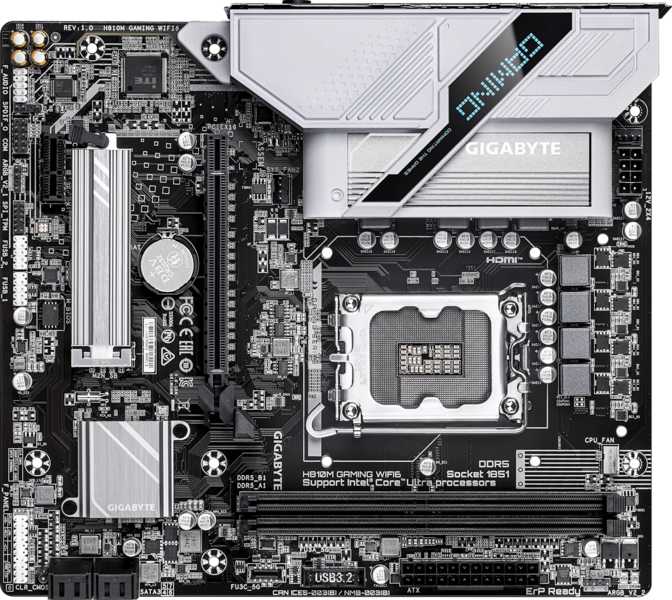
Gigabyte H810M Gaming Wi-Fi 6: The Budget LGA 1851 Board Reviewed
MotherboardsSocket
LGA 1851
Current Intel Gen
Form Factor
Micro-ATX
244 × 215 mm
Wireless
Wi-Fi 6
+ Bluetooth 5.3
Memory
DDR5 Only
Up to 128 GB
Warranty
3 Years
Manufacturer
Setting the Stage: Budget Platform, Modern Foundation
The Gigabyte H810M Gaming Wi-Fi 6 sits at a particular price point where the temptation to overpromise is strong — and where the "Gaming" label in the name should be taken with measured expectations. This is Intel's entry-level H810 chipset planted on the current LGA 1851 platform, and understanding what that pairing actually delivers is the most important thing before committing to a purchase.
The LGA 1851 socket supports Intel's Core Ultra 200 series — the company's current processor generation. Buying into this platform today means your investment isn't chasing a wave that's already passed. The H810 chipset, however, is deliberately positioned as the accessible entry tier: it trades overclocking support, multiple storage bandwidth lanes, and certain connectivity options for a lower price of admission. Whether those trade-offs align with how you actually use a computer determines everything about whether this board belongs in your build.
Design and Build Quality
Dimensionally, the H810M Gaming Wi-Fi 6 follows the Micro-ATX standard, measuring 244mm wide and 215mm tall. This format fits comfortably into a wide range of cases — from full mid-towers where it leaves generous room to compact Micro-ATX enclosures where the smaller footprint is an intentional choice. Anyone building a desktop that needs to stay manageable in size without going all the way to Mini-ITX will find this form factor a practical middle ground.
The board carries RGB lighting — a meaningful signal about its intended purpose. This isn't a board destined for a windowless rack; it's built for visible systems where aesthetics run alongside function. The lighting implementation is present without being elaborate by enthusiast standards.
No Clear CMOS button — BIOS recovery requires manual jumper or battery intervention.
No dual BIOS — there is no automatic fallback if a firmware update fails.
The Chipset Reality: What H810 Delivers
Chipsets function as the traffic management layer between a processor and the rest of the board. Intel's H810 is the most streamlined version of that layer for the current platform — appropriate for everyday computing, less appropriate for demanding configurations. Three practical limitations define its character:
No Overclocking
The H810 architecture removes support for adjusting CPU clock speeds beyond factory defaults. An unlocked K-series processor will function correctly but will run at its stock configuration regardless of any software or BIOS attempt to push it further.
PCIe 4.0, Not 5.0
The x16 graphics slot runs on PCIe 4.0. Every current consumer GPU operates comfortably within that bandwidth — this is a theoretical future ceiling rather than a present-day constraint. No GPU on the market today delivers fewer frames because of this distinction.
Single M.2 Slot
There is one M.2 slot on this board. Builders who want separate fast NVMe drives for their OS and games will find that impossible here without routing one through the slower SATA interface. This is the most tangible day-to-day trade-off.
Memory: Modern DDR5 With Genuine Speed Headroom
This platform requires DDR5 memory exclusively — there is no DDR4 compatibility option, which is standard for all LGA 1851 boards. DDR5 has matured significantly in terms of pricing and availability; mainstream kits are widely accessible.
The two memory slots operate in dual-channel mode, which delivers the full memory bandwidth the platform supports. Two slots instead of four is entirely standard at this board tier and introduces no performance penalty — dual-channel is the full operating mode, not a fallback. The practical implication is planning: upgrading memory capacity later means replacing both installed modules rather than adding more.
ECC memory, used in servers and mission-critical systems for error detection and correction, is not supported. For home, gaming, and professional creative use, standard non-ECC DDR5 is entirely appropriate.
2
DIMM Slots
Dual Channel
DDR5
Memory Type
No DDR4 support
128
GB Maximum
Far exceeds needs
6400
MHz Max Speed
Covers all kits
Storage Configuration: One Fast Lane, Four Traditional Bays
The single M.2 slot accepts current-generation NVMe SSDs — the standard for fast primary storage, delivering transfer speeds far beyond any traditional hard drive or SATA SSD. For most builds, this slot houses the operating system and primary applications at full NVMe speed. Four SATA 3 ports extend the configuration for bulk storage needs.
1 M.2 slot for NVMe SSDs. Handles the OS and speed-sensitive applications at full NVMe bandwidth.
1 Slot Only4 SATA 3 ports for conventional SSDs and HDDs. Cost-effective for large media libraries, project archives, or game collections.
4 Ports RAID CapableRear Panel Connectivity: Grounded Expectations Required
The rear I/O panel is where the H810's budget positioning becomes most transparent. Internal headers add useful flexibility — two USB 3.0-speed headers and four USB 2.0 headers allow a case with a well-equipped front panel to contribute meaningfully to total port count. The PS/2 port handles legacy keyboards or mice for users migrating from older systems.
- 5x USB 2.0 Type-A (rear panel)
- 1x USB 3.0 Type-A (rear panel)
- 2x USB 3.0 internal headers
- 4x USB 2.0 internal headers
- 1x Gigabit Ethernet (RJ45)
- 1x PS/2 legacy port
- No USB-C ports of any kind
- No USB 3.2 Gen 2 (10Gbps)
- No USB4 or Thunderbolt
- No high-speed external storage support
- No eSATA
Wireless and Networking: The Board's Clearest Strength
Wi-Fi 6 — the 802.11ax standard — is the single feature that most clearly separates this board from true bare-minimum budget alternatives. Wi-Fi 5, which still ships on many entry-level boards, handles ordinary single-device traffic adequately but degrades noticeably in congested environments with many competing wireless devices.
Wi-Fi 6 manages radio spectrum more efficiently, enabling multiple devices to communicate simultaneously rather than taking turns. In dense wireless environments, this translates to lower, more consistent latency rather than the periodic spikes that congestion produces. For online gaming over wireless — not the ideal scenario, but a genuinely common one — that consistency is the relevant metric.
Bluetooth 5.3 is integrated alongside the Wi-Fi hardware, providing wireless peripheral support — headsets, controllers, keyboards, mice — with the improved range and connection reliability of the current Bluetooth standard. Antenna connectors for the wireless module attach to rear panel ports and are typically included by Gigabyte in the box. No expansion cards or adapters are needed.
Wi-Fi 6 Included in the Box
Wi-Fi 6 at this price tier is the board's strongest differentiator. Many comparable budget boards still ship with Wi-Fi 5 or no wireless at all.
Also includes Bluetooth 5.3 — no separate adapter required for either standard.
Display Output: Available With Compatible Processors
The board provides an HDMI 2.1 connector and a single DisplayPort output on the rear panel. These are available for use when the installed processor supports display output through its built-in graphics capability. HDMI 2.1 supports higher-bandwidth video output than its predecessor — suitable for 4K high-refresh-rate displays if the processor's integrated graphics can drive those resolutions. For HTPC configurations and basic desktop use, this output quality exceeds what most budget boards at this tier offer.
If you install a dedicated graphics card, you will use that card's display outputs instead — the motherboard's HDMI and DisplayPort ports become inactive in standard configurations.
Audio: 7.1 Surround, Analog Only
The onboard audio supports up to 7.1 surround channel configurations — the format used by gaming headsets and multi-speaker setups with center, rear, and subwoofer channels. Three rear panel audio jacks cover stereo output, multi-channel analog configurations, and microphone input. For the majority of users — headsets connected to the front panel, desktop speakers on the rear — the analog audio output handles its function competently. Gigabyte's onboard audio at this price tier is appropriate for gaming, media consumption, and voice communication without requiring an external device.
No Digital Optical Output
There is no S/PDIF optical port. Connecting to AV receivers, certain DACs, or legacy home theater equipment via optical cable is not directly possible. An external USB audio interface is the solution for that use case.
Cooling Management and Expansion
Three fan headers manage all cooling hardware attached to the board — one for the CPU cooler and two for case fans. For a compact Micro-ATX build with a straightforward airflow layout, this is workable. For builders who want independent software-controlled speed curves across four or more fans, the header count requires a fan hub or splitter cable to extend.
A TPM header supports hardware security modules relevant to Windows 11 compliance requirements, BitLocker drive encryption, and enterprise security configurations.
- PCIe 4.0 x16 slot — primary GPU installation, full current-gen bandwidth
- PCIe x1 slot — for capture cards, sound cards, network adapters, USB-C expansion
- 3 fan headers total — 1 CPU + 2 chassis; hub required for more fans
- TPM header — supports hardware security module for Win 11 / BitLocker
Who This Board Serves — And Who It Doesn't
- Budget systems entering Intel's current LGA 1851 platform without overspending on chipset features that won't be used
- Home office and productivity builds where reliable everyday performance matters more than peak throughput
- HTPC and living room builds where compact size, Wi-Fi 6, and HDMI 2.1 output align cleanly
- Home file servers or NAS-like builds that benefit from RAID-capable SATA ports at a budget price
- Builds where Wi-Fi 6 is a priority and a separate wireless adapter is an expense to avoid
- Performance gaming rigs expecting multiple fast NVMe drives, PCIe 5.0 GPU bandwidth, or USB-C rear panel connectivity
- Content creation workstations needing fast external storage, USB-C peripherals, or multi-NVMe arrays
- Any build where CPU overclocking is part of the plan — H810 makes it a structural impossibility
- Builders expecting a full suite of modern rear-panel ports matched by equally capable high-speed options
Competitive Positioning
The H810M's most relevant comparisons are against a B860M on the same current platform and a B760M from the previous generation — both of which frequently overlap in the budget-to-mid-range price band.
| Feature | H810M Gaming Wi-Fi 6 | Typical B860M (LGA 1851) | Typical B760M (LGA 1700) |
|---|---|---|---|
| Platform Generation | Current LGA 1851 | Current LGA 1851 | Previous LGA 1700 |
| CPU Overclocking | Not supported | Memory / EXPO only | Memory / XMP only |
| M.2 NVMe Slots | 1 | 2–3 | 2–3 |
| PCIe GPU Slot | 4.0 x16 | 4.0 or 5.0 x16 | 4.0 x16 |
| Rear USB-C | None | Typically 1 | Typically 1 |
| Wi-Fi | Wi-Fi 6 Included | Varies by model | Varies by model |
| RAID Support | Yes (SATA) | Yes | Limited |
| Relative Pricing | Lowest | Moderate step up | Low to moderate |
B860M boards on LGA 1851 offer more M.2 slots and USB-C at a moderate premium. B760M boards on LGA 1700 provide more chipset features per dollar but tie the build to a previous processor generation.
Honest Assessment of Strengths and Weaknesses
- Anchoring to LGA 1851 gives the build meaningful platform longevity — you're buying into Intel's current architecture, not one winding down.
- DDR5 support with a high-speed ceiling covers every mainstream and enthusiast kit currently available without headroom concerns.
- Wi-Fi 6 inclusion at this price tier is the clearest differentiator — it covers a real connectivity need without a separate adapter.
- HDMI 2.1 output performs above expectations for this price tier, supporting high-bandwidth display configurations.
- Full RAID support across four SATA ports is an unexpected and genuinely useful feature for storage-conscious builds.
- Three-year warranty provides standard and appropriate manufacturer coverage.
- A single M.2 slot is the most constraining characteristic — it defines a fast storage ceiling that mid-range alternatives at a modest premium don't share.
- No USB-C anywhere on the board, heavy reliance on USB 2.0 rear ports, and no high-speed external storage options — genuinely dated for modern workflows.
- Three fan headers will feel restrictive for builders managing multi-fan airflow with individual speed curves.
- No dual BIOS and no accessible Clear CMOS mechanism adds friction on the rare occasion firmware recovery is actually needed.
- The "Gaming" branding overstates the H810 chipset's capabilities — buyers who rely on the name rather than the spec sheet may feel misled.
Common Buyer Questions
Final Verdict
The Gigabyte H810M Gaming Wi-Fi 6 is a purposeful budget board for Intel's current platform — coherent in what it offers, honest in its limitations when you read past the branding.
Its strongest use cases are builds where the priorities are current-generation platform access, reliable wireless connectivity, compact dimensions, and minimum expenditure. The Wi-Fi 6 inclusion and HDMI 2.1 output elevate it above bare-minimum territory. The RAID-capable storage configuration adds legitimate utility for home server and file storage applications.
Its limitations — a single NVMe slot, dated rear panel USB connectivity, no USB-C anywhere, and three fan headers — are real constraints that define the ceiling for what this board can accommodate. Anyone planning a multi-drive NVMe configuration, expecting USB-C peripheral support, or wanting overclock-capable BIOS flexibility should step up to a B860M board and budget for the difference.
For the builder who knows exactly what this board is — an affordable LGA 1851 entry point with solid wireless and honest mainstream capability — it fulfills that role without pretense. For the builder who assumes the "Gaming" name implies gaming-grade flexibility, the specifications will reveal the gap before the first boot.
Buy it if: you need LGA 1851 access on a tight budget, prioritize Wi-Fi 6 inclusion, and your storage plan works within one NVMe drive plus SATA expansion.
Look elsewhere if: you need multiple NVMe drives, USB-C connectivity, overclocking support, or the flexibility that only a mid-range chipset provides.
Budget Builder Pick
Best for entry-level LGA 1851 access with Wi-Fi 6 and honest mainstream capability