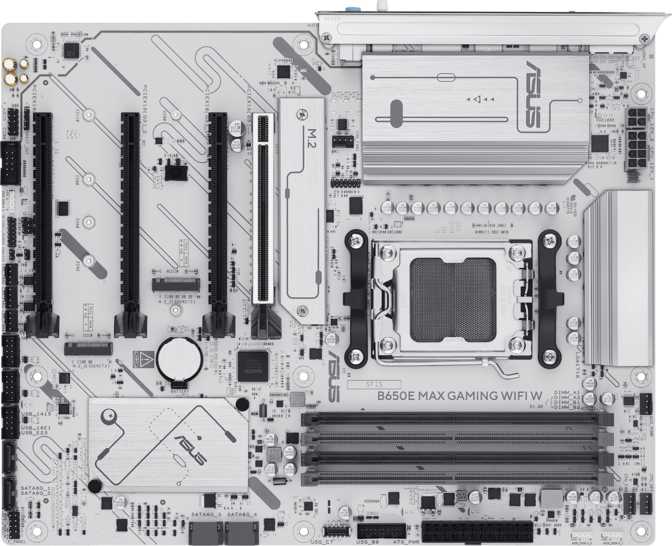
Asus B650E Max Gaming Wi-Fi W Review — An Honest Full Analysis
MotherboardsThe moment you commit to AMD's AM5 platform, every motherboard decision shapes what your system can do — today and several years from now. The Asus B650E Max Gaming Wi-Fi W lands at an interesting intersection: a mid-range chipset with connectivity capabilities that were exclusive to premium boards not long ago, wrapped in a white aesthetic that is harder to find than the demand suggests. The "E" in B650E is not marketing copy — it denotes hardware-level enhancements that separate this board from standard B650 options in ways that compound in value over a multi-year ownership horizon.
PCIe 5.0 Ready
GPU & Primary M.2
Wi-Fi 6E
+ Bluetooth 5.3
3 M.2 Slots
PCIe 5.0 Primary
3-Year Warranty
Asus Coverage
Design, Build Quality, and the White Aesthetic
Physical Footprint and Case Compatibility
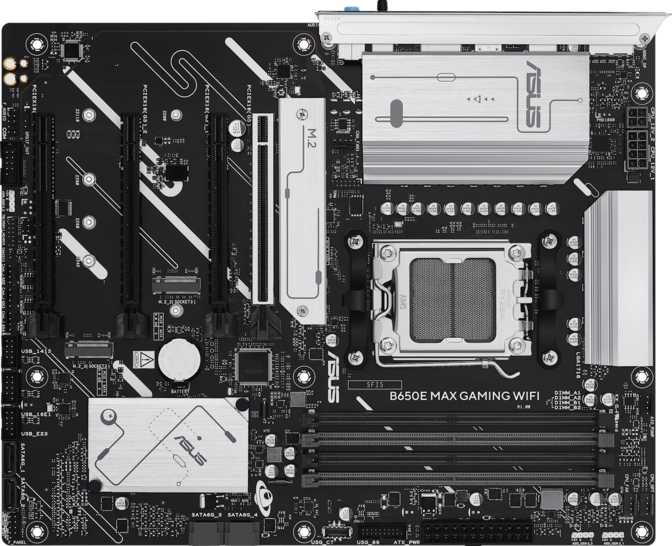
At standard ATX dimensions — 305 mm wide by 244 mm tall — this board fits any full-tower or mid-tower case designed for the ATX standard, covering the dominant majority of gaming and workstation enclosures. No specialty cases required, no clearance arithmetic to run. For builders new to PC assembly, ATX compatibility means shopping from the widest possible selection of cases.
The White Colorway Commitment
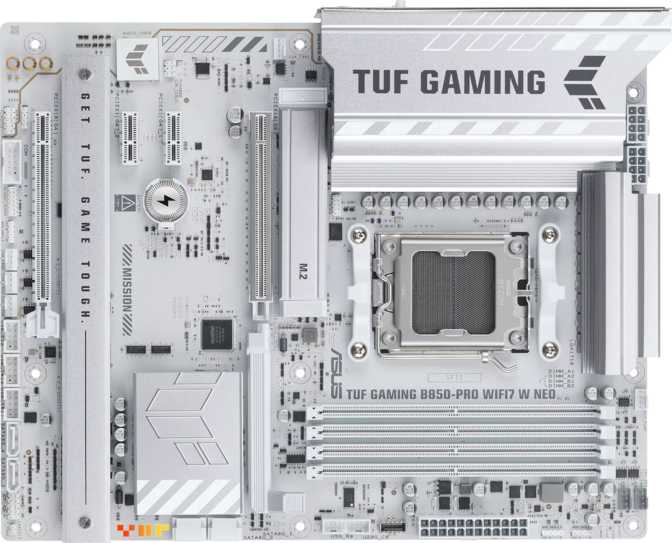
The "W" designation marks this as the white colorway variant, and the commitment runs deeper than a surface treatment. White heatsinks, a white PCB, and integrated RGB lighting tuned to complement the theme make this a board that participates visually in a build rather than hiding behind other components. White-themed systems have moved firmly into mainstream territory, yet boards that genuinely commit to the look remain scarcer than demand warrants.
The RGB zones across the board's illuminated areas work with the white theme rather than overwhelming it. Through a windowed side panel, the ambient lighting adds depth that the clean white base amplifies. Builders pairing this with white RAM kits, a white CPU cooler, and a light-colored case will find the board completes the visual language of the build rather than requiring workarounds.
This board ships without a dual-BIOS backup system and without a physical CMOS reset button on the rear I/O panel.
A dual-BIOS system maintains a secondary firmware copy that restores itself automatically if a primary BIOS flash fails. Without it, a failed update requires manual intervention — accessing jumper pins or removing the CMOS battery.
For everyday users following standard update procedures, this rarely surfaces. For builders who regularly flash experimental firmware or push aggressive overclocking limits, the absence is a genuine operational consideration.
What the B650E Chipset Actually Means for Your Build
AMD's mid-range chipset lineup follows a straightforward logic worth understanding before choosing a platform. The standard B650 is a capable mainstream option. The B650E — "Enhanced" — upgrades the primary PCIe interface running between chipset and processor, unlocking two capabilities the non-enhanced variant cannot offer.
Graphics Interface Headroom
Current graphics cards don't saturate PCIe 4.0 bandwidth in real gaming loads, so the jump to 5.0 doesn't translate to higher frame rates today. What it does is eliminate any interface bottleneck as future GPU architectures grow more data-intensive — a platform-longevity argument rather than an immediate performance one.
Where PCIe 5.0 Pays Off Now
PCIe 5.0 NVMe drives are on retail shelves and deliver sustained transfer speeds that PCIe 4.0 storage cannot match. For intensive file operations — editing high-bitrate video, loading complex game worlds, processing large datasets — the throughput difference is measurable in real time. Choosing a B650E board now means no future storage upgrade requires a new motherboard.
Memory Configuration and DDR5 Performance Potential
Four Slots, DDR5 Only
The board runs DDR5 exclusively — a platform-wide characteristic of AM5 rather than a board-specific restriction. If you're transitioning from a DDR4 system, existing memory will not carry over; budget for new DDR5 as part of the build. Four DIMM slots support up to 256 GB total in a dual-channel configuration. Start with two sticks in the recommended paired slots for optimal dual-channel activation, then add two more later without discarding anything purchased today.
Speed Range and Overclocking Ceiling
Real performance extraction on AM5 comes through memory profiles — EXPO (AMD's certified standard) and XMP (broadly compatible). Enabling these is a single BIOS toggle, not a manual timing exercise. DDR5 kits rated in the 6000–6400 MT/s range hit the sweet spot on AM5 where throughput and latency are balanced for both gaming and application workloads.
The board's overclocking ceiling reaches beyond 8000 MT/s — primarily relevant to enthusiasts benchmarking memory at theoretical limits. Equipping this board with an entry-level DDR5 kit at base speeds leaves meaningful performance untapped; a quality 6000 MT/s kit extracts what the platform actually offers.
| Type | DDR5 (exclusive) |
| Slots | 4 DIMM |
| Max Capacity | 256 GB |
| Channels | Dual Channel |
| Profile Support | EXPO / XMP |
| OC Ceiling | Up to 8000 MT/s |
| ECC Memory | Not supported |
Recommended Performance Zone
Storage: Three M.2 Slots and Enterprise-Grade RAID Options
The M.2 Configuration
Three M.2 slots position this board above most of its peer class in storage flexibility. Running a dedicated OS drive, a game library volume, and a third slot for video captures or project assets simultaneously requires no SATA connections whatsoever. The M.2 slots operate independently — using all three doesn't disable any SATA ports.
The primary M.2 slot's PCIe 5.0 support is the headline for next-generation NVMe drives. The remaining two M.2 slots operate at PCIe 4.0, the current standard for high-performance drives and more than sufficient for any gaming, editing, or general-purpose task without bottlenecking.
SATA Storage
Four SATA connectors accommodate 2.5-inch SSDs and 3.5-inch mechanical drives for bulk storage where cost per gigabyte matters more than peak transfer speed. High-capacity mechanical drives for media archives and long-term backups remain cost-effective at scales where NVMe pricing doesn't yet compete.
RAID Support Beyond Class Expectations
Full RAID support across all four major configurations is uncommon at gaming-oriented price points. Home media servers, video archive systems, and small creative studio setups will recognize this as a feature that normally requires spending significantly more or choosing a workstation-oriented alternative.
| Config | What It Does | Status |
|---|---|---|
| RAID 0 | Stripes data for maximum speed — no fault tolerance | |
| RAID 1 | Mirrors data across two drives — one can fail without loss | |
| RAID 5 | Parity protection across 3+ drives — speed plus redundancy | |
| RAID 10 | Mirroring and striping combined — performance and redundancy |
Connectivity: Wireless, USB, and Wired Networking
Wi-Fi 6E: Current-Generation Wireless
The wireless module covers Wi-Fi 6E (802.11ax extended), adding the 6 GHz frequency band to the 2.4 GHz and 5 GHz bands covered by earlier generations. The practical advantage in congested wireless environments — apartment buildings, dense neighborhoods, offices with competing networks — is access to a significantly less interference-saturated band. At close-to-moderate range, Wi-Fi 6E connections can approach the throughput of a moderately fast wired connection, making it a genuine cable-replacement option where running Ethernet is impractical.
Bluetooth 5.3 accompanies the wireless hardware, bringing improved connection stability, reduced latency for wireless audio, and more reliable handling of multiple simultaneously paired devices — directly relevant to gaming headsets, controllers, and wireless keyboards where hiccups are immediately noticeable.
Wired and Display Outputs
A single RJ45 port handles standard wired Ethernet. Builders wanting dual-port configurations for link aggregation or network redundancy will need a PCIe add-in card in one of the available expansion slots.
An HDMI 2.1 port and one DisplayPort output appear on the rear I/O, active only when the installed processor includes integrated graphics — the AMD Ryzen "G"-suffix APU lineup. Most Ryzen 7000 series desktop CPUs lack a graphics core and require a discrete GPU; these outputs serve primarily for APU builds or temporary diagnostic connections. Where active, HDMI 2.1 supports 4K at 120 Hz and 8K at 60 Hz — the full capability ceiling for current display technology.
Rear USB Port Layout
| Port Type | Qty | Speed | Best Use |
|---|---|---|---|
| USB 3.2 Gen 2 Type-A | 3 | 10 Gbps | Fast external SSDs and high-bandwidth peripherals |
| USB 3.2 Gen 1 Type-A | 2 | 5 Gbps | Standard peripherals and external storage |
| USB 3.2 Gen 2 Type-C | 1 | 10 Gbps | Modern accessories, display adapters, reversible devices |
| USB 2.0 | 2 | 480 Mbps | Keyboards, mice, dongles, legacy devices |
Audio: 7.1 Surround Output Without the Optical Stage
On-board audio supports 7.1 surround channel configurations through three analog jacks, covering stereo, front surround, and center/subwoofer outputs that desktop speaker systems and analog headset adapters use. For gaming headsets plugged into the 3.5 mm jack and analog desktop speaker setups, the on-board output delivers clean, low-noise sound appropriate for this platform tier.
The S/PDIF optical output is absent. Builders routing audio through a home theater receiver, an external DAC with optical input, or a standalone amplifier expecting a digital optical signal need an alternative path. A USB DAC bypasses the motherboard's analog stage entirely and is completely unaffected by this omission. A PCIe sound card with optical output is the slot-based route for those who need it. The absence is relevant only to a specific subset of audio configurations — the majority of gaming and desktop listening setups use analog or USB connections and will not notice.
- 7.1 surround channel support
- 3 analog audio jacks (rear I/O)
- USB DAC compatible — no limitation
- No S/PDIF optical output
Expansion Slots and Thermal Management
PCIe Slot Configuration
Four physical PCIe slots address a range of use cases, from current-generation graphics to legacy specialty expansion cards.
Ready for current and next-generation graphics cards without any interface ceiling
Capture cards, additional networking, or storage expansion — adequate bandwidth for all non-GPU add-in cards
Additional audio hardware, older networking cards, or niche professional cards with low bandwidth requirements
Fan and Thermal Management
Six fan headers give builders granular control over every cooling component in the system. A typical ATX gaming rig runs three to five case fans plus a CPU cooler — four to six connections total. Six independently addressable headers means every fan connects directly to the board without Y-splitter cables that compromise per-fan speed monitoring and control logic.
Individual thermal curves per header, configured through the BIOS fan tuning interface, allow quiet-mode profiles for idle workloads and full airflow headroom under sustained gaming or rendering loads — all without third-party software.
Who This Board Is For — and Who Should Keep Looking
- AM5 builders who want PCIe 5.0 M.2 support without paying X670E prices
- White-themed system builds where the board needs to be a visual participant, not hidden hardware
- Builders who want Wi-Fi 6E integrated rather than relying on a USB dongle or consuming a PCIe slot
- Multi-drive storage builds — three M.2 slots, four SATA ports, and RAID 5/10 cover configurations most competing boards at this tier cannot
- Home server, creative studio, or backup-sensitive workflows that benefit from storage redundancy without workstation-board prices
- Builders who rely on Thunderbolt or USB4 peripherals — neither is present and there is no board-level workaround
- Aggressive firmware experimenters who depend on dual-BIOS automatic recovery as a standard safety layer
- Audio setups requiring an optical S/PDIF digital output at the rear panel — it is not present on this board
- Buyers whose build aesthetic centers on dark or neutral-colored components — the white colorway is fixed on this variant
How This Board Compares to Its Realistic Alternatives
The B650E Max Gaming Wi-Fi W closes the most consequential performance gap between mid-range and premium AM5 platforms — PCIe 5.0 across GPU and primary M.2 — while stopping short of the X670E's full feature set in areas like Thunderbolt, dual-BIOS protection, and top-end M.2 count. For the majority of gaming and content creation builds, those omissions are acceptable.
| Feature | B650E Max Gaming Wi-Fi W | Standard B650 | X670E |
|---|---|---|---|
| GPU Interface | PCIe 5.0 x16 | PCIe 4.0 x16 | PCIe 5.0 x16 |
| Primary M.2 Speed | PCIe 5.0 | PCIe 4.0 | PCIe 5.0 |
| Wireless Standard | Wi-Fi 6E | Wi-Fi 6 (typically) | Wi-Fi 6E |
| M.2 Slot Count | 3 | 2–3 | 3–4 |
| RAID 5 & RAID 10 | |||
| Dual BIOS | Varies by model | ||
| Thunderbolt / USB4 | Sometimes | ||
| White Colorway | Rarely | Rarely |
Honest Assessment of Strengths and Limitations
PCIe 5.0 across both the primary GPU and M.2 slots on a mid-range chipset is a genuine technical achievement that extends the platform's useful life. Four DIMM slots with a high DDR5 overclocking ceiling, three M.2 slots with a PCIe 5.0-capable primary, full RAID 0/1/5/10 support, Wi-Fi 6E, Bluetooth 5.3, and six independently controlled fan headers add up to a platform that doesn't arbitrarily restrict features to push buyers toward a higher tier.
The white colorway fills a real gap for builders who want a modern ATX board that looks intentional rather than incidental in a light-themed build. The three-year warranty gives a coverage window that extends through the typical system replacement cycle, and AMD's AM5 platform longevity commitment reduces the risk of premature obsolescence on the CPU and memory side.
The missing dual-BIOS system is the only limitation that creates meaningful operational risk — and only for builders who regularly push firmware beyond stable releases. A single failed BIOS flash becomes a manual recovery project rather than an automatic rollback.
The absent S/PDIF output is a hard stop for specific home theater configurations. The lack of Thunderbolt and USB4 limits the board's appeal for professionals whose peripheral ecosystem depends on those interfaces.
The white-only colorway is simultaneously a strength and a constraint — ideal for white builds, a visual mismatch for everything else. These limitations are specific rather than structural, and for most builders, none of them subtract from what the board genuinely delivers.
Common Questions Before You Purchase
Final Verdict
The Asus B650E Max Gaming Wi-Fi W earns a confident recommendation for AM5 builds that prioritize PCIe 5.0 storage readiness, integrated Wi-Fi 6E, and storage versatility — and where a white aesthetic is either the goal or an acceptable advantage.
Rating Breakdown
Buy This Board If
- You're committed to AM5 and want PCIe 5.0 M.2 access without the cost of an X670E platform
- Strong integrated wireless and Bluetooth 5.3 are priorities for your setup
- You're assembling a white-themed system that needs a board matching the aesthetic intentionally
- Multi-drive storage with RAID redundancy is part of your current or future workflow
Look Elsewhere If
- Thunderbolt or USB4 connectivity are non-negotiable for your existing peripheral setup
- Dual-BIOS backup or a physical CMOS reset button are hard requirements for your workflow
- Your audio chain depends on an S/PDIF optical output at the rear panel
The three-year warranty and AMD's AM5 platform longevity commitment reduce long-term ownership risk — making this a platform purchase that holds its value well into the next upgrade cycle.