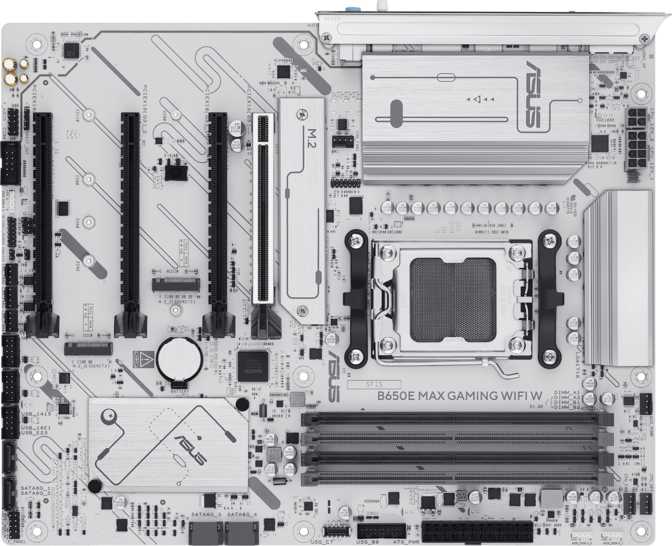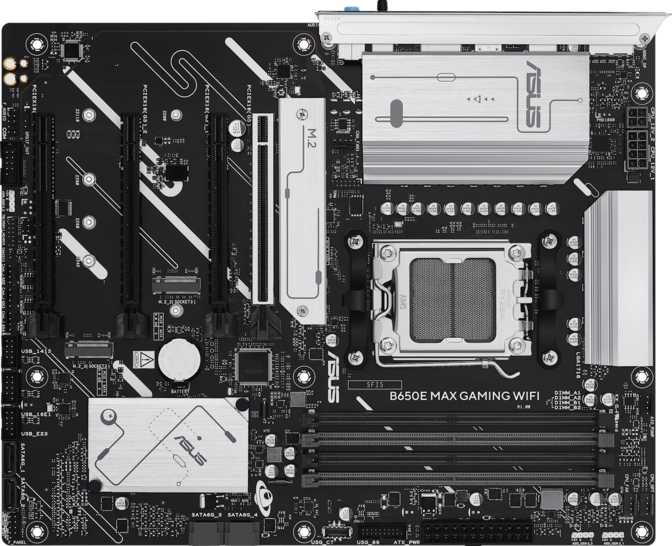
Asus B650E Max Gaming Wi-Fi: Full Review and Real-World Analysis
MotherboardsAt a Glance
PCIe 5.0 x16
GPU Slot Ready
3x M.2 Slots
PCIe 5.0 + 4.0
Wi-Fi 6E Built-In
802.11ax + BT 5.3
DDR5 Support
Up to 256 GB
AM5 Socket
ATX Form Factor
3-Year Warranty
Manufacturer
Why the B650E Chipset Changes the Motherboard Conversation
The AM5 socket era marked a genuine architectural shift for AMD-based builds — not just a new chip shape, but a platform commitment to DDR5 memory, PCIe 5.0 expansion lanes, and a socket lifecycle designed to outlast multiple CPU generations. Within that ecosystem, the B650E chipset occupies a specific and strategically valuable position: it delivers PCIe 5.0 to both the primary graphics card slot and the primary M.2 storage slot, without crossing into the higher-cost X670E territory.
The Asus B650E Max Gaming Wi-Fi is built on this foundation with a clear purpose. It targets enthusiast gaming builders who want forward-looking hardware today without paying for workstation-grade overkill. Understanding what "B650E" concretely means — and where the "Max Gaming" tier genuinely delivers — is the starting point for an honest evaluation.
The AM5 Platform: What You're Committing To
LGA Socket Design
AM5 moves the fragile CPU pins from the processor onto the motherboard socket itself. Dropping a Ryzen 7000-series processor no longer risks bending irreplaceable pins on the chip — only the board socket is exposed, making component handling considerably more forgiving for builders of all experience levels.
DDR5-Exclusive Platform
AM5 is DDR5-only — there is no DDR4 compatibility path, and the slot notch positions are physically incompatible between generations. This is a hard commitment, but the payoff is access to DDR5's substantially higher frequency ceiling and improved per-channel bandwidth, which pays measurable dividends in modern games and bandwidth-heavy workloads.
Platform Longevity: AMD has publicly committed to the AM5 socket for multiple future Ryzen generations, giving this board a realistic lifespan that extends well beyond the current processor lineup — a meaningful factor when calculating long-term value.
Design and Physical Build
ATX Form Factor — 305mm x 244mm
The Asus B650E Max Gaming Wi-Fi uses the standard ATX form factor, fitting comfortably in any ATX mid-tower or full-tower case. The "Max Gaming" designation within Asus's lineup signals a board engineered for sustained performance under load, typically providing more robust power delivery circuitry than base-tier B650E offerings — headroom needed to run high-TDP AM5 processors at their full performance envelopes without throttling through the VRM components.
RGB lighting is integrated and present throughout the board's design, synchronizable with Asus's Aura Sync ecosystem and compatible with a wide range of addressable lighting accessories. It can be disabled through BIOS or software for builders who prefer a clean look.
The board carries a three-year manufacturer warranty — standard for Asus at this product tier, and a reasonable expectation of durability from a platform built to last multiple CPU generations.
- Standard ATX Compatibility
305mm x 244mm — fits all ATX mid/full-tower cases
- RGB Lighting Included
Aura Sync compatible, software-disableable
- 3-Year Manufacturer Warranty
Standard for this Asus tier
- No Dedicated CMOS Reset Button
Recovery requires manual CMOS battery removal
- No Dual BIOS Chip
No secondary backup BIOS if primary is corrupted
Memory: DDR5 Performance and Real-World Headroom
Capacity and Dual-Channel Operation
Four memory slots across two channels support up to 256 gigabytes of total DDR5 RAM. For gaming, this ceiling is architecturally generous — even the most demanding titles benefit minimally beyond 32GB, and the practical sweet spot for high-refresh gaming remains 32GB in dual-channel configuration (two matched 16GB sticks).
Dual-channel operation doesn't double raw memory speed — it doubles the width of the memory bus, allowing the processor to pull data from both sticks simultaneously. The difference versus single-channel is consistent and measurable in CPU-heavy workloads and at higher gaming resolutions. Always populate matched sticks in the correct paired slots per the board manual.
The board does not support ECC (Error-Correcting Code) memory. This is expected for a consumer gaming platform and only matters for workstations where hardware-level data integrity is a non-negotiable requirement.
Frequency Headroom and EXPO Support
Through AMD's EXPO profile standard — AMD's native equivalent of Intel's XMP — compatible DDR5 kits run at their advertised higher speeds with a single BIOS toggle, no manual tuning required. Ryzen AM5 processors respond notably well to memory frequency improvements, making EXPO a practical day-one recommendation.
For enthusiasts who want to push further, manual overclocking reaches the current frontier of consumer DDR5 performance. Achieving the upper ceiling requires carefully selected memory kits and willingness to work through stability testing — results at the extreme end depend heavily on silicon quality in both the processor's memory controller and the DRAM modules themselves.
4
Memory Slots
256GB
Maximum Capacity
DDR5
Only — no DDR4 support
Dual-Ch
Architecture
Storage: Three M.2 Slots and a Flexible SATA Arrangement
Three M.2 sockets — SATA 3 connectors — Full RAID support (0 / 1 / 5 / 10)
Three M.2 NVMe Sockets Explained
PCIe 5.0 M.2
The B650E chipset designation guarantees at least one M.2 slot operates at PCIe 5.0 bandwidth. Compatible drives exceed 10,000 MB/s sequential reads — roughly double the PCIe 4.0 peak. This slot is ready for today's fastest drives and whatever comes next.
PCIe 4.0 M.2
The remaining M.2 slots operate at PCIe 4.0 speeds, reaching sequential reads around 7,000 MB/s — fast enough that no real-world gaming workflow, video editing session, or OS load sequence will ever be bottlenecked at this interface.
Cable-Free Storage
A full three-drive setup — OS, games, project scratch — runs entirely through M.2 without a single SATA data cable. The result is a cleaner interior, zero routing complexity, and maximum performance across every storage role.
SATA and Supplemental Storage
Four SATA 3 connectors handle traditional hard drives, SATA SSDs, and optical drives. In a high-performance build, SATA storage typically serves secondary roles — large-capacity archival hard drives or additional game library space — where its lower speed relative to NVMe is architecturally irrelevant.
RAID Configuration Support
The storage controller supports RAID 0, 1, 5, and 10. These configurations serve home server builders, content archives requiring redundancy, or specialized workstation setups. Most gaming-only builds will run drives independently without RAID, but the option is there.
| RAID Level | What It Does | Minimum Drives | Best For |
|---|---|---|---|
| RAID 0 | Stripes data for combined throughput | 2 | Maximum speed, zero redundancy |
| RAID 1 | Mirrors data for fault tolerance | 2 | Data backup and redundancy |
| RAID 5 | Distributed parity — speed + fault tolerance | 3 | Balanced workstation storage |
| RAID 10 | Striped mirrors — maximum performance + safety | 4 | High-demand servers / production |
Expansion Slots: PCIe 5.0 for the GPU, Room to Grow
Primary GPU Slot: PCIe 5.0 x16
The first and most important expansion slot runs at PCIe 5.0 x16 — the current-generation standard for discrete graphics cards. This interface provides 128 GB/s of theoretical bidirectional bandwidth, double the PCIe 4.0 equivalent.
In practice, today's most powerful consumer graphics cards don't approach the bandwidth limits of PCIe 4.0, let alone PCIe 5.0. A buyer installing a current-generation GPU sees no frames-per-second difference versus PCIe 4.0. What the PCIe 5.0 slot provides is forward compatibility — as GPU architectures advance and begin leveraging higher interface bandwidth (and they will), this board won't become the limiting factor.
Practical takeaway: Zero performance difference today versus PCIe 4.0. Potentially significant over a three to four year ownership window as next-generation GPU architectures mature.
-
Slot 1 — Primary GPUPCIe 5.0 x16
For discrete graphics cards
-
Slot 2 — Secondary Full-LengthPCIe 4.0 x16
Capture cards, secondary GPU, add-in NVMe
-
Slots 3 & 4 — AdditionalPCIe 3.0 x16
Low-bandwidth expansion cards
Ports and Rear I/O: The Full Connection Ecosystem
8 rear USB ports across four speed tiers — HDMI 2.1 — DisplayPort — Gigabit LAN
USB Connectivity by Speed Tier
10 Gbps
3x USB-A (Gen 2)
Current mainstream standard for external SSDs and high-bandwidth hubs
10 Gbps
1x USB-C (Gen 2)
Modern peripherals, docks, and charging-capable devices
5 Gbps
2x USB-A (Gen 1)
Keyboards, mice, webcams, audio interfaces, standard storage
480 Mbps
2x USB 2.0
Keyboards, mice, and any low-bandwidth accessory
Display Outputs — An Important Caveat
High-bandwidth display connection
Available on the rear panel — but only active when using an AMD Ryzen G-series APU with integrated Radeon graphics. Standard Ryzen 7000-series desktop processors include no integrated graphics; for those builds, this port produces no signal.
One output via rear I/O
Same caveat applies — this port is fed by CPU integrated graphics only. Builders using a discrete GPU route all display connections through the graphics card's own outputs. These rear panel ports are non-functional in that configuration.
Internal Headers and Expansion
| Header / Connector | Count | Purpose |
|---|---|---|
| USB 3.2 Gen 1 headers (5 Gbps) | 2 | Front-panel USB-A expansion |
| USB 3.0 headers | 2 | Additional internal USB 3.0 connectivity |
| USB 2.0 headers | 6 | Front-panel hubs, RGB controllers, legacy peripherals |
| SATA 3 connectors | 4 | HDDs, SATA SSDs, optical drives |
| Fan headers (PWM) | 4 | CPU cooler, case fans — hub needed for larger setups |
| TPM connector | 1 | Hardware security — required for Windows 11 compliance |
Wireless: Wi-Fi 6E and Bluetooth 5.3
The integrated wireless adapter covers all mainstream Wi-Fi generations, including Wi-Fi 6E — the 802.11ax standard extended to the 6 GHz radio band. This band is newer, far less congested than the 5 GHz band, and offers significantly more available channels. In apartments, office buildings, and urban environments where the 5 GHz spectrum is saturated with neighboring Wi-Fi signals, Wi-Fi 6E delivers meaningfully more consistent throughput and reduced latency.
In low-density environments, the practical difference between Wi-Fi 6 and Wi-Fi 6E is small. A compatible Wi-Fi 6E router is required to access the 6 GHz band. The adapter maintains full backward compatibility with Wi-Fi 5 and Wi-Fi 4 networks.
Wi-Fi 6E for Gaming
For competitive online gaming, wired Ethernet still outperforms any wireless standard in latency consistency. Wi-Fi connections introduce jitter — variable latency spikes — that wired connections avoid almost entirely. Wi-Fi 6E is ideal when running a cable is genuinely impractical.
Bluetooth 5.3
Current-generation Bluetooth supports modern device profiles for gaming controllers, headsets, keyboards, and mice. Note that aptX audio codec support is absent — audiophiles pairing this system with aptX-compatible Bluetooth audio equipment will rely on alternative codecs supported by their headset, which may deliver different audio quality characteristics.
Audio: What 7.1 Support Actually Means
The board's audio subsystem supports 7.1 surround sound — seven discrete channels plus a dedicated subwoofer output. This covers the full configuration used by home theater speaker setups and by premium gaming headsets that decode positional surround audio in hardware. Three physical audio jacks on the rear panel handle analog output in this configuration.
- 7.1 Surround Configuration
Covers front stereo, center/sub, rear surround, and side channels via software processing
- 3 Physical Audio Jacks
Front output, center/sub, and rear surround assignments
- No S/PDIF Digital Audio Output
No optical or coaxial out — users connecting to AV receivers or external DACs via optical will need a USB DAC or external audio interface
Onboard audio at this price tier is adequate for gaming and casual listening. Critical music listening or professional audio production still benefits from a dedicated external DAC or USB audio interface.
Overclocking: The B650E Advantage
Easy Overclocking Features
The board includes Asus's easy overclocking functionality — a simplified system allowing users to apply pre-validated performance profiles without manually adjusting voltage, frequency, and timing tables. This lowers the barrier to entry for performance tuning significantly, making meaningful CPU and memory speed gains accessible to builders who have never overclocked before.
DDR5 Frequency Ceiling
EXPO profile support enables compatible DDR5 kits to run at their advertised speeds with a single BIOS toggle — no manual configuration required. The manual overclocking ceiling sits at the current frontier of consumer DDR5 performance, requiring a carefully selected memory kit and stability testing, but representing maximum headroom for enthusiast memory tuning.
Most users will find EXPO-profile operation at a manufacturer-rated kit speed more practical and completely stable from day one — and fully sufficient for gaming performance gains.
Who Should Buy This Board — and Who Should Look Elsewhere
Matching the right board to the right builder matters more than raw specification counts
- AM5 Gaming Enthusiasts
Wants a PCIe 5.0-ready GPU slot and primary M.2 slot without X670E pricing
- Three-Drive NVMe Builders
Wants a fully cable-free, high-speed storage setup without touching SATA ports
- Wireless-First Builders
Wants Wi-Fi 6E and Bluetooth 5.3 integrated rather than added via an expansion slot
- Long-Term Platform Builders
Plans to hold this board for multiple CPU and GPU generations — PCIe 5.0 forward compatibility matters over time
- DDR5 Enthusiasts
Intends to run EXPO profiles or push memory frequencies toward the current performance frontier
- Content Creators Needing USB4 / Thunderbolt
High-bandwidth docks, external GPU enclosures, and 40 Gbps external storage require connectivity this board doesn't offer
- Complex Cooling Builds
Multi-fan radiators, six-fan case setups, or separate pump connectors will exhaust four fan headers quickly
- Budget-Focused Builders
Not yet buying a PCIe 5.0 GPU or NVMe drive? A standard B650 delivers equivalent gaming performance today at lower cost
- Home Server and NAS Builders
ECC memory for hardware-level data integrity requires X670 or HEDT platform alternatives
- Aggressive Overclockers
The missing CMOS reset button and dual BIOS will be felt frequently by builders who push limits and recover from failed boots regularly
Competitive Positioning: B650 vs. B650E vs. X670E
How this board fits within the AM5 motherboard landscape
| Feature | B650 (Standard) | B650E Max Gaming Wi-Fi | X670E |
|---|---|---|---|
| Primary GPU Slot | PCIe 4.0 x16 | PCIe 5.0 x16 | PCIe 5.0 x16 |
| Primary M.2 Slot | PCIe 4.0 | PCIe 5.0 | PCIe 5.0 |
| Wi-Fi 6E | |||
| USB4 / Thunderbolt | Rare | None | More common |
| Overclocking Headroom | Moderate | Good | Maximum |
| Dual Chipset Architecture | |||
| Price Tier | Lowest | Mid-Range | Highest |
| Ideal Use Case | Mainstream gaming | Enthusiast gaming | Workstation / extreme OC |
B650E vs. Standard B650
Against a standard B650 board, the difference is concrete: PCIe 5.0 on both the GPU slot and primary M.2, versus PCIe 4.0 on both. For today's hardware, this produces no measurable gaming performance difference. For hardware two or three GPU generations from now, it may matter substantially — particularly as GPU architectures begin to exploit interface bandwidth more aggressively.
B650E vs. X670E
X670E's dual-chipset architecture provides more PCIe 5.0 lanes, higher USB port density, and better headroom for sustained extreme CPU overclocking. It more commonly includes USB4 and Thunderbolt. The X670E price premium is justified when those capabilities have immediate use. For gaming-primary builds where the GPU is the central investment, B650E delivers the hardware foundation at considerably lower cost.
Honest Strengths and Real Weaknesses
Where It Delivers
PCIe 5.0 on both the GPU and M.2 slots is a genuinely forward-looking specification in the B650E tier. Buyers who plan to own this board for four or more years are better positioned than those locked into PCIe 4.0 as GPU architectures mature.
Three M.2 slots eliminate the need for SATA storage in most configurations. Running an OS drive, games library, and scratch drive entirely through M.2 is a cable-free, high-performance configuration that enthusiast builders increasingly expect as a baseline.
Wi-Fi 6E at this price point is appropriate and increasingly necessary — the 6 GHz band's reduced congestion in dense environments is a real-world benefit, not a marketing specification.
The DDR5 frequency ceiling sits at the current frontier of what consumer AM5 platforms support, giving enthusiasts full room to explore memory performance through both EXPO profiles and manual tuning.
Where It Falls Short
Four fan headers represent a meaningful limitation on a board branded for gaming. Cooling ambition runs high in this audience — multi-fan AIO radiators, high-count case ventilation, or water cooling loops with separate pump connections will exhaust those four headers before the build is finished. A fan hub resolves this, but shouldn't be a necessary add-on at this tier.
The missing CMOS reset button and absent dual BIOS chip are the more pointed disappointments. A board marketed toward overclockers should offer fast recovery tools as standard. Their absence is a design decision, not an oversight, and it becomes acutely relevant at the worst possible moment — when a failed overclock won't boot.
The absence of Thunderbolt or USB4 doesn't disqualify the board from gaming use, but it closes the door on buyers who stretch their use case toward content creation, professional audio, or high-bandwidth external workflows. Competing boards at this price tier from other manufacturers often include at least one USB4 port.
Questions Real Buyers Ask Before Purchasing
Answers to the most common searches before buying the Asus B650E Max Gaming Wi-Fi
Final Assessment
The Verdict
The Asus B650E Max Gaming Wi-Fi earns a clear recommendation for a specific buyer: an AM5 gaming enthusiast who wants PCIe 5.0 readiness on both the GPU and primary storage interface, three M.2 slots for a cable-free high-performance storage configuration, and integrated Wi-Fi 6E — all without stepping up to the X670E cost tier.
The platform choice is sound, the feature set hits the right marks for gaming longevity, and the DDR5 frequency headroom is genuine rather than speculative. None of these are small things, and the board delivers on each of them without qualification.
Buy This Board If:
- Your priority is a future-proofed gaming platform
- You want PCIe 5.0 now and DDR5 headroom for later
- A cable-free three-M.2 storage setup matters to you
- Wireless covered from the start is important
Consider Alternatives If:
- You need Thunderbolt or USB4 for your workflow
- You manage complex cooling with 5 or more fan connections
- You overclock aggressively and need fast BIOS recovery tools
- A standard B650 meets your actual current hardware needs
The Asus B650E Max Gaming Wi-Fi does exactly what its chipset tier promises. Where it falls short is in the execution details — fan header count, BIOS recovery tools, high-bandwidth USB — that separate a strong product from a polished one. Within those parameters, it's a technically sound board that earns its place in any AM5 gaming build built for longevity.