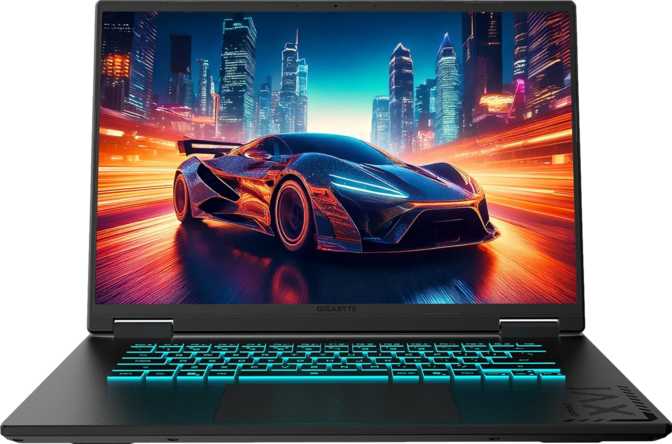
Gigabyte Gaming A16 GA6H Review: Blackwell GPU, Smart Midrange Choice
Laptops8.2
out of 10
Blackwell GPU
GDDR7 · Current-Gen
165Hz · 16:10
IPS · 16-inch
10-Core CPU
Hybrid · 4.9GHz Turbo
Under 2.2kg
Slim 19mm Profile
The Midrange Bet That Actually Pays Off
The budget-to-midrange gaming laptop market punishes indecision. Too many machines look correct in a spec summary but reveal their compromises the moment you use them — a dim screen here, a throttled GPU there, or an upgrade path that ends at the factory configuration. The Gigabyte Gaming A16 GA6H takes a more considered approach: concentrate hardware budget on the components that hold value over a machine's useful life, and be direct about what gets traded away to get there.
This 16-inch machine makes two specific bets: that buyers are better served by current-generation GPU architecture and memory technology than by higher-wattage previous-generation alternatives; and that a taller screen aspect ratio improves daily computing usability enough to justify breaking from the standard gaming laptop template. Whether those bets pay off — and where the trade-offs genuinely bite — is what this review establishes.
Design and Portability: Slim for the Category
~2.2 kg
Lighter than most 16-inch rivals
19mm
Slim profile with active cooling
16-inch
16:10 aspect ratio display
At approximately 2.2 kilograms, the GA6H sits comfortably toward the lighter end of what 16-inch gaming machines typically weigh. Competing hardware with comparable internals often tips 300 to 400 grams heavier — a gap that may seem marginal until you're carrying the machine across a campus or through an airport on a regular basis.
The chassis profile is impressively trim for a machine with active cooling, which the GA6H requires given the performance hardware inside. That slimness requires deliberate thermal engineering: Gigabyte has achieved it here, though not without consequences that appear under sustained load.
The aesthetic reads as understated for its category. No aggressive LED trim on the lid, no visual language that announces this as a gaming machine to a conference room. Users who move between professional environments and personal use will find it blends in accordingly. The backlit keyboard makes low-light use practical, which the gaming-after-hours use case demands.
The chassis carries no weather sealing or rugged certification. Standard careful transport applies — this is a commuter and desk machine, not a fieldwork tool.
The Display: Why a Taller Screen Changes the Daily Experience
1920×1200
16:10 Aspect Ratio
165Hz
Refresh Rate
IPS LCD
Wide Viewing Angle
No AR
Anti-Reflection Coating
The screen resolution of 1920×1200 pixels produces a 16:10 aspect ratio — roughly six percent taller than the 16:9 format that the vast majority of gaming laptops default to. That extra vertical height sounds trivial on paper. In use, it means more document visible without scrolling, more code lines on screen without horizontal cramping, and a more natural frame for web content designed for monitors rather than widescreen television formats.
For gaming specifically, the pixel count is only fractionally higher than standard 1080p. The GPU isn't meaningfully burdened beyond what a 1080p game demands, while the productivity benefit is real and permanent. The IPS panel technology delivers consistent color accuracy and wide viewing-angle stability that holds up for photo editing and video playback alongside game use.
The 165Hz refresh rate ensures fluid motion rendering in fast-paced titles where display response would otherwise cause visible judder. The practical gap between 144Hz and 165Hz is narrow — most players won't consciously register it — but the higher ceiling is there for the most demanding scenarios.
The Screen's Real Limitations
The screen's brightness sits in the moderate range that serves controlled indoor environments well but will wash out under direct sunlight or in window-adjacent positions. The absence of an anti-reflection coating means visible surface reflections in bright ambient light. This is the GA6H's most practical daily-use limitation — worth weighing honestly against your typical working environment before purchasing.
CPU Performance: Intel's Hybrid Architecture in Practice
The processor follows Intel's hybrid core design, pairing six higher-performance cores with four efficiency-oriented cores for a total of ten cores and sixteen processing threads. The performance cores engage for demanding tasks — gaming, video encoding, compilation — while the efficiency cores handle background processes without drawing heavily on the battery. Under peak demand, the performance cores push to just under 5GHz.
Benchmark Performance
Scores shown relative to high-end laptop CPU ceiling for visual context.
These scores place this CPU solidly in upper-midrange laptop territory — competitive with what a similarly priced machine offers and well ahead of older-generation chips still found in budget configurations. Single-core performance, which governs responsiveness in lightly threaded applications and gaming frame-time consistency, is equally competitive for the tier.
The combined L2 and L3 cache stores over 33MB of fast-access data close to the processor cores, supporting the engine logic and asset streaming that determines whether frame timing is consistent. Intel's Resizable BAR support allows the CPU to access the full GPU framebuffer in a single operation, delivering measurable frame-rate improvements in optimized titles with no user configuration required.
A 45-watt thermal ceiling in a 19mm chassis means the cooling system has real work to do. Fan noise under gaming or sustained encoding workloads is the predictable consequence — audible, necessary, and manageable with a headset but worth factoring into shared quiet spaces.
The Discrete GPU: Where the GA6H Makes Its Clearest Argument
The discrete NVIDIA graphics are built on Blackwell architecture — NVIDIA's current generation. Architecture generation matters beyond core count comparisons because it governs shader execution efficiency, the generation of AI-enhanced rendering hardware, and the capability ceiling for ray tracing acceleration. Being on the current generation ensures full compatibility with the rendering techniques games are being built for right now.
The GPU carries 8 gigabytes of GDDR7 video memory — the newest generation of graphics memory, offering substantially higher throughput per memory lane than the GDDR6 and GDDR6X found in previous-generation alternatives. On this GPU's 128-bit memory bus, GDDR7 achieves memory bandwidth that rivals configurations from prior generations with considerably wider buses. In practical gaming terms, that bandwidth matters in texture-heavy open-world environments, at higher quality settings, and in titles where memory access frequency scales with scene complexity. Raw floating-point throughput delivers just under 9.7 teraflops — well-matched to the display's native resolution, which sits only fractionally above standard 1080p in pixel count.
DLSS Upscaling
NVIDIA's AI-driven upscaling uses dedicated tensor hardware on the Blackwell chip to reconstruct high-quality frames from lower-resolution renders. In supported games — a large and growing library — enabling DLSS can recover 30–50% additional frame rate with minimal visible quality loss. This technology meaningfully extends what a mid-tier GPU achieves in practice and remains relevant as games grow more demanding.
Hardware Ray Tracing
Physically accurate light simulation is accelerated in dedicated hardware. Pairing ray tracing with DLSS is the recommended approach — the performance cost of ray tracing is real, but DLSS recaptures most of the headroom. The feature is usable at this tier, not a checkbox that delivers unplayable frame rates.
For non-gaming workloads, Intel's integrated graphics handle display output while the discrete GPU idles, directly conserving battery during productivity use. This hybrid graphics behavior requires no user management in practice.
Memory and Storage: Built for Today, Expandable for Tomorrow
System Memory
- Installed
- 16GB DDR5
- Generation
- DDR5 — Current Standard
- Slots
- 2 Accessible Slots
- Maximum
- 64GB
Storage
- Capacity
- 1TB NVMe SSD
- Interface
- PCIe 4.0
- Speed Class
- High-Performance NVMe
- Card Reader
- Not Included
System memory ships at 16 gigabytes of DDR5 — the current generation standard. The clock speeds this memory operates at provide noticeably higher bandwidth than DDR4 configurations found in older or less expensive alternatives, benefiting both gaming frame-time consistency and general computing responsiveness.
The two physical memory slots and a maximum configuration four times the shipping capacity mean this machine can grow with its owner's needs over several years — a meaningful differentiator over machines with soldered, non-upgradeable RAM. Storage arrives via a PCIe 4.0 NVMe SSD; the interface delivers the high sequential throughput that shows up in game load times and large file transfers. One terabyte fills up faster than most buyers anticipate once a gaming library builds, but the NVMe interface makes high-capacity portable drives a practical companion.
Connectivity and Ports: Capable but With a Clear Ceiling
No Thunderbolt. No USB4. The USB-C port operates at 5Gbps. For gaming this is irrelevant. For creative professionals or users dependent on high-bandwidth peripherals, this is a hard constraint that no accessory can address after purchase.
Physical Ports
- 1× USB-C (5Gbps — data and display output)
- 2× USB-A (5Gbps each)
- 1× USB-A legacy speed (mice, keyboards, receivers)
- 1× HDMI 2.1 (supports high-performance external displays)
- 1× Gigabit Ethernet (RJ45)
- 1× 3.5mm combined headphone/microphone jack
Wireless Connectivity
- Wi-Fi 6E — 2.4GHz, 5GHz, and 6GHz bands
- Bluetooth 5.2 — current-generation efficiency
Wi-Fi 6E advantage: In dense wireless environments — apartments, student halls, co-working spaces — the 6GHz band is far less congested than the 2.4GHz and 5GHz bands. More consistent throughput in crowded spaces is the practical benefit.
Wired Ethernet note: For competitive gaming, no Wi-Fi adapter fully eliminates packet-timing variance the way a direct cable connection does. The RJ45 port is present and worth using.
Battery and Power: Gaming Machines Have Limits; Know Them
The battery pack sits toward the upper end of what comparably priced gaming machines in this segment typically ship with — a meaningful capacity that supports genuine productivity endurance. In light-load conditions, the integrated graphics handle all display output, the discrete GPU idles, and the efficiency CPU cores handle most processing, supporting substantially extended runtime compared to full gaming load.
Light Productivity
Documents, browsing, calls — extended runtime. Integrated GPU handles display; discrete GPU idles throughout.
Streaming and Media
Similar to light productivity with moderate draw. Comfortable for long playback sessions away from a charger.
Active Gaming
Discrete GPU and performance CPU cores fully engaged. Serious gaming sessions require proximity to a power outlet.
Under gaming conditions, the discrete GPU activates and the performance CPU cores engage fully — battery drain accelerates significantly. This is a category-wide reality, not a specific flaw of this machine. The USB ports support pass-through charging during sleep, allowing connected devices to top up while the laptop is asleep — a consistently useful convenience for a single-charger travel kit.
Everyday Features Worth Knowing About
Dolby Atmos Audio
Spatial audio processing applied to the stereo speaker system. The improvement over an untuned laptop speaker is audible, particularly for media and music.
3D Facial Login
Windows Hello via 3D facial recognition — hands-free authentication for a machine opened repeatedly throughout the day. No fingerprint sensor as a fallback option.
Dual Microphones
Two microphones positioned for voice capture. Adequate for calls and voice recognition in standard productivity use without an external microphone.
Backlit Keyboard
Key illumination for low-light use. Essential for the gaming-after-hours use case this machine is built around.
Who Should Buy the Gigabyte Gaming A16 GA6H
Strong Fit
- Students who game seriously and do demanding coursework on the same machine, unable to compromise on either
- Buyers upgrading from an aging mid-range machine who want current-generation GPU without premium-tier pricing
- Remote workers needing a capable productivity machine that handles modern games after hours
- Anyone prioritizing DLSS, hardware ray tracing, and GDDR7 GPU memory on a laptop budget
- Users who primarily work in controlled indoor lighting where display brightness covers all daily needs
Not the Right Match
- Creative professionals or developers whose workflow depends on Thunderbolt for external storage, audio interfaces, or professional docking
- Users who frequently work in bright ambient environments or outdoors — moderate brightness plus no anti-glare creates persistent friction
- Buyers who require silence during use — active cooling at this performance level is audible under sustained load
- Anyone needing 32GB of RAM immediately and preferring not to add memory after purchase
How It Stacks Up Against the Competition
The 16-inch gaming laptop segment at comparable price points varies considerably in where machines allocate their hardware budget. The GA6H's differentiators are GPU generation currency, GDDR7 memory bandwidth, the 16:10 display aspect ratio, and a lighter chassis for the class. Its points of compromise are connectivity headroom and display brightness in ambient light.
| Feature | Gigabyte Gaming A16 GA6H | Typical Segment Competitor |
|---|---|---|
| GPU Architecture | Blackwell — current generation | Ada Lovelace / RDNA 3 — previous gen |
| GPU Memory Type | GDDR7 | GDDR6 |
| Display Aspect Ratio | 16:10 — taller, more visible | 16:9 — standard widescreen |
| Refresh Rate | 165Hz | 144Hz |
| Display Brightness | Moderate indoor range | Varies; some rivals higher |
| Anti-Reflection Coating | Not present | Varies; some rivals include it |
| Thunderbolt / USB4 | Not present | Available on some, at a premium |
| RAM Expandability | Up to 64GB across 2 slots | Often 1 slot or soldered |
| Chassis Weight | Lighter end for the class | Heavier by 200-400g typically |
Alternatives with higher-wattage GPU configurations may deliver stronger peak frame rates in the most demanding titles — usually at the cost of increased weight and reduced productivity battery life. Rivals with Thunderbolt 4 at equivalent GPU performance do exist but typically carry a price premium; if Thunderbolt is a hard requirement, budget for that premium explicitly.
Strengths and Weaknesses: The Honest Middle Ground
What Works
- GDDR7 on Blackwell architecture — a tangible memory bandwidth improvement that grows more relevant as engines increase in complexity
- DLSS makes this GPU perform beyond its shader count in real-world frame rates
- 16:10 display aspect ratio is a daily-use improvement most segment competitors don't offer
- DDR5, PCIe 4.0 storage, and two accessible memory slots build a foundation that ages well
What to Weigh
- No Thunderbolt or USB4 — irrelevant for gaming, but a hard constraint for Thunderbolt-dependent professional workflows
- Moderate screen brightness with no anti-reflection coating creates friction in bright ambient environments
- Audible fan noise under sustained gaming or encoding loads, by design of the slim chassis
- No SD card reader — photographers and videographers need a USB adapter
The build quality is solid for the price bracket. These trade-offs are well-defined rather than hidden in fine print — they rule the machine out for specific buyer profiles while leaving it as a clear recommendation for the majority.
Questions Real Buyers Ask Before Purchasing
A Well-Targeted Machine for the Buyer Who Knows Their Priorities
The Gigabyte Gaming A16 GA6H's clearest strength is the GPU: current-generation Blackwell architecture with GDDR7 memory, hardware DLSS, and ray tracing support in a chassis that avoids the bulk penalty of many gaming-first designs. The 16:10 display aspect ratio is a thoughtful choice that improves daily usability in ways a single number can't communicate until you use it. DDR5 system memory, PCIe 4.0 NVMe storage, and two expandable RAM slots round out a configuration that ages better than machines whose upgrade paths end at the factory.
The compromises are real and specific. No Thunderbolt or USB4 is a bounded constraint that matters enormously to creative professionals and not at all to pure gamers. The display's moderate brightness and reflective surface are daily friction points in bright ambient environments and non-issues in controlled ones. Neither limitation is hidden in the fine print.
Buy This Laptop If
Current-generation GPU architecture, GDDR7 memory bandwidth, DLSS, ray tracing, and a productivity-intelligent 16:10 display are what you're optimizing for — in a 16-inch machine that carries lighter than its hardware suggests.
Look Elsewhere If
Thunderbolt connectivity, above-average display brightness, or anti-glare treatment sit at the top of your requirements list. These priorities exist in the segment but come at a price premium or a weight trade-off this machine isn't built around.