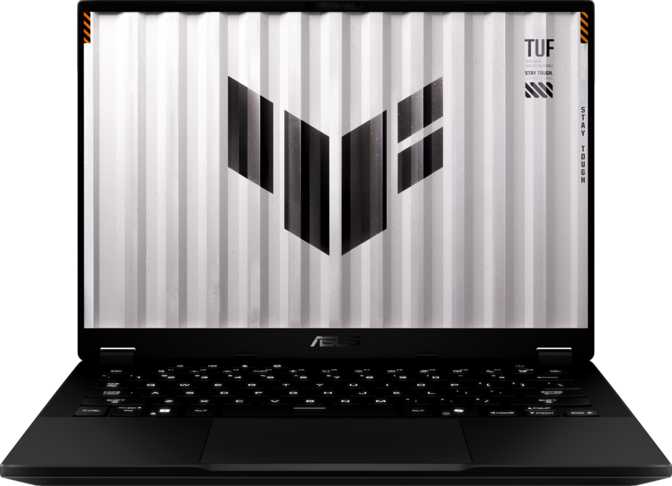
Asus TUF Gaming A14 (2025) FA401 Review: Full-Power Gaming in a Featherweight Frame
LaptopsA genuinely thin 14-inch gaming laptop powered by NVIDIA's Blackwell GPU, a sharp WQHD+ 165Hz display, and 32GB of fast DDR5 RAM — all under 1.5kg. The trade-offs are real (no ethernet, soldered RAM), but the core package is hard to match at this weight.
Overall Rating
- Exceptional portability
- Blackwell GPU + GDDR7
- No wired ethernet
- Soldered RAM ceiling
Most gaming laptops ask you to make a deal: raw power in exchange for a brick you'll resent carrying. The Asus TUF Gaming A14 (2025) FA401 breaks that agreement. At just over 1.4 kg and barely 16mm thick, it is one of the lightest 14-inch gaming machines on the market — and it pairs that portability with a discrete GPU built on NVIDIA's latest Blackwell architecture and a display sharp enough to make productivity feel genuinely pleasant alongside gaming sessions. That combination is rare, and it raises an obvious question: what did Asus actually give up to get here? The answer is nuanced enough to fill the rest of this review.
Design and Build: Substance in a Slim Frame
Physical Presence
The A14 FA401 measures 311 × 227 × 16mm — proportions that sit closer to a premium ultrabook than anything you'd traditionally call a gaming laptop. Pick it up and the 1.46 kg feels almost surprising; this is lighter than many 13-inch productivity laptops. For students, commuters, or professionals who also game, that matters more than almost any other spec.
The chassis is not rated as rugged or weather-sealed, which is an honest trade-off against thinness. The A14 FA401 leans into the "slim gaming" category rather than the "drop it and forget it" category. It is built to handle a work bag, not a construction site.
Cooling Philosophy
The A14 is not fanless, which means active cooling is present to manage a 45W CPU thermal envelope. That TDP puts this processor in a middle tier — not the thin-and-quiet 15W class, but not a full 55W+ desktop-replacement tier either.
Asus is threading a needle here, and in practice this means the fans will spin audibly under sustained gaming load. What you get in exchange is a chip that can genuinely sustain peak performance rather than throttling down after a few minutes.
1.46kg
Total Weight
16mm
Thickness
14"
Screen Size
45W
CPU TDP
Display: Sharp, Fast, and Colour-Accurate Enough
What You Are Actually Looking At
The 14-inch IPS panel runs at 2560 × 1600 pixels — a resolution that is wider than standard 16:10 but taller than traditional 16:9, giving you more vertical space for documents, code, and web pages while keeping games immersive. At 215 pixels per inch, individual pixels are invisible at normal viewing distances, and text looks crisp without needing display scaling gymnastics.
The 165Hz refresh rate sits in a practical sweet spot. For competitive gaming, it is fast enough to make motion visibly smoother than the 60Hz found on most office laptops. It is not the 240Hz or 360Hz found on larger, more power-hungry gaming panels — but those higher rates demand GPU performance that would compromise the battery and weight targets this machine was designed around.
The anti-reflection coating reduces glare from overhead lighting and windows, which matters more on a laptop you carry everywhere than on a desktop monitor sitting in a controlled environment.
Display Specifications
| Panel Type | IPS, LED-backlit |
| Resolution | 2560 × 1600 (WQHD+) |
| Pixel Density | 215 ppi |
| Refresh Rate | 165Hz |
| Anti-Glare | Yes |
| Touch | No |
| External Displays | Up to 4 simultaneous |
Multi-Display Capability
The A14 supports up to four simultaneous external displays — a specification that speaks directly to desk-setup users who dock this laptop and turn it into a workstation. The HDMI 2.1 port (capable of 4K at 120Hz) and the USB4 40Gbps port carrying DisplayPort signal make driving multiple high-resolution monitors straightforward without any adapters.
Performance: What the Hardware Actually Does
CPU Performance
The processor uses a hybrid core design with eight cores split across two efficiency tiers, running 16 simultaneous threads. Built on a 5nm manufacturing process, it operates within a 45W thermal envelope that balances sustained performance against heat and weight.
The burst frequency reaches 5GHz, meaning demanding burst tasks — opening applications, compiling code, processing a photo library — complete quickly. A combined 24MB of L2 and L3 cache helps keep frequently-used data close to the processor cores, reducing lag in complex workloads.
The integrated Radeon 860M graphics handles everyday display output and light graphical tasks without engaging the discrete GPU, preserving battery when the extra power is not needed.
Benchmark Performance
GPU: Blackwell in a Thin Body
The discrete GPU is built on NVIDIA's Blackwell architecture — the generation that succeeded Ada Lovelace — and carries 8GB of GDDR7 memory. GDDR7 is the current high-efficiency memory standard, delivering up to 448 GB/s of bandwidth through a 128-bit bus. That speed advantage over previous-generation GDDR6 means the narrower bus width does not create the bottleneck it would have on older memory types.
The GPU delivers approximately 9.7 TFLOPS of floating-point compute — firmly in the capable-of-1440p gaming tier for most titles at medium-to-high settings. With 3,328 shader processors and 104 texture units, the raw graphics hardware substantially outperforms anything in the integrated-only category.
GPU Specifications at a Glance
| Architecture | NVIDIA Blackwell |
| VRAM | 8GB GDDR7 |
| Memory Bandwidth | 448 GB/s |
| Compute (TFLOPS) | 9.684 |
| Shader Processors | 3,328 |
| Texture Units | 104 |
| Boost Clock | ~1,455 MHz |
| DirectX | DirectX 12 |
| Ray Tracing | Supported |
| DLSS | Supported |
Memory and Storage
The 32GB of DDR5 RAM runs at 7,500MHz — significantly quicker than the DDR4 found in older gaming laptops and most budget machines. For gaming, 32GB is above what most titles need today, leaving headroom for streaming, recording, and background applications simultaneously.
There are no accessible memory slots. The RAM is soldered to the motherboard. 32GB is the permanent ceiling — expansion is not possible after purchase.
The 2TB NVMe SSD uses PCIe 4.0 — the current standard for fast storage. Game loading times, system boot speed, and file transfers all benefit from this tier versus older SATA-based drives. Two terabytes comfortably holds a large game library without constant management.
Ray Tracing and DLSS
Both hardware ray tracing and DLSS are supported. Ray tracing adds realistic lighting, reflections, and shadows to compatible games. DLSS uses AI-trained upscaling to render at a lower resolution and reconstruct a sharper image — effectively giving you higher visual quality than raw GPU compute alone would suggest.
For a 14-inch thin laptop, these capabilities meaningfully extend the quality ceiling of playable games and keep this hardware relevant as more titles adopt these techniques.
Connectivity: Strong, With One Meaningful Gap
Port Layout
| Port Type | Count | Notes |
|---|---|---|
| USB4 (40Gbps) | 1 | Carries DisplayPort and power delivery |
| USB-C 3.2 Gen 2 | 1 | 10Gbps data transfer |
| USB-A 3.2 Gen 2 | 2 | 10Gbps, full-size connectors |
| HDMI 2.1 | 1 | 4K/120Hz capable |
| 3.5mm Audio Jack | 1 | Headset and headphone compatible |
| SD Card Slot | 1 | External memory expansion |
| Wired Ethernet (RJ45) | 0 | Requires USB adapter |
Wireless
Wi-Fi 6E support means this laptop can use the 6GHz band — a spectrum with less interference and higher potential throughput than the crowded 2.4GHz and 5GHz bands. In apartments or offices with many competing Wi-Fi networks, Wi-Fi 6E connections tend to be markedly more stable.
Bluetooth 5.3 handles peripherals without issue.
No Wired Ethernet
There is no RJ45 port. For competitive online gaming, wired connections offer lower latency and more stable throughput than Wi-Fi. A USB-A to ethernet adapter resolves this, but occupies one of only two USB-A ports and adds a dongle to your carry bag.
USB4 vs Thunderbolt 4
The USB4 40Gbps port is functionally close to Thunderbolt 4 in most real-world uses — it carries DisplayPort for monitor output, supports fast charging from compatible adapters, and enables external GPU enclosures. The distinction matters mainly to buyers with existing Thunderbolt 4 accessories that specifically require that certification.
Battery Life: Realistic Expectations
73 Wh
Battery Capacity
2–3 hrs
Gaming
5–7 hrs
Light Work
The 73Wh battery is on the larger end of what fits in a thin gaming chassis. Gaming under full GPU load will drain it in roughly two to three hours — this is physics, not a design flaw. Any discrete GPU with this level of performance draws significant power.
For productivity use — writing, browsing, video calls — the integrated Radeon 860M handles output and the discrete GPU stays dormant, which should extend battery life considerably. Expecting five to seven hours of light productivity work is a reasonable inference from the battery capacity and the efficiency of the hybrid CPU architecture, though actual figures depend heavily on screen brightness and workload.
The laptop supports USB Power Delivery charging via the USB4 port — meaning compatible USB-C chargers work in addition to the included adapter. This is a genuine convenience for travel.
Who This Laptop Is For — and Who Should Look Elsewhere
Ideal Buyers
-
The Portable Gamer
You want a machine that genuinely fits in a standard laptop bag, weighs less than most textbooks, and still plays modern games well.
-
The Student or Professional Who Also Games
The WQHD+ display, fast RAM, and 2TB SSD make this a capable productivity and creative machine during the day. The Blackwell GPU handles gaming in the evenings without a second device.
-
Desk-Docked Users Who Travel
With HDMI 2.1, USB4 with DisplayPort, and support for four external displays, this can anchor a proper desk setup at home and still travel lightly.
-
Content Creators in Compact Spaces
Fast CPU multi-core performance, 32GB RAM, large NVMe SSD, and Dolby Atmos audio make video editing and audio work practical on this hardware.
Who Should Consider Alternatives
-
Competitive Multiplayer Gamers
Heavier 15- and 16-inch laptops with full-power GPU configurations and 240Hz+ panels deliver higher sustained frame rates. Larger chassis win on raw performance.
-
Buyers Who Need Wired Ethernet
The absence of an RJ45 port is a real inconvenience if you play in environments where you can plug in directly without a dongle.
-
Anyone Expecting to Upgrade RAM
The soldered memory means 32GB is permanent. If your workload already pushes 32GB today, this machine is not the right platform.
-
Budget-Focused Buyers
Thin gaming laptops with current-generation discrete GPUs are premium products. Heavier, thicker alternatives exist at lower price points if cost is the primary constraint.
How It Sits Against the Competition
The A14's clearest competitors are other thin 14-inch gaming laptops. Within that group, the GDDR7 GPU memory and WQHD+ 165Hz display combination is differentiated. The main reason to choose a heavier 15-inch machine is the need for full-power GPU performance at sustained load, an ethernet port, or upgradeable memory.
| Feature | Asus TUF A14 FA401 | Typical 15" Gaming | Typical 14" Ultrabook |
|---|---|---|---|
| Weight | ~1.46 kg | 2.0–2.5 kg | 1.2–1.5 kg |
| Discrete GPU Tier | Blackwell Mid-Range | Blackwell Mid-High | None / Entry-Level |
| Display | 14" WQHD+ 165Hz | 15.6" FHD/QHD 144–240Hz | 14" FHD/QHD 60–120Hz |
| RAM | 32GB DDR5 (Soldered) | 16–32GB (Often upgradeable) | 16GB (Often soldered) |
| Storage | 2TB NVMe PCIe 4 | 512GB–1TB typically | 512GB–1TB typically |
| Wired Ethernet | No | Usually Yes | No |
| Battery | 73 Wh | 72–99 Wh | 60–86 Wh |
Genuine Strengths and Real Weaknesses
What It Gets Right
The A14 FA401 earns genuine praise for compression — fitting Blackwell-generation GPU performance, a WQHD+ 165Hz display, 32GB of fast DDR5 RAM, and a 2TB NVMe drive into a 1.46kg chassis at 16mm thickness is a real technical achievement.
The USB4 40Gbps port and HDMI 2.1 ensure the display connectivity story is complete for desk use. The anti-reflection coating on the display and Dolby Atmos audio certification signal attention to the everyday experience, not just benchmark numbers.
The GDDR7 memory on the GPU is notable. The bandwidth advantage over GDDR6-equipped competitors at the same VRAM capacity means the GPU is less likely to be memory-bottlenecked in demanding scenes, which helps visual quality at higher resolutions.
Where It Falls Short
The soldered RAM means the 32GB ceiling is permanent — if that is tight for your workload, it cannot be fixed later. The lack of wired ethernet forces a dongle for competitive gaming in environments where Wi-Fi is not trusted.
The 128-bit memory bus, while partially compensated by GDDR7 speed, is narrower than what you will find in full-power GPU configurations in heavier machines — and that difference shows in GPU-limited scenarios at very high resolutions and maximum settings.
The absence of a fingerprint reader means facial recognition via Windows Hello IR is the only biometric login option. It works reliably, but requires looking at the screen rather than tapping a corner of the keyboard.
Questions Buyers Actually Ask
Final Verdict
The Asus TUF Gaming A14 (2025) FA401
The Asus TUF Gaming A14 (2025) FA401 is the answer to a specific question: what is the lightest gaming laptop you can buy that does not meaningfully compromise on GPU generation or display quality? If that is your question, this machine answers it convincingly.
The Blackwell GPU with GDDR7 memory, the WQHD+ 165Hz IPS display, 32GB of fast DDR5, and a 2TB NVMe drive in a chassis under 1.5 kg and 16mm thick is a combination that does not exist in many places. For students, travelling professionals, and anyone who genuinely carries their laptop daily and also games, the case for this machine is strong.
The non-negotiable caveats: you must be comfortable with no ethernet port (or willing to carry a small adapter), and you must accept 32GB as a permanent RAM ceiling with no upgrade path. If neither of those concerns applies to your situation, the A14 FA401 is one of the most thoughtfully built thin gaming laptops available at this hardware tier.
Buy It If:
Portability and current-generation GPU performance in a compact form factor is your primary requirement and you game with a headset.
Skip It If:
You play wired competitive multiplayer regularly, anticipate needing more than 32GB RAM, or need maximum sustained GPU throughput that only a larger chassis can provide.
Overall Score