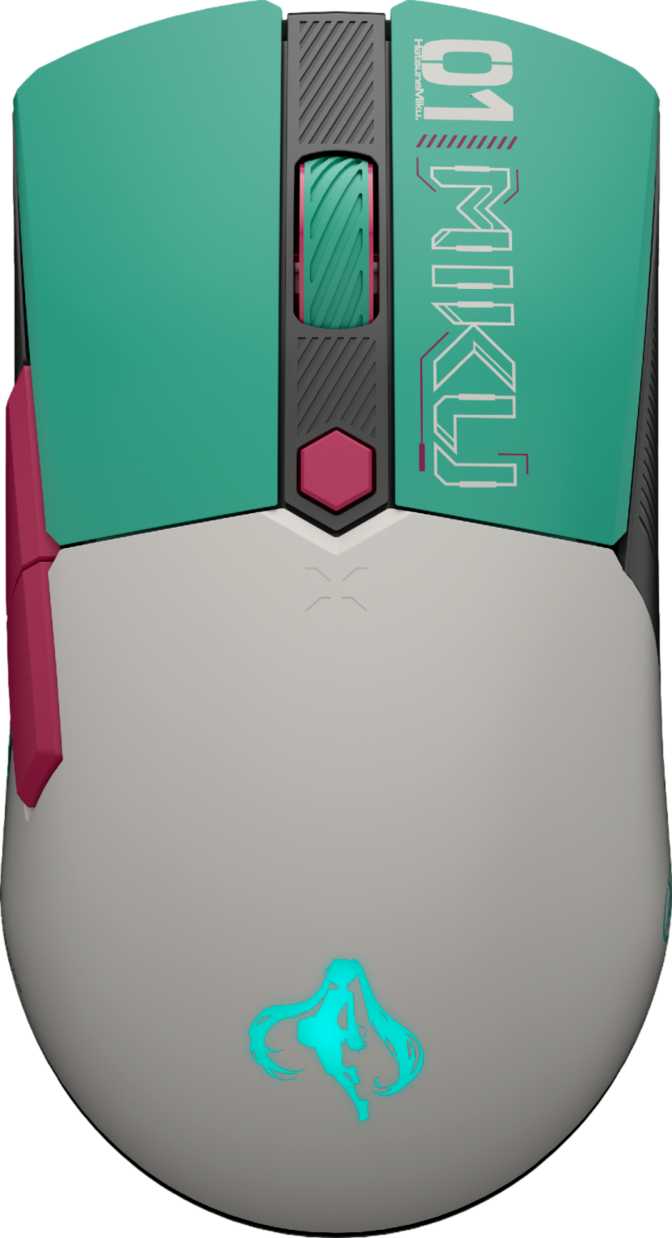
Asus TUF Gaming Mini Hatsune Miku Edition — An Honest Full Review
MiceThere are gaming peripherals, and then there are gaming peripherals that make you stop mid-unboxing. The Asus TUF Gaming Mini Hatsune Miku Edition occupies a genuinely rare position in the market: it is a legitimate wireless gaming mouse built around one of the most recognized figures in virtual pop culture. Hatsune Miku — the iconic teal-haired Vocaloid who has performed to sold-out stadiums as a hologram — has been translated here into a compact, 65-gram wireless mouse with triple connectivity and battery life that lasts for weeks. The result demands evaluation on two fronts simultaneously: does the hardware hold up, and does the collaboration justify itself? The honest answer to both is yes, with specific caveats that depend entirely on how you play and where.
Design, Build Quality, and the Miku Aesthetic
A Shell Built for Compact Grips
The first thing you notice when picking up the TUF Gaming Mini Hatsune Miku Edition is how little of it there is — and how intentional that feels. At 115mm long, under 64mm wide, and 37.5mm tall, this is a mouse designed explicitly for people with small to medium hands. If you typically use a claw grip (fingertips arched over the buttons, palm hovering) or a fingertip grip (only fingers touching the mouse), this shape will feel immediately natural and precise. If you are a palm gripper with larger hands who depends on full-contact support across a longer shell, the Mini's proportions will likely feel cramped during extended sessions.
The 65-gram total weight is one of the most practically significant things about this mouse. To put that in context, plenty of mid-range gaming mice sit between 80 and 100 grams — and those grams accumulate. After two or three hours of use, the difference between a 65g mouse and a 90g one registers in your wrist and forearm. The Mini is light enough that even after a long gaming session, hand fatigue from the mouse itself is rarely the culprit.
The Hatsune Miku Collaboration, Executed Properly
This is not a standard black mouse with a Miku sticker on it. The collaboration expresses Miku's signature palette — her characteristic teal and cyan tones — across the mouse's surface with the kind of cohesion that suggests the industrial design started with the character rather than ended with her. The RGB lighting built into the mouse amplifies this palette rather than fighting it, making the illumination feel like a unified part of the collector's piece rather than an afterthought.
TUF Gaming's build quality credentials carry through the Miku Edition. The shell has enough rigidity to feel purposeful and premium without adding unnecessary heft — a balance that lightweight mice do not always manage. The 2-meter cable provides comfortable reach for wired use or charging without pulling taut across a standard desk.
Performance: What the Numbers Actually Mean
Tracking Accuracy and Speed
The optical sensor inside the TUF Gaming Mini Hatsune Miku Edition covers a DPI range from 100 all the way to 12,000 — a span wide enough to accommodate everything from ultra-precise, slow cursor work to sweeping fast movement across multiple large monitors. In everyday terms: most competitive players who take aim-heavy games seriously settle somewhere between 400 and 1,600 DPI, using the mouse's physical sensitivity to control precision rather than raw DPI ceiling. The 12,000 DPI maximum is the upper limit of what is meaningful for human hand movements, not a number you will practically use in games.
What actually determines real-world tracking quality is the sensor's ability to keep up with fast, erratic hand movements without losing accuracy. The tracking speed this sensor supports covers even the most aggressive, large-swipe mouse movements without the cursor stuttering or jumping — the kind of motion that happens when reacting instantly in a fast-paced game. The acceleration rating ensures quick directional changes during hectic gameplay do not produce tracking errors. For the genres this mouse is designed for — action games, shooters, and MOBAs — the sensor is not a limiting factor.
Polling Rate and Perceived Responsiveness
The mouse reports its position to your computer 1,000 times per second. At this reporting frequency, cursor movement appears completely instantaneous and continuous to human perception — this is the standard that quality gaming mice have converged on, and for the overwhelming majority of players, including competitive ones, it is where the meaningful performance range begins and ends. Some ultra-high-end specialty mice have pushed to 2,000Hz or 4,000Hz, but the perceptual gains at those levels are imperceptible to most users and require specific software conditions to function properly. At 1,000Hz, the TUF Gaming Mini Hatsune Miku Edition sits in the tier where polling rate simply stops being a variable to worry about.
Triple Connectivity: More Useful Than It Sounds
The TUF Gaming Mini Hatsune Miku Edition connects via wired USB, 2.4GHz wireless, and Bluetooth 5.1. This three-mode setup is a practical utility feature — each mode serves a genuinely different purpose, and understanding which to reach for makes this mouse meaningfully more versatile than single-mode alternatives.
Wired USB
The reliable fallback and charging conduit. Because the mouse can be used while plugged in and charging, running low on battery mid-session does not mean pausing your game — it means grabbing the cable and continuing without interruption.
Ideal for: Reliable backup and charging sessions2.4GHz Wireless
The primary gaming mode. Operating via a dedicated USB dongle on its own wireless frequency, it delivers response times effectively indistinguishable from a wired connection during play. This is the mode for every competitive or serious gaming session.
Ideal for: All gaming sessionsBluetooth 5.1
Not optimized for low-latency gaming, but that is not its purpose. Bluetooth lets you pair to a laptop, secondary PC, or tablet without the dongle — ideal for users who move between a desktop gaming rig and a portable device for work or general use.
Ideal for: Multi-device flexibilityBattery Life: This Mouse's Strongest Card
Up to 134 hours of continuous use from a single charge is the kind of battery performance that rewrites your relationship with a wireless mouse. At four to five hours of daily gaming, that works out to roughly three weeks between charges. More casual users — an hour or two per day — might go a month or longer before needing to plug in. The mental overhead of monitoring battery levels, which plagues shorter-life wireless mice, essentially disappears.
The 134-hour figure reflects usage with RGB lighting minimized or off. RGB illumination is beautiful but power-hungry, and running the full light show will reduce that ceiling meaningfully. Even accounting for a significant reduction from maximum RGB use, the baseline is generous enough that battery life remains a strength rather than a concern.
The battery is permanently built in rather than user-replaceable — the modern standard for wireless gaming mice optimizing for weight efficiency. At this level of longevity, the trade-off is well worth it.
Who Should — and Should Not — Buy This Mouse
This Mouse Is the Right Call If You:
- Have small to medium hands and favor a claw or fingertip grip style
- Are a Hatsune Miku fan who wants a peripheral that reflects that passion without sacrificing gaming performance
- Want a lightweight wireless gaming mouse with outstanding battery life that removes weekly charging from your mental load
- Switch between a desktop and a laptop or secondary device and want Bluetooth as a genuine secondary connection
- Game on a single home setup where onboard memory profiles are functionally irrelevant
This Mouse Is the Wrong Call If You:
- Are left-handed — the ergonomic right-hand shell physically excludes you, regardless of the aesthetic appeal
- Compete at LAN events or travel regularly between different gaming setups where settings portability matters
- Have larger hands and depend on full palm-contact ergonomics during extended sessions
- Have a specific need for ultra-high polling rates above 1,000Hz — a requirement applicable to a very small number of competitive players
- The Miku aesthetic holds no appeal — without it, you would be paying a collaboration premium for hardware available elsewhere at a lower entry price
How It Compares to the Competition
Positioning a collaboration-edition mouse against the market requires acknowledging both dimensions: the gaming hardware itself and the collectible value. On pure hardware terms, here is how the TUF Gaming Mini Hatsune Miku Edition stacks up against typical alternatives in the same compact wireless class.
| Feature | TUF Mini Miku Edition | Mid-Range Compact Wireless | Premium Compact Wireless |
|---|---|---|---|
| Weight | 65g | 70–90g | 55–70g |
| Connection Modes | USB + 2.4GHz + Bluetooth | 2.4GHz + USB | 2.4GHz + USB |
| Battery Life | ~134 hours | 40–80 hours | 60–100 hours |
| Polling Rate | 1,000 Hz | 1,000 Hz | 1,000–4,000 Hz |
| DPI Ceiling | 12,000 | 18,000–25,000 | 25,000–36,000 |
| Onboard Profiles | None | 1–3 | 3–5 |
| Warranty | 1 year | 1–2 years | 2 years |
| Special Edition | Hatsune Miku | None | None |
Category averages based on similarly sized wireless gaming mice at comparable price points. Individual products may vary.
Honest Assessment: Strengths and Weaknesses
Where It Excels
Exceptional Battery Endurance
Weeks between charges rather than days — the 134-hour ceiling is a differentiating strength in the market, not just a good specification. It reduces charging anxiety to a near-zero daily concern.
Impressively Light for Its Feature Set
Achieving wireless triple connectivity, RGB lighting, six programmable buttons, and that battery life in a 65-gram shell involves real engineering restraint. The mouse does not feel hollow or cheap as a result of its lightness.
Triple Connectivity Adds Real Flexibility
The Bluetooth option makes this mouse genuinely useful across multiple devices without occupying a USB port — something single-mode mice simply cannot offer.
Miku Aesthetic Executed with Intention
The collaboration reads as cohesive rather than opportunistic. The design feels considered from the outset — not a character image placed on a generic shell as an afterthought, but a visual identity built into the product from the start.
Where It Falls Short
No Onboard Profile Storage
Custom settings live in Armoury Crate, not in the hardware. Move the mouse to a different machine and it resets. For single-setup home users this is irrelevant — for everyone else, a genuine recurring friction point.
One-Year Warranty Undercuts Premium Positioning
At the price point of a collaboration edition, a 1-year warranty feels thin when many competitors extend two years as standard. This mismatch is hard to defend.
Right-Handed Only
The ergonomic shell firmly excludes left-handed users — an entirely standard design constraint, but one that affects a meaningful segment of potential buyers drawn to the Miku theme.
DPI Ceiling Below Category Average
Rivals in this class regularly offer sensors with significantly higher DPI ceilings. The practical impact is near-zero — no real use case requires more than 12,000 DPI — but it does signal a mid-tier rather than flagship sensor specification.
Questions Real Buyers Are Asking
Final Verdict
The Asus TUF Gaming Mini Hatsune Miku Edition earns a confident recommendation for its intended audience.
The core hardware is legitimately good. A 65-gram wireless gaming mouse with triple connectivity, 134 hours of battery life, and six fully programmable buttons covers the needs of most gaming scenarios. The sensor performs without becoming a ceiling for any realistic use case, and the lightweight construction benefits any player prone to fatigue during longer sessions.
The absence of onboard profile storage is the one friction point that genuinely limits certain use cases — specifically anyone who games across multiple machines. For dedicated home-setup gamers, it is irrelevant. The 1-year warranty undercuts confidence in longevity at a premium price point, and it is the most defensible criticism of the overall package.
What elevates this beyond a standard verdict is that the Miku collaboration is executed with care. The aesthetic is not a cash-grab skin — it is a cohesive design language that makes the mouse recognizable and desk-worthy as a standalone piece, not just a functional tool.
Buy It If
- You are a Miku fan who games seriously
- You have small to medium hands
- You play on a single home setup
- You want wireless freedom with weeks-long battery endurance
- You switch between a desktop and other devices
Skip It If
- You are left-handed
- You need settings to travel across multiple machines
- You have large hands needing full palm support
- The Miku aesthetic holds no personal appeal
- You compete at LAN events requiring portable settings