Building a flagship or near-flagship AM5 system
The VRM, connectivity, and features only make economic sense paired with a mid-to-high-end Ryzen processor where the platform overhead is fully utilized.
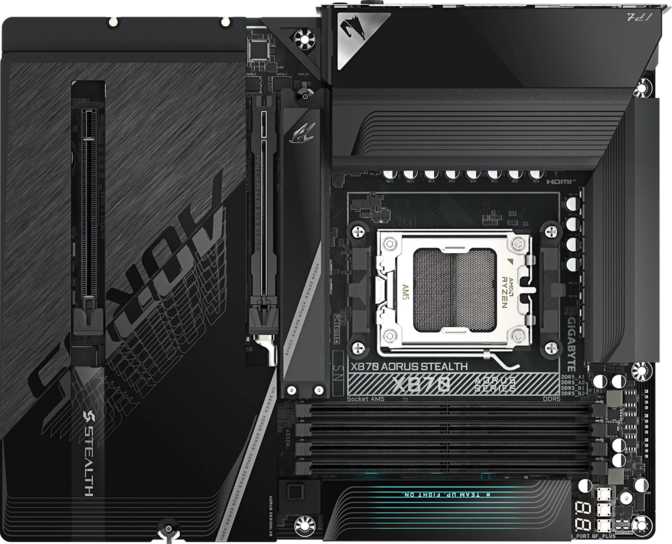
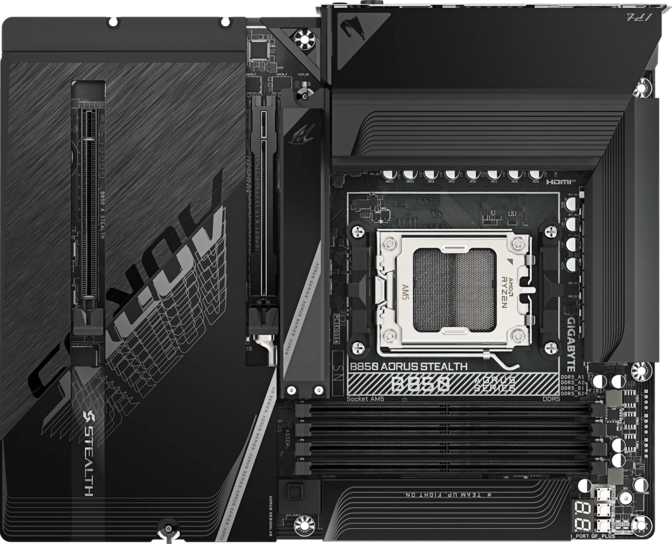
There is a particular type of PC builder who does not want their motherboard to announce itself to the room. They want flagship-tier capability without the light show — a board that performs at the top of the stack and looks the part in a subdued, professional way. The X870 Aorus Stealth is Gigabyte's answer to that builder: AMD's most capable consumer chipset paired with a connectivity suite that genuinely punches above the typical enthusiast tier. Whether you are building a content creation workstation, a no-compromise gaming rig, or a future-proofed daily driver, this board makes a serious case for itself. But it is not the right choice for everyone, and the decision deserves a hard look.
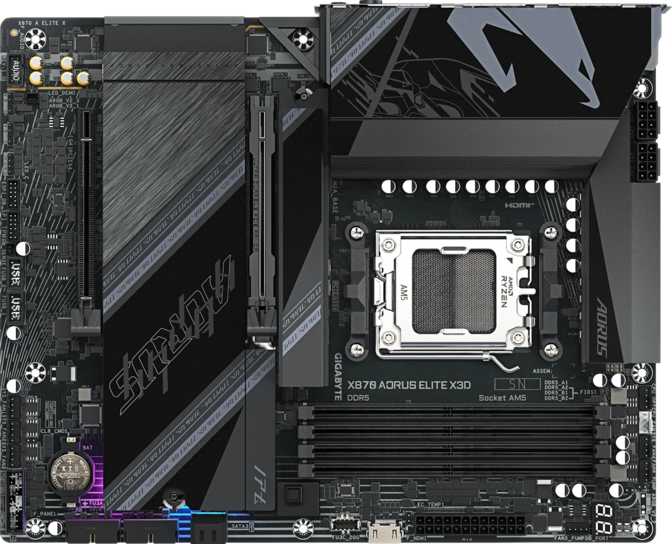
"Stealth" is not just a marketing label — it is a design philosophy. The X870 Aorus Stealth follows a restrained aesthetic that sets it apart from the more theatrical members of the Aorus lineup. RGB lighting is present but applied with intention rather than abandon, giving builders the option to express personality without committing to a full light show. Those who prefer a completely dark build can dial it down through Gigabyte's software.
At its standard ATX footprint of 305 mm × 244 mm, the board fits comfortably in the vast majority of mid-tower and full-tower cases without compatibility concerns. The layout reflects an engineering team that expects the board to be pushed hard — eight fan headers are distributed across the PCB for granular thermal control without needing an external fan controller, which matters when pairing a high-TDP processor with a serious cooling solution.
The physical finish is premium without being ostentatious. VRM and chipset heatsinks provide the thermal coverage expected at this price tier, and the overall component density communicates that Gigabyte has not compromised on power delivery infrastructure — a critical foundation when sustaining a top-end Ryzen processor under extended workloads. The three-year warranty supports that premium positioning.
The X870 Aorus Stealth is built for AMD's AM5 platform — the home of Ryzen 7000 series processors and AMD's long-term consumer architecture investment. AM5 is DDR5-exclusive: there is no backward compatibility with older Ryzen chips or DDR4 memory. If you are migrating from an AM4 system, plan on a clean start with a new processor and new RAM.
The X870 chipset sits at the top of AMD's consumer motherboard hierarchy, delivering more PCIe bandwidth, richer USB connectivity, and greater overclocking headroom than the mid-range X670 or budget B650 platforms. This board is explicitly configured to make overclocking accessible — the BIOS tooling and power delivery are tuned to support pushing CPU and memory beyond stock settings without requiring deep technical expertise.
This board omits both a dedicated CMOS reset button and a dual-BIOS failsafe. Recovering from a failed overclock or bad BIOS flash requires the traditional method — removing the battery or shorting CMOS pins. Experienced overclockers handle this routinely, but it is a meaningful gap at this price point.
| Tier | Chipset | Target Builder |
|---|---|---|
| Flagship | X870 | Enthusiast / Workstation |
| High-End | X670E | Advanced Builds |
| Mid-Range | B650E | Performance Mainstream |
| Entry | B650 | Value Builds |
The memory subsystem is configured for serious performance and longevity. Four DDR5 slots across two channels support up to 256 GB of total RAM — a ceiling that extends well beyond gaming and into professional territory. Video editing timelines, 3D scene caching, virtual machine stacks, and large dataset analysis all consume memory at scale, and this board accommodates them without compromise.
The platform's rated base speed — sufficient for everyday use without any manual tuning.
One of the highest officially supported ceilings on any AM5 board. Requires premium A-die memory kits and careful tuning.
Four slots across two dual-channel controllers support up to 256 GB using high-density DDR5 modules.
Most mid-range DDR5 kits ship at 5600–6000 MHz. Reaching speeds above 7200 MHz requires high-quality Samsung or Hynix A-die memory and manual voltage and timing adjustments — but the board's signal trace quality and BIOS infrastructure are built to support it. ECC memory is not supported, which is expected for a consumer board and only matters for data-critical professional environments where error-correcting capability is a hard requirement.
Four M.2 slots form the backbone of the storage configuration. M.2 is the form factor used by modern NVMe SSDs — they connect directly to the motherboard without cables, delivering dramatically faster transfer speeds than traditional SATA drives. Having four available means you can run a high-speed boot drive, a dedicated video scratch disk, and additional fast project storage simultaneously without sacrificing any other connectivity.
The primary M.2 slot runs on PCIe 5.0 — the current leading edge for consumer NVMe, with roughly double the bandwidth ceiling of the previous PCIe 4.0 generation. The remaining slots provide further high-speed storage without a single cable in sight.
Full RAID support across all four primary modes makes this board genuinely versatile for workstation-style storage setups — a combination most competing consumer motherboards do not offer.
The expansion slot configuration is deliberately focused rather than sprawling. A single PCIe 5.0 x16 slot handles your GPU at the full bandwidth ceiling the X870 chipset enables — PCIe 5.0 provides enough headroom that no current consumer graphics card comes close to saturating it. A second PCIe x4 slot accommodates add-in cards: capture boards, 10GbE network adapters, and additional NVMe expansion.
There are no legacy PCIe 3.0 x16 slots, no x1 slots, and no traditional PCI slots. This board was designed under the assumption that a modern build runs one GPU and routes additional functionality through the onboard feature set rather than stacking expansion cards. Multi-GPU configurations are not supported — one GPU slot is the intentional design. In practice, this is the pragmatic call: software ecosystems have effectively deprecated multi-GPU for all workloads except highly specialized compute, and a board that drops it in favor of cleaner signal integrity and layout makes the right choice.
The rear I/O panel is where the X870 Aorus Stealth most clearly separates itself from lower-tier boards. The combination of USB 4 and Thunderbolt 4 on an AMD motherboard was vanishingly rare before the X870 generation, and it eliminates the need for expensive add-in cards that previous-gen AM5 owners had to source separately.
| Port Type | Max Speed | Qty | Location | Best Use |
|---|---|---|---|---|
| USB 440 Gbps | 40 Gbps | 2 | Rear panel | External NVMe enclosures, high-speed docks |
| Thunderbolt 4 | 40 Gbps | 2 | Rear panel | eGPU enclosures, certified docks, daisy-chaining |
| USB 3.2 Gen 2 Type-A | 10 Gbps | 2 | Rear panel | Fast external SSDs, modern peripherals |
| USB 3.2 Gen 2 Type-C | 10 Gbps | 1 | Rear panel | Modern smartphones, USB-C peripherals |
| USB 3.2 Gen 1 Type-A | 5 Gbps | 4 | Rear panel | Flash drives, older external drives |
| USB 2.0 Type-A | 480 Mbps | 4 | Rear panel | Keyboards, mice, audio adapters |
| USB 3.2 Gen 1 Header | 5 Gbps | 2 | Internal | Front-panel USB-A on case |
| USB 3.2 Gen 2x2 Header | 20 Gbps | 1 | Internal | Front-panel USB-C on modern cases |
| USB 2.0 Headers | 480 Mbps | 4 | Internal | Additional front-panel ports |
Wi-Fi 7 (802.11be) is the headline — the latest wireless standard delivering faster throughput, lower latency, and better performance in congested environments compared to Wi-Fi 6E. Backward compatibility means the adapter works with every router currently on the market. Wi-Fi 7 performance unlocks the moment you upgrade your router — no future board-level upgrade required.
An HDMI 2.1 port is present on the rear panel, theoretically capable of driving 4K at 120 Hz or 8K displays. However, this board does not support integrated graphics — AMD Ryzen 7000 desktop processors lack iGPU capability by design. The HDMI port is effectively inactive for all current AM5 processor builds.
The onboard audio subsystem delivers 7.1 surround output with a 120 dB signal-to-noise ratio on the digital-to-analog converter. A 120 dB SNR means the audio circuitry is exceptionally quiet — background hiss that plagues cheaper motherboard audio is absent, and most listeners will not distinguish this from a dedicated budget sound card. This matters for headphone listeners and studio monitor setups equally.
S/PDIF optical output is available for connecting to external DACs, AV receivers, or surround sound systems that accept a digital signal — a useful option for home theater integration. The rear panel provides two analog audio jacks, which is somewhat minimal for a board at this tier. Users with complex multi-channel speaker configurations may want to factor in an external audio interface or DAC.
Bluetooth aptX is not present. This wireless audio codec can improve quality with compatible headphones, but its absence goes unnoticed by most users. Only those with high-end Bluetooth headphones specifically dependent on aptX need to factor this in.
The X870 Aorus Stealth is explicitly positioned as an overclocking-capable board — on both the CPU and memory sides. The power delivery infrastructure is built to sustain the voltage and current demands that come with pushing Ryzen processors beyond their rated TDP limits. Gigabyte's BIOS tooling is well-regarded for exposing the controls enthusiasts need without overwhelming the interface for less experienced builders.
The memory overclocking ceiling of 8200 MHz is one of the highest officially supported on any consumer AM5 board, suggesting investment in signal trace quality and BIOS tuning that most competitors at this tier do not match. For competitive benchmarkers and memory enthusiasts, this ceiling is a genuine differentiator. Reaching it requires premium Samsung or Hynix A-die DDR5 kits and careful voltage and timing adjustments — but the board's architecture does not obstruct the process.
No dual BIOS means a failed BIOS flash or corrupted settings require manual CMOS recovery — shorting pins or removing the battery. The absence of a physical CMOS reset button adds friction to a process that should be quick. Know the recovery procedure before you start pushing aggressive settings.
The X870 Aorus Stealth is a highly specific product. It rewards builders who match its profile and punishes those who pay for features they will never use.
The X870 Aorus Stealth's case rests primarily on connectivity depth and memory ceiling. The table below contextualizes it against typical X670E and B650E alternatives across the most decision-critical features.
| Feature | X870 Aorus Stealth | Typical X670E ATX | Typical B650E ATX |
|---|---|---|---|
| Chipset Tier | X870 Flagship | X670E High-End | B650E Mid-Range |
| PCIe 5.0 GPU Slot | |||
| PCIe 5.0 M.2 Slot | Limited | ||
| Total M.2 Slots | 4 | 3–4 | 2–3 |
| USB 4 (40 Gbps) | 2 ports | Rare | |
| Thunderbolt 4 | 2 ports | Very rare on AM5 | |
| Wi-Fi Standard | Wi-Fi 7 | Wi-Fi 6E | Wi-Fi 6E |
| Bluetooth Version | 5.4 | 5.3 | 5.3 |
| Maximum Memory | 256 GB | 256 GB | 128–192 GB |
| Max RAM Speed (OC) | 8200 MHz | ~7200 MHz | ~6400 MHz |
| Dual BIOS | Varies | Varies | |
| Fan Headers | 8 | 6–8 | 6 |
| RAID Support | 0, 1, 5, 10 | 0, 1 | 0, 1 |
Four high-speed ports combining USB 4 and Thunderbolt 4 on an AM5 platform was rare before the X870 generation. This eliminates the need for add-in cards that previous-gen AM5 owners had to source separately at additional cost.
The adapter works with existing hardware today and delivers full Wi-Fi 7 performance gains the moment your router catches up — no board-level upgrade needed at that point.
The 8200 MHz ceiling and 256 GB capacity support mean this board will not become the limiting factor in memory performance for the foreseeable life of the AM5 platform.
Four M.2 slots with a PCIe 5.0 lead and full RAID 0/1/5/10 support is a combination most competing consumer motherboards simply do not offer. RAID 5 and 10 are genuinely unusual at this tier.
Builders who want premium performance without aesthetic excess have very few alternatives at this feature level. The Stealth branding delivers on its promise.
Competing boards at equivalent cost from ASUS and MSI routinely include dual BIOS. For an overclocking-focused flagship, the absence of a BIOS backup is a meaningful gap that matters when things go wrong during tuning sessions.
A physical CMOS reset button is a trivial addition that Gigabyte has chosen to omit. Manual recovery adds unnecessary friction for anyone who pushes aggressive overclocking settings with any regularity.
Two SATA 3 connectors feel minimal for a flagship board. Builders migrating existing arrays of mechanical drives or SATA SSDs will run out of ports quickly.
Two rear audio connectors is sparse for a board targeting enthusiasts and content creators. Multi-channel analog speaker setups will need an external DAC or audio interface to accommodate all channels.
The HDMI 2.1 output is non-functional for every current AM5 desktop processor. It is dead silicon on the rear panel for the overwhelming majority of builders on this platform.
Gigabyte X870 Aorus Stealth
The X870 Aorus Stealth earns its flagship positioning through connectivity depth and memory performance ceiling rather than through feature sprawl or aggressive aesthetics. For a builder who wants everything the AM5 platform offers — Wi-Fi 7, Thunderbolt 4, USB 4, and an elite memory overclocking ceiling — wrapped in a board that does not look like a gaming peripheral, this is one of the most coherent options available.
The dual BIOS omission and the absence of a hardware CMOS reset are genuine shortcomings that will matter to serious overclockers. Anyone who pushes settings aggressively and frequently should look at competing X870 boards from ASUS or MSI that include those safety nets as standard. The two-SATA limitation and minimal rear audio jacks are secondary concerns but worth factoring in for specific use cases.
For the builder who fits this board's profile precisely — flagship connectivity, workstation storage depth, a clean aesthetic, and a single high-end GPU — the X870 Aorus Stealth delivers without meaningful compromise where it counts most. It is a board built for people who know exactly what they need and have stopped being impressed by spectacle.