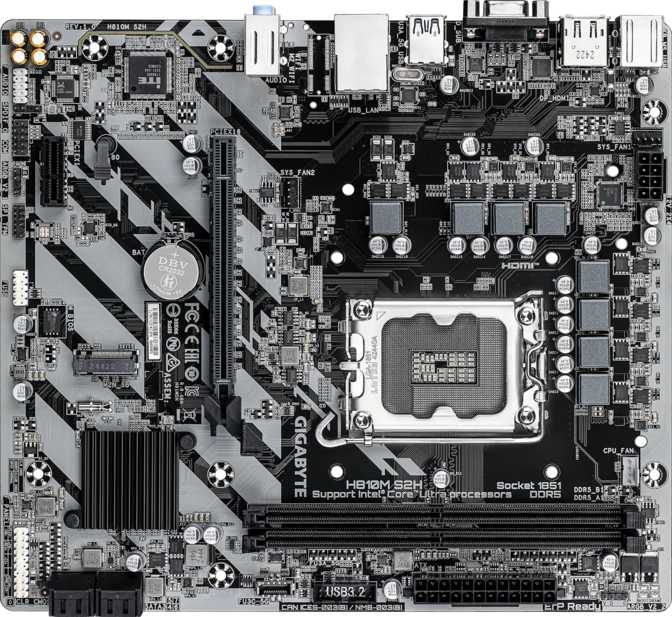
Gigabyte H810M S2H Review: Current-Gen Platform at a Budget Price
MotherboardsAt a Glance
Building a PC in the entry-level tier has historically meant choosing between a modern platform and a low price. The Gigabyte H810M S2H challenges that trade-off by sitting at the base of Intel's current-generation desktop chipset stack — offering DDR5 memory, a contemporary CPU socket, and a respectable display output selection without the premium associated with more feature-loaded boards in the same family.
The positioning is deliberate. The H810M S2H is a board purpose-built for practical, stable, everyday computing. The H810 chipset establishes firm capability limits, and understanding those limits clearly is the key to making a confident purchase decision.
Editorial Score
Budget Micro-ATX Motherboard
Design, Layout, and Physical Build
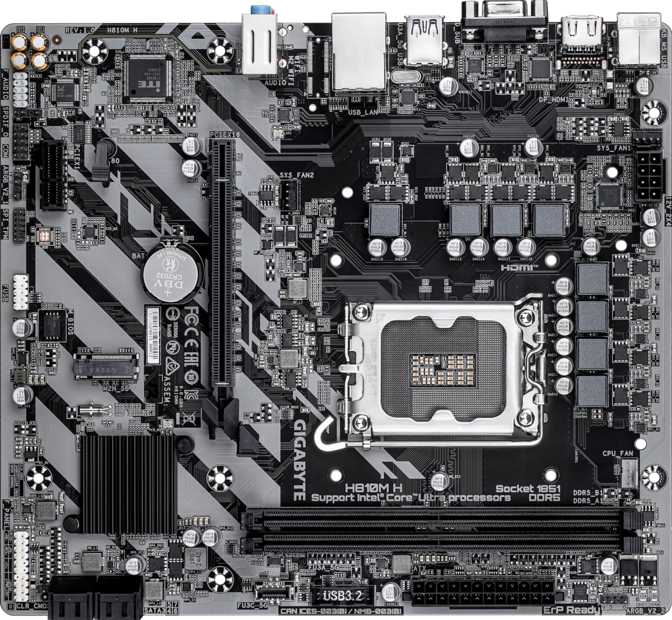
The H810M S2H adopts the Micro-ATX form factor — one of the most versatile board sizes available. At 244 mm wide and 215 mm tall, it fits comfortably in compact enclosures and mid-tower builds alike, compatible with every standard Micro-ATX and full ATX case without modification or adapter brackets.
The component density is deliberately modest. Fewer chips, heatsinks, and slots crowding the PCB means routing cables and seating components is noticeably less stressful than on a feature-dense enthusiast board. First-time builders in particular will appreciate the accessible layout — everything is reachable, nothing is cramped, and the color-coded headers follow Gigabyte's standard conventions.
RGB lighting is included on the board — a pleasant detail at this price tier. It is not a fully programmable multi-zone ecosystem with addressable LEDs per-pixel, but it gives a windowed build a finished, intentional look without requiring a separate purchase. The overall visual profile is restrained and versatile, equally at home in a home office desktop and a compact gaming setup.
Physical Specifications
- Form Factor
- Micro-ATX
- Width
- 244 mm
- Height
- 215 mm
- CPU Sockets
- 1
- RGB Lighting
- Included
- Case Compatibility
- mATX & ATX Cases
The Intel LGA 1851 Platform: Why the Socket Matters
The most consequential specification on any motherboard is the CPU socket. On the H810M S2H, that socket is Intel's LGA 1851 — the physical interface for Intel's current-generation Core Ultra 200 series desktop processors. This is not a legacy platform holding onto an aging architecture. It is Intel's most current consumer desktop standard, in active production and receiving ongoing software support.
The H810 chipset sits at the base of this generation's chipset stack — beneath the mid-range B860 and well below the enthusiast Z890. The chipset determines what capability the board exposes beyond the CPU itself: the number of available PCIe lanes, USB controller throughput, and critically, whether the processor's performance settings can be adjusted by the user.
The H810 does not permit CPU overclocking. The multiplier is locked at the chipset level, and no BIOS configuration or aftermarket cooling solution changes that. For the vast majority of home, office, and casual gaming builders, this distinction has no practical impact — processors pairing with this board perform well at their rated factory speeds. It becomes relevant only if pushing hardware beyond manufacturer specifications is a goal from the outset.
What the platform does deliver is genuine relevance and longevity. The Core Ultra 200 series represents a current investment in Intel's ecosystem, not a compromise to hardware one generation behind.
Chipset Tier Context
The same LGA 1851 socket is shared across H810, B860, and Z890 boards. Only chipset capability differs — the CPU you buy is compatible with any board in this socket family, giving you an upgrade path to a better board later.
No CPU Overclocking
CPU frequency tuning is blocked at the hardware level on H810. Memory speed profiles (XMP / EXPO) may be supported, but manual multiplier overclocking is unavailable regardless of BIOS version.
Memory: DDR5 Access at Realistic Limits
DDR5 Only — DDR4 Is Physically Incompatible
The notch position on DDR4 modules differs from DDR5 slots. DDR4 sticks will not physically seat in this board. If migrating from a DDR4 build, budget for new DDR5 memory as part of the total system cost.
Two memory slots arranged for dual-channel operation are provided. Populating both from the start is the correct approach — running two matched sticks in dual-channel mode roughly doubles memory bandwidth compared to a single module, and on DDR5 this translates to measurably better performance in CPU-bound tasks and memory-intensive workloads. Do not start with one stick and plan to add a second: build with two from day one.
Memory speed support reaches the current sweet spot of the DDR5 market — fast enough to pair appropriately with Intel Core Ultra 200 series processors without requiring premium-tier exotic modules. The ceiling here is not a bottleneck for the tasks this board targets.
Maximum total capacity stands at 128 GB — relevant primarily for workstation-class workflows like large virtual machine stacks or professional data science environments. For gaming, creative applications, and general productivity, configurations between 16 GB and 64 GB cover everything comfortably. ECC (Error Correcting Code) memory — used in certified servers and workstations — is not supported, which is consistent with the board's market tier.
Memory Specifications
- Standard
- DDR5
- Slots
- 2 (Dual-Channel)
- Max Speed
- 6400 MHz
- Max Capacity
- 128 GB
- Memory Channels
- 2
- ECC Support
- Not Supported
Storage: One Fast Drive and Four Traditional Ones
A single M.2 slot handles modern NVMe solid-state storage — the compact, high-speed drive format that has become the default for operating system installation and primary application libraries. One slot is the expected allocation at this chipset tier, and for the majority of home and office builds it is adequate: your system drive lives here, and supplemental storage connects through the four SATA ports.
Those four SATA connections support conventional 2.5-inch and 3.5-inch drives in any combination, making them the natural home for mass storage, large media libraries, and backup volumes where capacity per dollar matters more than peak transfer speed.
Full RAID support across the SATA ports is a meaningful inclusion at this tier. All four primary RAID configurations are available, covering speed-focused striped arrays, redundancy-focused mirrored arrays, and hybrid parity arrangements that balance both. This gives the board a genuine second identity as a home file server foundation or a small business machine with built-in protection against drive failure.
Single M.2 Slot — Plan Ahead
Content creators, expanding game library collectors, and power users often discover within one to two years that they want a second NVMe drive. With only one M.2 slot, that expansion requires a SATA SSD or external storage rather than a second internal NVMe installation.
Storage Summary
- 1× M.2 slot (NVMe SSD)
- 4× SATA 3 connectors
- Full RAID 0, 1, 5 & 10 support
- No mSATA connector
RAID Configurations
Full SATA-based RAID across all four ports. Suitable for home NAS and redundancy builds.
Rear Panel Ports: Functional But Not Generous
The rear input/output panel is where the H810M S2H's budget nature shows most plainly. The USB selection is the most likely source of daily friction — worth examining closely before committing to this board.
| Interface | Ports | Max Speed | Best For |
|---|---|---|---|
| USB 3.2 Gen 1 (USB-A) | 1 | 5 Gbps | External drives, fast flash storage |
| USB 2.0 (USB-A) | 5 | 480 Mbps | Keyboards, mice, phone charging |
| USB-C (any standard) | 0 | — | Not available on this board |
| Ethernet (RJ45) | 1 | Standard Gigabit LAN | Wired internet, NAS, network storage |
| PS/2 (Legacy) | 1 | Legacy | Older keyboards and mice only |
Five of the six USB ports run at speeds suited to keyboards and mice, but inadequate for data transfer. Moving a large file collection to or from an external drive through any of those five ports is a frustrating experience by modern standards.
The complete absence of USB-C is the panel's most significant gap in daily use. USB-C has become the dominant connector for smartphones, audio interfaces, external SSDs, and a growing range of peripherals. Users with current device ecosystems will encounter this limitation regularly.
Missing Connectivity
- No USB-C of any standard
- No Wi-Fi (add-in card required)
- No Bluetooth
- No USB 3.2 Gen 2 or faster
Wireless can be added via a PCIe Wi-Fi card in the secondary x1 slot, or through a USB adapter. Neither matches the integration of built-in Wi-Fi, and the PCIe route occupies the board's only spare expansion slot.
Display Outputs: Three Options, One Modern Standard
The H810M S2H provides three physical display outputs — an unusually broad selection at this price tier. All three depend on integrated graphics in the installed CPU; the board carries no display hardware of its own. Once a discrete GPU is installed, display output switches to the GPU itself and the board's rear panel outputs become inactive.
HDMI 2.1
Current StandardThe board's most capable output. HDMI 2.1 supports high-resolution and high-refresh-rate displays including 4K televisions and premium gaming monitors. Most competing boards at this price still ship with HDMI 2.0 — this upgrade costs the buyer nothing extra and represents genuine value differentiation.
DisplayPort
Pro & ProductivityPreferred by professional monitors, multi-display productivity setups, and KVM switches. A single DisplayPort output provides meaningful flexibility for users whose display hardware or workplace setup is built around this connector standard.
VGA
Legacy AnalogThe analog connector that served desktop computing for decades. VGA extends compatibility to older office monitors and projectors that lack digital inputs — valuable in corporate environments or educational settings still standardized on legacy display equipment.
Audio: Surround Sound Through Three Jacks
Onboard audio delivers 7.1-channel surround sound through three standard 3.5 mm audio jacks on the rear panel. The multi-channel implementation is software-driven: the three physical jacks handle stereo output, line input, and microphone, with virtual spatial audio applied through the driver for headphone users seeking positional audio in games and media.
For gaming, music, video playback, streaming, and video calls, the onboard audio covers typical desktop needs without requiring external hardware. The audio codec quality is appropriate to the board's price tier — capable and clean for general use, though dedicated audio enthusiasts with high-end headphone amplifiers or studio monitoring equipment will likely route through a USB audio interface regardless of what the motherboard provides.
S/PDIF optical output is not included on this board. Users whose audio chain runs through a home theater receiver, AV processor, or DAC via optical cable will need to use a USB audio interface or a dedicated internal sound card to access that routing path.
Audio Specifications
- 7.1-channel surround output
- 3× rear panel 3.5 mm jacks
- Software-driven headphone surround
- No S/PDIF optical output
Expansion Slots: One Primary Slot Done Right
The primary PCIe slot runs at PCIe 4.0 x16 — the full-length slot where a graphics card seats. PCIe 4.0 at full 16-lane bandwidth provides more throughput than any current consumer GPU can saturate during gaming or rendering workloads. The absence of PCIe 5.0 — which appears on B860 and Z890 boards — carries no meaningful GPU performance penalty today.
Where PCIe 5.0 becomes relevant is for a new category of extremely fast NVMe storage devices engineered specifically to exploit fifth-generation bandwidth. That upgrade path is not available on this board — both the primary PCIe slot and the single M.2 slot cap at generation four.
A secondary PCIe x1 slot provides space for a compact add-in card. With only one slot available, the choice of what fills it is effectively permanent. The most common candidates are a Wi-Fi card for wireless connectivity, a USB expansion card for adding modern port types, or a dedicated audio device. Think of this slot as a single-use upgrade socket rather than a flexible expansion bay.
Expansion Slot Summary
-
1× PCIe 4.0 x16Full-length GPU slot
-
1× PCIe x1Wi-Fi, USB expansion, or audio
-
No PCIe 5.0Next-gen NVMe speed not available
Internal Connectors: Case Integration Essentials
The internal header selection covers what a practical build needs without over-provisioning for complexity most users will never engage with.
| Connector Type | Count | Purpose |
|---|---|---|
| M.2 Socket | 1 | Primary NVMe solid-state drive |
| SATA 3 Connectors | 4 | HDDs, SATA SSDs, optical drives |
| Fan Headers | 3 | CPU cooler + 2 case airflow fans |
| USB 3.2 Gen 1 Headers | 2 | Front panel SuperSpeed USB ports |
| USB 2.0 Headers | 2 | Front panel standard USB ports |
| TPM Connector | 1 | Hardware security module |
Three fan headers handle thermal management — one for the CPU cooler and two for case fans. This is a minimal but functional allocation for a compact, well-ventilated build. Elaborate multi-fan configurations or all-in-one liquid coolers with pump and fan headers may require a fan hub or splitter to work around the limited count.
TPM Header Present
The TPM connector supports hardware-level security features required by modern operating systems and enterprise encryption tools. Relevant for both home users on current Windows versions and business deployments requiring secure boot configurations.
No Dual BIOS or Clear CMOS Button
There is no backup BIOS chip and no dedicated recovery button. A failed firmware update or badly misconfigured BIOS requires a manual reset procedure. Update firmware only when necessary and avoid experimental BIOS tuning.
No Front-Panel USB-C Header
Cases with a USB-C port on the front panel will find no matching internal connector on this board. That front port will remain inactive with a standard installation.
Competitive Positioning: H810 vs. the Tier Above
Differentiation within the H810 board market is narrow — competing boards from other manufacturers share similar port counts and chipset-imposed limits. The more meaningful comparison is against entry-level B860 boards, the next chipset tier in Intel's current lineup. That comparison tells you whether the additional cost resolves limitations you actually care about.
| Feature Area | Gigabyte H810M S2H | Typical B860 Board |
|---|---|---|
| CPU Overclocking | Not supported | Memory profile tuning available |
| Primary PCIe Slot | PCIe 4.0 x16 | PCIe 5.0 x16 on most models |
| M.2 Storage Slots | 1 | 2 to 4 |
| Onboard Wi-Fi | Not included | Often included |
| High-Speed Rear USB | 1 port (USB 3.2 Gen 1) | Usually 2+ Gen 2 or faster |
| USB-C on Rear Panel | Absent | Often present |
| Target User | Budget, home office, casual | Mid-range, gaming, creative work |
The step to B860 resolves most of the H810's genuine limitations. The right choice depends entirely on whether those improvements appear on your actual requirements list — paying for features you will never use gains nothing.
Strengths and Weaknesses in Plain Terms
What It Does Well
-
Current-Generation PlatformLGA 1851 with Intel Core Ultra 200 series support means the CPU investment is modern and forward-looking, not a compromise to previous-generation hardware that is losing software attention.
-
HDMI 2.1 at This Price PointMost competing budget boards ship with HDMI 2.0. The current 2.1 standard found here supports 4K and high-refresh-rate displays at no additional cost — a genuine value-add that costs the buyer nothing extra.
-
DDR5 Memory PlatformCurrent-generation memory means longevity and wide module availability rather than reliance on increasingly scarce DDR4 stock. Any DDR5 kit on the market today is compatible.
-
Full RAID Across Four SATA PortsRAID 0, 1, 5, and 10 support gives this board a viable second identity as a home file server or redundant-storage workstation base — a meaningful capability at any price.
-
Three-Year WarrantyAbove-average coverage duration for a budget board. Three years of manufacturer protection provides meaningful peace of mind for a component that forms the long-term structural foundation of a build.
-
Broad Display CompatibilityHDMI 2.1, DisplayPort, and VGA together cover almost every monitor in active use today — from current 4K panels to legacy office displays — without needing adapters.
Where It Falls Short
-
Outdated USB Speed ProfileFive of the six rear USB ports operate at USB 2.0 speeds — adequate for input devices, but frustratingly slow for external storage. Only one port reaches transfer rates suited to modern drives.
-
No USB-C Anywhere on the BoardNo rear-panel USB-C and no front-panel USB-C header means the board is structurally incompatible with USB-C peripherals and cases without additional expansion hardware.
-
No Wireless ConnectivityWi-Fi and Bluetooth both require add-on hardware. In a wireless-first household, this adds cost and occupies the board's only spare expansion slot if the PCIe route is chosen.
-
Single M.2 SlotOne NVMe slot limits fast storage expansion. Users who later want a second NVMe drive must plan around this ceiling or accept slower SATA-based alternatives for supplemental storage.
-
No Dual BIOS or Recovery ButtonFirmware error recovery requires a manual reset procedure with no safety net. The absence of a backup BIOS chip or dedicated clear-CMOS button is a tangible operational risk during firmware updates.
-
No Overclocking HeadroomThe H810 chipset permanently blocks CPU frequency tuning. Not a concern for most users, but an absolute and unchangeable ceiling for performance enthusiasts from the moment the board is installed.
Questions Real Buyers Ask Before Purchasing
Final Verdict: Know What You Are Buying, and It Delivers
The Gigabyte H810M S2H is a genuinely useful motherboard for a specific audience — and an incomplete one for everyone else. That is not a criticism; it is precisely the definition of a product that understands its own market.
Buy This Board If...
- You are building a home office PC, family desktop, or casual gaming system on a tight budget
- Your network connection is wired Ethernet, or you are willing to add a PCIe Wi-Fi card
- You want a current-generation Intel platform without paying for overclocking headroom you will never use
- Your peripherals use USB-A connectors and your data transfer needs are modest
- You are building a home NAS or small file server where RAID across four drives is the priority
Step Up to B860 If...
- Wireless connectivity is expected rather than optional in your home or workspace
- You anticipate wanting a second NVMe drive within the next one to two years
- USB-C peripherals — external drives, audio interfaces, smartphones — are part of your regular workflow
- High-speed external storage transfer is part of your daily work routine
- You are targeting a gaming or content creation build and want memory tuning headroom
Recommended for budget home and office builds on Intel's current-generation LGA 1851 platform