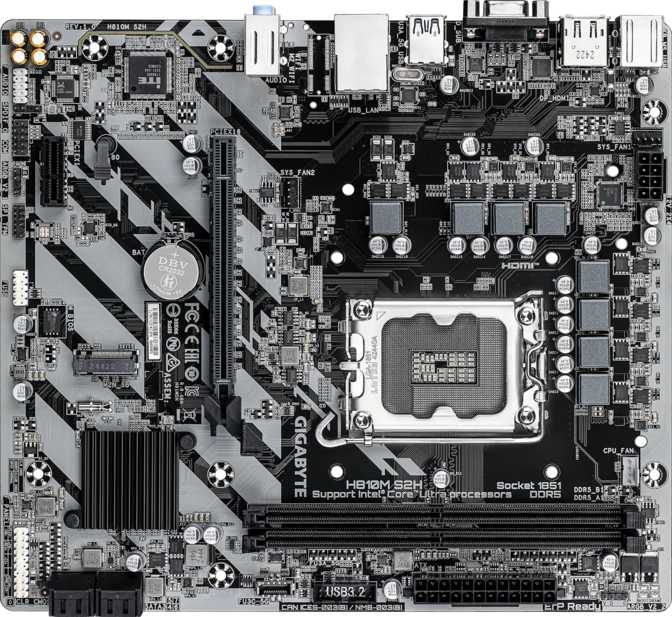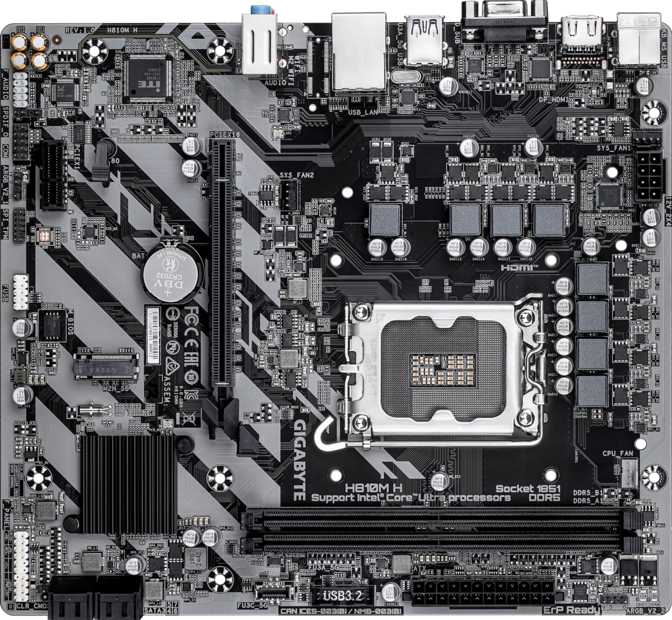
What You're Really Buying With the Gigabyte H810M H
A motherboard does not need every premium feature to be a smart purchase — it needs the right features for the build going into it. The Gigabyte H810M H is a Micro-ATX board built around Intel's newest LGA1851 desktop socket, positioned deliberately at the value end of that platform's chipset lineup. That positioning shapes nearly everything about it: modern memory support and solid storage flexibility are here, while overclocking headroom, built-in wireless, and a stacked rear I/O panel are not.
That trade-off will matter enormously to some builds and not at all to others. This review breaks down exactly where those lines fall, what is gained, what is given up, and which kind of build this board was actually designed to serve, so a confident decision can be made before committing to it.
Gigabyte H810M H at a Glance
The complete picture before getting into specifics.
Platform & Socket
Built for Intel's newest LGA1851 desktop processors. A modern foundation without overclocking flexibility.
Form Factor
Micro-ATX, compact enough to fit comfortably in most mid-tower and compact cases.
Memory
DDR5 dual-channel across two slots, up to 128GB total, with a refreshingly simple setup.
Graphics Slot
One PCIe 4.0 x16 slot, enough bandwidth for any current graphics card on the market.
Storage
One M.2 slot plus four SATA bays, with RAID 0, 1, 5, and 10 support built in.
Rear USB
Six total ports, but only one runs faster than USB 2.0. Plan peripherals accordingly.
Wireless
No Wi-Fi or Bluetooth built in. Wired networking only, unless an adapter is added.
Display Outputs
HDMI 2.1 and VGA, both dependent on installing a processor with integrated graphics.
Security
A TPM header is included, supporting Windows 11 requirements and hardware encryption.
Design, Build Quality, and Everyday Footprint
At 244mm wide and 215mm tall, the H810M H sits within Gigabyte's Micro-ATX form factor, running slightly shorter than the maximum height the standard allows. That is good news, not a downside: every mounting hole still lines up with any case built for Micro-ATX or full ATX boards, so nothing is sacrificed on compatibility — the layout is simply tighter and more efficient, with less wasted board space.
Gigabyte did not strip out the lighting just because this lands in the value tier. The board carries built-in RGB lighting, adding a bit of visual personality even on a budget-focused build, which is useful when a windowed case is part of the plan and a finished look matters alongside a modest price.
Backing it all is a three-year warranty, longer than the one-to-two-year coverage found on many motherboards at this price point. It is a reasonable signal of confidence in the board's long-term reliability, even with a deliberately lean feature set.
Build Snapshot
- Form factorMicro-ATX
- Dimensions244 x 215mm
- LightingBuilt-in RGB
- Warranty3 years
Platform Performance: What LGA1851 and the H810 Chipset Mean for You
The H810M H is built around Intel's LGA1851 socket, the physical interface for the company's current generation of desktop Core Ultra processors. Chipsets within that socket family are tiered by feature set rather than raw compatibility, and the H810 naming places this board at the accessible end of that hierarchy. That positioning is not a knock against it. It explains almost every design choice covered in this review, from the missing wireless module to the modest USB port count.
Because the CPU sits in a socket rather than being soldered to the board, the processor can also be swapped or upgraded later within the same socket family, a flexibility that boards with a built-in, non-removable chip simply do not offer.
The Overclocking Reality
This board does not support CPU overclocking. The multiplier and core voltage controls overclockers rely on are not exposed here, so however fast a chosen processor runs out of the box is, functionally, how fast it will always run on this board. For anyone running a system at stock settings, which describes most buyers, this changes nothing about day-to-day performance.
For graphics, a single PCIe 4.0 x16 slot is on offer. That is plenty of bandwidth for any current graphics card. PCIe 4.0 is not a bottleneck for gaming performance, and even high-end GPUs rarely come close to saturating the lanes available here in real-world use. There is no PCIe 5.0 slot, but that is a non-issue today since no consumer graphics card yet needs that extra bandwidth. What is missing is a second x16 slot for multi-GPU setups, an increasingly rare need outside specific professional workloads anyway.
A single PCIe x1 slot rounds out the expansion options. It is small, but useful for add-in cards such as a sound card, a capture card, or, notably given this board's lack of built-in wireless, a PCIe Wi-Fi adapter.
Memory Support: DDR5 Speed, Capacity, and Dual-Channel Simplicity
Memory support here is built entirely around DDR5, paired with two DIMM slots feeding a dual-channel memory controller. Because there are exactly two slots and dual-channel operation needs exactly two sticks, there is no ambiguity about which slots to populate. Install a matched two-stick kit and the system runs at full dual-channel bandwidth automatically. That simplicity is worth appreciating for a first build: some four-slot boards require checking the manual to find the correct slot pairing, while this board removes that decision entirely.
Capacity tops out at 128GB total, which in practice means two 64GB modules at the high end. That is far more than almost any consumer workload needs today. Even demanding multitasking, large creative projects, or running several virtual machines at once will rarely push past 32GB or 64GB in combined use, so the headroom here exists mainly for future-proofing and the rare power user running unusually memory-hungry software.
On the speed side, the board is rated to support memory running as fast as 6400MHz. Reaching that speed in practice typically depends on using a memory kit with an XMP-style profile, since standard DDR5 modules ship at considerably lower default speeds. A value-tier board supporting this ceiling at all is a reasonable indicator that its memory controller and BIOS are tuned competently, even with the CPU itself remaining locked from overclocking.
One specification that will not matter to most readers: this board does not support ECC memory. ECC, short for error-correcting code, is a workstation and server feature that automatically catches and corrects memory errors. It is valuable for mission-critical systems but irrelevant for gaming, everyday productivity, or content creation. Buyers who need ECC already know it, and they will be shopping in a different category of motherboard entirely.
Storage and Expansion: M.2, SATA, and RAID on the H810M H
Storage is where this board's value positioning shows up most clearly, for better and worse.
There is exactly one M.2 slot for NVMe solid-state storage, the fast, compact format that has become the default for boot drives. One slot is enough for a single fast drive running an operating system and main applications, which covers the actual storage needs of most builds. What it does not allow for is the now-common practice of pairing a small, fast boot drive with a second, larger NVMe drive for games or media. Buyers wanting that second fast drive are looking at either a PCIe expansion card occupying the only spare slot, or falling back to SATA storage instead.
That is where the four SATA3 connectors come in. They are enough to build out a meaningful amount of bulk storage — a couple of large hard drives for media, a SATA SSD as overflow, or any mix that suits the build — without requiring a single PCIe slot. For a no-frills setup combining one fast NVMe boot drive with SATA drives for everything else, this board has exactly enough connectivity to make that work comfortably.
If data redundancy matters, the chipset supports several RAID configurations through SATA drives.
| RAID Level | What It Actually Does | Minimum Drives |
|---|---|---|
| RAID 0 | Combines drives into one faster volume with no protection against drive failure. | 2 |
| RAID 1 | Mirrors data across two drives in real time for redundancy. | 2 |
| RAID 5 | Spreads data and recovery information across drives, balancing speed and fault tolerance. | 3 |
| RAID 10 | Combines mirroring and striping for both speed and redundancy. | 4 |
RAID 0+1 is not part of the package, but that is a minor omission. RAID 10 accomplishes a similar goal with better fault-tolerance characteristics, so most users planning a redundant array will not miss it.
One more inclusion worth flagging for business and security-conscious buyers: a TPM header is present on the board. This allows an optional discrete TPM module to be attached for hardware-level encryption support, which matters for Windows 11 security requirements and for BitLocker drive encryption. Many modern processors already include firmware-based TPM functionality without needing this header at all, but having the option here adds flexibility for buyers with specific compliance needs.
Connectivity and Rear I/O: A Deliberately Minimal Approach
This is where the value positioning is felt most directly, day to day, more than in any other part of the board.
Rear Panel Ports: Mostly USB 2.0
The rear panel carries six USB ports total, but only one of them runs faster than USB 2.0: a single USB 3.2 Gen1 port capable of 5Gbps transfer speeds. The remaining five are USB 2.0, the older standard most commonly associated with basic peripherals like keyboards and mice.
In practice, this means planning a USB layout deliberately. A keyboard and mouse will run happily on USB 2.0 with zero noticeable difference. Anyone who regularly moves large files to an external SSD, or owns recent peripherals that benefit from higher bandwidth, should reserve that single fast port for whichever device needs it most, and consider a USB hub for everything else.
If the case supports front-panel USB headers, the board's internal connectors add a couple more 5Gbps-class ports plus two more USB 2.0 ports to that total. Even counting those, there is no USB-C anywhere on this board, front or back, and no USB4 or Thunderbolt support either. Anyone with newer phones, accessories, or laptops built around USB-C as standard will need an adapter to connect them here.
Port Summary
- 1x USB 3.2 Gen1 Type-A (5Gbps)
- 5x USB 2.0 Type-A
- 1x HDMI 2.1
- 1x VGA
- 1x RJ45 Ethernet
- 1x PS/2
- 3x Audio Jacks
Display Outputs: HDMI 2.1, VGA, and an Important Catch
The rear panel includes an HDMI 2.1 port and a legacy VGA connector, a combination spanning from genuinely modern to genuinely old-school. HDMI 2.1 supports higher resolutions and refresh rates than older HDMI versions, useful when connecting to a recent monitor or television. VGA, decades old at this point, remains useful for older monitors, projectors, or displays still common in offices, classrooms, and signage setups where replacing the screen is not worth the cost.
The catch: this motherboard has no graphics chip of its own. Both the HDMI and VGA outputs only work if the installed processor has integrated graphics built in. Most processors in this socket family include one, but not every model does, so anyone planning to skip a dedicated graphics card entirely should confirm their specific CPU includes integrated graphics before buying. Without it, neither port will display anything until a graphics card is added.
There is no DisplayPort or DVI output here, which simplifies the decision but also means HDMI is the only modern option. That is fine for most monitors and TVs, but worth confirming if a display setup specifically needs DisplayPort.
Wireless: What's Missing, and Whether It Matters
Neither Wi-Fi nor Bluetooth is built into this board. There is one wired Ethernet port for an internet connection, and that is the extent of the networking hardware included.
For a desktop that lives near a router or already runs through Ethernet wiring, this changes nothing: wired connections are typically faster and more stable than wireless anyway. The gap shows up if the PC needs to sit somewhere a cable cannot easily reach, or if wireless keyboard, mouse, or audio accessories that rely on Bluetooth are part of the plan. Either way, a USB Wi-Fi adapter or a small PCIe wireless card, which would fit in the spare PCIe x1 slot, solves the problem cheaply, though it is an extra purchase that pricier boards in this lineup likely skip by including the hardware from the start.
Cooling, BIOS Recovery, and Long-Term Reliability
Three fan headers are available on the board, enough to run a CPU cooler plus one or two case fans, a sensible amount for a straightforward build using stock or modest air cooling. Plans involving an elaborate multi-fan setup or a case with several intake and exhaust fans will likely need a fan splitter or hub to stretch beyond what is available natively.
Two features that overclockers and tinkerers care about are absent here: dual BIOS and a dedicated Clear CMOS button. Dual BIOS provides a backup BIOS chip that can rescue a system if a firmware update goes wrong. Without it, a failed BIOS flash is a more serious problem to recover from, though this risk only comes into play during deliberate BIOS updates, not regular use.
Resetting the BIOS to default settings, useful after a configuration mistake or when a system will not boot, requires the traditional jumper or battery-removal method rather than a single push of a dedicated button. It is a more manual process, but not a difficult one, and a procedure most users will rarely if ever need to perform.
Audio: What 7.1-Channel Support Really Means Here
The onboard audio codec supports 7.1-channel surround sound, delivered through three audio jacks on the rear panel. In practice, this typically means the codec re-tasks those jacks to handle multiple channels rather than dedicating one jack per channel, a common and effective approach on boards with a modest jack count, though dedicated home-theater enthusiasts chasing a full discrete multi-speaker setup may eventually want a more elaborate audio solution.
For the much larger group running a stereo pair, a 2.1 setup, or a gaming headset, this is more than sufficient, with no limitation noticeable in daily use. The one absence worth flagging is S/PDIF optical output, which some home theater setups use to pass digital audio to an external receiver. Without it, that specific connection requires relying on HDMI audio instead, assuming a graphics card or integrated graphics output is in use, or adding a separate sound card.
Who the Gigabyte H810M H Is Built For (and Who Should Look Elsewhere)
Every cut feature here corresponds to a specific kind of buyer who will not miss it, and a specific kind of buyer who will.
| Good Fit For | Not a Good Fit For |
|---|---|
| Budget-focused builds prioritizing function over features | Overclocking enthusiasts wanting to push CPU performance |
| Office, school, or home productivity PCs | Multi-NVMe storage setups needing more than one M.2 slot |
| HTPC or media center builds paired with an integrated-graphics CPU | Anyone needing built-in Wi-Fi or Bluetooth without add-on hardware |
| Builds where Ethernet is already available and Wi-Fi is not needed | Users with several modern high-speed USB or USB-C peripherals |
| Buyers running their CPU at stock settings with no overclocking plans | Workstation builds requiring ECC memory |
| Storage setups pairing one fast NVMe drive with SATA bulk storage | Multi-GPU configurations |
How the H810M H Compares Across Intel's Chipset Tiers
Every Intel desktop platform splits its chipsets into tiers, and understanding where H810 sits helps clarify exactly what is being traded away, and what is not.
| Chipset Tier | Overclocking | Typical Connectivity | Best Suited For |
|---|---|---|---|
| Entry tier (H810, this board) | Not supported | Fewer high-speed USB ports, no built-in wireless, single M.2 slot common | Budget builds, office and home PCs, simple media boxes |
| Mid tier (B-series) | Often limited or absent | Usually adds extra M.2 slots, faster USB ports, sometimes Wi-Fi | Mainstream gaming and productivity builds wanting more headroom |
| High-end tier (Z-series) | Full CPU and memory overclocking | Maximum M.2 and USB connectivity, premium power delivery | Enthusiasts, overclockers, high-performance and workstation builds |
None of these tiers is objectively better. They are built for different priorities. The H810M H makes sense specifically because it does not ask buyers to pay for overclocking headroom, extra M.2 slots, or built-in wireless they might never use. When any of those features matter to a build, moving up a tier is the right call. When they do not, this board allows skipping that cost entirely.
Strengths and Weaknesses: The Honest Assessment
Where It Excels
Judged on its own terms, the Gigabyte H810M H earns real credit in a few specific areas. DDR5 support with a 6400MHz ceiling and full 128GB capacity gives this board more memory headroom than its price tier might suggest, and the dual-slot simplicity makes setup genuinely foolproof for first-time builders. The single PCIe 4.0 x16 slot means graphics card bandwidth is not sacrificed despite the value positioning, and four SATA ports with RAID 0, 1, 5, and 10 support give it more storage flexibility than many competitors offer at this level. The inclusion of a TPM header, a three-year warranty, and even RGB lighting suggests Gigabyte resisted the temptation to cut every corner just because this sits at the accessible end of the lineup.
Where It Falls Short
The weaknesses are equally clear, and they cluster almost entirely around connectivity. A single M.2 slot will frustrate anyone planning a multi-drive NVMe setup, and a rear panel with only one port faster than USB 2.0 feels noticeably dated when plugging in modern peripherals, especially with no USB-C in sight, front or back. The complete absence of Wi-Fi and Bluetooth means wireless capability is an extra purchase rather than a built-in convenience, and the lack of a Clear CMOS button or dual BIOS removes two safety nets that more expensive boards include almost as standard. None of these weaknesses are deal-breakers in isolation, but they add up to a board that genuinely expects buyers to know what they are not getting before committing to it.
That trade-off is really the entire story here: every cost saving was clearly directed toward keeping the fundamentals competitive rather than compromised. Memory support, GPU bandwidth, and storage flexibility all hold up; the cuts were made almost entirely around connectivity extras instead.
Frequently Asked Questions
Final Verdict: Should You Buy the Gigabyte H810M H?
The Gigabyte H810M H is exactly what it claims to be: a no-frills, modern foundation for a desktop PC that does not need to push performance limits. This is the right board for a straightforward home, office, or study PC, for an HTPC built around a processor with integrated graphics, or for anyone who wants a stable, DDR5-based Micro-ATX platform without paying for overclocking support, premium connectivity, or built-in wireless that would go unused. Dual-channel DDR5 up to 6400MHz, a proper PCIe 4.0 x16 slot, four SATA bays with RAID flexibility, and a three-year warranty cover the fundamentals better than its position in the lineup might suggest.
Buyers needing more than one fast NVMe drive, planning to overclock, wanting built-in wireless without an add-on, or regularly connecting several high-speed USB or USB-C peripherals should look elsewhere: the rear I/O here will start to feel restrictive fast. Enthusiast builders, content creators with demanding storage needs, and anyone chasing maximum connectivity are better served by a higher chipset tier.
The Bottom Line
A sensible, well-judged board for budget-focused, function-first builds. Not a fit for overclockers, multi-drive storage builds, or high-speed peripheral setups.