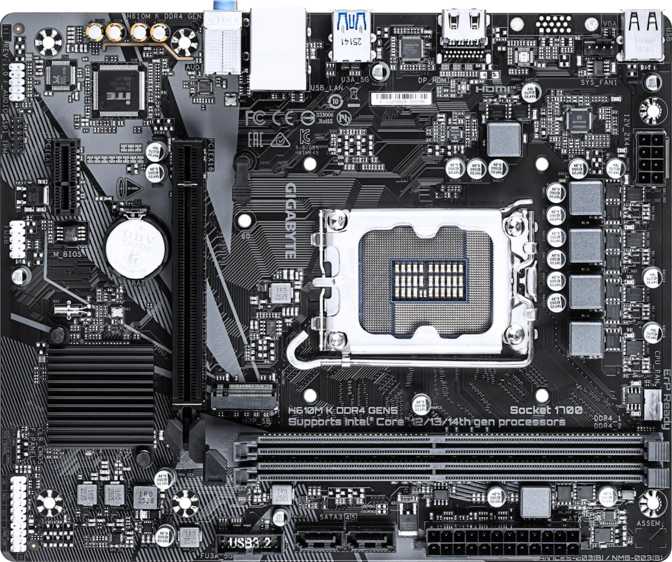
Gigabyte H610M K DDR4 Gen5: Full Review of a Budget Intel Board
MotherboardsNot every PC build calls for a flagship motherboard loaded with features most users will never touch. The Gigabyte H610M K DDR4 Gen5 is engineered around a clear philosophy: give builders exactly what they need for a functional, stable Intel platform — and nothing more. That restraint is either its greatest virtue or its most significant limitation, depending entirely on what you are trying to build. This board targets the segment where budgets are tight, expectations are grounded, and the goal is a working system rather than a showcase piece.
At a Glance
Core specifications that define this motherboard
Review Score
Evaluated across six performance and usability categories
Design and Build Quality
Physical footprint, layout, and what you actually get on the board
Form Factor and Physical Footprint
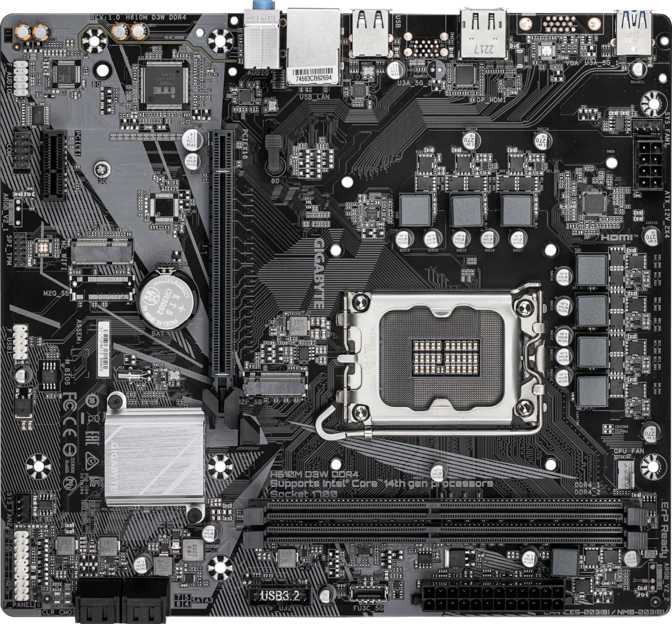
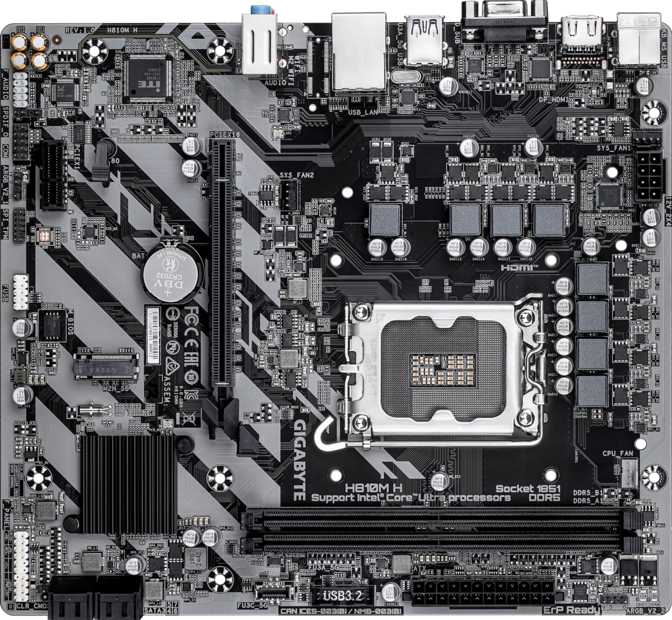
The H610M K DDR4 Gen5 uses the Micro-ATX form factor at 226 mm wide by 185 mm tall. Micro-ATX is smaller than a standard full-size ATX board, which means it fits a wider range of cases — compact mid-tower and small form factor enclosures — while still fitting into any standard ATX case. This flexibility makes it a sensible choice for space-conscious builds or home theater PCs where footprint matters.
The board carries no RGB lighting whatsoever. There are no addressable headers, no LED accents, no visual flair of any kind. If a clean, subdued system is the goal, this delivers that by default. If lighting matters to your build, this is the wrong starting point.
Component Layout
With only two DIMM slots and a single M.2 socket, the board's physical layout is uncluttered. The primary PCIe slot sits in a position typical for Micro-ATX boards, and the overall component density reflects the H610 chipset's inherent simplicity.
Two SATA ports are placed near the board edge — functional, if minimal. Fan header count is limited to two. For a basic build with a CPU cooler and one case fan, that is workable. Anything more thermally complex will require a fan hub or splitter.
Platform and Processor Compatibility
Which CPUs fit, and what the H610 chipset actually restricts
LGA 1700 Socket — Which CPUs Fit
The LGA 1700 socket is Intel's interface for its 12th and 13th generation Core processors — the Alder Lake and Raptor Lake families. This covers a wide range, from entry-level Celeron and Pentium chips all the way up to Core i9 processors sharing the same socket.
However, the H610 chipset introduces meaningful constraints on which processors make practical sense here. Since this board does not support overclocking in any form, pairing it with a performance-grade "K" or "KF" series processor means paying for unlocked headroom you can never access. Budget and mid-range non-K processors are the natural and correct match.
The H610 Chipset — What It Restricts
The H610 sits at the base of Intel's chipset hierarchy for this platform. It is not built for enthusiasts, and it does not pretend to be. Compared to the B660 or Z690/Z790 chipsets that share the same socket, the H610 removes a deliberate set of capabilities.
- CPU Overclocking
- Not supported
- Memory XMP
- Not supported
- Max RAM Speed
- 3200 MHz fixed
- PCIe Lanes
- Reduced vs B660/Z
- Overlock Features
- None available
Memory Configuration
Capacity, speed ceiling, and how to configure RAM correctly
Capacity and Speed
The board supports DDR4 RAM — the mature, widely available previous-generation standard — across two slots with a combined maximum of 64 GB. Installing RAM in both slots activates dual-channel operation, where the CPU's memory controller can access both sticks simultaneously. This roughly doubles the available memory bandwidth compared to a single-stick setup. Always install RAM in pairs to benefit from this.
The maximum officially supported memory speed is 3200 MHz. At this operating point, DDR4 hits the performance sweet spot where most 12th and 13th generation Intel processors perform optimally without needing more expensive kits. This is also the hard ceiling — the H610 chipset has no mechanism to run faster RAM at its advertised speed.
Two slots means a maximum of two physical RAM sticks. To expand beyond your initial installation, you replace sticks rather than simply adding more. Plan your starting configuration with the long term in mind.
Memory Quick Reference
- GenerationDDR4
- Slots2 (Dual-Channel)
- Max Capacity64 GB
- Max Speed3200 MHz
- XMP / OCNot supported
- ECC SupportNot supported
Storage Options
M.2, SATA, and what two ports of each actually means for your build
M.2 and SATA — The Full Picture
A single M.2 socket handles primary fast storage. NVMe M.2 drives — ultra-fast SSDs that connect directly to the motherboard rather than via a cable — are dramatically faster than traditional drives for loading operating systems and applications. For most users building on this platform, an NVMe M.2 drive as the system boot drive is the right first move.
Two SATA 3 connectors provide connectivity for conventional 2.5-inch SSDs or 3.5-inch hard drives. Two ports cover a boot drive plus one secondary storage device — enough for a typical single-user system. Builders who anticipate housing a media library, large game collection, or multiple working drives need to account for this ceiling carefully before committing to this board.
RAID configurations for data redundancy or performance striping are not supported. Storage is straightforward: one device per available connector, nothing more.
Storage Connector Summary
Recommended setup: NVMe in the M.2 slot for the OS, one SATA SSD for secondary files.
Expansion Slots and PCIe 5.0
The primary differentiator that sets this H610 board apart
The PCIe 5.0 x16 Slot — A Genuine Differentiator
The primary expansion slot runs at PCIe 5.0 x16 — the latest generation of the PCIe standard and the source of the "Gen5" in this board's name. This is a notable specification for an H610-class board, where competitors in the same price tier typically offer PCIe 4.0 as the primary slot.
PCIe 5.0 doubles the bandwidth of PCIe 4.0, which itself doubled PCIe 3.0. In practical terms for discrete graphics cards today: current GPUs do not saturate even PCIe 4.0 bandwidth in gaming workloads, so the raw slot bandwidth does not translate directly to higher frame rates right now. Its real value is forward-compatibility. GPUs designed specifically to leverage PCIe 5.0 bandwidth will operate at full specification in this slot, extending the board's relevance as graphics card generations advance.
The secondary PCIe x1 slot accommodates smaller expansion cards — Wi-Fi adapters, sound cards, capture cards, or any accessory that does not need a full-width slot.
Expansion Slot Summary
Connectivity
Rear panel ports and internal headers — a complete breakdown
Rear Panel Ports
The rear I/O panel offers a practical but conservative selection. Notable omissions — no USB-C, no Wi-Fi, no Bluetooth — are worth understanding before purchase.
| Port | Count | Use Case |
|---|---|---|
| USB 3.2 Gen 1 (USB-A) | 2 | Fast external storage, modern peripherals |
| USB 2.0 (USB-A) | 4 | Keyboard, mouse, webcam, low-bandwidth devices |
| HDMI 2.0 | 1 | Display output via CPU integrated graphics (4K@60Hz) |
| RJ45 Ethernet | 1 | Wired network — reliable, low-latency |
| USB-C (any gen) | 0 | Not available on this board |
| DisplayPort | 0 | Not available — HDMI only |
| Wi-Fi / Bluetooth | — | Not included — add via PCIe card |
Internal Headers and Connectors
Internal headers connect the case's front-panel ports and additional components. The selection is minimal but complete for a basic build.
| Connector | Count | Purpose |
|---|---|---|
| USB 3.2 Gen 1 Header | 2 | Front-panel USB 3.0 ports on case |
| USB 2.0 Header | 2 | Front-panel USB 2.0 ports on case |
| SATA 3 Connector | 2 | HDD / SATA SSD storage drives |
| Fan Header | 2 | CPU cooler + one chassis fan (hard limit) |
| M.2 Socket | 1 | NVMe SSD primary storage |
| TPM Connector | 1 | Windows 11 hardware security requirement |
Audio
On-board audio capabilities and what the three-jack setup means
The board includes a 7.1-channel audio implementation accessible through three rear 3.5mm jacks. The three-jack configuration covers stereo headphones and speakers paired with a microphone — the standard desktop audio arrangement for the vast majority of users. Running a full 7.1 surround speaker system would require additional hardware, as only three physical output jacks are present despite the channel rating.
There is no optical S/PDIF digital output. Users with AV receivers or digital-to-analog converters that require an optical connection will need a separate USB audio adapter to support that workflow.
Audio Summary
- Channel Support7.1 Channels
- 3.5mm Jacks3 Rear Jacks
- Practical ConfigHeadset + Mic
- Optical S/PDIFNot included
Who Should Buy This Board — And Who Should Not
Honest guidance on the build types this board serves well and those it does not
Ideal Use Cases
Who Should Look Elsewhere
Competitive Positioning
How the H610M K DDR4 Gen5 compares to the logical alternatives
The key question for any H610 board is whether the budget saved justifies the features lost. The table below maps the H610M K DDR4 Gen5 against a typical B660 competitor at a moderate price premium, and against a standard H610 board at the same tier.
| Feature | H610M K DDR4 Gen5 | Typical B660 Board | Standard H610 Board |
|---|---|---|---|
| Memory Overclocking (XMP) | Not Supported | Supported | Not Supported |
| Max Memory Speed | 3200 MHz (fixed) | 4800 MHz+ with XMP | 3200 MHz (fixed) |
| M.2 Sockets | 1 | 2 – 3 typically | 1 |
| SATA Ports | 2 | 4 – 6 typically | 2 – 4 |
| USB-C Rear Panel | None | Often 1 | Rarely |
| Primary PCIe Slot | PCIe 5.0 x16 | PCIe 4.0 or 5.0 x16 | PCIe 4.0 x16 (typically) |
| Fan Headers | 2 (minimal) | 4 – 6 typically | 2 – 3 |
| CPU Overclocking | Not Supported | Not Supported | Not Supported |
Honest Assessment
A balanced view of where this board succeeds and where it falls short
What It Gets Right
PCIe 5.0 primary slot — Most H610 boards offer PCIe 4.0 as the GPU slot. Having Gen 5 bandwidth here is a genuine forward-compatibility advantage that costs users nothing extra at this price tier.
3-year warranty — Unusually generous for this segment. Many budget boards at this level offer 1-2 years. Gigabyte's 3-year coverage reflects confidence in the product and gives buyers meaningful peace of mind.
Clean, minimal layout — The uncluttered design suits first-time builders and anyone who wants a system that just works. Fewer headers and slots means fewer things to configure incorrectly.
Correct DDR4 pairing — DDR4 at 3200 MHz is affordable, widely available, and performs exactly as this platform requires. Users are not pushed toward more expensive DDR5 for marginal gains.
Micro-ATX flexibility — Fits both Micro-ATX and full ATX cases, making case selection easier and keeping build options open.
Where It Falls Short
Two SATA ports is genuinely restrictive — A boot drive and one secondary drive exhausts all available storage. Anyone who anticipates growing their storage will hit this ceiling quickly, and there is no solution within this board.
No USB-C anywhere — As peripherals, monitors, and mobile devices increasingly standardize on USB-C, the complete absence of this port — on the rear panel or as an internal header — becomes more uncomfortable over time.
Two fan headers — The bare minimum for a functional build. A thermally demanding CPU in a warm case will exhaust these immediately, requiring a fan hub accessory.
Fixed memory ceiling — Because the H610 chipset prevents memory tuning, users who discover their RAM is not running optimally have no adjustment available. You are locked into what the defaults allow.
No wireless of any kind — Wi-Fi and Bluetooth require additional hardware. For users in environments where wired Ethernet is inconvenient, this adds cost and complexity from day one.
Frequently Asked Questions
Answers to the questions real buyers search for before purchasing
Yes. The included TPM connector satisfies Microsoft's hardware security requirement for Windows 11. Provided the paired processor also appears on Intel's supported list for the operating system, installation proceeds without issue. The TPM module connects to the dedicated header on the board itself.
With a discrete graphics card installed in the PCIe 5.0 x16 slot, yes — competently. The H610 chipset does not bottleneck GPU performance in gaming workloads. The limitation is the platform's inability to extract extra performance from RAM or CPU through overclocking. For 1080p gaming with a mid-range GPU, this board is more than adequate.
The LGA 1700 socket is physically compatible with both 12th and 13th generation Intel Core processors. H610 chipset boards typically support both generations with the appropriate BIOS version loaded. Before purchasing, verify BIOS revision compatibility with your specific intended processor on Gigabyte's official support page — this is always advisable before committing.
Yes, through a PCIe x1 Wi-Fi expansion card or a USB Wi-Fi adapter. A PCIe card provides more stable performance and uses the secondary slot without occupying a USB port. A USB adapter is cheaper and simpler to install. Either approach works, but both add cost beyond the initial board purchase that should be factored into your total build budget.
DDR4 at 3200 MHz delivers entirely adequate performance for the applications this board targets. It is also more affordable and more widely available than DDR5. The practical performance difference between DDR4 and DDR5 at these platform tiers is measurable in benchmarks but rarely impactful in real-world everyday tasks or 1080p gaming. For a budget-focused build on the H610 platform, DDR4 is the rational and correct choice — and this board does not support DDR5 regardless.
Final Verdict
A clear, direct purchase recommendation based on everything reviewed
The Gigabyte H610M K DDR4 Gen5 is a competent, no-frills foundation for an Intel LGA 1700 system built to a tight budget. Its PCIe 5.0 primary slot stands as a genuine advantage over competing H610 boards, and Gigabyte's 3-year warranty provides security that cheaper alternatives often skip.
The right buyer builds a home office PC, a light gaming rig anchored by a mid-range discrete GPU, or a compact media system — without needing overclocking, USB-C, wireless connectivity, or more than two storage drives.
The wrong buyer sees this board as a starting point for an evolving, expanding build. The H610's ceiling is low and fixed. Spending a measured amount more for a B660-class board buys genuine headroom: faster memory, more storage ports, more USB options, and the flexibility to tune the system as needs change.
Buy this board knowing exactly what it is. Within its intended category — budget Intel builds where the basics are all that are needed — it delivers reliably and honestly. Outside that category, look one tier up before committing.