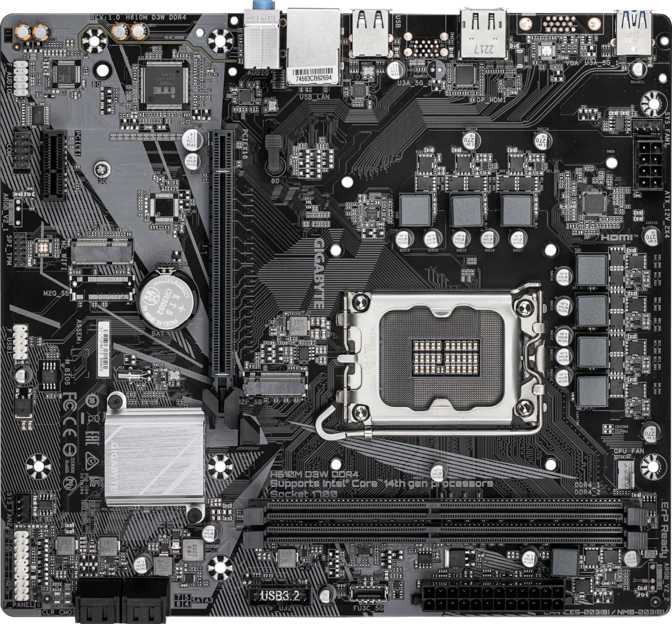
Gigabyte H610M D3W DDR4 Review: Budget Intel Board, Honest Verdict
MotherboardsBuilding a PC on Intel's current mainstream platform does not have to mean an expensive motherboard. For buyers who want a reliable, no-frills base for an office machine, a light gaming setup, or a first desktop build, the Gigabyte H610M D3W DDR4 makes its case through deliberate restraint rather than feature overload. It does fewer things than premium alternatives — but the things it does, it handles well enough that it will not be the bottleneck in your build.
This is a value-tier entry into Intel's LGA 1700 ecosystem, purpose-built for builders whose priorities are stability, affordability, and a clean upgrade path — not extreme performance tuning or future-proofing every port. Understanding what this board is not trying to be is essential before deciding whether it belongs in your build.
Quick Specifications
-
Socket / ChipsetLGA 1700 — Intel H610
-
Form FactorMicro-ATX (244 x 220 mm)
-
MemoryDDR4, 2 slots, up to 64 GB
-
Storage1x M.2 + 4x SATA 3
-
Video OutputHDMI 2.1 + DisplayPort
-
NetworkingGigabit Ethernet — no Wi-Fi or Bluetooth
-
Audio7.1-channel surround, 3 analog jacks
-
Warranty3 Years
Design and Physical Footprint
Compact, understated, and built to fit — not to impress.
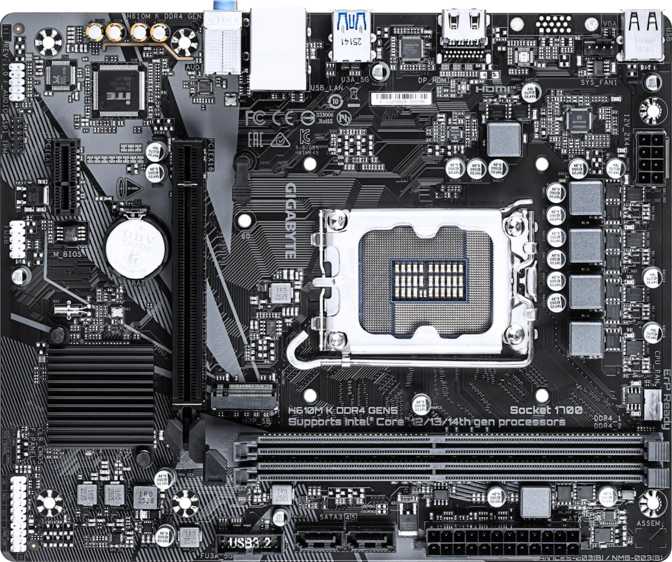
The H610M D3W DDR4 uses a Micro-ATX layout, which fits comfortably inside both standard mid-tower cases and compact mATX enclosures. At just under 24.5 centimeters wide and 22 centimeters tall, it occupies significantly less space than a full ATX board — useful for smaller builds where internal real estate is limited, and it leaves the interior feeling less crowded.
The aesthetic is strictly utilitarian. There is no RGB lighting anywhere on the board, and the color scheme leans toward understated dark tones that disappear cleanly inside any case. For builders who find LED-saturated boards distracting or unnecessary, that absence is genuinely a feature. For those constructing a windowed showpiece with coordinated lighting throughout, this board offers no participation.
Build quality at this price tier is functional rather than exceptional. The power delivery system is sized for stable stock operation rather than headroom above it, which is entirely appropriate for the workloads this board was designed to serve.
Warranty standout: Three years of manufacturer coverage is not universal at this price point. For a budget build where component replacement costs sting more, that coverage provides meaningful reassurance over the long term.
Form Factor Summary
- Layout
- Micro-ATX
- Width
- 244 mm
- Height
- 220 mm
- RGB Lighting
- None
- Overclocking
- Locked
- Warranty
- 3 Years
The H610 Chipset: What Entry-Level Actually Means
The chipset governs what the board can and cannot do. Know the limits before committing.
The chipset is the unsung gatekeeper of what a motherboard can and cannot do. The H610 is Intel's most accessible chipset for the LGA 1700 socket, and choosing it means accepting several firm limits in exchange for a lower price floor.
The most significant limit: this board does not support CPU overclocking of any kind. The processor clock multiplier is locked at whatever Intel set it to. If you plan to push your CPU beyond its factory speeds, you will need a Z-series board — this one will not cooperate regardless of which unlocked chip you install. For the majority of builders running stock settings, this is irrelevant to real-world performance. For anyone who researched overclocking and is hoping to extract free speed from an unlocked processor, it is a dealbreaker worth confronting before purchase.
What the H610 does offer is compatibility with Intel's mainstream LGA 1700 processor lineup, covering both the 12th and 13th generation families. That breadth of CPU compatibility is an underappreciated strength — buyers can pair this board with a budget dual-core chip or a higher-core-count option without touching the motherboard.
The primary expansion slot runs at PCIe 4.0 — the current standard bandwidth for discrete graphics cards. Some budget boards use a slower generation for the primary GPU slot, which can subtly constrain a capable graphics card. That this board avoids that compromise is a quiet but genuine win for any pairing with a modern GPU.
Platform Capabilities
-
12th & 13th Gen Support Wide CPU compatibility on LGA 1700
-
PCIe 4.0 Primary Slot Full GPU bandwidth, no artificial throttling
-
PCIe x1 Secondary Slot For Wi-Fi, sound, or USB expansion cards
-
No CPU Overclocking Clock multiplier is platform-locked
-
No Dual BIOS Single firmware chip only
-
No Easy CMOS Reset Standard jumper-only reset method
PCIe 4.0 x16 GPU Slot
Current-gen graphics cards run without artificial bandwidth restriction on this board
PCIe x1 Expansion
Secondary slot adds Wi-Fi, sound, or USB expansion — useful given absent onboard wireless
Stock-Optimised VRM
Power delivery sized precisely for stable factory-speed operation — no overspec waste
Memory: DDR4's Cost Advantage, With Clear Limits
DDR4 has settled into its best pricing sweet spot — here is what that means for your build and where the ceiling sits.
The H610M D3W DDR4 uses the previous generation of system memory — DDR4 — which has settled into a comfortable pricing sweet spot now that DDR5 has become mainstream on higher-end platforms. For budget builders, this translates to meaningfully lower RAM costs compared to DDR5-equipped alternatives at similar performance levels.
The board provides two memory slots. That covers the vast majority of practical use cases. Two matching modules running simultaneously enables dual-channel operation — where the memory controller uses two parallel data pathways instead of one — which delivers a noticeable throughput improvement over a single installed stick. For processor-dependent tasks and any workload leaning on integrated graphics, dual-channel operation matters more than the raw numbers suggest.
Maximum supported capacity reaches 64 gigabytes using two high-density modules. That ceiling comfortably handles general computing, gaming, video streaming, and productivity workloads. It falls short for memory-intensive professional environments — large-scale video editing timelines, scientific simulation, or virtualization setups that genuinely benefit from running well beyond that capacity.
The memory speed ceiling sits at 3200 MHz. In practical terms, this means buying faster DDR4 kits delivers no performance benefit — the platform simply will not run them faster. The upside: 3200 MHz DDR4 is the most widely available and cost-effective speed tier, so builders can shop broadly without paying a premium for speed the board cannot use.
Reuse tip: Migrating DDR4 from a previous system? Modules rated above 3200 MHz will simply run at 3200 MHz here. Check your current RAM's rated speed before assuming it will operate at full specification.
Memory Specifications
| Type | DDR4 |
| Slots | 2 (dual-channel) |
| Max Capacity | 64 GB |
| Max Speed | 3200 MHz |
| ECC Support | Not supported |
| Recommended Config | 2 x 8 GB DDR4-3200 |
Storage: One Fast Lane, Four Dependable Ports
A practical split between NVMe speed and conventional drive capacity that covers most build scenarios.
M.2 NVMe Slot
The M.2 slot is the natural home for an NVMe solid-state drive — the type of storage that boots an operating system in seconds and opens heavy applications nearly instantly. For builders upgrading from a mechanical hard drive, an NVMe drive installed here represents the single most noticeable quality-of-life improvement in the entire build. One M.2 slot is adequate for most users; it only becomes a constraint for workstation-style setups that assign separate NVMe drives to different roles — operating system, active project scratch space, and archival storage, for instance.
4x SATA 3 Ports
The four SATA 3 ports handle conventional SSDs and spinning hard drives. Four connections is generous for this price tier and covers most multi-drive scenarios: a system drive, a game or media library, and a bulk storage volume, with a spare port remaining. Four ports is more than the majority of home or office builds will ever use.
RAID configurations — combining multiple drives for redundancy or combined performance — are not supported. Expected at this price tier, but worth confirming for buyers who had that setup in mind.
Connectivity: The I/O Reality Check
Where the board's budget positioning shows most clearly — and where expectations need to be grounded in what's actually present.
Audio: Functional Surround, No Digital Output
Adequate for everyday use — but with a meaningful omission for home theater builders.
The onboard audio supports up to 7.1 channel surround sound through three analog jacks. In practice, most users connect stereo headphones or a two-channel speaker set through a single output, and the full surround capability is more relevant to home theater PC builds with dedicated speaker arrays.
Missing for home theater builders: There is no digital audio output for connecting to a home theater receiver or an external digital-to-analog converter. Audiophiles and HTPC builders who rely on optical or coaxial digital audio will need an external solution or a dedicated sound card in the PCIe x1 slot.
Audio Summary
-
7.1-Channel Surround Supports multi-speaker surround setups
-
3 Analog Jacks Front/rear/center channel connections
-
No S/PDIF Digital Output No optical or coaxial out to AV receivers or external DACs
Who This Board Is Built For — and Who Should Look Elsewhere
Match your build goals to this board's honest strengths. Misaligned expectations are the number one source of buyer regret.
The Right Buyer
- A first PC build aimed at solid everyday performance without overspending on the platform
- A home office or small business machine running productivity software, video calls, and browser-based tools
- A media center or living room computer handling video playback and casual gaming
- A builder reusing existing DDR4 memory from a previous system
- Someone who plans to run CPU and RAM at stock settings and never explore performance tuning
- A build going into a case with strong front-panel connectivity, which meaningfully offsets the modest rear USB selection
The Wrong Buyer
- Anyone who wants to overclock their CPU — the platform prevents it entirely
- Builders who need multiple fast NVMe drives for a high-speed storage workflow
- Those who require built-in Wi-Fi or Bluetooth rather than a separately purchased card
- Anyone who frequently transfers large files to external drives and needs a high-speed USB-C port readily available
- Content creation or workstation builders that push memory capacity and bandwidth to their absolute limits
- Builders who want a backup BIOS chip in case a firmware update goes wrong
How It Compares to Alternatives
The key decision: is staying at H610 the right call, or does a B660M board justify the additional cost for your specific build?
| Feature | Gigabyte H610M D3W DDR4 | Typical B660M DDR4 Board | Typical H610M Competitor |
|---|---|---|---|
| CPU Overclocking | Not supported | Not supported | Not supported |
| Max Memory Speed | 3200 MHz | 4800 MHz+ (XMP) | 3200 MHz |
| M.2 Slots | 1 | 2 (typically) | 1 |
| Rear USB-C | None | Often 1 | Often none |
| Primary GPU Slot | PCIe 4.0 x16 | PCIe 4.0 x16 | PCIe 4.0 x16 |
| Built-in Wi-Fi | No | Varies by model | No |
| Warranty | 3 Years | 3 Years | Varies |
| Price Tier | Entry | Mid-Entry | Entry |
The key question: A B660M board opens the door to faster memory speeds and often adds a second M.2 slot. For builders who need dual NVMe drives or want to push faster DDR4 kits, the B660M is the correct answer. For everyone else — the majority of budget builders — the functional difference in daily use is considerably smaller than the specification gap implies.
Honest Strengths and Real Limitations
No product review earns trust without addressing both sides with equal candor.
Where It Genuinely Earns Its Place
The PCIe 4.0 primary slot is worth pausing on. Some competing boards at this tier downgrade the GPU lane to an older generation, subtly constraining a capable graphics card. The H610M D3W DDR4 does not take that shortcut, and a modern mid-tier GPU will operate without artificial bandwidth limits.
DDR4 compatibility keeps memory costs meaningfully lower compared to DDR5 platforms at similar price points. The combination of four SATA ports and an M.2 socket covers the storage needs of the overwhelming majority of builds in this segment without requiring any workarounds.
The three-year warranty coverage adds a layer of confidence that is not universal at this price point. Budget builds are the ones where a failed component bites hardest, and that coverage period provides real protection over a longer ownership window.
Where the Budget Compromise Shows
The rear USB selection is modest — one faster USB-A port alongside slower legacy options, with no USB-C and no Gen 2 port for rapid external storage access. For a workstation that regularly moves large files to external drives, this gap has tangible real-world impact.
The absence of built-in wireless means an additional card purchase for anyone needing wireless connectivity, consuming the secondary expansion slot in the process. If you also wanted a sound card or USB hub in that slot, you now face a choice you would not face on a board with integrated Wi-Fi.
There is no redundant BIOS chip, meaning a failed firmware update cannot be recovered by switching to a backup. This is a genuine consideration for less experienced builders who might experiment with BIOS settings without full confidence in the process.
Questions Real Buyers Ask Before Purchasing
Answers to the specific concerns people search for before committing to this board.
Gigabyte H610M D3W DDR4
Overall Rating
Our Recommendation
The Gigabyte H610M D3W DDR4 succeeds by not pretending to be something it is not. It provides a stable, compatible base for Intel's mainstream CPU lineup, supports generous DDR4 memory capacity at an affordable price, offers practical storage options through a combination of fast NVMe and conventional SATA connectivity, and backs the package with a warranty that outperforms many competitors in its tier.
For a first-time builder assembling a capable home office machine, for someone constructing a media center or basic gaming PC, or for any buyer who needs Intel's LGA 1700 platform without paying for features they will never use — this board earns a confident recommendation. Buy it with clear expectations, pair it with appropriate components, and it will deliver everything it was designed to do without complaint.
Not the right board if: You want to overclock, need multiple fast NVMe drives, or require built-in wireless. Those builders should step up to a B660M — the premium is justified by real capability differences.
Best For
- First-time PC builders
- Home office & productivity builds
- Media center and HTPC setups
- DDR4 memory reuse builds
Look Elsewhere If
- CPU overclocking is a priority
- You need dual NVMe storage
- Wireless connectivity required built-in
- High-speed USB-C output essential