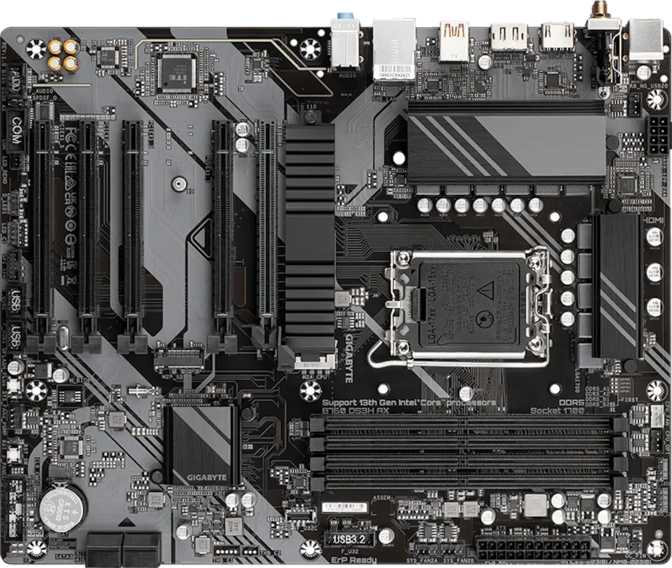
Gigabyte B760 DS3H AX Review: Real-World Performance Tested
MotherboardsThe Intel B760 platform is where most sensible builders land — capable enough for gaming and productivity, priced well below the enthusiast tier, and compatible with the same Intel processors that power far more expensive boards. The Gigabyte B760 DS3H AX takes that solid foundation and adds something that has historically cost extra: built-in Wi-Fi 6E. That combination, on a full-size ATX board with a clean, no-frills aesthetic, makes this worth a serious look before you finalize any mid-range Intel build.
Key Specifications at a Glance
Platform
LGA 1700 / B760
Form Factor
ATX (305 x 244 mm)
Memory
DDR5, 4 Slots, 256 GB
Wireless
Wi-Fi 6E + BT 5.3
Fastest USB-C
20 Gbps Gen 2x2
Storage
2x M.2 + 4x SATA 3
Display Output
HDMI 2.1 + DisplayPort
Fan Headers
6 Headers
RAID Support
0 / 1 / 5 / 10
Warranty
3 Years
What the B760 Platform Actually Means for Your Build
Before getting into the specifics of this board, it helps to understand what the B760 chipset offers and where it intentionally stops.
B760 is Intel's mainstream chipset for the LGA 1700 platform — the same socket family that powers Intel's 12th, 13th, and 14th generation Core processors. That means you're buying into a platform with serious processor options, from entry-level budget chips all the way up to high-core-count workhorses.
What B760 Delivers
- Full compatibility with 12th, 13th, and 14th Gen Intel Core processors on the LGA 1700 socket
- DDR5 memory support with XMP overclocking profiles for higher memory speeds
- PCIe 4.0 x16 for current-generation graphics cards without creating a bandwidth bottleneck
- Stable, mature platform with broad hardware and driver support across a wide processor range
Where B760 Stops
- CPU clock multiplier is locked — no manual overclocking beyond Intel's factory specification
- No PCIe 5.0 primary slot — that capability is reserved for Z790 and higher-end platforms
- Fewer total PCIe lanes than Z790 limits supplemental M.2 slot expansion options
The performance gap between a stock Intel processor and an overclocked version has narrowed considerably with modern architectures. The money saved by choosing a B760 platform almost always buys more real-world performance when redirected toward better cooling, more storage, or a faster GPU — all of which have a more tangible impact on daily use than CPU headroom most workloads rarely need.
Design and Build: Function Over Flash
The DS3H AX is a full-size ATX board — standard dimensions that fit comfortably in any mid-tower or full-tower case. Builders working with a compact Micro-ATX or Mini-ITX enclosure will need a different board; this one requires the full ATX footprint.
No RGB Lighting
Clean Minimal Aesthetic
Full ATX
305 x 244 mm
3-Year Warranty
Industry Standard
No Dual BIOS
Manual Recovery Only
There is no RGB lighting on this board. For builders who consider addressable lighting an unnecessary complexity — something that requires software to manage and adds cost without adding performance — this is precisely what they want. Minimalist builds, professional workstations, and cases without tempered glass panels all benefit from a board that isn't trying to put on a light show.
The board carries no onboard graphics of its own. Display output depends entirely on the processor: Intel Core processors with integrated graphics will drive the HDMI and DisplayPort outputs on the rear panel directly. Processors with an "F" suffix in the model designation have no integrated GPU and require a dedicated graphics card for any display output — without one, those systems produce nothing on screen.
No Dedicated BIOS Reset Button — No Dual BIOS
Clearing firmware to factory defaults requires manually using the on-board CMOS jumper or temporarily removing the CMOS battery. Without a dual BIOS chip, a failed or corrupted firmware update has no automatic rollback — manual recovery is required. Both scenarios are uncommon, but worth knowing before committing to this board.
Memory: DDR5 at Serious Speeds
DDR5
Only — No DDR4 Compatibility
4 Slots
Dual-Channel, Up to 256 GB Max
XMP
High-Speed DDR5 Profiles Supported
This is a DDR5-only board. DDR4 memory from a previous build will not transfer — the slot type and electrical specifications are incompatible. If you're planning a fresh build, DDR5 pricing has matured considerably and the gap from DDR4 at equivalent capacities has narrowed substantially.
The four memory slots support dual-channel operation, which Gigabyte recommends by populating matching pairs in the correct slot order (refer to the board manual for the specific pairing preference). Dual-channel memory effectively doubles the data bandwidth available between the processor and RAM, producing tangible benefits in gaming frame consistency, video editing throughput, and any workload that moves substantial data through system memory at speed.
The total capacity ceiling — spread across all four slots — is enough to run a professional video editing workstation, a virtual machine host running multiple operating systems simultaneously, or a 3D rendering setup without constraint. For gaming, even a fraction of that ceiling is ample; this upper limit matters only in the most demanding professional configurations.
The board's support for XMP memory profiles is where DDR5's real performance story lives. High-performance DDR5 kits at speeds approaching current DDR5 maximums are supported — rates that outpace anything the DDR4 platform was ever capable of. If you buy high-performance DDR5 today, this board won't be the limiting factor in unlocking that speed.
ECC Memory: Not Supported
Error-correcting memory — used in servers to silently detect and fix random bit flips in RAM — is not supported on this board. This is standard for consumer mainstream hardware. ECC requirements belong on a dedicated workstation or server platform.
Connectivity: Where the AX Earns Its Place
Wi-Fi 6E — The Full 6 GHz Band
The "AX" in the product name isn't decorative — it indicates Wi-Fi 6E, which is a meaningful step beyond standard Wi-Fi 6. Wi-Fi 6E adds access to the 6 GHz radio spectrum, a band so newly opened for consumer use that it remains far less congested than the 2.4 GHz and 5 GHz bands that virtually every wireless device has used for decades. In a dense wireless environment — an apartment building, an office, anywhere that a Wi-Fi scan reveals dozens of competing networks — the 6 GHz band offers interference levels that the older bands simply cannot match.
Full backward compatibility with Wi-Fi 5 and older standards means your existing router works without any modifications. The 6 GHz advantage only activates when paired with a Wi-Fi 6E router; if you plan to upgrade your networking hardware later, this board is already ready for it.
Bluetooth 5.3
Bluetooth 5.3 ships alongside the wireless module. The current Bluetooth generation handles audio peripherals, wireless keyboards and mice, game controllers, and nearby device connections with the range and reliability that earlier versions often failed to deliver.
No aptX Support: The Bluetooth implementation does not support the aptX codec used by some premium wireless headphones for higher-fidelity audio over Bluetooth. Standard audio codecs are available, but aptX-dependent headsets will not unlock their full audio quality through this connection.
Wi-Fi Compatibility
- 6E
802.11ax (6 GHz Band)
Least congested, highest throughput
- 6
802.11ax (2.4 / 5 GHz)
Current-generation Wi-Fi standard
- 5
802.11ac
Compatible with existing routers
- 4
802.11n
Legacy backward compatibility
Rear Panel Port Breakdown
-
20 Gbps
USB-C (USB 3.2 Gen 2x2) — 1 Port
Fast enough to saturate the sequential throughput of current high-speed external SSDs. The go-to connection for external NVMe enclosures, high-bandwidth docking stations, and any USB-C accessory that benefits from headroom beyond standard USB speeds.
-
10 Gbps
USB-A (USB 3.2 Gen 2) — 1 Port
Standard fast USB-A for external drives, high-speed hubs, and modern USB-A peripherals that can make use of 10 Gbps bandwidth. This is the only fast USB-A port at the rear — its scarcity is one of this board's genuine trade-offs.
-
USB 2.0
USB-A (USB 2.0) — 4 Ports
Adequate for keyboards, mice, headsets, webcams, and other peripherals that don't move large files. Not bottlenecks for their intended purpose — they work exactly as designed for input devices and low-bandwidth accessories.
-
HDMI 2.1 — 1 Port
Supports 4K at high refresh rates and 8K signals. Bandwidth ceiling exceeds what most current monitors consume, making this connection relevant through multiple display upgrade cycles. Functions only with a processor that includes integrated graphics.
-
DisplayPort — 1 Port
Serves monitors that prefer DisplayPort input or secondary display configurations. Also requires CPU integrated graphics to function.
-
RJ45 Ethernet — 1 Port
Wired network connection for a stable, latency-consistent link. Verify the exact speed rating (Gigabit or 2.5 Gigabit) on Gigabyte's official product listing, as this detail is not enumerated in the available specification data.
-
PS/2 — 1 Port
Legacy connector for older keyboards and mice using the round non-USB format. Rarely needed in modern builds, but useful for reusing older input devices or working in environments with legacy hardware.
Internal Connectors and Headers
The internal headers expand on what the rear panel alone provides, covering front-panel USB connections, thermal management, and supplementary expansion options that make this board's total connectivity significantly broader than the rear I/O alone suggests.
USB Expansion Headers
2x USB 3.2 Gen 1 Headers
Feeds USB 3.0-speed front-panel ports on compatible cases — where most users connect external drives and day-to-day USB peripherals
4x USB 2.0 Headers
Additional front-panel low-speed connections and supplementary USB expansion card support
Cooling and Security
6x Fan / Pump Headers
CPU coolers, case fans, liquid cooling pump headers, and radiator fans — all manageable through BIOS fan curve controls without a separate hub
TPM Header
Hardware-based security attestation for OS encryption and enterprise security configurations
Storage: Two Fast Lanes and Four SATA Ports
Storage is handled through two M.2 sockets and four SATA 3 connectors. The M.2 slots support high-speed NVMe drives that communicate directly through PCIe lanes rather than older storage controllers, delivering speeds that mechanical hard drives and even SATA SSDs cannot approach.
Two M.2 slots covers the standard need: one for an operating system drive, one for secondary fast storage, with the four SATA ports handling additional hard drives, older SSDs, or optical drives in extended configurations.
Full RAID support across all four SATA ports is a more complete inclusion than most B760-tier boards offer. The four available configurations serve distinct needs:
RAID 0
Combined speed, no redundancy
RAID 1
Mirror — single drive failure protection
RAID 5
Striped with parity — speed + fault tolerance
RAID 10
Mirrored striping — performance + redundancy
Expansion Slots: One GPU, Four Extras
The primary expansion slot is PCIe 4.0 x16 — the standard connection for dedicated graphics cards. PCIe 4.0 offers double the bandwidth of the previous generation, ensuring that even current high-end GPUs have adequate communication with the CPU. No currently available gaming GPU is constrained by a PCIe 4.0 x16 connection in real-world use.
There is no PCIe 5.0 slot — that belongs to Z790 and premium platforms. For today's graphics cards, this isn't a practical limitation.
Slot Configuration
-
x16
1 x PCIe 4.0 x16
Primary GPU slot — full bandwidth for dedicated graphics cards with headroom to spare
-
x1
4 x PCIe x1
Capture cards, USB controllers, audio cards, network adapters, and other thin-profile add-ins — four x1 slots is a generous count for this price tier
No Multi-GPU Support: There is no secondary x16 slot. Multi-GPU gaming configurations have been effectively abandoned by major game developers, making this a non-issue for gaming builds. Professional multi-GPU compute workloads require a different platform entirely.
Display Outputs
The onboard display outputs — HDMI 2.1 and DisplayPort — rely entirely on the processor's integrated graphics. They function when paired with Intel Core processors that include Intel UHD or Iris Xe graphics. Processors with an "F" suffix and no integrated GPU require a dedicated graphics card for any display output; without one, those systems produce nothing on screen.
HDMI 2.1 supports 4K at high refresh rates and 8K signals, with a bandwidth ceiling that exceeds what most current monitors consume. This makes it a forward-looking choice that won't become obsolete when you upgrade your display. The single DisplayPort output serves monitors that use that standard as their primary input or secondary display configurations.
HDMI 2.1
4K High Refresh / 8K Ready
DisplayPort
Standard Monitor Input
Audio Performance
The on-board audio supports 7.1-channel surround sound — the full home-theater configuration used by gaming headsets with simulated surround, multi-speaker desktop setups, and immersive audio software. Three physical audio jacks on the rear panel handle analog connections: line out, line in, and microphone.
No Optical (S/PDIF) Output
Soundbars, AV receivers, and home theater systems that require a digital optical connection won't find it here. A USB audio interface or discrete PCIe sound card would fill that gap without requiring a board change.
For standard PC audio — desktop speakers, wired headsets, USB DACs — the onboard implementation is fully capable. The 7.1 channel support handles surround gaming setups without requiring additional hardware.
Thermal Management: Six Headers, Full Control
Fan Headers
More than most B760-tier boards include at this price
Six fan headers across the board means connecting CPU coolers, case fans, pump headers for liquid cooling loops, and radiator fans without needing a separate fan hub. All cooling components can be directly managed through the BIOS using per-header fan curves. Builders who take airflow management seriously will appreciate not having to manage a secondary controller or deal with the limitations of a hub's lower-resolution speed control.
A TPM (Trusted Platform Module) header supports hardware-based security features required for certain operating systems and enterprise configurations. For most home users, this is background infrastructure that operates transparently; for security-conscious builds, it satisfies security attestation requirements without adding a separate module.
Who Should Buy the Gigabyte B760 DS3H AX
Good Match For
First-time Intel builders
Wanting integrated Wi-Fi 6E from the start, without buying a separate PCIe card later or accepting Wi-Fi 5 as a compromise
Upgraders transitioning to DDR5
Moving from an older DDR4 platform who want modern wireless and DDR5's performance ceiling without paying Z790 premium prices
Clean-build enthusiasts
Who find RGB lighting an aesthetic annoyance, prefer hardware that requires no lighting software, and favor understated builds
Home office and workstation builds
Where Wi-Fi 6E reliability and RAID-based storage redundancy are practical tools, not marketing afterthoughts
Gaming PC builders not overclocking
Wanting a stable, feature-complete foundation with fast memory support and no need to pay for Z790 OC capability
Wrong Choice For
Overclockers
Who want to push CPU clocks beyond factory specification — the B760 chipset physically prevents this. A Z790 board is the correct choice for that use case.
Content creators needing 3+ M.2 drives
Two M.2 slots is the constraint; SATA ports cover the gap but not at NVMe speeds
Home theater optical audio setups
Relying on S/PDIF to connect a soundbar or AV receiver — this board has no optical output at all
Compact build enthusiasts
The full ATX footprint won't fit Micro-ATX or Mini-ITX cases — a different board format is required
Those who need a dual BIOS safety net
No dual BIOS means a failed firmware update requires manual recovery rather than automatic rollback
How It Positions Against the Alternatives
The primary comparison is upward to Z790 boards. Stepping up to Z790 buys CPU overclocking capability, more PCIe lanes for additional M.2 slots, and a PCIe 5.0 primary slot for future GPU generations. Within the B760 category, the DS3H AX's Wi-Fi 6E inclusion distinguishes it from competing boards that stop at Wi-Fi 5 or omit wireless entirely.
| Feature | B760 DS3H AX | Typical Z790 | Generic B760 |
|---|---|---|---|
| CPU Overclocking | None | Unlocked | None |
| Wi-Fi Included | Wi-Fi 6E | Often Wi-Fi 6E | Wi-Fi 5 or None |
| Primary GPU Slot | PCIe 4.0 x16 | PCIe 5.0 x16 | PCIe 4.0 x16 |
| M.2 Slots | 2 | 3 to 5 | 2 |
| RGB Lighting | None | Often Yes | Varies |
| Dual BIOS | No | Often Yes | Varies |
| Optical Audio Output | No | Varies | Varies |
| Price Tier | Mid-Range | Premium | Mid-Range |
Honest Assessment: What It Gets Right and Where It Falls Short
Where It Gets Things Right
The DS3H AX handles several things well that its price tier doesn't guarantee. Wi-Fi 6E is the obvious headline, but the 20-gigabit USB-C port on the rear I/O is equally significant — external storage workloads that would saturate a 10 Gbps port won't throttle here. Six fan headers give thermal management flexibility that better-specced boards sometimes lack.
RAID support across all SATA ports adds data resilience options without requiring software-only workarounds. HDMI 2.1 is a forward-looking display choice that won't become obsolete when you upgrade your monitor. The three-year warranty backs everything with a reasonable assurance of build quality.
Four PCIe x1 expansion slots give this board more flexibility for supplemental add-in cards than many competing boards at this price — a practical advantage for content creators, streamers, and builders with specialized peripheral needs.
Where It Falls Short
The rear USB-A allocation is the most consequential trade-off. Only one USB-A port runs at high speed — the remaining four are standard-speed connections suited for input devices, not storage. A user regularly moving data between multiple high-speed USB-A drives simultaneously will feel this constraint and reach for a hub. The 20 Gbps USB-C port compensates for some use cases, but USB-A remains the physical standard most existing peripherals use.
The dual BIOS omission carries low probability but high consequence. If a firmware update fails or a BIOS gets corrupted — rare events, but not impossible — recovery requires manual intervention rather than automatic rollback. It's a safety net that's invisible when you don't need it and conspicuous when you do.
No optical audio output is a hard constraint for home theater setups. A USB audio interface solves it, but it's an additional cost for buyers who assumed onboard audio would cover all their output needs.
Common Questions Before Buying
Yes. The LGA 1700 socket is compatible across Intel's 12th, 13th, and 14th generation Core processor families. For specific CPU compatibility — particularly with very recent processor releases — check Gigabyte's CPU support list and verify the required BIOS version. Some processors benefit from a BIOS update before they are properly recognized.
Yes, provided your processor includes Intel integrated graphics. Most mainstream Intel Core processors — any variant without an "F" in the model designation — include Intel UHD or Iris Xe graphics, which drive the rear HDMI and DisplayPort outputs directly. Processors with the "F" suffix have no integrated GPU and require a dedicated graphics card for any display output.
The price gap has narrowed substantially from early DDR5 availability. Entry-tier DDR5 for standard use is now competitive with equivalent DDR4 at the same capacity. Premium high-speed DDR5 kits carry a price premium, but those are performance-oriented products aimed at users specifically wanting the highest memory throughput this platform supports.
Yes. The board is fully backward-compatible with Wi-Fi 6, Wi-Fi 5, and older standards. Your existing router works without any configuration changes. The 6 GHz band advantage of Wi-Fi 6E only activates when paired with a Wi-Fi 6E router — this board is simply ready for that upgrade when it happens on your end.
No. The USB-C connection on this board operates at 20 Gbps under the USB 3.2 Gen 2x2 standard — fast enough for the fastest consumer external SSDs and high-bandwidth docking stations. Thunderbolt, which is not present on this board, starts at 40 Gbps and supports specific professional peripherals, external GPU enclosures, and daisy-chained device arrays. For most consumers, 20 Gbps USB-C is more than adequate.
Without dual BIOS, recovery requires manual intervention — using the CMOS jumper on the board to clear settings, removing and reinserting the CMOS battery, or following Gigabyte's Q-Flash recovery procedure using a USB drive. It is a solvable problem, but it is not the automatic safety net that a dual-BIOS board provides. When updating firmware, always do so from a stable power state and never interrupt the process mid-write.
Final Verdict
The Gigabyte B760 DS3H AX is a well-considered board for builders who want a complete Intel platform without the Z-series price tag. It doesn't try to be everything — there's no RGB, no dual BIOS, no PCIe 5.0 — but what it does include, it chooses thoughtfully. Wi-Fi 6E at a price point where it typically costs extra, a 20-gigabit USB-C port that won't bottleneck fast storage, DDR5 with a high memory speed ceiling, and RAID flexibility that adds real data resilience for storage-conscious builders.
The purchase makes the most sense when you're content to run your processor within its factory specification, your case is ATX-sized, and you want wireless connectivity built in from the start. If CPU overclocking is a priority, or if dual BIOS protection is non-negotiable, or if three or more fast NVMe drives are part of the storage plan — a different board belongs in this build. Knowing which side of that line you're on is the only decision this review asks you to make.
Buy If You:
- Run your CPU at Intel's factory specification
- Use an ATX-compatible mid or full tower
- Want Wi-Fi 6E included from day one
- Prefer a clean build with no RGB
Skip If You:
- Need CPU overclocking — choose Z790
- Require three or more fast M.2 NVMe drives
- Depend on optical S/PDIF audio output
- Need a dual BIOS safety net for BIOS recovery