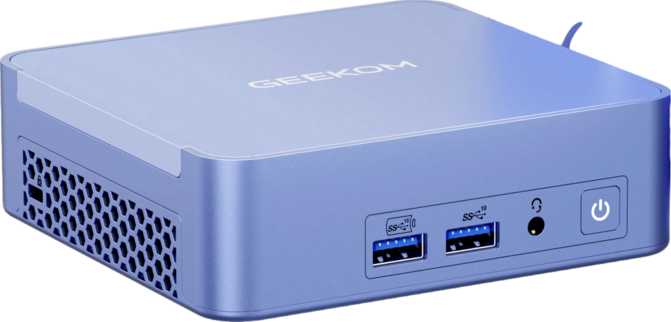
Geekom AX8 Max Review: The Mini PC Built for Serious Work
Mini PCsMini PCs have a credibility problem. Too many are marketed as desktop replacements but buckle the moment you push them past email and spreadsheets. The Geekom AX8 Max is a different proposition — a palm-sized box that lands with specs more commonly associated with mid-range workstations than with something you can hide behind a monitor. This review unpacks exactly what those specs mean in daily practice, where the AX8 Max genuinely delivers, and where it quietly falls short.
Best for professionals & power users
Performance Scorecard
Six dimensions that define this machine’s real-world value for serious buyers.
Key Specifications at a Glance
Design & Build Quality
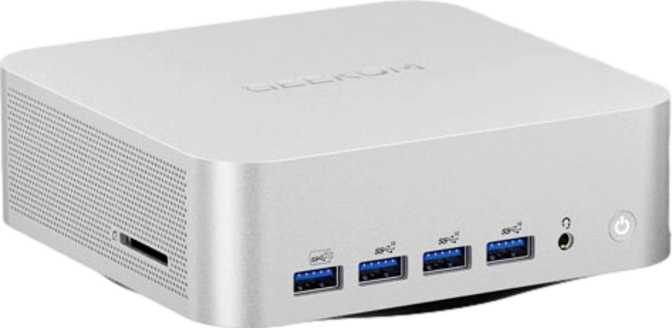
The Geekom AX8 Max measures roughly 135mm wide, 132mm deep, and just under 47mm tall — roughly the footprint of a large paperback novel. The overall internal volume sits just under 836 cubic centimeters, which is impressively tight for the hardware it contains.
Unlike many mini PCs that feel hollow or plasticky in hand, the AX8 Max has a presence that suggests solidity. Geekom has built a reputation for dense, well-assembled enclosures, and the AX8 Max continues that pattern. Ventilation slots are strategically placed to allow airflow without creating an aesthetic mess.
There is no water-cooling system inside — the machine relies entirely on active air cooling. Given a processor operating at a 15-watt thermal envelope, this is perfectly adequate under most workloads. Where sustained, heavy loads are the norm, expect the fan to become audible. It won’t rattle your desk, but it won’t be invisible either.
VESA mount compatibility is a practical consideration for a machine this size. Mounting it directly to the back of a monitor eliminates the last visible trace of a computer from your workspace — worth factoring into your setup plans.
- Width135 mm
- Depth132 mm
- Height46.9 mm
- Volume835.8 cm³
- CoolingActive Air
- Warranty1 Year
Processor Performance: Eight Cores in a 15-Watt Envelope
The processor inside the AX8 Max runs eight cores across sixteen processing threads. Its base frequency sits at 3.8 GHz across all cores, with the ability to surge individual cores up to 4.9 GHz when a task demands it. That architecture — a single core type running at consistent high clocks — means predictable, uniform performance across all threads rather than the variable output of a split big-and-small-core design.
Sixteen megabytes of L3 cache and eight megabytes of L2 cache allow the CPU to hold a meaningful working dataset close to the cores, reducing the performance penalty of reaching out to main memory. For tasks like code compilation, data processing, or working with large documents, this cache hierarchy matters more than raw clock speed alone.
The multiplier on this processor is locked, meaning overclocking is not an option. In practice, the factory configuration provides substantial headroom for the vast majority of professional workloads without any tuning required.
Benchmark Results
Radeon 780M Graphics: Not Just Another iGPU
The integrated GPU is built on AMD’s RDNA 3.0 architecture using a 4-nanometer manufacturing process — hardware that genuinely changes what “integrated graphics” means.
With 768 shading units, 48 texture mapping units, and 32 render output units, the 780M has a hardware foundation that would have been considered a respectable discrete GPU just a few years ago. Its GPU cores boost to 2,700 MHz — an aggressive ceiling for integrated silicon.
Floating-point throughput reaches approximately 8.3 TFLOPS. Many entry-level dedicated graphics cards from prior generations sat in this range. The gap between “integrated” and “entry-level discrete” has narrowed considerably here.
DirectX 12 Ultimate support means modern games and demanding applications can access ray tracing, mesh shaders, and variable rate shading. OpenCL 2.1 and OpenGL 4.6 extend the 780M’s usefulness into GPU-accelerated compute — video encoding, machine learning inference on consumer-scale models, and scientific computation can all leverage the graphics silicon beyond traditional rendering.
Four simultaneous displays can be driven from this machine — two via HDMI 2.1 and two via DisplayPort. For a multi-monitor productivity setup, this is genuinely rare capability at this size.
GPU Technical Breakdown
- ArchitectureRDNA 3.0 (4nm)
- Compute Performance8.294 TFLOPS
- Boost Clock2,700 MHz
- Shading Units768
- Simultaneous Displays4 Outputs
- Ray TracingSupported
- DirectX12 Ultimate
- DLSSNot Supported
Memory: Where the AX8 Max Pulls Noticeably Ahead
Thirty-two gigabytes of DDR5 memory running at 5,600 MHz is not a small detail. DDR5 at this frequency is faster than what most desktop systems shipped with at DDR5’s introduction, and the dual-channel configuration means the processor and GPU both access memory at full bandwidth simultaneously.
Critically, the integrated Radeon 780M shares system memory for its graphics work. Higher, faster RAM directly translates to better graphics performance — this is one of the few machines where investing in maximum RAM spec pays off for graphics-intensive users even without a discrete card.
ECC Memory Support
ECC (Error-Correcting Code) memory automatically detects and corrects single-bit memory errors — the kind of silent data corruption that causes inexplicable crashes or corrupted files in long-running workloads. This specification typically appears on workstation and server hardware, not consumer mini PCs. For professionals running financial calculations, database operations, or scientific simulations, this is a meaningful differentiator from competing mini PCs that simply omit it.
DDR5 Speed & Bandwidth
The dual-channel DDR5 running at 5,600 MHz delivers substantial memory bandwidth to both the CPU and integrated GPU simultaneously. The architecture supports up to 7,500 MHz in theory, meaning there is headroom for faster modules if you upgrade — a meaningful long-term flexibility advantage that most mini PCs in this class cannot match.
Storage: Capable Capacity, One Notable Trade-Off
One terabyte of SSD storage ships as the base configuration — enough for a clean operating system installation, a full creative software suite, and a substantial working file library without immediately reaching for external drives.
The drive, however, connects via the SATA interface rather than the faster PCIe NVMe pathway. This distinction matters in specific scenarios: sequential file transfers, large application launches, and particularly demanding storage workloads will be measurably slower than on an NVMe-equipped competitor.
For general productivity, web work, and office tasks, the practical difference in day-to-day feel is minor. For users who routinely work with very large files — raw video footage, large disk images, or extensive sample libraries — this is worth weighing consciously. If an M.2 PCIe slot is available internally, an NVMe upgrade is straightforward — confirm with Geekom before buying.
- Interface
- SATA (not NVMe PCIe)
- Capacity
- 1,000 GB (1 TB)
- Who Is Affected?
- Noticeable for large-file creative workflows; negligible for standard productivity use
Connectivity: A Port Lineup Built for Professional Needs
Two USB4 ports at 40 Gbps sit alongside two Thunderbolt 4 ports — a combination that surpasses what most full-size desktop motherboards include as standard. The dual 2.5 Gigabit Ethernet ports open up configurations that go far beyond simple internet access, including direct peer-to-peer NAS connections and redundant network failover.
| Port Type | Count | Speed / Standard | Primary Use Case |
|---|---|---|---|
| USB4 (Type-C) | 2 | 40 Gbps | External NVMe, high-res displays, docking |
| Thunderbolt 4 (Type-C) | 2 | 40 Gbps | Pro peripherals, eGPU, daisy-chaining |
| USB 3.2 Gen 2 (Type-A) | 4 | 10 Gbps | External drives, audio interfaces, hubs |
| USB 3.2 Gen 1 (Type-A) | 1 | 5 Gbps | Standard peripherals |
| USB 2.0 (Type-A) | 1 | 480 Mbps | Wireless dongles, low-bandwidth devices |
| HDMI 2.1 | 2 | 4K@120Hz / 8K@60Hz | High-refresh & ultra-high-res monitors |
| DisplayPort | 2 | Up to 4K | Professional displays |
| 2.5G Ethernet (RJ45) | 2 | 2,500 Mbps | NAS, direct transfer, redundant network |
| 3.5mm Audio Jack | 1 | — | Headphones & speakers |
Who Should Buy the Geekom AX8 Max?
- Home office & remote workers — handles video calls, multi-tab research, presentations, and document editing with significant headroom. Clean desk, quiet operation at light loads.
- Developers & engineers — sixteen threads, large cache, ECC support, and up to 256GB RAM make this viable for Docker environments, virtual machines, language servers, and compilation pipelines running simultaneously.
- Creative professionals (1080p–4K) — video editing in DaVinci Resolve or Premiere at 1080p is comfortable; 4K editing is workable with optimized media workflows.
- Multi-monitor power users — four simultaneous display outputs from a machine this size is genuinely rare. This specific capability may be the deciding factor for many buyers.
- Small businesses & IT admins — ECC support, dual NICs, and 256GB RAM headroom make this a credible thin-client server or departmental workstation for small deployments.
- Dedicated gamers — the 780M handles casual titles well, but demanding modern games will require quality compromises that a similarly priced gaming desktop would not impose.
- Professional 3D renderers — projects that benefit from GPU rendering acceleration will be limited by the absence of a dedicated card. This is a workstation-class machine, not a rendering node.
- DLSS-dependent workflows — if AI upscaling or DLSS-based features are central to your pipeline, this machine’s AMD GPU is not the right match.
- Maximum single-core performance seekers — systems with higher-TDP desktop CPUs will outperform it in single-threaded tasks. If your work doesn’t parallelize well, a conventional desktop may serve better.
Competitive Positioning
The AX8 Max competes in a crowded segment. Here is how it stacks up on the specifications that matter most to the professional buyers most likely to consider it.
| Feature | Geekom AX8 Max | Typical Competitor |
|---|---|---|
| Default RAM | 32GB DDR5 | 16–32GB DDR4/DDR5 |
| ECC Memory Support | Rarely included | |
| Maximum RAM | 256GB | 64–96GB typical |
| USB4 + Thunderbolt 4 | 2 + 2 ports | Often 1 or none |
| Dual 2.5G Ethernet | Occasionally | |
| Simultaneous Displays | 4 outputs2–3 typical | |
| Storage Interface | SATA SSD | NVMe on many rivals |
| GPU Architecture | RDNA 3.0 (780M) | Varies; 780M near class top |
Honest Assessment
Running a processor with this performance ceiling at just 15 watts is not trivial — the thermal management is doing real work. The result is a machine that can sit in an office or living room without becoming a thermal event. Fan noise at light loads is genuinely unobtrusive.
The connectivity loadout reflects genuine thought about how professionals use peripherals. USB4 and Thunderbolt 4 together cover virtually every high-bandwidth peripheral scenario without adapters or compromise.
ECC memory support is the kind of specification that passes unnoticed by most reviewers and matters deeply to the buyers for whom it is relevant. Including it in a consumer mini PC signals that Geekom is deliberately targeting professional and semi-professional buyers, not just the home enthusiast crowd.
The SATA SSD is the clearest practical weakness. It doesn’t cripple the machine, but it is an anachronism in a system that otherwise leads with its specifications. Buyers who can tolerate an upgrade procedure will find adding an NVMe drive transformative; buyers who prefer an out-of-the-box NVMe experience should factor this into their decision.
The one-year warranty is noticeably shorter than what some competitors offer at this price tier. For business deployments where uptime matters, this deserves scrutiny and a direct conversation with Geekom about extended coverage options.
The absence of DLSS is a consequence of using AMD’s architecture rather than a product flaw, but it is a hard boundary for any workflow built around NVIDIA’s ecosystem.
Common Questions Before Buying
Final Verdict
The Geekom AX8 Max is a compact workstation designed for professionals who need real compute capability, multi-display output, exceptional connectivity, and the kind of memory architecture that enterprise IT departments respect — all in a form factor that disappears on or behind a desk.
The SATA SSD is a genuine compromise in an otherwise strong package, and the one-year warranty deserves scrutiny for business deployments. For home office professionals, developers, multi-monitor power users, and small business IT environments, the AX8 Max makes a compelling case on nearly every specification that matters to those groups. The ECC memory support and 256GB RAM ceiling alone separate it from the mini PC mainstream in ways its target audience will recognize immediately.
“If your work involves sustained, parallel computation in a space-constrained environment and you’ve been waiting for a mini PC that doesn’t ask you to compromise on professional features, the Geekom AX8 Max is the clearest answer currently in this size class.”