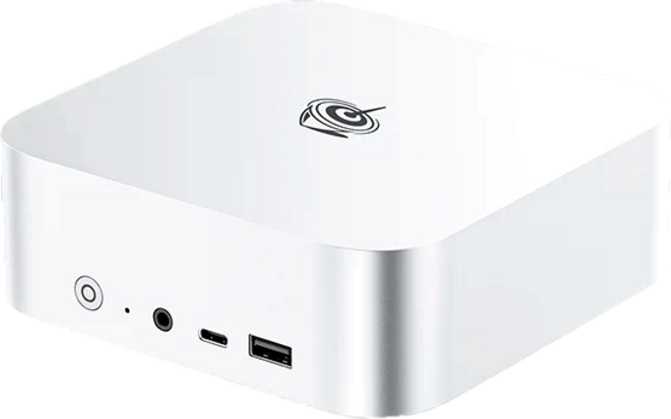
Beelink SER9 Max Review: A Mini PC That Means Business
Mini PCsAt a Glance
Six numbers that define what this machine actually is
Editorial Score and Category Ratings
Performance by Category
The Case for Reconsidering What a Desktop Computer Needs to Look Like
There’s a version of desktop computing where the machine itself disappears — where the hardware stops demanding attention and starts simply delivering capability. The Beelink SER9 Max is built around that idea. Physically smaller than a hardcover novel, it carries processor performance that competes with dedicated workstation hardware, an integrated graphics chip that quietly dismantles old assumptions about what “no discrete GPU” means, and a connectivity spread that shames most laptops retailing at multiples of its price.
It also ships with a storage drive that, bluntly, doesn’t belong in the same sentence as the rest of its hardware. That tension — between the machine the SER9 Max mostly is, and the one that one specification prevents it from fully becoming — runs through this entire review. Understanding both sides before you buy is exactly what this review is for.
Design and Build: Compact Without Compromising
Form factor, thermal management, and physical quality
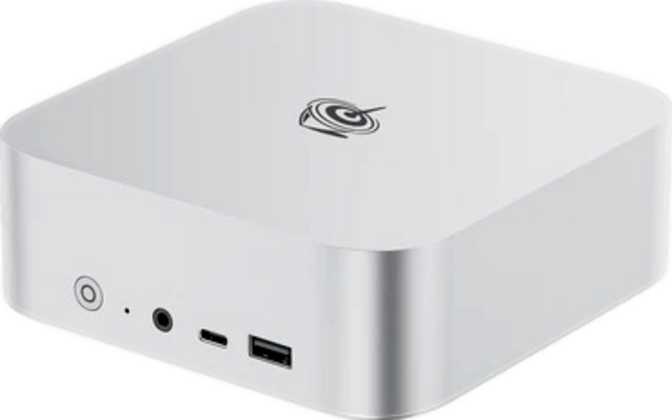
At 135 mm square and just under 45 mm tall, the SER9 Max occupies about the same desk footprint as a large coaster. Its total physical volume comes in comfortably under a liter — closer in size to a thick paperback than any conventional desktop tower. For anyone upgrading from a mid-tower or small form-factor desktop, the spatial relief is immediate.
What makes the SER9 Max’s compactness notable is what it contains. The processor runs at a sustained thermal ceiling of 45 watts — meaningfully higher than the 15–25 watts most compact machines allow their chips. Packing that kind of heat into a chassis this small demands real engineering. Beelink relies on active air cooling, so a fan is present and does engage under sustained load.
At idle or during light tasks, the machine is near-silent. Drive it hard with sustained encoding, compilation, or heavy multitasking, and you’ll hear the cooling working — though nothing approaching the stressed whine of a thin laptop fighting the same hardware in a thinner chassis.
Build quality sits above what the price point typically delivers. The chassis doesn’t flex, ports feel anchored rather than fragile, and the overall construction suggests a product designed to survive desk life. One firm omission: there is no external memory card slot of any kind. SD and microSD cards have no home here; an external reader becomes a necessary accessory for card-based workflows.
- Width × Depth135 × 135 mm
- Height44.7 mm
- Total Volume< 1 litre
- Processor TDP45 W (sustained)
- Cooling TypeActive Air Fan
- Memory Card SlotNone
- Warranty Period1 Year
Processing Performance: What Eight Cores at 45 Watts Delivers
CPU benchmarks, core architecture, and sustained workload capability
The SER9 Max is built around an eight-core, sixteen-thread processor running at approximately 3.8 GHz base with a turbo ceiling approaching 4.9 GHz. Every core handles two simultaneous processing threads, which is why software designed to distribute work across many cores — video encoding, code compilation, batch processing, simulation — sees disproportionate benefit from this chip.
To frame the nearly 29,000 PassMark result: a capable productivity laptop might land in the 10,000–15,000 range. A mid-range gaming tower might reach 18,000–22,000. At nearly 29,000, the SER9 Max isn’t competing within the mini PC category’s usual ceiling — it’s competing with dedicated performance desktop hardware.
The 45-watt thermal ceiling also enables sustained, near-peak speeds during extended tasks. Most compact machines cap their chips far lower, forcing the processor to throttle back once the chassis warms up. The SER9 Max’s higher allowance means encoding a long video or compiling a large codebase runs closer to peak speeds throughout, not just at the start.
A Uniform Core Architecture
Unlike designs that mix fast performance cores with slower efficiency cores on the same die, every core here is built to identical specifications. There is no performance lottery based on which core a given thread lands on. The processor is manufactured at a 4-nanometer process node and carries 16 MB of L3 cache alongside 8 MB of L2 cache, giving it ample high-speed memory before reaching out to system RAM. Enthusiasts should note that the clock multiplier is locked, so traditional overclocking via multiplier adjustment is not available.
-
Beelink SER9 Max28,797
-
Mid-range gaming tower~20,000
-
Productivity laptop~12,000
-
Entry-level mini PC~5,000
The Radeon 780M: Where “Integrated Graphics” Stops Being a Warning
RDNA 3.0 architecture, compute specs, and real-world capability
The Radeon 780M runs on AMD’s RDNA 3.0 architecture, manufactured at the 4-nanometer node. “Integrated” used to mean “compromised.” For generations it was true. The 780M changes that story considerably.
At just over 8.2 teraflops, the 780M delivers roughly double the compute of entry-level discrete cards from the previous generation — cards people bought specifically for light gaming — without a separate power connector, dedicated video memory, or the added cost of a discrete card.
The 780M supports DirectX 12, OpenGL 4.6, and OpenCL 2.1, covering modern game engines, current 3D software stacks, and GPU-accelerated compute workloads. Hardware ray tracing is included, though compute-intensive ray tracing scenes will require settings moderation to maintain acceptable frame rates.
What You Can and Cannot Run
At 1080p with appropriately tuned settings, the 780M handles a broad library of titles: competitive multiplayer games, esports titles, indie releases, older AAA games, and casual gaming. For 4K gaming or demanding modern AAA titles at high graphical settings, discrete graphics hardware is required regardless of which integrated GPU you choose — that remains true here.
One notable limitation: DLSS is not supported. AMD offers its own upscaling alternative in software across supported titles, but buyers with Nvidia-specific tooling or DLSS-optimized pipelines should account for that absence. The GPU connects internally via PCIe 4.0, providing full bandwidth for the 780M without interface-level constraints.
- ArchitectureRDNA 3.0
- DirectX SupportDirectX 12
- Ray TracingHardware
- DLSS SupportNot supported
- Multi-DisplayUp to 4
- PCIe InterfacePCIe 4.0
- OpenGL4.6
- OpenCL2.1
- 4K Video DecodeHardware
Memory and Storage: One Outstanding, One Disappointing
DDR5 bandwidth, expansion ceiling, and the SATA caveat explained plainly
Thirty-two gigabytes is the practical threshold above which most users never feel constrained. Dozens of active browser tabs, a video call, virtual machines, and multiple background applications can all run simultaneously without the system reaching for storage as memory overflow.
DDR5 at 5,600 MHz also matters directly for the Radeon 780M. With no dedicated video RAM, the GPU draws from the same memory pool as the processor. Faster, wider memory translates directly into higher graphics throughput — part of why the 780M outperforms its “integrated” category expectations.
One terabyte provides ample capacity for an operating system, full application suite, a game library, and working project files simultaneously. Capacity is not the issue here.
The issue is the SATA interface. A SATA SSD peaks at roughly 500–550 MB/s for sequential reads. NVMe drives — now standard in laptops and desktops at comparable price points — deliver 3,000–7,000 MB/s. That gap is invisible during application launches and document work. It surfaces during large file transfers, loading game levels with large asset packs, and high-bitrate media import and export.
| Task | SATA SSD Impact | NVMe Impact |
|---|---|---|
| Launching apps / opening documents | No perceptible difference | No perceptible difference |
| Transferring 50 GB file batch | ~90 seconds | ~10–15 seconds |
| Game level load times (large asset packs) | Noticeably slower | Fast |
| 4K video import / export (media work) | Real bottleneck | Handled comfortably |
| Virtual machine disk I/O | Throttles under sustained load | Sustained throughput |
Connectivity: A Port Layout That Respects Actual Workflows
Ports, display outputs, wireless, and networking
High-Speed Data Ports
The headline connection is a USB4 port operating at 40 Gbps, with Thunderbolt 4 capability confirmed on this port. This single connection represents an extraordinary bandwidth pipe for a machine this compact. At these speeds it can attach an external NVMe enclosure at full NVMe throughput, carry display signals for a high-resolution monitor, or connect a Thunderbolt dock that expands this box into a full multi-port workstation hub. It is also the practical answer to the internal SATA drive limitation for storage-intensive buyers.
Two USB-A ports at USB 3.2 Gen 2 speeds (10 Gbps each) provide high-bandwidth connections for external drives and high-speed peripherals. A USB-C port at USB 3.2 Gen 2 adds a further high-speed Type-C option beyond the Thunderbolt 4 port. Two additional USB-A ports operate at USB 2.0 speeds — adequate for keyboards, mice, headsets, and accessories that need connection but not bandwidth.
Display Outputs
An HDMI 2.1 port handles 4K output at high refresh rates. A separate DisplayPort output adds an independent second display connection. Combined with the Thunderbolt 4 port’s display-carrying capability, four monitors can be driven simultaneously from native outputs — a configuration that previously required dedicated multi-display graphics hardware. For traders, developers, and data analysts who work across multiple screens, this is a differentiated capability at this form factor and price level.
Wireless and Networking
Wi-Fi 6 (802.11ax) handles wireless networking, with backward compatibility for older Wi-Fi 5 and Wi-Fi 4 environments. Wi-Fi 6’s primary advantage is more efficient traffic management in congested environments — apartment buildings and office networks with many simultaneous devices benefit most. Bluetooth 5.2 covers peripheral connectivity with enough bandwidth for audio quality that earlier Bluetooth versions struggled with. For environments where reliability is non-negotiable, the RJ45 ethernet port provides wired gigabit connectivity that wireless cannot match for consistency.
-
USB4 / Thunderbolt 4 40 Gbps ×1
- USB-C 3.2 Gen 210 Gbps ×1
- USB-A 3.2 Gen 210 Gbps ×2
- USB-A 2.0×2
- HDMIHDMI 2.1 ×1
- DisplayPort×1
- RJ45 Ethernet×1
- 3.5mm Audio Jack×1
- VGA / S/PDIFNot present
- Wi-Fi StandardWi-Fi 6 (802.11ax)
- Bluetooth5.2
Real-World Use Cases: Who This Machine Is Built For
Match your workflow to this machine before you commit
The Desk-Space Reclaimer
Replacing a full-size tower without sacrificing performance for CPU-bound work. Content creation, coding, office productivity at scale, and everyday computing translate without compromise. Budget for an external NVMe solution if large file transfers are frequent.
The Multi-Monitor Power User
Four simultaneous displays from an integrated GPU is uncommon at this form factor and price level. Traders, developers, and analysts who work across multiple screens will find this capability a genuine differentiator here.
The Light-to-Moderate Gamer
The Radeon 780M changes what “no dedicated GPU” means at 1080p. Competitive titles, esports, indie games, older AAA releases, and casual gaming are comfortably within reach. Demanding modern AAA at high settings are not.
The Developer
Compilation times, container orchestration, and running multiple local development environments all scale with multi-core performance. Pair with an external NVMe via USB4 and the developer setup here is genuinely capable without the desk footprint of a tower.
The Homelab Builder
A 256 GB RAM ceiling in a mini PC is genuinely unusual. Running multiple virtual machines, hosting home lab services, or operating as a compact server node are all scenarios where that memory headroom separates this machine from almost everything else at this size.
Not for These Buyers
4K or AAA gaming at high settings, GPU-intensive 3D rendering, machine learning model training on local hardware, workflows requiring ECC memory, or media professionals whose primary bottleneck is internal storage speed.
Competitive Positioning: Where the SER9 Max Sits in the Market
How it stacks up against the performance mini PC segment
| Dimension | Beelink SER9 Max | Typical Competition at This Tier |
|---|---|---|
| Multi-Core Benchmark | ~29,000 PassMark | 15,000–25,000 typical |
| Integrated GPU | Radeon 780M (RDNA 3.0) | Iris Xe to Radeon 680M range |
| Base Memory (Stock) | 32 GB DDR5 | Often 16 GB DDR4 or entry DDR5 |
| Max RAM Ceiling | 256 GB | Typically 32–64 GB |
| Storage Interface | SATA SSD | Increasingly NVMe standard |
| High-Speed Data Port | USB4 40G + Thunderbolt 4 | Often absent or USB4 20G only |
| Simultaneous Displays | Up to 4 | Typically 2–3 |
| Warranty Coverage | 1 Year | 1–2 Years typical |
The SER9 Max holds a meaningful lead in processing performance, graphics capability, memory bandwidth, high-speed connectivity, and multi-display support. Its competitive vulnerability is storage — the category where NVMe is becoming the baseline expectation and the SER9 Max’s SATA choice stands out unfavorably against the trend. On price-per-performance for CPU-bound workloads, the machine competes well. That calculation shifts for buyers who treat storage speed as a priority.
Honest Assessment: Strengths and the One Real Weakness
A balanced evaluation without the promotional filter
-
Category-Defining CPU PerformanceNearly 29,000 on PassMark multi-core puts this machine in a genuinely different tier than conventional mini PCs — competing with dedicated workstation hardware rather than the compact desktop norm.
-
Radeon 780M Redefines Integrated GraphicsOver 8 teraflops from an integrated GPU changes what buyers can realistically expect from a machine without a discrete card. 1080p gaming and GPU-accelerated creative tasks are no longer off the table.
-
32 GB DDR5 with a 256 GB CeilingGenerous from the start and expandable to a figure most mini PCs can’t approach. The memory configuration serves both current workloads and future growth without a platform change.
-
Thunderbolt 4 and Four-Display SupportConnectivity features that typically command a premium are present here as standard. The Thunderbolt 4 port alone transforms what peripheral configurations are possible.
-
Compact Without Thermal CompromiseThe 45-watt thermal ceiling enables sustained performance that thermally-constrained mini PCs at lower TDP cannot match under extended workloads.
-
The SATA SSD: A Mismatched DecisionShipping hardware capable of nearly 29,000 on PassMark alongside a SATA drive is a genuine mismatch. The storage subsystem becomes a bottleneck in precisely the scenarios where the rest of the hardware could handle more. It doesn’t cripple everyday performance, but it limits peak productivity for the workflows this chip could otherwise handle without hesitation.
-
No Discrete GPU PathThere is no external GPU enclosure support or eGPU upgrade path via the Thunderbolt 4 port on this platform. Buyers who expect to grow into discrete GPU workloads need a different machine from the start, not an upgrade later.
-
One-Year Warranty OnlyFor a machine positioned as a primary productivity tool or always-on deployment, twelve months of manufacturer coverage is thin. Extended warranty options at point of purchase deserve serious consideration.
-
Fan Noise Under Sustained LoadThe active cooling solution does its job, but buyers expecting passive silence during heavy workloads will be disappointed. The noise is manageable rather than disruptive, but it is present.
-
No Memory Card SlotThe complete absence of any SD or microSD slot is a daily friction point for photographers and videographers who pull media from camera cards. An external reader becomes a permanent accessory.
Questions Buyers Ask Before Purchasing
Real answers to the questions that close or kill the purchase decision
A Serious Mini PC with One Compromise You Should Know About
Our recommendation for who should buy — and who should wait
The Beelink SER9 Max earns its place on a serious buyer’s shortlist. The processor reaches a performance tier that mini PCs haven’t historically occupied. The Radeon 780M demonstrates that integrated graphics can carry real workloads. The memory configuration is generous now and expandable for demanding futures. The connectivity profile — anchored by Thunderbolt 4 and four-display support — delivers capabilities that comparable form factors regularly omit.
The SATA storage is the price you pay for everything else. For the majority of productivity users, developers, multi-monitor setups, and casual-to-moderate gaming households, it won’t be the daily constraint it would be for a media professional pulling large files from local storage. For that smaller group, an external NVMe enclosure via the Thunderbolt 4 port compensates effectively — though it adds cost and a device to the setup.
Buy It If:
- Your desk space is precious and your work is CPU-bound
- You need genuine multi-display capability from a compact machine
- Your gaming expectations are realistic: 1080p, casual to moderate
- You can leverage the Thunderbolt 4 port for an external NVMe solution if storage speed matters
Look Elsewhere If:
- 4K gaming, demanding AAA titles at high settings, or GPU-heavy 3D rendering are core to your workflow
- You move large media files frequently and need internal NVMe speeds without workarounds
- Your deployment is mission-critical and a one-year warranty period falls short of your requirements