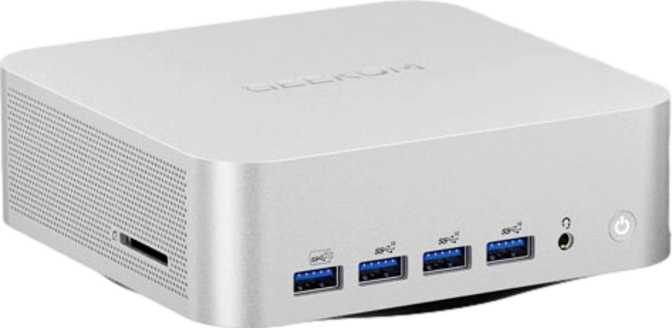
Geekom A7 Max Full Review: Maximum Power, Minimum Footprint
Mini PCsGeekom A7 Max at a Glance
The headline numbers behind this mini PC's outsized ambition
Small Enough to Forget, Powerful Enough to Matter
The modern desktop computer has a size problem — not that they're too big for everyone, but that for many users, they genuinely are. Traditional towers demand desk real estate, cable discipline, and a kind of permanent commitment to a fixed location. The Geekom A7 Max challenges all of that.
It packs eight processor cores, 64 gigabytes of high-speed memory, two terabytes of fast storage, and a graphics processor capable of driving four simultaneous displays into a chassis roughly the size of a thick paperback novel.
That pitch works only if the performance holds up in practice — and this review examines exactly whether it does, and who this machine is genuinely built for.
Physical Footprint
- Width x Depth
- 112 x 112 mm
- Height
- 37 mm
- Total Volume
- Under 470 cm³
- Comparable to
- A paperback book
Build and Physical Design
Extreme compactness with deliberate engineering decisions
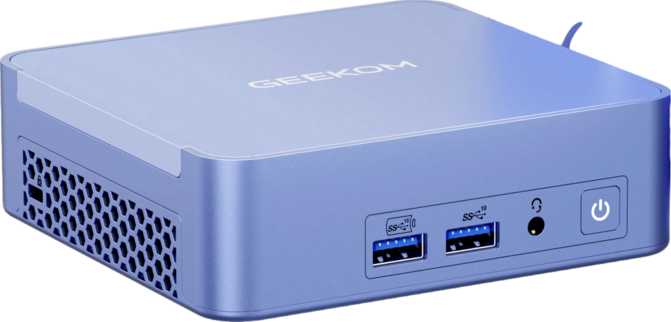
At just 37 millimeters tall and 112 millimeters square, the Geekom A7 Max occupies less desk space than most keyboard wrist rests. Its total internal volume sits under 470 cubic centimeters — a figure that places it firmly among the smallest PCs on the market. You can tuck this machine behind a monitor on a VESA mount, slide it into a shelf, or carry it between locations without a bag.
That extreme compactness comes with a deliberate engineering decision. The processor is a mobile-class chip — the type found in premium laptops — operating within a tightly constrained thermal budget. Geekom has prioritized silence and heat management over raw sustained output.
For most buyers, that trade-off is entirely sensible. Unless you are compiling enormous software projects or encoding video for hours at a stretch, you will not notice any difference between this configuration and a thermally unconstrained desktop processor.
-
Pocket-Sized Chassis112 x 112 x 37 mm — smaller than a paperback. Hides cleanly behind a monitor or inside a shelf.
-
VESA Mount CompatibleAttach directly behind your monitor for a true zero-footprint desk with no hardware visible on the surface.
-
Near-Silent at IdleThermal-first design keeps the fan quiet during typical office and productivity workloads.
-
Mobile-Class TDPEfficiency-first design may throttle under prolonged extreme workloads. Heavy sustained compute tasks should be factored in.
Processor Performance
Eight cores in a pocket-sized package — and the benchmarks to back it up
The A7 Max houses an eight-core, sixteen-thread processor with a consistent base clock across all cores and a peak single-core boost speed above 5 GHz. Eight cores allow genuine multitasking without the stutter that cheaper mini PCs — typically built around four-core budget chips — exhibit the moment you push more than a few demanding applications simultaneously.
Sixteen threads mean the chip handles parallel workloads gracefully: a browser with dozens of tabs, background cloud sync, a running communication app, a video call, and a code editor — all at once, without perceptible slowdown. The high single-core peak speed is particularly meaningful for everyday responsiveness, because most application launches, file operations, and browser interactions are single-threaded in nature.
Cache: The Hidden Driver of Consistent Speed
The processor carries 16 MB of L3 cache — a large on-chip memory pool that keeps frequently accessed data close to the cores rather than waiting on system RAM. This is the architectural detail that separates chips that feel consistently fluid from those that stutter during context switches. Combined with healthy secondary cache capacity, the chip sustains performance in data-heavy tasks: complex spreadsheets, software compilation, and media encoding all benefit directly.
Benchmark Scores
Performance relative to high-end category reference ceilings
Memory and Storage
Configured at the platform ceiling — no compromises here
64 GB DDR5
Sixty-four gigabytes makes this machine viable for workloads that previously required a full workstation: multiple virtual machines running simultaneously, large datasets held entirely in memory, professional 4K video editing, or dozens of browser-based applications in parallel without memory pressure.
DDR5 architecture delivers higher bandwidth per channel and operates more efficiently under the parallel-access patterns that modern applications create.
2 TB NVMe SSD
The onboard storage uses the NVMe interface over the latest PCIe generation — the same connection found in high-end gaming desktops and professional workstations. Operating system loads, application launches, and large file transfers all reflect this speed tier directly.
Two terabytes is a practical capacity for a desktop replacement — ample for a meaningful media library, substantial software installations, and workspace files with room to spare.
Radeon 780M: Serious Integrated Graphics
RDNA 3.0 architecture redefines what "integrated" means
The integrated Radeon 780M is built on AMD's latest graphics architecture, manufactured on a 4-nanometer process — the same generation used in high-end discrete graphics cards. The transistor count dedicated to this GPU alone rivals graphics silicon from standalone cards sold just a generation ago. This is not the integrated graphics that once meant "barely functional." It is something categorically different.
The GPU delivers over 8.2 teraflops of floating-point compute throughput and sustains a peak clock well above 2.5 GHz. Texture processing rates exceed 129 billion operations per second. These figures place the 780M above any previous integrated graphics solution and into territory that overlaps with entry-level discrete GPUs.
What This Means in Practice
For productivity users: 4K video playback is effortless. UI rendering across multiple high-resolution monitors is smooth. GPU-accelerated features in image editing, motion graphics, and video color grading software work correctly and quickly.
For light gaming: The 780M handles competitive multiplayer games, real-time strategy titles, older action games, and most indie releases well at 1080p and often 1440p at moderate quality settings. Visually demanding modern titles require settings reductions, but they run.
Hardware-level ray tracing support speaks to the GPU's modernity — a feature absent from integrated graphics until this generation. DirectX 12 Ultimate and OpenGL 4.6 compatibility mean no modern rendering API is off-limits.
GPU Specifications
| Architecture | RDNA 3.0 / 4 nm |
| Compute Throughput | 8.29 TFLOPS |
| Peak GPU Clock | 2,700 MHz |
| DirectX Support | DirectX 12 Ultimate |
| Ray Tracing | Hardware Supported |
| OpenGL / OpenCL | 4.6 / 2.1 |
Gaming Capability at a Glance
- Competitive multiplayer titles at 1080p to 1440p
- Strategy and simulation games — well within capability
- Indie and older titles — comfortable frame rates
- Hardware ray tracing in supported titles
- Demanding modern titles need resolution and quality reductions
Driving Four Monitors From a Paperback-Sized Box
A capability that redefines what a mini PC can be in a professional workspace
The A7 Max provides two HDMI outputs and two DisplayPort outputs — all four active simultaneously. For a financial analyst running market dashboards across a four-monitor array, a video editor with separate timeline, preview, reference, and output monitors, or a developer who permanently displays documentation, code, terminal, and browser side by side — this removes the most common practical objection to mini PC adoption.
Both HDMI outputs support 4K at 60Hz per port. DisplayPort handles 4K and above. Four monitors, all at full resolution and full refresh rate, from a single compact unit sitting behind the center screen.
Connectivity: Deep and Fast
With one significant gap that every buyer needs to know about
| Port / Interface | Qty | Speed / Standard |
|---|---|---|
|
USB4 (USB-C)
|
2 | 40 Gbps |
|
Thunderbolt 4 (USB-C)
|
2 | 40 Gbps + Thunderbolt ecosystem |
|
USB 3.2 Gen 2 (USB-A)
|
5 | 10 Gbps each |
|
USB 2.0 (USB-A)
|
1 | Legacy devices |
|
HDMI Output
|
2 | HDMI 2.0 — 4K @ 60Hz each |
|
DisplayPort Output
|
2 | 4K and above |
|
Audio Jack
|
1 | 3.5 mm combined headset |
|
Wireless
|
— | Wi-Fi 6E + Bluetooth 5.2 |
|
Wired Ethernet
|
0 | Not included |
The Geekom A7 Max ships with no wired Ethernet port — a puzzling omission on a machine otherwise built without compromise.
Users relying on wired connections for network stability, VPN performance, or NAS access will need a USB-to-Ethernet adapter. These are inexpensive and effective, but they consume a high-speed port and add a dongle to an otherwise clean setup.
Wireless Performance
Wi-Fi 6E provides access to the 6 GHz radio band, delivering less congestion and faster real-world throughput in environments with many connected devices — dense offices and apartments benefit noticeably.
Bluetooth 5.2 handles peripherals, headsets, and audio devices reliably at range with low latency.
Who the Geekom A7 Max Is Built For
And who should consider other options
Built for These Users
-
Professional Power Users
Compact desk, demanding multi-app workflow, possibly working across locations. The A7 Max handles video calls with screen sharing, large spreadsheets, multi-tab research, and document production simultaneously — with headroom to spare.
-
Developers
64 GB and eight fast cores make this a credible development machine. Local databases, dev environments, Docker containers, and test browsers run simultaneously. ECC memory support adds meaningful reliability for production-grade work.
-
Light-to-Moderate Gamers Who Also Work
The Radeon 780M makes this a genuine dual-purpose machine. If gaming is secondary to serious daily work, you don't need two computers. The 780M handles competitive and older titles at comfortable frame rates.
-
Multi-Monitor Power Users
Four simultaneous display outputs from one compact device is unusual even in full-sized desktops. Traders, researchers, designers, and media producers who live on screen real estate benefit most.
Consider Alternatives If You Need...
-
Dedicated High-Performance Gaming
Visually demanding modern titles at high frame rates require a discrete GPU. Integrated graphics — even at the 780M's impressive level — cannot match a mid-range or high-end dedicated card for GPU-intensive gaming.
-
3D Rendering, ML Training, or Heavy Encoding
Professional sustained GPU compute requires dedicated hardware. The 780M accelerates these tasks relative to weaker alternatives, but is not a substitute for a discrete GPU in genuinely demanding, sustained workflows.
-
Built-In Wired Ethernet Without a Workaround
If a wired connection is required and a dongle-based solution is unacceptable, choose a competing device that includes a built-in Ethernet port.
-
Maximum Performance Per Dollar
The A7 Max sits at the premium end of the mini PC market. The hardware justifies the price, but if this capability tier isn't needed, more affordable options exist.
How It Compares to the Competition
Where the A7 Max leads and where it gives ground
| Feature | Geekom A7 Max | Typical Upper-Tier Rival |
|---|---|---|
| Maximum RAM | 64 GB DDR5 | Often 32 GB; sometimes 64 GB |
| GPU Performance Tier | Radeon 780M (RDNA 3) | Ranges widely; 780M is the top |
| Simultaneous Displays | 4 outputs | Typically 2 to 3 |
| USB4 / Thunderbolt 4 | 2 of each | Often 1 or none |
| USB-A High-Speed Ports | 5 x 10 Gbps | Typically 2 to 4 |
| ECC Memory Support | Included | Rarely available |
| Wired Ethernet | Adapter required | Usually built in |
| Overclocking | Not available | Generally not available |
Comparison reflects general market positioning among upper-tier mini PCs. Specific competing products vary in configuration and price.
The Honest Assessment
What the A7 Max genuinely gets right — and where it gives ground
What It Gets Right
The A7 Max gets the fundamentals right in ways that distinguish deliberate design from cut-corner ones. Memory is included at the platform ceiling — there is no future upgrade path for RAM, which means Geekom chose to ship fully configured rather than leave buyers with unfilled potential. The storage is generous. The wireless connectivity is current-generation. The display output count is unusual at this size class.
The processor's daily-use performance is the headline. Applications open instantly. Switching between demanding tasks introduces no stutter. The high single-core boost speed means the machine responds immediately to user input — the quality that determines whether a computer feels genuinely fast or merely competent in practice.
Where It Falls Short
The tightly constrained thermal design means that under extended high-load tasks — long video encodes, prolonged compilation runs — the processor will not maintain peak performance indefinitely. It will pull back to manage heat. Most daily users will never encounter this. Professionals with genuinely continuous compute demands will, and should account for it.
The missing wired Ethernet port remains the most puzzling design decision on an otherwise serious machine. It is not a dealbreaker — the USB ecosystem covers it — but it is a gap that serves no one.
The one-year warranty is shorter than some competitors offer at comparable price points. Extended coverage options are worth investigating at purchase.
Questions Real Buyers Ask
Honest answers before you spend your money
Final Recommendation
The Geekom A7 Max is a genuinely impressive machine that earns its place at the premium end of the mini PC category. Eight cores, 64 gigabytes of DDR5 memory at the platform maximum, two terabytes of fast NVMe storage, four simultaneous display outputs, Thunderbolt 4 and USB4 connectivity — all delivered in a chassis that fits in a jacket pocket.
Standout Strengths
- Maximum 64 GB DDR5 — shipped at the platform ceiling
- Eight-core performance in a chassis smaller than a paperback
- Four simultaneous 4K displays from a single compact unit
- 2x USB4 40 Gbps and 2x Thunderbolt 4 — class-leading I/O
- ECC memory support — rare in consumer-grade mini PCs
Known Limitations
- No built-in wired Ethernet — USB adapter required
- Thermal throttling possible under sustained extreme workloads
- Only a 1-year warranty — shorter than some competitors
- Locked CPU multiplier — no overclocking path available
This machine suits developers, multi-display power users, and professionals who need a clean desk without sacrificing capability, and light gamers who want one device that covers everything. It is not the right tool for heavy 3D rendering, machine learning at scale, or dedicated high-performance gaming.
If maximum compute and memory capacity in the smallest possible footprint is your priority — and if the Radeon 780M covers your GPU needs — the Geekom A7 Max is the most complete mini PC in its category.