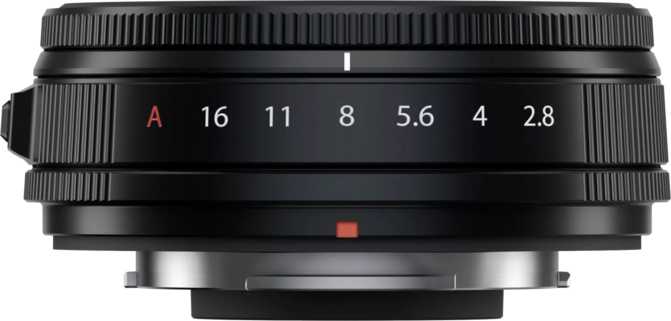
Fujifilm XF 23mm f/2.8 R WR Review: The Everyday X-Mount Street Prime
Camera LensesAt a Glance
Fujifilm XF 23mm f/2.8 R WR — Key Specifications Summary
The 35mm Perspective — And Why This Focal Length Matters
On Fujifilm's APS-C sensor, 23mm of focal length translates to approximately the 35mm equivalent field of view that photographers have returned to for decades. It sits at a particular optical sweet spot: wide enough to include environmental context around a subject, but not so wide that it distorts faces or exaggerates spatial relationships. Objects at the edges of the frame look like themselves. Distant backgrounds stay distant. The perspective is honest, and honesty at this scale is harder to achieve than it sounds.
The XF 23mm f/2.8 R WR is Fujifilm's practical, everyday argument for this focal length. Not the fastest version of 23mm in the X-mount catalog — that's the f/1.4 sibling — but possibly the most useful one for consistent daily use. It is small where that lens is large, light where that lens is substantial, and priced where more photographers can realistically commit to it. The question this review works through is whether those trade-offs hold up in real shooting conditions.
In plain terms: This lens delivers the "human eye" field of view — the same perspective many of the greatest documentary and street photographers have worked with throughout history. It captures what your eyes see when you look forward naturally, with enough peripheral context to place your subject honestly within its environment.
Built to Disappear Into Your Day
Design, construction, and physical experience
Featherlight Build
At approximately 90 grams, this lens weighs less than most smartphones. Mounted on a mid-range Fujifilm body, the combination fits comfortably in a jacket pocket or small bag without demanding a dedicated camera backpack — a practical reality that shapes how often it actually gets used.
Weather Sealing
Sealed against light rain, mist, sea spray, and dusty environments — the conditions outdoor, street, and travel photographers encounter most frequently. It's not waterproof; it's confidence for when weather turns mid-shoot. That distinction is worth understanding before you test its limits.
Metal Mount
The camera-to-lens interface uses metal rather than engineered plastic — a choice that compounds in importance over years of field use. The mount bears the most mechanical stress during every attach, detach, and accidental knock. Metal holds up where cheaper materials gradually fail.
Compact 39mm Thread
The 39mm filter thread keeps the overall lens compact. Filters in this size are among the most affordable and widely available on the market — if you use polarizers or neutral density filters, you won't need expensive step-up rings or specialty-sized options.
How Portability Changes Shooting Behavior
A lens this light and small stays mounted on the camera. It goes to places where heavier glass stays in the bag. It's present for moments that heavier setups never see — not because it's technically superior, but because it was there. Photographers who've made the shift to compact, lightweight primes describe the same outcome consistently: they shoot more, carry less, and the camera becomes a natural extension of moving through the world rather than a considered piece of equipment to deliberately deploy.
Optical Performance and Field of View
Understanding what the glass actually delivers in practice
The 63-degree angle of view produced by this lens corresponds to what the eye perceives when looking forward with natural peripheral awareness. It's close enough to normal human vision that the perspective requires no mental translation — images taken with it simply look like how things looked when you were standing there. Scenes feel accurate. People look like people.
That said, neutral perspective is not the same as dramatic perspective. Photographers who want architectural lines to converge aggressively, foreground subjects to loom large against distant backgrounds, or far-away subjects to appear compressed against near ones — those effects require different focal lengths. The 23mm on APS-C faithfully records spatial relationships as they exist. What you see is what you get, and for documentary, travel, and street work, that fidelity is exactly right.
The lens focuses to a minimum working distance of about 20 centimeters from the front element. For a wide prime, this is unusually close. At that distance, a subject fills a useful portion of the frame while still including surrounding context — excellent for food photography that wants the plate and the table, or for environmental details that need proximity without isolation. The maximum magnification ratio sits firmly in the useful-for-context-close-ups category rather than macro territory.
Optical Characteristics
-
35mm Equivalent PerspectiveNatural, honest field of view — closest to how the human eye perceives scenes when looking directly ahead
-
Close Focus at 20cmGet surprisingly close to small subjects while retaining meaningful environmental context in the same frame
-
Minimal DistortionObjects at the frame edges render honestly — faces, architecture, and furniture all look like themselves
-
No Background CompressionThis focal length doesn't compress spatial depth — backgrounds stay proportional to their actual physical distance
The f/2.8 Aperture: A Realistic Assessment
What this aperture delivers — and where it reaches its ceiling
What f/2.8 Delivers
- Adequate light for most daylight and well-lit indoor environments — cafes, shops, offices, and homes with natural light
- Gentle, gradual background separation that looks natural and documentary rather than manufactured
- Comfortable handheld shooting in typical indoor environments without immediately reaching for flash
- A significantly smaller and lighter lens body compared to faster-aperture alternatives at this focal length
Where f/2.8 Has Limits
- Concert venues, poorly lit bars, and nighttime interiors without supplementary lighting push ISO values higher than ideal
- Won't produce the dramatic, creamy background blur of an f/1.4 lens at normal portrait shooting distances
- Two full stops slower than the f/1.4 sibling — a meaningful real-world difference when light becomes demanding
Why 11 Rounded Aperture Blades Matter
The aperture mechanism uses eleven individually rounded blades, and this detail has outsized importance for image quality. When light sources appear in or near the background — streetlights, candles, window light bleeding in behind a subject — they render as near-perfect circles rather than angular polygons.
Even stopped down a stop or two from maximum aperture, the bokeh highlights retain their smooth, circular shape rather than turning into pentagons or hexagons. The result is a pleasing, unobtrusive background that supports rather than competes with the subject. The aperture range also extends down to f/16, useful for landscape work or long exposures with neutral density filters in bright conditions.
Smooth, circular bokeh highlights even when the aperture is partially stopped down from its maximum
Autofocus: The Practical Case for Silence
Internal motor design and its real-world advantages for photographers and videographers
Completely Silent
The focus motor operates without audible sound. For video work, autofocus corrections during recording won't appear in your audio track. For street photography, the lens doesn't announce the moment of capture in quiet environments or close quarters.
Internal Focus Design
Focusing elements move inside the lens body — the physical length never changes during autofocus. This prevents lens breathing in video and keeps polarizing filters properly oriented during AF operation, two practical advantages that external-barrel designs can't match.
Video-Ready
Silent motor and no lens breathing make this lens well-matched to video production. Interview work, run-and-gun documentary, and social content all benefit from a lens that focuses without audible sound or visible focal length shifts during recording.
Close Focus Advantage: The 20-centimeter minimum focus distance enables a specific kind of storytelling image — intimate proximity with environmental honesty. You're physically very close to your subject, but the wide angle of view means the object reads within its full environment rather than in isolation. A food plate, a detail, a hand — all captured with context intact. Most comparable wide primes don't match this capability.
Who Should Buy This Lens
Matching the XF 23mm f/2.8 R WR to the right photographer
This Lens Is Built For
Street & Documentary Photographers
Compact enough to go unnoticed in public spaces, sealed against weather, with silent autofocus that doesn't announce itself. The 35mm-equivalent perspective is the classic street photography field of view for good reason.
Travel Photographers
Handles architecture, food, people, street scenes, and interior spaces. Survives the conditions that travel creates. Small enough to take to places where a heavier lens stays behind in the hotel room.
Videographers
Silent motor and internal focus design make this lens mechanically well-suited to video. On a lightweight gimbal or compact rig, it adds minimal weight and avoids the optical noise problems that plague older focus designs.
Minimal Kit Builders
As a one-lens prime for everyday use, this focal length covers the majority of creative situations — specific enough to develop a shooting discipline around, versatile enough not to limit what's possible on any given day.
Consider Alternatives If You...
Shoot Primarily in Very Low Light
Concert venues, dark events, and nighttime shooting without supplementary light push ISO values into territory where image quality suffers. Two additional stops of aperture from the f/1.4 version represent a meaningful real-world difference in these conditions.
Need Extreme Background Isolation
If backgrounds dissolving completely behind subjects is central to your creative vision, f/2.8 at this focal length won't achieve it at typical shooting distances. A faster aperture or a longer focal length serves this purpose substantially better.
Need Optical Stabilization
This lens has no built-in optical stabilization. Fujifilm bodies with in-body stabilization compensate effectively, but cameras without that feature make slow-shutter handheld shooting and stabilized video more challenging.
How It Compares to the Alternatives
XF 23mm f/2.8 R WR versus the obvious competition in the X-mount system
Against the Fujifilm XF 23mm f/1.4 R WR
This is the comparison most X-mount photographers face when considering the 23mm focal length. The f/1.4 version offers two stops of additional maximum aperture — significant for low-light shooting and background separation — at the cost of considerably more size, weight, and price. Neither is objectively superior; they serve different creative priorities.
| Feature | XF 23mm f/2.8 R WRThis Lens | XF 23mm f/1.4 R WR |
|---|---|---|
| Maximum Aperture | f/2.8 — covers most daylight and well-lit indoor scenarios effectively | f/1.4 — two full stops of additional light-gathering capability |
| Size & Weight | Compact and pocket-friendly | Significantly larger and heavier |
| Weather Sealing | Yes | Yes |
| Bokeh Quality | Excellent — 11 rounded blades produce smooth, circular highlights | Strong — wider max. aperture further enhances subject separation |
| Best Use Case | Everyday carry, travel, street, video | Low light, shallow depth-of-field work, portrait isolation |
| Price Position | More accessible | Premium |
Against Third-Party 23mm Options
Several third-party manufacturers produce 23mm lenses for the Fujifilm X mount, often at wider maximum apertures. These typically trade compactness for optical speed, resulting in larger, heavier packages that may not offer equivalent weather sealing or native autofocus integration quality. For photographers prioritizing maximum aperture at minimum cost, some represent genuine value. For those prioritizing a compact, consistently reliable everyday experience, the Fujifilm first-party option remains the coherent choice.
Genuine Strengths and Real Limitations
An honest assessment of what this lens does well — and where it falls short
Where It Genuinely Excels
The XF 23mm f/2.8 R WR's strengths are not about raw optical specification — they're about what the design enables in practice. Consistent daily use. Confidence in mixed weather. A quiet autofocus system that doesn't announce itself. The 11-blade aperture mechanism produces beautiful, smooth out-of-focus rendering. A minimum focus distance that opens useful compositional space without requiring a separate macro lens. A metal mount that holds up over years of field use rather than gradually loosening.
These aren't features that impress in a specification comparison; they're characteristics that compound over time into a better photography practice. A lens this convenient to carry gets used more, and more use produces better photographs more reliably than any single specification advantage can.
The Honest Limitations
Photographers who need to shoot handheld in near-darkness at fast shutter speeds will hit the ceiling of what f/2.8 can do without significant ISO increases. Those who want subjects perfectly sharp against completely blurred backgrounds will need a faster lens — the combination of this focal length and f/2.8 aperture simply don't achieve that effect at typical shooting distances.
The absence of built-in optical stabilization is real. Whether it matters depends entirely on the camera body. Recent Fujifilm bodies with sensor-based stabilization significantly reduce the practical impact; older bodies without that feature make it a genuine consideration for low-light or slow-shutter video work.
Questions Buyers Ask Before Purchasing
Honest answers to the real questions photographers ask about this lens
Final Recommendation
Our purchase verdict for the Fujifilm XF 23mm f/2.8 R WR
The Fujifilm XF 23mm f/2.8 R WR earns its place as one of the most practically useful X-mount lenses available — not through maximum specification performance, but through a combination of portability, durability, optical quality, and behavioral versatility that compounds into genuine value over real-world shooting time. It doesn't try to do everything, and the discipline of that restraint is precisely what makes it work.
Buy This Lens If:
- You want a compact, weather-sealed prime in the universally useful 35mm-equivalent focal length
- You value carryability enough to have the camera with you consistently, every single day
- You shoot street, travel, documentary, lifestyle, or video content regularly
- You want a capable one-lens kit that handles the majority of everyday shooting situations
Consider the f/1.4 Version Instead If:
- Low-light shooting is a primary and regular requirement for the work you create
- Background isolation through shallow depth of field is central to your creative vision
- You regularly work in conditions where two stops of extra aperture would meaningfully change your results
The Bottom Line
Small enough to forget. Capable enough to matter. Built well enough to last. For street photographers, travelers, documentary shooters, and videographers who understand that the best lens is the one that's always with you — this is the 23mm to own.