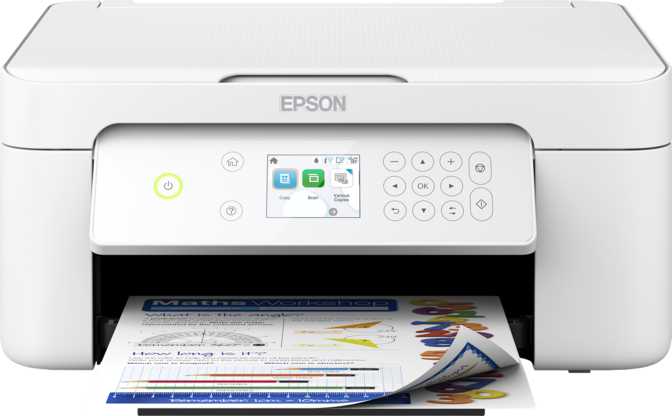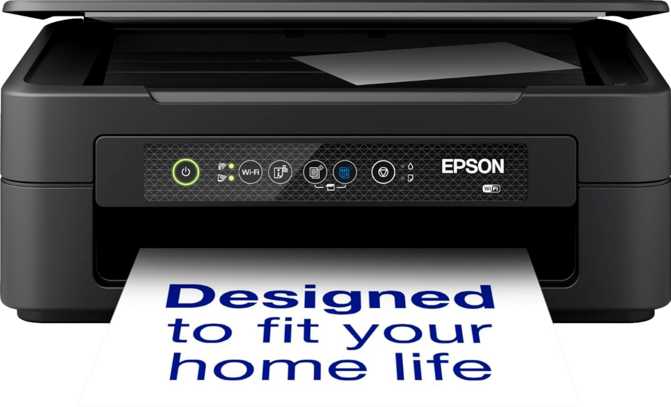
Epson Expression XP-2200 Review: Quality Above Its Price Tag
PrintersAt a Glance
Core specifications for the Epson Expression XP-2200 home multifunction printer
Most households don't need a printer that manages a small office. They need something that handles a school assignment on Tuesday morning, produces a decent photo for a birthday card on the weekend, and doesn't require a setup tutorial every time it wakes from sleep. The Epson Expression XP-2200 is built for exactly that reality — a compact, wireless three-function device that connects to virtually any device without friction and fits on a desk where larger machines simply cannot go.
That focus is the XP-2200's defining characteristic, and it cuts both ways. Within its intended territory, it performs with confidence. Step outside those boundaries — high-volume printing, multi-page document scanning, wired office networks — and the machine reaches its ceiling quickly. This review maps those boundaries precisely so you know before you buy whether the XP-2200 fits your life or whether you need to look one category up.
Design and Physical Build
At 390mm wide and just 146mm deep, the XP-2200 has a footprint smaller than a sheet of A4 paper placed lengthwise. That depth measurement is what surprises people most in practice — even budget printers typically protrude significantly from a shelf or desk edge. This one doesn't, and that single dimension transforms what it's like to actually live with the machine day to day.
At 4 kilograms, it's light enough to relocate between rooms with one hand. For households that store the printer out of sight between uses, or share it between a home office and another workspace, that portability is a practical advantage rather than a marketing footnote.
The chassis is functional plastic throughout. It feels consistent and sturdy enough for daily home use, but there's no premium texture or weight to the materials. Nothing about it feels fragile — it simply feels proportionate to what it costs and who it's for.
The single input paper tray holds 50 sheets. That figure shapes the daily experience more than any headline specification. For occasional printing — a report here, a recipe there — 50 sheets is plenty. For sessions running to 30 or more pages in a single job, refilling becomes a recurring interruption. There is no secondary tray and no option to add one.
- Width
- 390 mm
- Depth
- 146 mm (notably compact)
- Height
- 300 mm
- Weight
- 4.0 kg
- Input Trays
- 1 tray
- Paper Capacity
- 50 sheets
Print Performance
Speed in Context
The XP-2200's stated black print speed under optimal conditions represents the upper end of what the hardware can deliver — measured on fast-mode output with simple page content and minimal ink coverage. Standard-quality printing of graphics-heavy content or photos will be slower in real-world conditions.
For the target user, this is largely irrelevant. Printing a ten-page document, a boarding pass, or a week's worth of homework takes seconds rather than minutes. Where speed would matter — sustained high-volume output, large print queues — an inkjet at this price tier isn't the right tool regardless of the number on the box.
Resolution and Photo Output
The maximum print resolution of 5760 x 1440 dots per inch is the XP-2200's most compelling technical specification. Most home inkjets at comparable prices operate at lower resolution figures. The XP-2200's ceiling is measurably higher, which translates into finer ink droplet placement and more precise reproduction of detail — particularly visible in photographic output.
On standard document pages — text, tables, forms — the resolution advantage is minor and most users won't notice it. On a photo print on dedicated photo paper, the difference becomes visible: colour gradients in landscape photography are smoother, fine detail in portraits is sharper, and colour field transitions don't show the faint banding that lower-resolution inkjets can produce at close inspection distances.
This resolution spec positions the XP-2200 not just as a document printer but as a credible entry point into home photo printing — and that's a meaningful dual identity at this price.
Print Resolution in Perspective
Higher resolution produces noticeably smoother gradients and sharper detail in photo prints.
Automatic Duplex Printing
Automatic two-sided printing — not a given at this price
The XP-2200 prints on both sides of a page automatically, without requiring you to remove and reinsert the paper manually mid-job. Several competing printers at the same tier require manual duplex, which adds steps and often produces misaligned second sides. For students printing essays or anyone handling longer documents regularly, automatic duplex cuts paper consumption roughly in half and eliminates a tedious workflow step entirely.
Scanning: Solid Flatbed, Real Limitations
Understanding what the scanner can and cannot do before you buy
- 1200 × 2400 dpi optical resolution
Faithfully reproduces old photographs at enlargeable quality, fine text from dense documents, and detailed artwork — more than adequate for home archiving.
- Flatbed glass scanner
Well-suited to single-page scanning: receipts, ID documents, contracts, drawings, and reference materials.
- App-assisted PDF creation
Epson's dedicated smartphone app supports scanning to PDF and routing to cloud services or email — closing the gap for mobile users.
- No Automatic Document Feeder (ADF)
Every page must be placed manually on the glass, lid closed, scan initiated, then repeated. For a 15-page report, this becomes tedious quickly.
- No duplex scanning
Cannot scan both sides of a document in one pass. Double-sided originals require two separate operations per page.
- No on-device scan-to-PDF
There is no standalone scan-to-PDF button on the printer itself. PDF creation requires routing through the companion app on a connected phone.
Bottom line on scanning: The XP-2200 is a printing-first device. Scanning is offered as an occasional convenience, not an equal workflow capability. If you regularly digitise batches of multi-page documents, the absence of an ADF is a substantive limitation — not a minor inconvenience.
Connectivity: Wide Wireless, Narrow Wired
Every wireless standard that matters for a modern home — plus one important absence
AirPrint
iPhones, iPads, and Macs detect and print without any app installation. Just connect to the same Wi-Fi network.
Mopria
Android phones, tablets, and Chromebooks use the device's built-in print function. No third-party software required.
Wi-Fi Direct
Print directly to the printer without a home router. Useful for guests or when the network is down.
Dedicated App
Epson's smartphone app adds photo printing from your camera roll, scan-to-PDF routing, and remote ink monitoring.
Full Connectivity Overview
| Connection Type | Available |
|---|---|
| Wi-Fi (home network) | |
| AirPrint (Apple devices) | |
| Mopria (Android / Chrome OS) | |
| Wi-Fi Direct (router-free) | |
| Dedicated Smartphone App | |
| USB (wired to one computer) | |
| Ethernet (wired network) | |
| Bluetooth | |
| NFC | |
| External memory slot |
The Ethernet Absence
There is no Ethernet port. The XP-2200 connects to a network via Wi-Fi or to a single computer via USB — full stop.
For home use, this rarely matters. Home printer sharing happens over Wi-Fi in almost every household. In a small studio, workshop, or shared office environment where wired network stability is a priority, this becomes a more meaningful constraint.
What You Cannot Do
- Insert a USB drive or SD card and print photos directly from it
- Connect via Bluetooth for proximity-based printing
- Use Alexa or Google Assistant for voice-triggered print jobs
Features Worth Knowing About
Borderless Printing
The XP-2200 prints edge-to-edge on compatible paper sizes. For photographs, this is the finished-product standard — prints without white borders come off the machine ready to frame or share without any trimming. Without borderless support, every photo print would have a white margin that requires manual cropping.
Smartphone App
Epson's dedicated app extends the printer's capability significantly for mobile-first users. From it, you can print photos directly from your camera roll, initiate scans and save as PDFs to cloud services or email, and monitor ink levels remotely. The app compensates for several hardware-level gaps — most notably the absence of on-device scan-to-PDF.
Physical Control Panel
The XP-2200 uses physical buttons rather than a touchscreen. Basic copy and function selection happens through the panel, keeping on-device navigation simple and unambiguous. For more advanced configuration — wireless setup, scan routing, quality settings — the companion app handles the nuanced controls from a phone, which is where most users are more comfortable anyway.
What's Not Here
- No optical character recognition — scanned text cannot be converted to editable text on-device
- No voice assistant compatibility (Alexa or Google Assistant)
- No external memory slot for direct photo printing
- No fax capability
Who Should Buy the XP-2200 — And Who Should Look Elsewhere
-
Students and light home users
Assignments, forms, boarding passes, recipes — intermittent print jobs handled quickly and reliably with no fuss.
-
Multi-device households
AirPrint, Mopria, and Wi-Fi Direct together mean every phone, tablet, and laptop in the home can print without any installation or setup expertise.
-
Home photo printers on a budget
The resolution ceiling and borderless support make this a credible entry-level photo printer — output quality typically found at a higher price point.
-
Space-constrained environments
The compact footprint and light weight make it a realistic desk resident where most printers would be impractical.
-
High-volume or frequent printing
A 50-sheet tray and a single paper path aren't designed for sustained output. Users printing dozens of pages daily will find the XP-2200 under-specced for the workload.
-
Regular multi-page document scanning
Without an ADF, any scan workflow involving more than a few pages becomes a manual, repetitive exercise. A step-up model with ADF is worth the extra cost.
-
Wired network environments
No Ethernet means it cannot participate in a structured wired office or studio network. Wireless-only operation is a firm constraint.
-
On-device scan-to-PDF
If the ability to create a PDF directly from the printer's controls — without involving a phone — is a workflow requirement, this machine doesn't deliver it.
How It Stacks Up Against the Category
The XP-2200 versus typical budget home multifunction rivals
| Feature | Epson XP-2200 | Typical Budget Rival A | Typical Budget Rival B |
|---|---|---|---|
| Max Print Resolution | 5760 × 1440 dpi | 4800 × 1200 dpi | 4800 × 1200 dpi |
| Auto Duplex Printing | Varies by model | Varies by model | |
| Paper Tray Capacity | 50 sheets | 60 – 100 sheets | 60 – 100 sheets |
| Automatic Document Feeder | No | Some models: Yes | |
| AirPrint Support | |||
| Mopria Support | |||
| Ethernet / Wired Network | No | Some models: Yes | |
| On-Device Scan to PDF | Varies | Varies | |
| Borderless Photo Printing | Varies | Varies |
Rival columns represent typical specifications found in the same market segment — not a single specific model. Always verify individual model specifications before purchasing.
The competitive take: The XP-2200's print resolution is a clear differentiator. Most rivals at this price cap their maximum output at figures below what the XP-2200 achieves, and on photo paper that difference is visible in gradients and fine detail.
Where alternatives pull ahead is paper capacity and ADF availability. Some competing models from Canon's PIXMA TR range or Brother's DCP line offer ADF functionality at comparable price points — though often at lower print resolution. If ADF matters more to you than photo print quality, that trade-off is worth exploring directly.
Questions Real Buyers Ask
Answers to the most common pre-purchase questions about the Epson Expression XP-2200
The Full Picture
Where It Earns Its Price
The strongest argument for the XP-2200 is the combination of print resolution and wireless reach at its price point. The resolution ceiling is measurably above most category rivals, which pays off specifically in photo output quality on appropriate paper — a difference buyers typically have to spend more to achieve elsewhere.
The wireless implementation is well-executed without being overengineered. AirPrint, Mopria, and Wi-Fi Direct together mean the printer works naturally with every device in a typical home without any configuration expertise required. It's the kind of wireless setup that non-technical users can complete once and forget about.
Automatic duplex adds practical value that compounds over the machine's lifespan. Paper saved, time saved, manual steps eliminated — at this price, it's an inclusion worth crediting explicitly.
Where It Reaches Its Ceiling
The 50-sheet tray is the most immediately felt constraint for users who print in sustained batches. There's no option to expand capacity, and the single tray means switching paper types breaks workflow rather than flowing through a software selection.
The absence of an ADF is the largest functional gap. It is not a minor omission for users who scan regularly — it reflects a clear product positioning choice. The XP-2200 is a printing-first device with scanning offered as occasional convenience, not a parallel capability.
The missing on-device scan-to-PDF, no OCR, no external memory slot, and no Ethernet add up to a consistent picture: this machine does the everyday home printing job well, and makes deliberate compromises on everything else. None of those compromises should surprise a buyer who has read this far.
Editorial Verdict
Final Recommendation
The Epson Expression XP-2200 makes a focused, credible case for home users who print and occasionally copy or scan, value compact size, and want reliable wireless printing across multiple devices without technical setup.
Its print resolution is the strongest technical credential in its category — measurably higher than most rivals at the same price, and visibly beneficial for photo output on quality paper. Automatic duplex printing and broad wireless compatibility are execution details done correctly and not universally matched at this price.
The constraints are real and specific: 50 sheets of tray capacity, a flatbed-only scanner with no ADF, no Ethernet, and no on-device scan-to-PDF. If any of those limitations directly reflect how you work, they will show up in your daily experience — not stay theoretical.
Best For
Students, home users, and photo printers who value quality and compact size over volume capacity
Skip If
You scan multi-page documents regularly, need Ethernet, or print large batches frequently
Overall Rating
Recommended for Home Use