Epson EcoTank ET-1810 Review: Print Quality and Value Examined

Epson EcoTank ET-1810 Review: Print Quality and Value Examined

Printers
Editorial Verdict

A smart buy for regular home printers who need no scanning or copying. The ink economics and print quality combination is compelling and difficult to match at this price point.

4 / 5

Rated on print quality, ink economy, connectivity, and overall value

Key Strengths

  • Very low per-page running cost
  • Excellent color and photo print quality
  • Automatic two-sided printing included

Key Limitations

  • Print only — no scanner or copier
  • No AirPrint support for Apple users
  • No borderless photo output

The EcoTank Concept: Why It Changes the Ownership Experience

The defining feature of every EcoTank model is the replacement of sealed, disposable ink cartridges with large refillable reservoirs built directly into the printer body. Instead of buying a small cartridge every few weeks, you purchase substantially larger bottles of Epson ink and pour them into the printer's tanks when levels run low.

The arithmetic is straightforward: more ink per purchase, lower cost per page printed. For someone who prints regularly — multiple documents a week, photo projects, school assignments, work-from-home paperwork — the higher upfront cost compared to a basic cartridge model is typically recovered within months. The per-page economics then stay favorable for the life of the printer.

The visible ink tanks also eliminate the guesswork of cartridge-level monitoring. You can see how much ink remains at a glance, rather than relying on software estimates that are often unreliable.

EcoTank vs. Cartridge

Lower Cost Per Page

Bottled ink delivers far more output per pound spent than individual cartridges.

Visible Ink Levels

Translucent tanks let you monitor ink without relying on software guesswork.

Less Frequent Refills

For typical home use, refilling is a monthly or less frequent event, not a weekly one.

Design and Build: Sensible, Compact, No-Nonsense

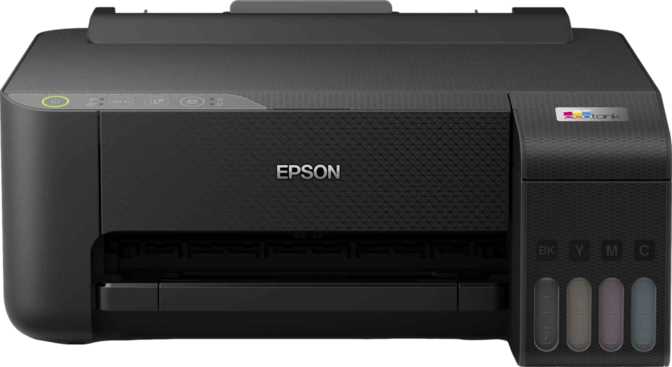
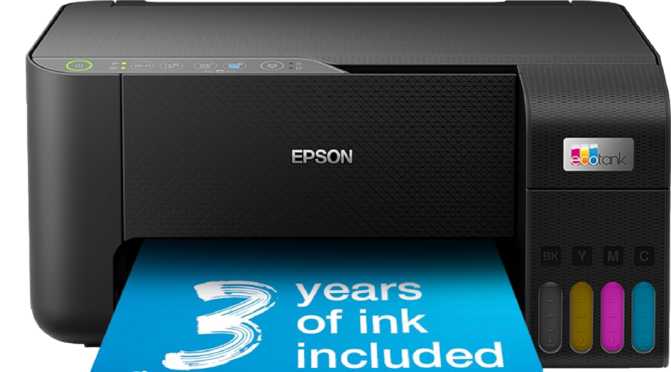
EcoTank printers have historically been bulkier than their cartridge counterparts — the physical reservoirs have to live somewhere inside the chassis. The ET-1810 manages this more efficiently than many. Its dimensions are broadly comparable to an open laptop with a shallow stand behind it: wide enough to accommodate standard paper sizes with room to spare, but shallow enough to sit against a wall without jutting far into your workspace. At a weight light enough to lift and reposition with one hand, it does not feel like a permanent installation.

The body is clean and unadorned — matte plastic surfaces, no unnecessary curves or decorative detailing. There is no touchscreen or LCD navigation panel. Controls are physical buttons, which keeps the interface immediately intuitive but limits what can be configured without turning to software. For a printer that accepts jobs wirelessly from phones and computers, this trade-off makes sense: simplicity over on-board complexity. Buyers who expect a navigation screen will need to adjust expectations, or look at higher-tier EcoTank models that include one.

Physical Profile

Footprint
Laptop-sized width
Depth
Shallow, wall-friendly
Weight
Single-hand lift
Controls
Physical buttons
Display
None
Print Technology
Inkjet

Automatic Two-Sided Printing: Small Feature, Real Benefit

The ET-1810 handles two-sided printing automatically. Set the preference in your print dialog and the printer feeds each page back through to print on the reverse without any manual intervention. For multi-page documents, this halves paper consumption — a meaningful ongoing saving that compounds over time. For a printer whose entire value proposition is built around reducing consumable costs, automatic duplex is not a luxury addition; it is philosophically consistent with the product.

Up to 50% less paper

Automatic two-sided printing cuts paper use in half for multi-page documents — no manual page flipping required.

Connectivity: Solid Foundation with Notable Gaps

Wi-Fi Network Printing

Supported

Connects to your home or office Wi-Fi. Any device on the same network can send print jobs without additional configuration.

Wi-Fi Direct

Supported

Creates a direct device-to-printer wireless link — no router needed. Useful for guests, travel, or network-down scenarios.

Smartphone App

Supported

Epson's dedicated app for iOS and Android handles job submission, print settings, and ink level monitoring.

AirPrint

Not Supported

Apple's native wireless print protocol is absent. iPhone and iPad users must print via the Epson app — one extra step on setup.

Ethernet (Wired)

Not Available

Wireless-only connectivity. No wired network port for users who prefer a stable cabled connection.

Bluetooth / NFC

Not Available

No Bluetooth or NFC pairing. Wi-Fi Direct covers the direct-connection use case instead.

What the ET-1810 Cannot Do

This matters as much as any specification. The ET-1810 is a printer and only a printer.

No Scanning

Cannot digitize documents, photos, receipts, or any physical paper. A separate scanner or multifunction device is required if this is part of your workflow.

No Copying

Without a scanner, standalone photocopying is also absent. Not a concern if you never copy, but a dealbreaker if you do.

No Borderless Printing

Every page prints with a white margin on all edges. Fine for documents. Visible on photographs intended for frameless display.

No Direct Memory or Drive Printing

No memory card slot or USB drive port. Printing from a camera card or flash drive without a connected computer or phone is not possible.

Who Should Buy the ET-1810 — and Who Should Not

This Printer Suits You If...

  • You print regularly — several times a week or more — and want to stop the cartridge repurchase cycle
  • Your output is primarily documents: contracts, reports, forms, homework, invoices
  • You already own a dedicated scanner or use a phone-based scanning app
  • You want excellent color and photo print quality without paying photo-printer prices
  • You value a simple, minimal interface and are comfortable managing the printer via app or software

Look Elsewhere If...

  • You need to scan documents even occasionally — consider an EcoTank multifunction model instead
  • You are heavily in the Apple ecosystem and expect AirPrint to work out of the box
  • You want edge-to-edge borderless photo prints for frameless display or custom cards
  • You print very infrequently — a few pages per month — and the break-even timeline matters
  • You need high-volume, very fast output typical of an office laser environment

How It Compares: Practical Positioning

Understanding where the ET-1810 sits relative to its logical alternatives is key to making the right purchase decision.

Feature Epson ET-1810 Cartridge Inkjet EcoTank Multifunction Entry Laser
Ink / Toner System Refillable tank Disposable cartridge Refillable tank Toner cartridge
Per-Page Running Cost Very Low High Very Low Low–Moderate
Color Print Quality Excellent Good Excellent None / Basic
Scanning / Copying
Borderless Printing Some models Some models
AirPrint Common Common Common
Upfront Purchase Cost Moderate Low Moderate–Higher Moderate

The key decision point: If there is any possibility you will need to scan documents, the modest additional investment in a multifunction EcoTank model is worth making before checkout. The ink savings are identical; the capability gap is significant.

Honest Assessment: Strengths and Weaknesses

Where It Excels

The ET-1810's core proposition — excellent color print quality from a refillable ink system — delivers. For the right buyer, this combination is genuinely compelling and difficult to match at the price. Output quality consistently exceeds what people expect from a compact home inkjet, and the reduced ongoing ink cost changes the long-term ownership experience in a tangible way.

Automatic two-sided printing, reliable wireless connectivity, and a compact physical footprint round out a practically solid package. The print resolution is competitive with dedicated photo printers — a meaningfully stronger result than most buyers anticipate.
Where It Falls Short

The weaknesses are real, concentrated, and clearly defined. The print-only limitation is the most consequential — not because scanning is universally necessary, but because many buyers assume any modern inkjet includes it. The absent AirPrint adds setup friction for Apple users that a competing model would not impose. The no-borderless restriction narrows the photo printing use case for a specific audience.

What the ET-1810 does not suffer from is opacity. Its limitations are visible and its strengths are genuine. That is a better position than a printer that promises everything and underdelivers on most of it.

Common Questions Before Buying

Yes — if you print regularly. The upfront cost of an EcoTank printer is higher than a basic cartridge model, but each ink bottle refill delivers far more output per pound spent than an equivalent volume in cartridge form. For a household printing multiple times per week, the initial premium is typically recovered within a few months. For infrequent printers, the savings accumulate more slowly and the break-even takes longer.

Not directly — AirPrint is not supported. You will need to install Epson's smartphone app, which then handles wireless printing from your iPhone. The setup adds one step compared to AirPrint-compatible printers but works reliably once configured.

Very good, with one constraint. The output detail is competitive with dedicated photo printers, and color accuracy is strong. The limitation is borderless printing — photos will have a small white margin on all sides rather than edge-to-edge coverage. For matted or framed prints this typically does not matter; for prints you want to display without a frame, the border will be visible.

This depends on print volume and content type. Ink-heavy pages — solid color backgrounds, full-page photographs — consume more than text-heavy documents. For a typical home user printing mostly documents with occasional color output, refilling is measured in months rather than weeks. The visible tank makes it easy to monitor levels without relying on software estimates.

No. The process involves downloading Epson's setup utility or mobile app, following prompts to connect to your Wi-Fi network, and completing the first-time ink priming process. The ink fill is guided step-by-step and takes only a few minutes. Most users have the printer ready within half an hour of unboxing.

Yes. Wi-Fi Direct allows the printer to establish its own direct wireless connection to a nearby device, bypassing the home router entirely. It is not the default workflow, but it is a reliable fallback for urgent print jobs when the network is unavailable.
Final Verdict

The Epson EcoTank ET-1810 earns a clear, targeted recommendation.

For buyers who print regularly and are ready to stop paying cartridge prices, it delivers on its core promise: excellent output quality at a low per-page cost, with wireless convenience that makes day-to-day use low-friction.

The purchase decision hinges on one question above all others: do you need to scan? If the answer is no — or if you already own a scanner — the ET-1810 is a strong, honest choice at its price point. If scanning is even an occasional need, the right move is to spend a little more on a multifunction EcoTank. The ink savings are identical; the added capability is worth far more than the price difference.

Buyers committed to the Apple ecosystem who want AirPrint support out of the box should verify compatibility on whatever model they choose. For everyone else who prints regularly and wants to stop feeding the cartridge cycle, this printer does its job well.

Overall Rating

4 /5

Print Quality
Ink Economy
Connectivity
Versatility