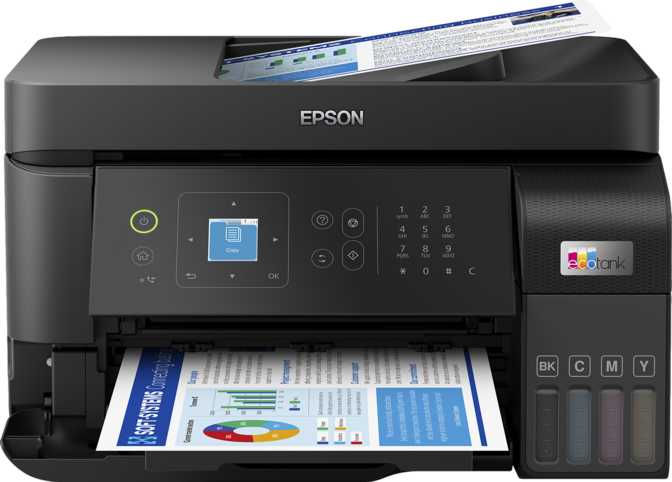
Most people buy a printer the same way they did twenty years ago: accept a low upfront cost, then absorb the quiet financial drain of replacement cartridges for years afterward. The Epson EcoTank ET-4810 is built on a different premise. Its refillable ink tank system replaces disposable cartridges with large, user-topped reservoirs — a structural shift that fundamentally changes what printing costs over time.
But the ET-4810 is more than a cost-saving argument. It is a full all-in-one with print, copy, scan, and fax functions, a connectivity suite that covers virtually every wireless standard a modern home or small office would need, and a print resolution specification that puts it in genuine photo-capable territory. Whether it earns a place on your desk depends entirely on how well its design trade-offs match your actual workflow — and that is what this review settles.
Key Specifications at a Glance
Design and Build: Workhorse Aesthetics, Practical Dimensions
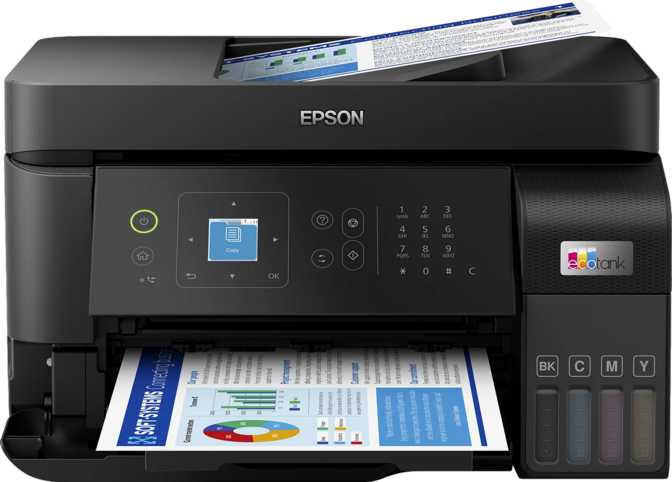
The ET-4810 is compact without being cramped. Its footprint is roughly the width of a large keyboard and about as deep as a standard monitor stand, with a height that keeps it well clear of eye level on a desk. The weight, approaching eight kilograms, gives it the grounded stability a flatbed machine needs when the document feeder is running or a scan lid is being pressed down firmly.
There is nothing aspirational about the physical design. This is a utility device, and its appearance communicates that honestly. The control interface centers on a 1.44-inch display — genuinely small for a machine of this capability. It does not respond to touch; everything is navigated through physical buttons. That is a defensible choice: physical buttons do not accumulate fingerprints, do not require calibration, and hold up better over years of daily use. The trade-off is that cycling through settings on a small menu screen — adjusting copy density, selecting a scan destination, or configuring fax options — involves more button presses than a modern touchscreen interface would require. A page preview feature at least provides visual confirmation before you commit to printing.
The output tray collects up to 100 printed pages before needing to be cleared — practical for batch jobs that you do not want to babysit. The automatic document feeder at the top of the unit accepts stacks of up to 30 pages, handling multi-page scan and copy jobs without manual intervention. That ceiling is adequate for home use and light office tasks; anyone scanning large document batches regularly will need to reload frequently.
Physical Footprint
439 mm wide · 330 mm deep · 157 mm tall — desk-friendly without dominating the workspace
Weight and Stability
Just under 8 kg — solid enough to stay planted during ADF use, light enough to reposition without effort
Control Interface
1.44-inch display with physical buttons and page preview — functional but compact for a 4-in-1 machine
Print Performance: What the Specifications Actually Deliver
Speed and Real-World Output
Black text documents emerge at a rate of roughly one page every four seconds under standard printing conditions. That is brisk enough that you are not standing idle watching pages slowly appear — a full ten-page document is done before you have resettled into your chair. Color printing takes noticeably longer, processing around eight to nine pages per minute. The gap between black and color speeds is expected for inkjet hardware at this tier, but if you regularly print color-dense presentations, reports, or graphics, the difference across a multi-page job becomes tangible.
Duplex printing — printing on both sides of the page automatically — is built in, and the machine handles it at a throughput that does not dramatically lag behind single-sided speeds. For anyone who currently prints one-sided and manually flips pages to produce a double-sided document, this feature eliminates a persistent friction point.
The first page from a standing start takes 15 seconds for black output and 25 seconds for color. These delays are within the normal range for an inkjet waking from standby, but they are worth factoring in if single urgent pages are a frequent use pattern in your day.
| Output Type | Speed | First Page Out |
|---|---|---|
| Black (single-sided) | 15 ppm | 15 seconds |
| Color (single-sided) | 8.5 ppm | 25 seconds |
| Black (duplex) | 15.58 ppm | — |
| Color (duplex) | 8.72 ppm | — |
| Photo | 8.5 ppm | — |
Resolution and Photo Quality
The ET-4810 lays down ink at extreme density — particularly along the page direction — producing the smooth color transitions and fine tonal gradations that separate a genuine photo print from a passable approximation. The horizontal precision handles text and line art with clarity; the vertical density is what matters for photography and graphics, and the specification here is among the stronger numbers in this product category.
Borderless printing is supported, meaning photographs print edge-to-edge without white margins. For anyone printing photos as gifts, framing, or cards, this is essential rather than optional.
The maximum print length extends well beyond the standard page boundary — far enough to produce banner-format output over a meter long. This capability is unusual in a home-class device and genuinely useful for school projects, event materials, or custom displays that most comparable printers cannot produce.
Monthly Volume and Design Intent
The machine is engineered for moderate, consistent use — roughly 25 to 30 pages on a typical working day, or equivalent in less frequent but heavier batches. It is not designed for sustained high-volume output; pushing significantly beyond the intended monthly range would accelerate wear in ways that are expensive and avoidable. If your printing needs regularly exceed several hundred pages per week, this machine operates outside its comfort zone, and a higher-capacity device is a better fit.
The EcoTank Advantage: Changing the Economics of Inkjet Ownership
The name "EcoTank" is not branding for its own sake — it describes the machine's core design departure from conventional inkjet hardware. Where standard inkjet printers use sealed cartridge modules that are discarded and replaced when empty, the ET-4810 uses large integrated ink reservoirs that are refilled from bottles. When a color runs low, you add ink directly; you do not replace a unit.
This changes the long-term cost structure of owning the printer. Ink bottles yield substantially more output per purchase than equivalent-cost cartridges, and while the ET-4810 carries a higher purchase price than entry-level cartridge inkjets, that gap inverts and eventually reverses for users who print regularly. The printer rewards consistency: the more frequently it is used, the faster the initial price difference is recovered, and the greater the ongoing savings compound over time.
Important: The EcoTank Model Only Rewards Regular Use
For households that print sporadically — a few pages here and there with long idle gaps — the higher upfront cost takes considerably longer to justify, and ink sitting in reservoirs for extended periods can thicken or degrade. The EcoTank system is not the right economic choice for a printer that will spend most of its life unused.
Scan and Copy: Capable, With One Notable Gap
Scan Quality and Document Intelligence
The flatbed scanner operates at an optical resolution that captures fine document and photographic detail with accuracy — enough for high-quality archiving, photo digitization, and document processing. The color bit depth is particularly high for a home-class scanner, capturing an exceptionally broad range of tonal and color information when preserving photographs or artwork. Grayscale scanning operates at a depth well above what most business documents require.
Scan-to-PDF is supported natively, requiring no computer software to produce a usable document file. Optical character recognition converts scanned pages into text that is selectable, searchable, and editable — a function that elevates this machine from a copier with a digital output into a document processing tool. Color scan speed through the automatic document feeder runs at 12 pages per minute; grayscale reaches 15 pages per minute.
Scan Capabilities
- 600 × 1200 dpi optical resolution
- 48-bit color depth for photo archiving
- Native scan-to-PDF output
- OCR — text recognition built in
- Auto scan mode and page preview
- Max scan area: 215.9 × 355.6 mm
Key Limitation
The ET-4810 does not scan both sides of a page automatically. The ADF processes one face at a time only.
To digitize a double-sided document, each page must be manually reinserted or the batch reorganized. For occasional use this is an inconvenience. For workflows that routinely process two-sided contracts, forms, or reports, it becomes a meaningful daily friction point.
Copy Functions
Adjustable copy density accommodates originals that have faded over time or cases where higher-contrast output is needed. The scaling range allows documents to be reduced significantly in size — useful for fitting oversized originals onto standard paper. The first copy from a standing start takes 15 seconds for black and 25 seconds for color, consistent with the print warm-up figures.
Connectivity: A Comprehensive Set of Options
The ET-4810 covers every mainstream wireless and wired connection method that a home or small office would realistically use, with two specific exceptions worth knowing upfront.
What Is Included
-
Standard Wi-Fi — full network integration for wireless printing and scanning from any device on the home or office network
-
Wi-Fi Direct — print directly from a phone or laptop without needing a router, practical when a network is unavailable or unstable
-
Ethernet — wired, stable network connection for environments where Wi-Fi congestion or interference is a concern
-
AirPrint and Mopria — direct printing from iPhones, iPads, and Android devices without drivers or apps
-
NFC Tap-to-Print — compatible Android devices initiate a print by touching the printer, with no menu navigation required
-
Amazon Alexa and Google Assistant — basic printer commands through smart speakers or voice interfaces
-
USB Drive — direct printing from a flash drive and document sync without a computer
What Is Missing
-
No Bluetooth — Wi-Fi Direct covers most direct-print scenarios, but Bluetooth-specific workflows are unsupported
-
No Memory Card Slot — SD card standalone photo printing is not available
-
No USB-C Port — the USB port is standard Type-A; users with USB-C-only laptops should confirm they have an adapter before setup
Features That Go Beyond Basic Printing
Power and Noise: The Invisible Daily Costs
Operating at 12 watts while printing, the ET-4810 draws less power than many LED desk lamps. Standby consumption drops to 2.5 watts — barely perceptible on an electricity bill. These figures matter for devices that stay plugged in continuously, and they position this printer favorably against laser alternatives, which typically draw significantly more power during both operation and warm-up.
The operating noise level sits at 44 decibels — roughly equivalent to a quiet office background hum or a gentle rainfall. It is audible in a silent room but not disruptive during a video call or phone conversation. For home office users, this means the printer can run without demanding acknowledgment every time it starts.
Who This Printer Is — and Is Not — Built For
-
Households with consistent, recurring print needs — daily or near-daily users who print homework, forms, invoices, and occasional photos will stay within the comfortable operating range and benefit most from the ink tank economics.
-
Small businesses needing a single all-in-one device — print, copy, scan, fax, ADF, OCR, and full network connectivity covers what most micro-businesses require without multiple appliances.
-
Home photo printing — resolution ceiling and borderless capability make this a genuine photo printer, not just a document machine that tolerates photo jobs.
-
Paperless workflow environments — OCR, scan-to-PDF, and direct network sync create a functional document digitization pipeline.
-
Very low-volume or occasional users — the higher upfront price takes considerably longer to recover, and ink left idle in reservoirs can degrade.
-
High-volume offices — the machine's design intent caps comfortable monthly output well below what a busy office demands. A laser or higher-tier inkjet is better suited.
-
Workflows centered on scanning double-sided documents — no automatic duplex scanning means a real day-to-day limitation for legal, HR, or archive-heavy use cases.
-
Speed-first environments — color output at eight to nine pages per minute is adequate, not fast. Laser alternatives at comparable prices are consistently quicker.
How It Compares to Its Alternatives
The ET-4810 occupies a specific position in the all-in-one printer landscape: above basic cartridge-based home inkjets, below dedicated business laser systems. Here is how it stacks up across the factors that matter most to a buying decision.
| Feature | ET-4810 (EcoTank Inkjet) |
Typical Cartridge Inkjet | Entry Laser MFP |
|---|---|---|---|
| Ink / toner cost per page | Lower over time | Higher (cartridge) | Moderate (toner) |
| Black print speed | Fast for inkjet | Moderate | Faster (20–30 ppm) |
| Color print speed | Moderate | Moderate | Faster, but quality limited |
| Photo output quality | High — fine ink resolution | Moderate to high | Low — laser can't match ink depth |
| Fax function included | Rarely | Sometimes | |
| Duplex scanning | Rare at this tier | More common | |
| Operating power draw | Very low — 12W | Low | Noticeably higher |
| Long-format / banner printing | Rarely | ||
| Upfront purchase price | Higher than budget inkjets | Lower | Similar to higher |
The central competitive tension is against lower-priced cartridge inkjets. The ET-4810 asks for a higher initial outlay and makes a long-term cost argument that only materializes with regular use. Against entry laser printers, it wins on photo quality, power efficiency, and long-format capability; it concedes print speed and, in some configurations, duplex scanning availability.
Honest Assessment: Where It Shines and Where It Falls Short
The ET-4810's strengths are concentrated precisely where its design promises them. The ink tank system, matched to users who print with real consistency, creates a fundamentally different cost relationship with the machine over its usable life — one that becomes more significant with every passing month of regular use. Print resolution and photo capability are genuine rather than aspirational; the combination of fine output density and borderless support makes this a credible photo printer, not just a document machine that tolerates photo jobs.
Connectivity is another clear strength. Covering Wi-Fi, Ethernet, AirPrint, Mopria, Wi-Fi Direct, NFC, Alexa, and Google Assistant means this printer integrates into virtually any home or office environment without compatibility friction. Adding fax with an answering machine at this tier gives small businesses a compliance-ready function without a separate appliance.
The weaknesses deserve equal clarity. The absence of automatic duplex scanning is not a minor footnote — for specific workflows it is a daily constraint. The 1.44-inch non-touch display is functional, but operating a multi-function machine of this capability through a small button-navigated menu panel feels mismatched with what the hardware can actually do. And for users who print sporadically, the entire economic argument inverts: a cheaper cartridge printer serves irregular printing needs without the upfront premium.
Questions Real Buyers Search Before Purchasing
Final Verdict: A Confident Buy for the Right Household
The Epson EcoTank ET-4810 earns its recommendation for households and small offices with steady, recurring print needs. Its ink tank design changes the long-term economics of inkjet ownership in ways that become more significant the more frequently it is used. Print resolution and photo capability are genuine strengths. The connectivity range — covering every relevant wireless standard, voice assistant integration, NFC, and Ethernet — means it fits into almost any environment without friction. Fax, OCR, and network document sync add practical depth that comparable devices at this price point often omit.
It is not a universal recommendation. Low-volume users will not recover the upfront premium before it matters. Speed-demanding environments will be underwhelmed by the color throughput. Anyone whose workflow depends on automatic duplex scanning will encounter a daily inconvenience the specification simply does not solve.
Buy It If You Are
- Printing daily or near-daily
- Tired of budgeting for cartridge replacements
- Wanting photo-quality output at home
- Running a home office or micro-business
Skip It If You Are
- Printing only occasionally
- Needing fast color output above all else
- Regularly scanning double-sided documents
- Running a high-volume office print environment