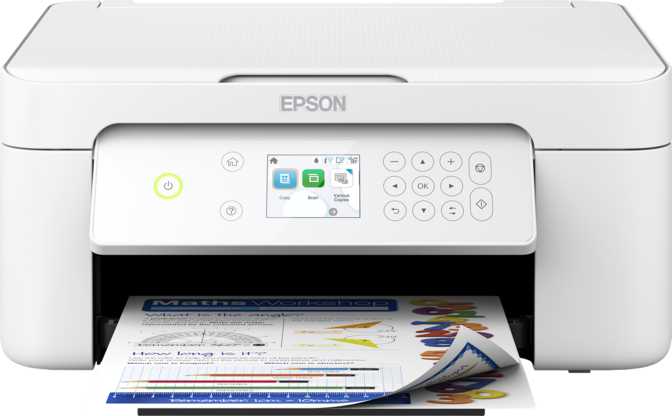
Epson Expression Home XP-4205 Review: More Capable Than It Looks
PrintersA compact, versatile home inkjet that delivers above its price tier on scanning quality and wireless connectivity — while staying honest about its limits for high-volume printing.
Standout Features
Limitations
4.1 / 5
Overall Editor Rating
Best for: light-to-moderate home use and document digitization
What the XP-4205 Is Really Built For
The home all-in-one printer market is flooded with machines that market themselves as everything to everyone, then quietly fail at one or two critical tasks. The Epson Expression Home XP-4205 takes a more grounded position: a compact, capable multifunction inkjet designed for households with moderate printing habits, a mix of devices on the network, and a genuine need to digitize documents — not just print them.
What separates this machine from similarly positioned alternatives isn't one headline feature. It's the accumulation of thoughtful capabilities across print, scan, and connectivity that most competitors at this price tier either omit entirely or treat as an afterthought. Understanding exactly where those capabilities are strong, and where the machine deliberately holds back, is what will tell you whether it deserves a place in your home.
Design, Build, and Physical Experience
A Compact Footprint With a Practical Personality
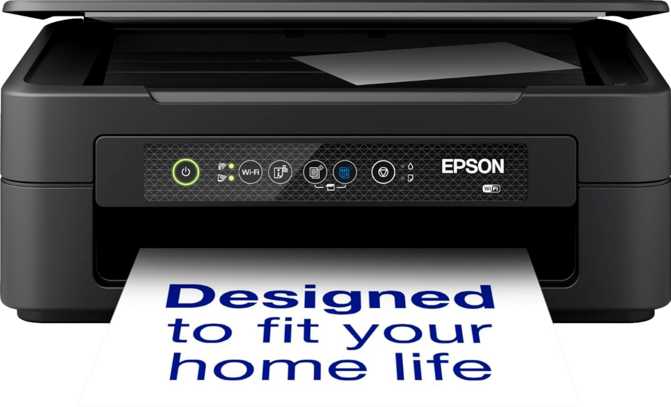
The XP-4205 is genuinely compact for a multifunction machine with a document feeder. Measuring just under 15 centimeters tall and occupying a desk footprint roughly the size of a large laptop in landscape orientation, it fits comfortably on a shelf unit, a side desk, or a countertop. At exactly four kilograms, it's light enough to reposition without effort — useful if you want to tuck it away between sessions.
The physical design is clean and utilitarian. There are no unnecessary curves or premium textures; this machine presents itself honestly as a practical household tool. The 2.4-inch display is a standard panel with physical navigation buttons — not a touchscreen. For most users, the menu structure is simple enough that this is a non-issue. For buyers moving from a printer with a touch interface, the adjustment is minor and short-lived.
The document feeder at the top holds up to 20 sheets, feeding them through automatically for scanning or copying without your involvement. The output area catches up to 100 printed pages before needing to be cleared — a comfortable buffer for home printing sessions.
Operating Noise
50 dB — audible in a small room but won't interrupt a nearby phone call. Comparable to a desktop fan, not a grinding mechanism.
Energy Efficiency
Draws roughly 12W while printing and drops below 1W on standby — significant for a device left plugged in around the clock.
Physical Specs at a Glance
-
Dimensions
442 × 330 × 145 mm (W × D × H)
-
Weight
4.0 kg — light enough to reposition by hand
-
Control Panel
2.4" LCD panel with physical navigation buttons
-
Output Capacity
Holds up to 100 printed sheets
-
Document Feeder
20-sheet ADF for hands-free scanning and copying
-
Warranty
1 year — standard for this product category
Print Performance: Honest Speeds, Strong Output Quality
Black & White
10 ppm
Strong for inkjet category; laser printers at this price can exceed double this rate
Color Documents
5 ppm
Standard for color inkjet processing; most noticeable on long multi-page jobs
Photo Printing
5 ppm
Pace matched by genuinely high output quality with very fine tonal gradations
Auto Duplex
5.8 ppm
Fully automatic — no manual paper flip needed. Color duplex runs at 3.8 ppm
Black and White Documents
For everyday printing — correspondence, forms, assignment submissions, reference pages — the XP-4205 produces black pages at a steady ten pages per minute. That figure needs context: this is an inkjet, not a laser printer, and ten pages per minute is strong for this product category. A laser printer at a comparable price point can often double that rate, but laser printers carry their own trade-offs in upfront cost and warm-up behavior.
The first page from idle takes roughly 18 seconds to emerge — a standard warm-up period for an inkjet that's been sitting dormant. For single-page printing this delay is noticeable; for multi-page jobs, the machine settles into its pace quickly and the wait becomes irrelevant.
Color and Photo Output
Color documents arrive at five pages per minute — half the black-and-white rate. This is typical inkjet behavior under multi-color workloads, and it becomes most noticeable when printing long presentations, detailed charts, or illustrated school assignments. For occasional color output, the pace is entirely acceptable.
Where color output genuinely impresses is quality, not speed. The print engine packs an exceptionally fine level of vertical detail — far beyond what most printed photos require at normal viewing distances — producing smooth tonal gradations, accurate skin tones, and sharp edges in everything from snapshots to greeting cards. Borderless printing is supported, meaning photos and graphics fill the full page edge-to-edge with no margins interrupting the composition. The maximum printable length also extends well beyond a standard A4 page into banner territory, which is an unexpectedly useful feature for party signage, decorations, or custom artwork on long sheets.
Monthly Volume: The Most Important Number to Understand
This printer is calibrated for a recommended monthly output of 300 pages. That's a design constraint, not a marketing caveat. Epson sets this based on printhead longevity and ink system durability under sustained use. For a typical household printing a few dozen pages per week, that limit is rarely approached. For anyone with consistent daily business printing demands, this figure should redirect attention toward a laser multifunction printer before a purchase is made.
First Page Out Times
Volume Ceiling: 300 Pages/Month
The single most important figure for any buyer to internalize before purchasing. Consistently exceeding this figure accelerates wear on the printhead. For a few dozen pages per week, this limit is almost never reached. For regular business-level output, consider laser alternatives.
Extended Print Length
The printable area extends far beyond a standard A4 sheet — into banner-length territory. Party decorations, event signage, or long creative prints are all possible. Most home printers at this price cannot match this capability.
Scanning: Where the XP-4205 Genuinely Overdelivers
Scanning is where many home all-in-ones quietly disappoint. The XP-4205 does not — and this is the category where it most clearly earns its place over alternatives in the same price range.
Flatbed + ADF
Two scanning modes covering every home scenario. The flatbed handles photos, open books, and fragile originals. The 20-sheet ADF feeds stacks of loose pages through automatically — no manual attention needed.
Duplex Scanning
Captures both sides of a two-sided document in a single ADF pass. Uncommon at this price point. Grayscale duplex scanning via ADF reaches 20 pages per minute — fast enough to process a serious document stack efficiently.
High-Fidelity Optics
Optical scan resolution faithfully reproduces fine print detail, including small-print legal text and handwritten notes, with enough precision to support significant enlargement without visible degradation.
48-Bit Color Depth
Captures twice the color information per pixel compared to a standard home scanner. Editing software gains significant latitude to correct exposure, recover shadow detail, and restore faded colors in archived photos.
Scan-to-PDF with OCR
Sends scans directly to searchable PDF format. Optical Character Recognition converts printed text into selectable, editable digital text — scan a contract and search it by keyword in the resulting file.
Direct Network Sync
Scanned files go straight to a designated shared network folder with no PC intermediary. Scan from the printer, retrieve the file from any device on the network — entirely computer-free.
Scanning Speeds at a Glance
| Color Mode | Scan Method | Speed |
|---|---|---|
| Grayscale | Flatbed simplex | 25 ppm |
| Color | Flatbed simplex | 15 ppm |
| Grayscale | Flatbed duplex | 4 ppm |
| Color | Flatbed duplex | 3.2 ppm |
| Color | ADF simplex | 10 ppm |
| Grayscale / Color | ADF duplex | 20 ppm |
Copying: Functional, Controlled, and More Flexible Than It Looks
The copy function gets the basics right. A black copy is ready in roughly 18 seconds from the moment you initiate it — the time the machine needs to scan the original and produce the output. Color copies complete in under 30 seconds for the first page. Neither is blazing fast, but both are entirely acceptable for home use where copying is occasional rather than continuous.
Adjustable copy density gives control over output lightness and darkness, which is particularly valuable when working from faded originals, high-contrast photographs, or documents printed on colored paper where a default density would produce muddy or washed-out results.
The copy reduction capability deserves specific mention: the machine can shrink a copy down to just 25% of the original size. A full A4 page can become a pocket reference card. A printed form can be condensed into a compact archive version. For study flashcards, mini booklets, or annotation-friendly condensed copies of reference materials, this is a more practically useful capability than it initially sounds.
Copy Features
-
First Black Copy
Ready in approximately 18 seconds
-
First Color Copy
Ready in approximately 27 seconds
-
Density Control
Adjustable — useful for faded or high-contrast originals
-
Reduction Range
Down to 25% of original — significant miniaturization capability
-
Multi-Feed Detection
Ultrasonic detection prevents double-feeds from corrupting copy jobs
Connectivity: Unusually Well-Covered for a Home Printer
Connectivity is one of the XP-4205's clearest differentiators. The range of wireless and wired options provided here is broader than most home machines offer at this price tier.
Wi-Fi
Connects to your home network for shared access from any device — phones, tablets, laptops, and PCs simultaneously.
Ethernet
Wired network connection for stable, interference-free printing. Many home printers at this price omit this entirely.
Wi-Fi Direct
Devices print directly to the printer without going through your router. Useful for guests or when the router is temporarily unavailable.
NFC Tap-to-Print
Compatible smartphones initiate printing by tapping the printer's NFC contact point. No app navigation required in the moment.
AirPrint + Mopria
iPhone, iPad, and Mac users print natively via AirPrint. Android devices print natively via Mopria. No drivers required for either.
Alexa + Google Assistant
Voice control for both major smart home ecosystems. Print or check printer status hands-free — useful for multi-tasking or accessibility.
Storage and Wired Access
A USB port handles direct computer connections for those who prefer a wired link. An external memory slot allows printing from a USB drive and saving scanned documents to one — enabling a completely computer-free workflow where needed.
Combined with the direct network sync for scanned documents, this machine can archive a stack of pages into a shared folder without a computer involved at any stage of the process.
What's Not Included
-
No Bluetooth
Wireless printing works through Wi-Fi and Wi-Fi Direct instead, covering the practical use cases.
-
No USB-C Port
Wired connection uses USB-A. Users on all-USB-C setups will need an adapter for a direct cable connection.
-
No Fax Hardware
Functions are print, copy, and scan only. Fax-dependent workflows require a different machine.
Who Should Buy This Printer — and Who Shouldn't
The XP-4205 Works Best For
-
Families with Mixed Devices
AirPrint, Mopria, NFC, Wi-Fi Direct, Alexa, and Google Assistant cover virtually every device in a household without configuration headaches.
-
Students
Print assignments, scan handouts to searchable PDFs, copy reference materials. OCR scanning is especially valuable for converting printed notes into editable digital text.
-
Remote and Hybrid Workers
Print contracts, scan signed paperwork, manage document workflows at home. The ADF duplex scanning and network sync handle the digitization needs that remote work routinely generates.
-
Photo Hobbyists at Home
Borderless printing and high output resolution make casual photo printing genuinely satisfying rather than disappointing.
Who Should Look Elsewhere
-
High-Volume Printing Environments
Several hundred pages per week will stress this machine beyond its design parameters. A laser multifunction printer handles sustained volume more economically and durably.
-
Fax-Dependent Workflows
There is no fax capability. Legal offices, healthcare providers, and some government workflows still require fax — the XP-4205 cannot serve those needs.
-
Buyers Focused on Long-Term Ink Economy
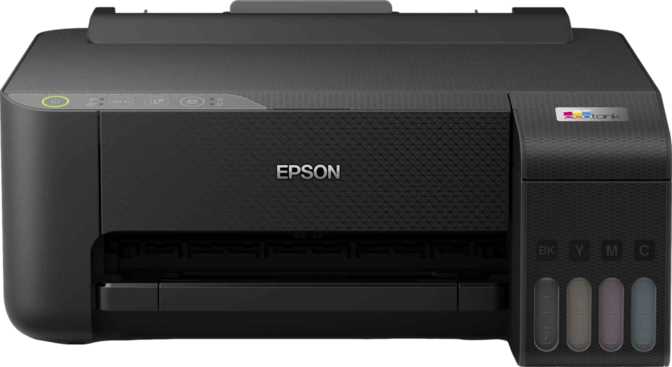
Individual cartridges carry a higher cost per page than ink-tank alternatives or laser toner. For moderate-to-heavy use, the EcoTank line or a laser multifunction deserves direct comparison.
-
Bluetooth-Dependent Workflows
Wireless printing works through Wi-Fi and Wi-Fi Direct — not Bluetooth. For setups that rely on Bluetooth device pairing, this is a hard miss.
Competitive Context: How It Stacks Up
In the home all-in-one inkjet space, the XP-4205 competes against machines from Canon, HP, and Brother at similar price points. This table reflects what's typical at this tier — not every competitor includes every listed feature, but the XP-4205's position is clear.
| Feature | Epson XP-4205 | Typical Competitors |
|---|---|---|
| Automatic Document Feeder | Often absent at this price | |
| Automatic Duplex Print | Varies — some require manual flip | |
| Duplex Scanning via ADF | Uncommon at this price point | |
| NFC Tap-to-Print | Uncommon | |
| Ethernet Port | Frequently omitted | |
| Alexa + Google Assistant | Sometimes one, sometimes neither | |
| Scan Color Bit Depth | 48-bit | Typically 24-bit at this tier |
| Optical Scan Resolution | 1200 x 2400 dpi | Often 600 x 1200 dpi |
| OCR Built-In | Varies | |
| Direct Scan-to-Network | Often requires PC | |
| Bluetooth | Some include it | |
| Fax | Some include it | |
| USB-C Port | Rare at this tier | |
| Ink Running Costs | Cartridge (higher per page) | Varies — EcoTank/laser lower |
Key Takeaway on Competition
The XP-4205's scanning specification — color bit depth, optical resolution, and ADF duplex capability — stands out most clearly when compared side-by-side. Where it concedes ground is ink running costs; Epson's own EcoTank range or a comparable laser printer delivers a substantially lower cost-per-page for frequent printers.
Honest Assessment
Genuine Strengths
The scanning package is the XP-4205's most defensible selling point, and it genuinely holds up under scrutiny. The combination of ADF, duplex scanning, extended color bit depth, OCR, scan-to-PDF, and direct network sync creates a document digitization capability that sits meaningfully above what similarly priced alternatives typically provide. For households where scanning is a regular activity — digitizing contracts, archiving family photos, converting printed coursework into searchable files — this scanner is the most compelling reason to choose this machine.
Connectivity breadth is the second genuine strength. The simultaneous presence of Wi-Fi, Ethernet, Wi-Fi Direct, NFC, AirPrint, Mopria, Alexa, and Google Assistant is unusual for a home printer. Most machines at this price sacrifice at least two or three of these; the XP-4205 makes none of those concessions, making it genuinely universal across a mixed-device household.
Photo print quality is another area where the machine earns its keep. The output resolution and borderless printing capability combine to produce home prints that look noticeably better than what budget inkjets achieve — particularly in tonal gradations and edge sharpness where the difference becomes visible when prints are compared side-by-side.
Real Limitations
Color printing speed is slow, and there's no way around it. A batch of ten color pages takes around two minutes to complete. For occasional color output, this is a minor inconvenience. For anyone who regularly prints multi-page color documents, it becomes a sustained friction point that erodes the day-to-day experience of using the machine.
The 300-page monthly volume ceiling is the single most important figure for buyers to understand before purchasing. It is a design constraint with real consequences for longevity — not a suggestion that can be safely ignored. This machine was engineered for light-to-moderate home use, and its economics and durability reflect that engineering decision.
The 2.4-inch non-touch display feels dated against competitors who now offer larger or touch-capable panels in the same price bracket. The navigation is simple enough that this is not a daily frustration, but it's the most visually underwhelming aspect of an otherwise well-specified machine.
The one-year warranty is category-standard, but worth noting against alternatives that now extend to two or three years — a consideration that matters when evaluating total cost of ownership over a longer horizon.
Questions Real Buyers Ask Before Purchasing
Final Verdict
Overall Rating
The Epson Expression Home XP-4205 earns a clear recommendation for households that fit its intended profile — and an equally clear caution for those that don't.
If your home prints at a modest pace, contains multiple different devices that all need to connect to a single printer without friction, and values the ability to scan and digitize documents well rather than merely adequately, the XP-4205 makes a compelling case for itself. The scanning capability alone — OCR, duplex ADF scanning, extended color depth, network sync, scan-to-PDF — delivers a document digitization experience that most comparably priced machines cannot match. The connectivity breadth, photo print quality, automatic duplex printing, and energy efficiency round out a feature set that is more comprehensive than the price suggests.
The trade-offs are real: slow color printing speeds, a modest monthly volume ceiling, no fax, no Bluetooth, no USB-C, and running costs that favor light use. None of these are hidden flaws — they are predictable characteristics of a machine designed specifically for home rather than office deployment. If those trade-offs sit within your usage reality, the XP-4205 is a well-considered, capable home multifunction printer that will serve a typical household reliably. If your printing volume is high, your ink cost sensitivity is strong, or fax capability is a hard requirement, look elsewhere — but be specific about why, because on the dimensions that matter most to the home user this machine was built for, it delivers more than the price implies.
Buy if you...
- Print under 300 pages monthly
- Need to scan and digitize documents regularly
- Have a mixed-device household
- Want photo printing without a dedicated photo printer
Skip if you...
- Print hundreds of pages per week
- Require fax functionality
- Are prioritising lowest ink cost per page
- Need fast color output regularly