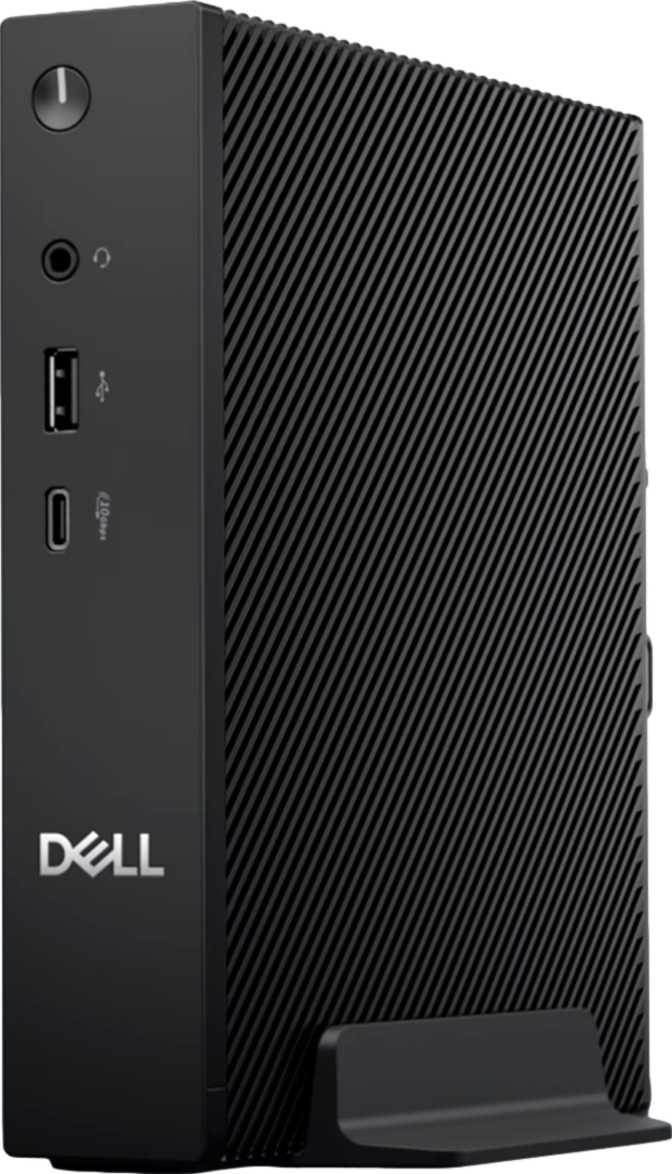
Dell Q9M1260 Review: A Compact Productivity Desktop Done Right
Mini PCsThe Dell Q9M1260 occupies a specific and increasingly crowded corner of the computing market: the compact desktop, designed to sit on a desk, mount behind a monitor, or tuck out of sight entirely while handling everyday computing without a tower-sized footprint. With dimensions roughly comparable to a thick hardcover book and a total internal volume of barely over a liter, this is a machine built around the premise that most people do not need a full-sized PC to accomplish most things.
That premise is either exactly right for you or completely wrong — and this review examines the Q9M1260 closely enough that you will know which side of that line you fall on before you finish reading.
Wireless Standard
Wi-Fi 7
Display Outputs
3 Screens
Storage
1TB NVMe
Quick Specifications
- Form Factor
- Micro-ATX Mini PC
- Processor
- 8-Core, 7W TDP
- Memory
- 16GB DDR5 5600
- Storage
- 1TB NVMe SSD
- Display Outputs
- 3× DisplayPort
- Wireless
- Wi-Fi 7
- Dimensions
- 178 × 182 × 36 mm
Review Score
3.8out of 5.0
Recommended for Office UseScore Breakdown
Design and Build: A Machine That Disappears Into Its Environment
At 178mm tall, 182mm wide, and just 36mm thick, the Q9M1260 has a physical presence closer to a tablet laid flat than a traditional desktop. Dell has consistently used this form factor to target office environments and clean desk setups, and the Q9M1260 fits that pattern — it is a device built to be placed, forgotten, and simply used.
The chassis follows Dell's utilitarian design language: no RGB lighting, no aggressive venting grilles, no enthusiast-market styling. The build reads as purposeful rather than flashy. For a home office, a school lab, or a corporate deployment, that restraint is a feature. For anyone hoping for a statement piece on their desk, look elsewhere.
The port layout rewards closer inspection. Three USB-A connections handle legacy peripherals with no adapters required — one of which delivers high-speed transfer rates suited to external drives. Two USB-C ports at the same fast-data tier add modern device compatibility, useful for newer monitors, docking stations, or current-generation peripherals. A dedicated Ethernet port and a 3.5mm audio jack round out what Dell has prioritised here: wired reliability and universal compatibility over cutting-edge exclusivity.
Physical Footprint
178mm
Height
182mm
Width
36mm
Depth
Display Adapter Note: All three video outputs are DisplayPort only — there is no HDMI port. Connecting to HDMI-only monitors or televisions requires an active DisplayPort-to-HDMI adapter. Passive cables will not function in most cases.
Performance: What a 7-Watt Processor Actually Means Day to Day
The processor inside the Q9M1260 is a low-power, efficiency-focused chip originally developed for portable computing — which is why Dell classifies it as a laptop-class CPU. At a thermal ceiling of just 7 watts, it consumes roughly the same power as a standard LED lightbulb. That figure defines everything this machine is and is not.
Where This CPU Thrives
For the work most people actually do on a computer — web browsing across multiple tabs, email, video calls, document editing, spreadsheets, light photo work in browser-based tools, and media streaming — the Q9M1260 handles the load without complaint. Eight processing cores allow it to juggle multiple open applications without the stutter that plagues true entry-level systems.
Each core can accelerate to nearly 4GHz when a task demands it, then throttle back when demand drops. This dynamic range means responsive single-task snappiness alongside reasonable multi-app workload handling for standard office use.
Where Performance Hits Its Ceiling
Video encoding, 3D rendering, data science pipelines, software compilation, and sustained CPU-intensive workloads expose the thermal budget limitations. The processor physically cannot sustain the heat output that demanding work generates, so it will throttle under prolonged heavy load.
The processor does not use simultaneous multithreading — a deliberate efficiency trade-off that means it performs better for sequential tasks than for heavily parallelised workloads.
This is a fundamental characteristic of the efficiency-first architecture, not a manufacturing defect.
PassMark Benchmark Results
7,484
Multi-Core Score
PassMark CPU Mark
1,981
Single-Core Score
PassMark CPU Mark (Single)
7,758
Overclocked Score
PassMark CPU Mark (OC)
The multi-core result places the Q9M1260 above true entry-level systems and competitive with recent mainstream laptop processors. The minimal gap between the base and overclocked scores confirms a locked, thermally conservative architecture — there is very little performance headroom beyond its standard operating state.
Memory and Storage: Well-Specified Where It Counts
16GB DDR5 — Ahead of Its Tier
The Q9M1260 ships with DDR5 memory running at 5,600MHz — a specification more commonly associated with premium laptops and mid-range desktops than compact mini PCs in this segment. DDR5 at this speed offers significantly higher peak bandwidth than the DDR4 systems it competes against, which benefits the integrated graphics and any workload that moves large volumes of data through RAM.
The caveat is architectural: the memory runs in a single-channel configuration, which halves the effective bandwidth compared to what a dual-channel arrangement would deliver with the same DDR5 specification. For everyday use, this is rarely perceptible. For integrated graphics performance — which relies heavily on memory bandwidth — it represents a tangible ceiling.
No upgrade path. The maximum supported memory is fixed at 16GB with no expansion slot. What ships is what you have for the machine's entire lifetime.
1TB NVMe SSD — A Generous Allocation
The 1TB NVMe SSD reads and writes data far more quickly than any traditional spinning hard drive. The NVMe interface uses a direct PCIe connection to the processor, delivering the responsiveness that makes the entire operating experience feel faster — from boot time to application launches to large file operations.
One terabyte comfortably accommodates the operating system, a full suite of applications, years of documents and emails, and a reasonable archive of photos or downloaded media without requiring constant storage management. For a business or productivity machine, this is the right allocation — and meaningfully ahead of the 128–256GB eMMC options common at comparable price points.
Integrated Graphics: Three Monitors From a Compact-Class Chip
The Intel Graphics solution built into the Q9M1260 is an integrated GPU — it shares system resources rather than operating from dedicated video memory. Despite this, it supports up to three simultaneous displays via the three DisplayPort outputs, an unusually capable multi-monitor configuration for this form factor and price tier.
Full support for DirectX 12 Ultimate means modern Windows graphics APIs work completely — including hardware-accelerated video decoding for streaming platforms, which keeps the processor free for other tasks during playback. Compatibility with OpenGL 4.6 and OpenCL 3.0 covers professional productivity software and developer tools that leverage GPU acceleration for compute tasks.
The three-display output is genuinely useful for productivity. Traders, developers working across multiple windows, analysts managing dashboards, and anyone who has experienced the productivity gain of an extended desktop will find this feature valuable at a price point where multi-monitor support is not always a given.
Gaming Note: Casual 2D games and older titles at low resolutions are achievable. Any modern 3D game at standard settings is outside this machine's scope. The Q9M1260 was never positioned as a gaming device, and the integrated GPU reflects that clearly.
Graphics At a Glance
- Simultaneous Displays 3 screens
- DirectX Support 12 Ultimate
- OpenGL Version 4.6
- OpenCL Version 3.0
- Process Node 10nm
- Execution Units 32 EUs
Connectivity: Wi-Fi 7 Is the Standout Specification
The wireless connectivity in the Q9M1260 is notable for the category. Wi-Fi 7 (802.11be) support means this machine is equipped with the most current wireless standard available, offering higher theoretical speeds and lower latency than Wi-Fi 6E — which was itself only recently considered cutting-edge. For a compact desktop that will likely remain in service for several years, launching with Wi-Fi 7 provides meaningful future-proofing as router infrastructure continues to catch up.
Backward compatibility covers Wi-Fi 6E, Wi-Fi 6, Wi-Fi 5, and Wi-Fi 4, so the Q9M1260 connects reliably to any existing network infrastructure without requiring router upgrades to function normally.
The wired Ethernet port provides a stable, low-latency alternative for users who prefer a cabled connection — important for business environments, video call reliability, or working in dense wireless environments where interference is a factor. Bluetooth is also included for wireless peripherals such as keyboards, mice, and headsets.
Supported Wi-Fi Standards
-
Wi-Fi 7
802.11be Current Gen
- Wi-Fi 6E 802.11ax (6GHz)
- Wi-Fi 6 802.11ax
- Wi-Fi 5 802.11ac
- Wi-Fi 4 802.11n
Port Summary
| Port Type | Count | Best Used For |
|---|---|---|
| USB-A — Standard Speed (USB 2.0) | 3 | Keyboards, mice, webcams, USB drives, legacy peripherals |
| USB-A — High Speed (10Gbps) | 1 | External SSDs, fast peripherals, high-speed data transfers |
| USB-C — High Speed (10Gbps) | 2 | Modern monitors, docking stations, current-generation peripherals |
| DisplayPort Outputs | 3 | Multi-monitor setups — requires DP monitors or active adapters for HDMI |
| Ethernet (RJ45) | 1 | Wired network for stability, video calls, low-latency work |
| 3.5mm Audio Jack | 1 | Headphones, powered speakers, combined headsets |
Real-World Usage: Who This Machine Is — and Is Not — For
The Q9M1260 is a purpose-built device with a clear profile. Knowing whether you fall inside or outside that profile will determine whether this machine serves you well for years or frustrates you from the first month.
Well-Suited For
-
Office and productivity users
Standard business software — Microsoft 365, browsers, communication tools, PDF work, and light data entry — runs without complaint. The low power draw also reduces energy costs over time compared to a full-sized desktop.
-
Multi-monitor productivity setups
Three DisplayPort outputs at this form factor is genuinely unusual. Traders, developers, and analysts managing multiple windows get a capability that typically costs a premium to achieve at this physical size.
-
Space-constrained environments
Reception desks, media rooms, school labs, and secondary home office machines all benefit directly from the slim physical profile — less than 1.2 liters of total volume.
-
Silent or near-silent setups
The low thermal envelope allows for very quiet cooling. For a home office, a recording-adjacent room, or any noise-sensitive environment, the operating sound level is appropriate.
Not a Good Fit For
-
Creative professionals
Video editing, audio production, and illustration will encounter consistent throttling under sustained loads. The architecture is not designed for that kind of prolonged heavy output.
-
Gamers at any meaningful level
The integrated GPU is insufficient for modern 3D games at standard settings. Beyond casual browser-based or very old titles at low resolution, look for a dedicated gaming machine instead.
-
Users who anticipate needing more RAM
16GB is the permanent ceiling. Virtual machines, large datasets, and memory-intensive development environments will hit this wall with no upgrade path available — ever.
-
HDMI-primary monitor users
Every display output is DisplayPort. Connecting to HDMI-only monitors or TVs requires active adapters — a cost and compatibility factor worth factoring in before purchasing.
How the Q9M1260 Compares to Logical Alternatives
| Feature | Dell Q9M1260 | Typical Intel NUC-Class Mini PCs | Entry Thin Client Boxes |
|---|---|---|---|
| Display Outputs | 3× DisplayPort | Usually 1–2 | Often 1–2, lower spec |
| Wi-Fi Generation | Wi-Fi 7 | Often Wi-Fi 6 or 6E | Often Wi-Fi 5 or 6 |
| Memory Standard | DDR5 5600MHz | Varies (DDR4 common) | Usually DDR4 |
| Storage | 1TB NVMe | Varies by configuration | Often 128–256GB eMMC |
| CPU Thermal Budget | 7W | 15–28W typical | 6–10W |
| Multi-Monitor Support | Strong | Moderate | Limited |
The Q9M1260's differentiation is clear: its connectivity specification — particularly Wi-Fi 7 and three display outputs — is ahead of most direct competitors at the same physical size. Its trade-off is the conservative CPU power budget, which sits at the lower end even among compact desktops.
Honest Assessment: Strengths and Weaknesses
What the Q9M1260 Gets Right
The Q9M1260 makes a genuine case for itself through the quality of its peripheral infrastructure. Wi-Fi 7 in a compact desktop is ahead of the curve — most competing devices in this size class still ship with Wi-Fi 6 or 6E, meaning the Q9M1260 arrives already future-proofed for router infrastructure that the rest of the market is still catching up to.
DDR5 memory at high speeds demonstrates that Dell has not cut corners on the components that age best. Memory standard and speed directly affect how useful a machine feels three or four years into ownership — higher-bandwidth components stay relevant longer. Three display outputs at this form factor is a practical differentiator that most competitors in the compact desktop category simply cannot match at a comparable price.
The 1TB NVMe SSD is a generous allocation for a machine of this type. Users who have previously managed 256GB or 512GB entry-level systems will notice the headroom immediately, and the storage configuration requires no compromises for standard office use.
Where It Falls Short
The 7-watt CPU is efficient and quiet, but it is also the component most likely to feel limiting if computing needs evolve. Users who start with basic productivity use and gradually expand into heavier workflows may find the Q9M1260 has no room to grow with them — the thermal ceiling is fixed by design.
The memory ceiling is permanent. There is no path to 32GB, which rules out a meaningful portion of the developer, virtual machine, and advanced user market entirely. Single-channel memory, while adequate for daily use, also leaves bandwidth on the table — particularly relevant for the integrated GPU's performance ceiling.
The absence of HDMI will catch buyers off guard who do not study the specification carefully before purchasing. The lack of Thunderbolt 4 also means the high-bandwidth docking station ecosystem favoured by mobile professionals is not accessible here — worth factoring in if a docking station is part of your planned setup.
Questions Real Buyers Ask
These are the questions that come up consistently before people purchase a compact desktop. If you are reading this before deciding, your question is likely answered here.
Final Verdict
A Capable, Well-Connected Compact Desktop
out of 5.0
The Dell Q9M1260 makes a genuine case for itself as a compact productivity desktop. Wi-Fi 7 connectivity, DDR5 memory, three DisplayPort outputs, and a 1TB NVMe SSD are specifications that hold their value over a longer ownership horizon than budget systems typically allow — and they are all present here in a chassis smaller than most people's lunch boxes.
Purchase this if you need a compact, reliable productivity machine for multi-monitor office or home office use, and you will not need to push it past those boundaries. Do not purchase it expecting gaming capability, upgradability, or sustained performance under creative or computational workloads. Within its intended purpose, the Q9M1260 is a thoughtfully connected machine that gets the important things right.