DALI Sonik 3 Review: A Bookshelf Speaker That Punches Above Its Size
Home Audio SpeakersQuick Specifications Overview
Speaker Type
Passive 2-Way
Woofer
7-inch Driver
Bass Floor
47 Hz
Peak Power
150 W
Impedance
6 Ohm
Warranty
5 Years
Expert Verdict: A technically accomplished passive bookshelf speaker whose driver dimensions and build quality surpass most competitors at this size and price tier.
Design and Build Quality
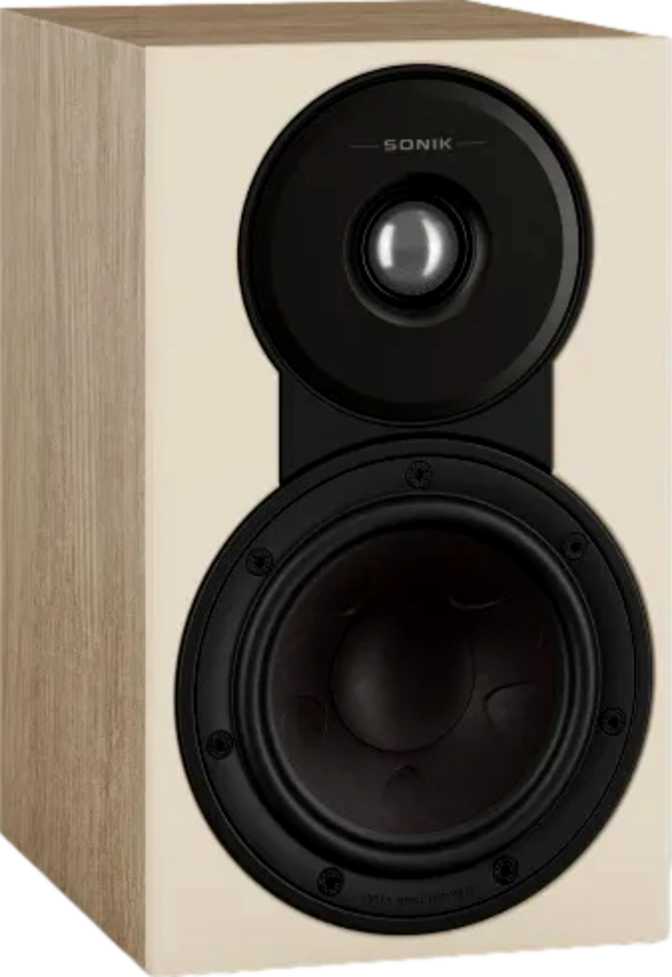
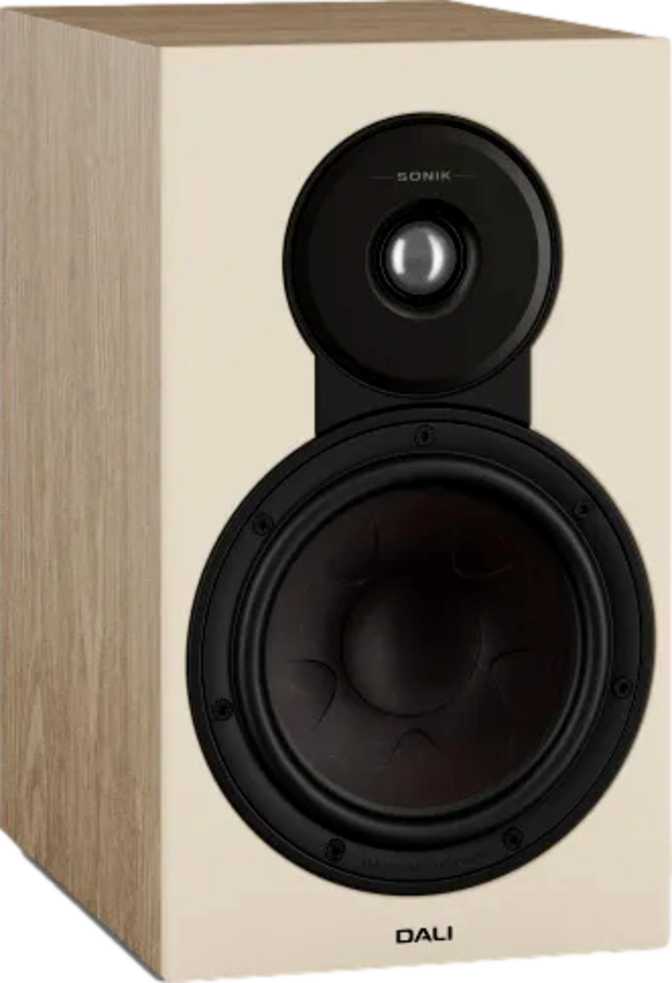
At 200mm wide, 350mm tall, and just over 300mm deep, the Sonik 3 fits the classic bookshelf form factor without demanding shelf space you cannot spare. Each cabinet weighs 6.5 kg — substantial enough to feel engineered rather than hollow, but light enough to reposition without effort. Pick one up and the density is immediately noticeable; this does not feel like a budget product.
The enclosure uses a bass-reflex (ported) design — a deliberate engineering decision that allows the cabinet to extend low-frequency output beyond what a sealed box of equivalent size could achieve. When positioning these speakers, leaving some distance from the rear wall, ideally 20 to 30 centimetres, gives the port room to breathe and keeps bass clean rather than boomy.
Wall mounting is supported, giving the Sonik 3 genuine placement flexibility. Whether set on dedicated speaker stands, on a bookshelf, or mounted flush against a wall, these speakers adapt to your room rather than dictating to it — a practical advantage that matters far more in real living spaces than it ever does on a specification sheet.
Physical Dimensions at a Glance
- Width
- 200 mm
- Height
- 350 mm
- Depth
- 306 mm
- Weight (each)
- 6.5 kg
- Enclosure
- Ported
- Wall Mountable
- Yes
- Warranty
- 5 Years
Driver Configuration: Why the 2-Way Layout Matters
The Sonik 3 uses two drivers working in concert — a tweeter for high frequencies and a woofer for everything below. Understanding each driver explains why this speaker performs well above its size class.
Tweeter — 1.14-inch Soft Dome
The tweeter is slightly larger than the 1-inch dome found in most competing speakers. That extra surface area allows it to move more air at high frequencies with less excursion, which typically translates to lower distortion when the volume climbs — an audible benefit during loud or complex musical passages.
It takes over from the woofer at 2.3 kHz — a relatively low crossover point that puts more of the vocal range in the tweeter's hands. When executed well, this adds presence and air to voices and acoustic instruments that higher crossover points tend to miss.
- Larger than standard — lower distortion at high volumes
- Low crossover point preserves vocal naturalness
- Extends to 26,000 Hz — beyond the threshold of human hearing
Woofer — 7-inch Main Driver
A 7-inch woofer is genuinely uncommon for a bookshelf speaker. Most speakers in this class use 5.25-inch or 6.5-inch drivers to maintain a slimmer profile. DALI chose acoustic performance over aesthetics — a larger cone moves more air per cycle, supporting deeper and more controlled bass without requiring the amplifier to strain.
Combined with the ported enclosure, this woofer reaches down to 47 Hz — covering bass guitar fundamentals, the lower registers of a piano, and the bass content of virtually all mainstream music genres.
- Larger than most bookshelf competitors — genuine bass authority
- Tuned to extend down to 47 Hz with the ported cabinet
- Handles all frequencies up to the 2.3 kHz crossover point
Frequency Range: What 47 Hz to 26 kHz Means in Practice
Numbers on a spec sheet mean little without context. Here is what the Sonik 3's frequency range translates to in a real listening environment.
Frequency Coverage — Logarithmic Scale (20 Hz to 30 kHz)
The Low End: 47 Hz
A standard bass guitar open E string resonates at around 41 Hz — the Sonik 3 comes close without quite reaching the absolute lowest octave. For jazz, classical, rock, and acoustic music, 47 Hz delivers complete and satisfying bass reproduction. Only listeners with a specific appetite for electronic sub-bass or cinematic soundtracks will feel the absence, and a subwoofer partnership resolves this for those applications.
The High End: 26,000 Hz
Extending above the 20 kHz threshold of human hearing is not about perceiving extra frequencies directly. It ensures the highest audible frequencies are reproduced cleanly, without the phase errors or early rolloff that would make cymbals sound dulled or string harmonics disappear. Listeners streaming high-resolution audio or using lossless files benefit most from this extended ceiling.
Amplifier Compatibility: Matching the Sonik 3 to Your System
The Sonik 3 is a passive speaker — it requires an external amplifier to function. Understanding its electrical characteristics ensures you pair it with a compatible and capable source of power.
6-Ohm Impedance
The Sonik 3 sits between the two most common standards — 8 ohms, which is very easy to drive, and 4 ohms, which is demanding on amplifiers. Any receiver or integrated amplifier rated for 6-ohm or 4-ohm loads handles these speakers comfortably, which covers most mid-range and above products on the market.
150 W Peak Power
The 150-watt peak ceiling is generous — and it does not mean you need a 150-watt amplifier. During normal listening in a typical room, most speakers draw between 1 and 10 watts on average. The high ceiling exists as a safety margin and indicates quality internal crossover components and driver construction.
Real-World Usage: Who Is This For?
The Sonik 3 is engineered for specific use cases — and equally unsuited to others. Matching a speaker to your actual listening habits matters as much as matching it to your budget.
Stereo Music Listeners
This is the Sonik 3's primary calling. Paired with a stereo integrated amplifier and a quality source — streaming DAC, turntable, or CD player — these speakers deliver a two-channel experience with genuine bass weight and physical presence that smaller drivers simply cannot replicate. Jazz, classical, rock, and acoustic music all benefit from the 7-inch woofer's midrange authority.
Secondary Home Theatre
As front left and right speakers in a smaller home theatre setup — a bedroom, home office, or study — the Sonik 3 performs well. Power handling and bass extension cover film dialogue and moderate action sequences effectively. For a dedicated cinema room, adding a subwoofer fills in the low frequencies these speakers do not cover below 47 Hz.
Stereo System Upgraders
Moving from a soundbar, powered desktop speakers, or a small passive setup, the Sonik 3 represents a significant step up. The jump in driver size and cabinet engineering is not incremental — it is a category shift in what a bookshelf speaker can deliver. The difference is audible from the first listening session.
Not the Right Choice If...
You want wireless or Bluetooth connectivity without a receiver — the Sonik 3 is purely passive and always requires an external amplifier to function.
You need reference-level sub-bass for a serious home cinema — a subwoofer is essential to cover what these speakers do not reach below 47 Hz.
You plan desktop near-field listening — the 7-inch woofer and ported enclosure are optimised for a greater listening distance than a typical desk setup allows.
Your shelving is less than 32 cm deep — the cabinet depth demands real shelf space or dedicated speaker stands for both safety and sound quality.
How It Compares: Competitive Positioning
The specifications that distinguish the Sonik 3 from typical bookshelf competitors are not cosmetic — each has a direct acoustic consequence.
| Feature | DALI Sonik 3 | Typical Competitor | Advantage |
|---|---|---|---|
| Woofer Size | 7 inch | 5.25 – 6.5 inch | Sonik 3 |
| Tweeter Size | 1.14 inch | 1 inch | Sonik 3 |
| Low-Frequency Extension | 47 Hz | 50 – 60 Hz | Sonik 3 |
| High-Frequency Ceiling | 26,000 Hz | 20,000 – 22,000 Hz | Sonik 3 |
| Peak Power Handling | 150 W | 80 – 120 W | Sonik 3 |
| Warranty Period | 5 Years | 2 Years | Sonik 3 |
| Enclosure Type | Ported (Bass Reflex) | Ported or Sealed | Comparable |
| Passive / Active | Passive | Varies | Context-dependent |
Honest Assessment: Strengths and Limitations
Where the Sonik 3 Excels
-
Uncommon Driver Dimensions
A 7-inch woofer in a genuine bookshelf cabinet is rare. It delivers bass weight and midrange authority that smaller drivers simply cannot produce — not because of tuning differences, but because of physics. More cone area moves more air, full stop.
-
Extended Treble for High-Resolution Sources
The 26 kHz ceiling ensures the highest audible frequencies are reproduced without distortion or premature rolloff. Listeners using lossless files or high-resolution streaming services will hear the difference over speakers with a harder frequency cutoff at 20 kHz.
-
Five-Year Warranty
An industry-leading warranty period signals genuine confidence in component longevity and substantially reduces the financial risk for buyers who want to spend once on a long-term solution.
-
Flexible Placement Options
Support for wall mounting alongside conventional stand or shelf placement gives the Sonik 3 genuine versatility across different room layouts — an advantage that rarely appears in specifications but matters daily in a real home.
Limitations to Know Before Buying
-
Requires a Separate Amplifier
As a passive speaker, the Sonik 3 cannot function without an external amplifier. Buyers starting from scratch must budget for this additional component, which changes the total cost of ownership when comparing against powered alternatives.
-
Bass Floor Is Not Sub-Bass
At 47 Hz, the Sonik 3 is respectable but does not reach the lowest registers of electronic music or cinematic soundtracks. For those applications, a subwoofer is a natural and necessary addition to the system.
-
Cabinet Depth Requires Proper Placement
At over 300mm deep, the Sonik 3 needs a shelf with real depth or dedicated speaker stands. Casual placement on a thin or shallow surface is neither physically safe nor acoustically optimal for the ported enclosure.
-
Amplifier Impedance Must Be Verified
The 6-ohm impedance is not a problem for most amplifiers, but it requires a quick specification check if your receiver is entry-level. A unit that specifies 8-ohm loads only will not perform optimally with these speakers.
Frequently Asked Questions
The questions real buyers search for before purchasing the DALI Sonik 3 — answered directly and without marketing language.
Final Verdict
Our Recommendation on the DALI Sonik 3
The DALI Sonik 3 makes a convincing case for itself without requiring generous interpretation. The driver dimensions and cabinet engineering put it ahead of most bookshelf competitors on the specifications that translate most directly to listening performance — bass reach, power handling, and treble extension.
It is not for the buyer who wants plug-and-play simplicity, and it is not a subwoofer substitute. But for anyone assembling or upgrading a proper stereo system — someone who already owns or plans to buy a capable amplifier — the Sonik 3 delivers a listening experience that genuinely exceeds what its compact dimensions imply.
The five-year warranty gives buyers a long runway of confidence, and the driver size advantage over most competing speakers at this form factor is real — not a marketing claim. DALI's engineering reputation is built on exactly this type of product: speakers that do more with less, without fanfare.