JBL Endurance Run 3 Review: A Wired Sport Earphone That Earns Its Place
HeadphonesMost workout earphones force a choice between reliable weather protection and an affordable price. The JBL Endurance Run 3 refuses that trade-off — delivering genuine IP65 durability and a sub-17-gram frame at a price that undercuts most true wireless alternatives. It is a focused, no-nonsense tool for athletes who want consistent performance without battery anxiety or connection drama.
Editorial Quick Score
-
Durability / IP Rating
-
Comfort & Fit
-
Sound for Sport
-
Microphone Quality
-
Value for Price
Design and Build: Lightweight, Locked In, and Ready to Get Wet
Physical build, fit, and weather protection
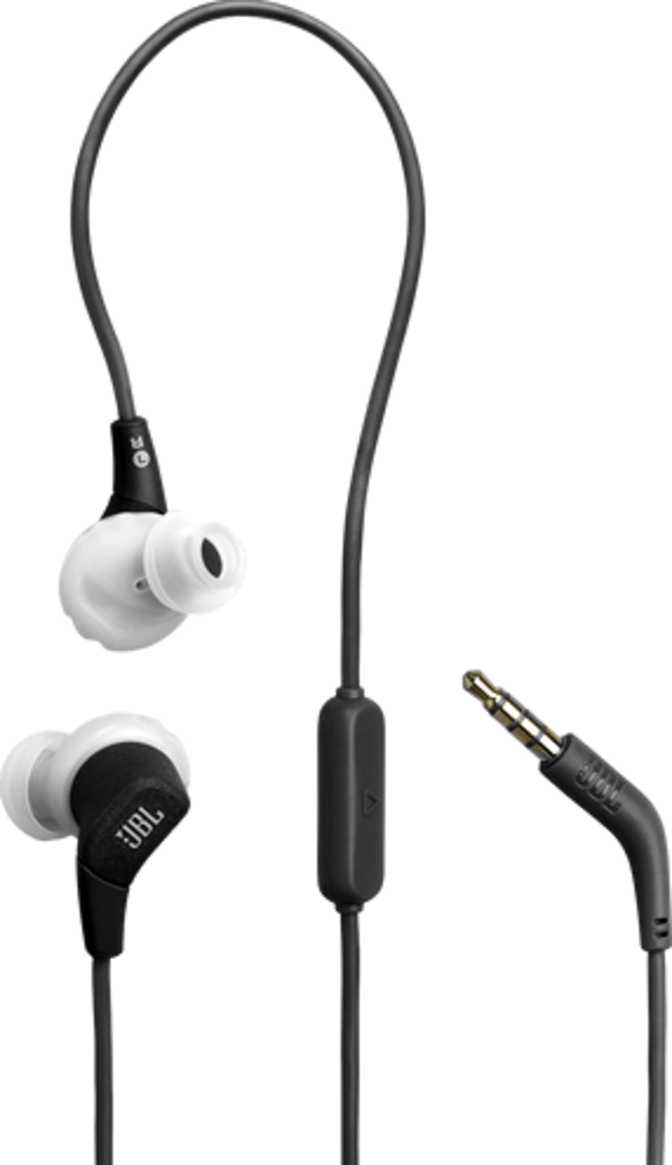
At just under 17 grams for the entire assembly — cable included — the JBL Endurance Run 3 is one of the lightest wired earphones in its category. In practice, that means you genuinely forget you're wearing them after the first few minutes of a workout. There is no neck fatigue, no pulling sensation, and no awareness of the cable during normal movement.
The fit is a standard in-ear configuration, meaning the earbuds sit in the ear canal rather than resting against the outer ear. This physical seal has two significant benefits for active users: the earphones stay put during movement, and they naturally block a meaningful portion of ambient noise without any electronics required.
The cable is constructed to resist tangling — a detail that sounds minor until you've spent thirty seconds unraveling knots before a run and decided to skip the session entirely. The cable is not detachable, so damage anywhere along the wire means replacing the unit rather than swapping a cable. That is a real trade-off worth weighing.
IP65 Rating — What It Actually Means
The IP65 rating is the single most important specification for athletes. Here is how to read it:
- "6" — Dust Protection
- Fully sealed against dust and solid particles — not just resistant, but completely blocked.
- "5" — Water Protection
- Handles sustained, low-pressure water jets from any direction without damage.
- Heavy sweat — fully handled
- Rain during outdoor runs — fully protected
- Rinsing under a tap — perfectly safe
- Submersion in water — not rated for this
Sound Quality: Honest Performance for Active Use
Driver analysis, frequency balance, and passive noise isolation
The Driver and Frequency Range
The Endurance Run 3 uses an 8mm dynamic driver — compact enough to sit comfortably in the ear canal, and well-matched to this type of earphone at this price tier. The frequency range spans the full extent of human hearing, covering the lowest audible bass notes to the upper ceiling of treble perception.
Full-range coverage is table stakes for any earphone, so the more meaningful question is how that range is balanced. JBL has historically tuned its consumer earphones toward an energetic, bass-forward sound signature, and the Endurance Run 3 follows that tradition. For workout use, this is deliberate — bass-heavy music feels more motivating during physical effort, and the boosted low-end helps cut through gym ambient noise or road sound.
Passive Noise Isolation
Without active noise cancellation electronics, the Endurance Run 3 relies entirely on its physical in-ear seal to reduce outside noise. A well-fitted in-ear earphone with a good seal typically reduces ambient sound by 15–25 decibels across mid and high frequencies — enough to significantly reduce gym floor noise, traffic, or wind, while still allowing some lower-frequency ambient sound through.
Outdoor Safety Note
Because passive isolation retains some environmental awareness, these earphones are arguably safer for road running than ANC models that can make you nearly deaf to approaching vehicles or cyclists.
Controls and Microphone: Practical, Not Premium
In-line remote, call quality, and feature limitations
An in-line control panel sits on the cable, giving you access to playback and volume without pulling out your phone. During a run or workout, this is genuinely useful — skipping a track without breaking stride matters more than it sounds.
The single built-in microphone allows the Endurance Run 3 to handle phone calls, making it a practical daily-use earphone beyond workout sessions. In quiet environments — indoors or at a desk — call quality is acceptable. In windy conditions or on a busy street, the person on the other end will hear significant background noise. This is the inherent limitation of a single passive microphone, not a flaw unique to this product.
Feature Availability at a Glance
- In-line playback & volume control Available
- Headset — take calls Available
- Active Noise Cancellation Not Available
- Ambient sound passthrough Not Available
- Auto-pause on removal Not Available
- Microphone mute button Not Available
- Noise-cancelling microphone Not Available
The absence of smart features — auto-pause, ambient mode, touch controls — is entirely by design in a passive wired product. These require electronics that would add cost and battery dependency. If you want those features, you are looking at a fundamentally different (and more expensive) product category.
Wired in a Wireless World: The Honest Case For and Against
Why the cable is both a strength and a real limitation
The Case for Wired
- Zero battery anxiety — plug in and go, every time
- No pairing process, no connection drops, no latency
- Consistent audio signal unaffected by wireless interference
- Lower cost for the same audio driver quality
- Works with any device that has a 3.5mm headphone jack
The Real Limitations
- Jackless phones require a dongle adapter — an added step and failure point
- Cable vibration can transmit noise to the ear canal during intense movement
- Physical tether between your device and your ears
- Cable damage requires replacing the entire unit, not just a component
- Not ideal for contact sports or cycling where a cable creates a snag risk
Who Should Buy the JBL Endurance Run 3
Match your use case before you commit
Strong Match For
- Gym-goers who use cardio machines or lift weights and keep their phone stationary nearby
- Runners and walkers comfortable routing a short cable to a pocket or armband
- Anyone who has repeatedly lost or damaged wireless earphones and wants a lower-stakes alternative
- Budget-conscious buyers who want genuine IP65 protection without paying for wireless
- Athletes who train in environments with wireless interference, such as gym equipment that creates RF noise
- Pool-side music listeners who need splash-proof protection without spending on premium waterproofing
Look Elsewhere If You…
- Use a smartphone without a 3.5mm jack and don't want to manage a dongle adapter
- Need completely hands-free, cable-free operation during your activity
- Frequently take calls outdoors or in wind-heavy environments and need clear voice pickup
- Prioritize soundstage, instrument separation, or audiophile-grade accuracy over workout functionality
- Commute or travel frequently and need active noise cancellation for focus or relaxation
How It Compares to the Alternatives
JBL Endurance Run 3 vs. typical budget sport earphone categories
| Feature | JBL Endurance Run 3 | Budget Wireless Sport | Mid-Range Wired Competitor |
|---|---|---|---|
| Connection | Wired 3.5mm | Bluetooth | Wired 3.5mm |
| Battery Required | No | 3–8 hrs typical | No |
| IP Protection | IP65 | IPX4–IPX5 typical | IPX4 typical |
| Total Weight | ~17g | 10–15g per earbud | 15–22g |
| Call Mic Quality | Basic — passive | Basic to moderate | Basic — passive |
| Tangle-Resistant Cable | Yes | N/A | Varies |
| Price Tier | Budget | Budget–Mid | Budget |
The IP65 rating is the Endurance Run 3's clearest competitive advantage — most wired competitors in the same bracket top out at IPX4, and wireless alternatives in the same price range carry higher charging and connection risks.
Strengths and Weaknesses: The Unvarnished Assessment
An honest look at where this earphone earns its price and where it falls short
Where It Earns Its Place
The IP65 durability rating stands above the budget norm and gives the Endurance Run 3 real credibility as a workout earphone rather than a lifestyle product dressed up in athletic packaging. Most competitors at this price stop at IPX4 — a rating that covers splashing but not the sustained water exposure of rain running or heavy sweat. The JBL clears that bar with headroom to spare.
The sub-17-gram weight is the other headline achievement. It makes the earphone one of the least physically intrusive wired options available. You will not be constantly reminded of its presence during a hard interval session or a long-distance run.
The tangle-resistant cable addresses a quality-of-life irritant that cheaper earphones consistently fail on, and the passive noise isolation from a well-fitted in-ear seal does more work than many buyers anticipate — reducing gym noise without making you dangerously unaware of your surroundings.
Where It Falls Short
The single passive microphone is a notable limitation if call quality matters in your typical environment. It handles quiet indoor calls acceptably, but it is not designed for calls taken in motion, wind, or noisy spaces. Buyers who frequently take outdoor calls should factor this in before purchasing.
The fixed, non-detachable cable means any damage to the wire — at the connector, at a stress point near the earbuds, or anywhere along the length — requires replacing the entire earphone rather than just the damaged component. It is a meaningful long-term ownership consideration.
The absence of smart features — auto-pause, ambient sound mode, touch controls — is a deliberate design choice and not an oversight. But it does mean making a conscious simplicity trade-off compared to more feature-rich wireless alternatives, some of which now reach competitive price points.
Common Questions Before You Buy
Answers to what buyers actually search for
Final Verdict
The JBL Endurance Run 3 is a purpose-built workout earphone that does not pretend to be anything else. If you train regularly, want genuine weather protection above the budget norm, and have no objection to wired audio, it delivers reliable daily performance at an honest price. The sound is appropriate for exercise, the fit is secure, the weight is negligible, and the IP65 rating is the real headline — it protects against everything a gym or outdoor training environment can realistically throw at it.
It earns no points for feature depth, and the fixed cable and basic microphone are genuine trade-offs that matter to specific buyers. But for anyone who simply wants a durable, dependable earphone that sounds good during a workout and will not die when they sweat through a hard session, the Endurance Run 3 makes a compelling, uncomplicated case for itself.
Buy It If
You want a reliable wired sport earphone with serious sweat and weather protection at a competitive price, and you are comfortable with the wired format and a device that has — or can adapt to — a 3.5mm jack.
Look Elsewhere If
You need wireless freedom, a noise-cancelling mic for regular outdoor calls, or a device that works without an adapter on a jackless smartphone. The right tool for those jobs is a different product.